llmdoc: a V3 knowledge surface that narrows the agent's working set and then gets out of the way
TokenRoll LLMDoc for Coding Agent
At a glance
- What is it?
- A CLI and plugin pair that stores durable engineering decisions in an llmdoc/ directory and gives coding agents a routing gate for retrieving them. The design is built around restraint: prune only reports, upgrade only runs on request, and a code change creates a review obligation rather than a documentation rewrite.
- Who is it for?
- llmdoc suits repositories where agents keep rediscovering the same architecture, and it is deliberately unhelpful about code: retrieval narrows the working set, then native tools do the reading. Two things decide whether it fits.
- Can I use it commercially?
- The repository metadata does not identify a licence. Check the project’s published terms and any component-specific licences before reuse.
- Is it still maintained?
- Yes. The repository last received commits 1 day ago.
- What is it written in?
- Mainly TypeScript, according to GitHub's language statistics.
Answers come from the project's GitHub data, last synced on November 25, 2026, and from our analysis. They are not legal advice.
Star history
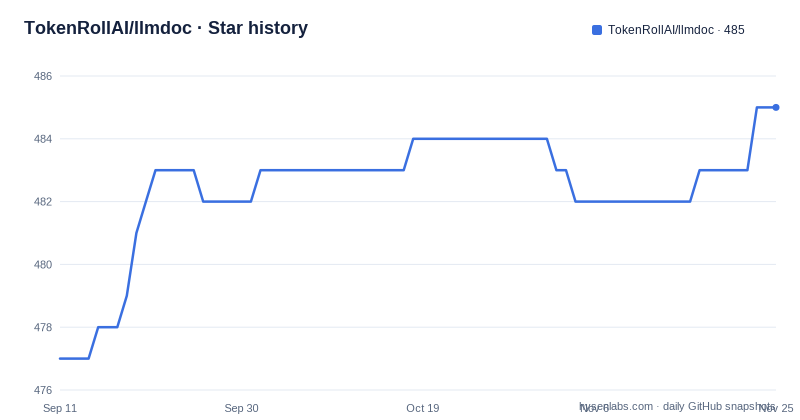
- TokenRollAI/llmdoc485 ★ · +8
| Repository | 2026-09-11 | 2026-11-25 |
|---|---|---|
| TokenRollAI/llmdoc | 477 | 485 |
8 Stars in the last 75 days, measured from the daily GitHub snapshot. Compare with other projects
Editorial analysis
The scoped package name is the safety mechanism, not a style choice
The CLI is published as `@tokenroll/llmdoc`, and the documentation is unusually insistent that the scope matters. The bare name `npx llmdoc` refers to an unrelated package, and the instruction is never to use it. The scoped npx form also keeps the tool outside the consumer repository, which is why you are told not to add it to a project's `package.json` or lockfile.
For a repository that already has an `llmdoc/` directory, no plugin is needed at all. Two commands are the whole entry point:
npx -y @tokenroll/llmdoc tree
npx -y @tokenroll/llmdoc search "revision"
`npx -y` accepts the yes flag so nothing prompts, and the package exposes a `llmdoc` binary. For reproducible runs the package spec is pinned instead, written as `npx -y @tokenroll/llmdoc@<version> <command>`, which freezes the version you get. That matters more than usual here, because every command in this tool rewrites or reads a knowledge surface that persists in your repository.
Hooks call the same CLI through an alias, because a file: dependency can shadow the bin
Plugin lifecycle hooks invoke the scoped CLI through an npm package alias rather than the short form. The reason given is specific: a local dependency or a `file:` dependency with the same name but no built bin can shadow the hook runtime. Normal interactive commands keep the shorter spelling, so the long form appears only where an unattended process has to be certain of what it loaded.
The plugin itself is installed two different ways. Claude Code adds a marketplace and then a plugin:
/plugin marketplace add TokenRollAI/llmdoc
/plugin install llmdoc@llmdoc-plugin
If the install summary says to reload plugins, run it, and if that reload warns about rereading the conversation, rerun it with the force flag. Codex takes a shell step first:
codex plugin marketplace add TokenRollAI/llmdoc
codex
Inside Codex you open the plugins menu, find the `llmdoc-plugin` marketplace, install, and are told to review the plugin and its hooks before enabling them. Only then does a new session in the repository initialize it, which is a separate step from installation on both hosts.
Four workflows, and upgrade is the one that must never be offered
The four workflows are not interchangeable commands, and the documentation says so directly. `init` creates a small, high-value V3 knowledge surface when none exists, which is why it is safe to run early: it does not attempt to document everything.
`update` semantically verifies affected knowledge. Its notable property is that unchanged documents can be recorded as verified without inventing prose changes, so a no-op run does not manufacture edits just to have something to show.
`prune` targets duplicate, fragmented or cheaply reconstructable knowledge, and here the boundary is hard: the CLI only supplies a read-only report. Deletion is left to a human or an agent working from that report.
`upgrade` migrates legacy or V2 knowledge, and it carries the strictest rule in the whole tool. It runs only when you explicitly ask for it, and it must never be suggested or folded into another workflow. An agent that helpfully upgrades your knowledge base as a side effect of an update is doing exactly the thing the design forbids.
Five result states, and prune only ever hands back a report
Every explicit workflow reports exactly one of five result states: `success`, `no_change`, `dry_run`, `incomplete` or `failed`. A single closed set matters more than it looks, because callers can branch on it instead of parsing prose. A `no_change` is a first-class success rather than an error, which is what makes the verify-without-editing behavior of `update` usable in automation.
`dry_run` is the other state that does real work. It is what makes the read-only side of `prune` expressible, and it is how a caller can find out what a change would touch before committing to it.
The same restraint shows up in the interaction with `llmdoc.config.json`, which can list documents to preload at session start. `validate` reports malformed config, missing paths and path escapes, and normalizes aliases of the same document by deduplicating them with a warning rather than loading both. `prune --report` lists the preload references that would need updating before a manual merge or deletion happens, so deleting a document out from under the config is caught in advance. `mv` rewrites matching preload paths transactionally instead.
The routing gate offers five alternatives and no fixed sequence
Before broad exploration, and again on entering a new subsystem, there is a gate that maps intent to one command. A concept, contract, term or where-is-X question goes to `search <query>`. Context for concrete source files goes to `context --files <path...>`. A cold start or unclear scope goes to `tree`. A known topic or kind goes to `index --topic <topic>` or `index --kind <kind>`. Bodies already identified go to `show <path...>`.
The critical qualifier is that these are alternatives rather than a fixed sequence. There is no prescribed order to walk through, and running all five would be a misuse. The framing is that llmdoc narrows a working set and then gets out of the way.
What happens after narrowing is where the division of labor gets explicit. Once the set is small, exact source text, line numbers, test behavior, counts and Git state all come from native tools, not from the knowledge surface. One property of `context --files` is worth knowing because it protects against false confidence: every input file is evaluated independently and unmapped ones are reported as `unmappedFiles`, so a non-empty impacted set never hides unmapped siblings.
status and delta are excluded from retrieval on purpose
Two commands sit outside the routing gate, and the reason is stated rather than implied. `status` and `delta` assess validity and impact. They answer questions about whether stored knowledge is still trustworthy and what a change touches, which is a different question from finding something to read. Treating them as retrieval steps would blur the gate that the rest of the design depends on.
The full command set is discoverable rather than enumerated in the documentation. `npx -y @tokenroll/llmdoc --help` and `npx -y @tokenroll/llmdoc help <command>` are given as the complete, current reference, which is a reasonable stance for a CLI whose surface is still moving between minor versions.
A typical working session looks like this, and note how little of it is llmdoc doing the reading:
# Map the knowledge surface
npx -y @tokenroll/llmdoc tree --docs

# Find relevant knowledge
npx -y @tokenroll/llmdoc search "revision" --limit 5
npx -y @tokenroll/llmdoc context --files cli/src/cli.ts

# Read only the selected bodies
npx -y @tokenroll/llmdoc show architecture.mdx cli-runtime/retrieval-and-mutation.mdx

# Browse the knowledge surface locally
npx -y @tokenroll/llmdoc serve
`--limit` bounds the search result count, and `serve` opens the knowledge surface in a local viewer rather than leaving it as files you have to browse by hand.
preload injects bodies with no budget, and hooks are fail-open by design
An optional `llmdoc.config.json` at the llmdoc workspace root controls session start behavior. In a Git repository that root is the nearest Git root owning `llmdoc/`.
{
  "$schema": "https://llmdoc.tokenroll.ai/schemas/config.schema.json",
  "schema": "llmdoc.config/v1",
  "startup": {
    "remindSkill": true,
    "preload": [
      "architecture.mdx",
      "plugin-packaging/claude-and-codex.mdx"
    ]
  }
}
`remindSkill` controls the SessionStart guidance, which tells the host to load the skill, use the retrieval gate, and delegate to the llmdoc roles. It defaults to true and can be set to false to opt out. `preload` lists exact document IDs with an optional `llmdoc/` prefix, and a cold SessionStart inserts their bodies in the listed order with no llmdoc character or token budget at all. That is the sharp edge: the budget is llmdoc's own, not the host's, so a long preload lands whole in the session.
A completion marker confirms the host supplied the full preload, and without it you retrieve only the missing body with `show`. Compact re-entry lists the configured IDs but does not inject the bodies again, so you continue from `LLMDOC_STATE`. And the failure policy is explicit: lifecycle hooks stay fail-open, so unreadable schema or JSON falls back to the default reminder, while a valid `remindSkill` choice survives preload-only errors. Without the file at all, SessionStart emits its state and the default guidance, and preloads nothing.
Two lockfiles, a private root package, and a README that stops mid-sentence
The root `package.json` is `@tokenroll/llmdoc-repository`, marked private and described as the development workspace for the V3 CLI and plugin surfaces. It is not the published artifact. Its version reads 3.6.0, matching the newest tag `v3.6.0` published on 2026-08-31, a few hours after `v3.5.3` the same day.
Every script delegates into the `cli/` subdirectory, so the npm side is the one the tooling drives, and the workspace depends on its own CLI through a `file:cli` devDependency. A `validate:dogfood` script runs the built binary directly from `cli/dist/bin/llmdoc.js`, which is a self-check on the local build rather than on a published one. Two lockfiles sit side by side at the root, `package-lock.json` and `pnpm-lock.yaml`, along with a pinned vite override.
The English README has a Chinese counterpart, `README.zh-CN.md`. All fixed CLI interface text is English, covering help, diagnostics, hook messages and the local viewer, while Chinese queries and repository document content remain supported. That last paragraph ends mid-sentence, right after that statement, so anything the file intended to add about it is not written down. There is also no license file at the top level of the repository, so the licensing position is not something the tree answers.
Editorial conclusion
llmdoc suits repositories where agents keep rediscovering the same architecture, and it is deliberately unhelpful about code: retrieval narrows the working set, then native tools do the reading. Two things decide whether it fits. If your repository has no durable decisions worth writing down, init has nothing to record. And if you want an agent to keep documentation in sync automatically, that is the opposite of this design, because a code change creates a review obligation rather than a rewrite. Pin the version, always use the scoped package name, review the hooks before enabling them, and settle the licensing question yourself, since no license file appears at the top level of the repository.
Frequently asked questions
What is llmdoc and where does it keep knowledge?
Durable engineering meaning in an `llmdoc/` directory at the workspace root, not a copy of the repository. An agent retrieves the smallest useful set, checks current facts against source and tests, and verifies affected knowledge later as code changes.
How do I install the llmdoc plugin for Claude Code?
Add the marketplace with `/plugin marketplace add TokenRollAI/llmdoc`, then install with `/plugin install llmdoc@llmdoc-plugin`, run the reload command if the summary asks for it, and initialize the repository with `/llmdoc:init`.
What does the llmdoc retrieval gate route each request to?
Concept or contract questions go to `search <query>`, concrete source files to `context --files <path...>`, cold starts to `tree`, a known topic or kind to `index --topic` or `index --kind`, and already identified bodies to `show <path...>`.
Which llmdoc commands are not retrieval steps?
`status` and `delta`. They assess validity and impact rather than retrieving anything, so they sit outside the routing gate even though both are part of the CLI.
What does preload in llmdoc.config.json do at session start?
It lists exact document IDs, optionally with an `llmdoc/` prefix, and a cold SessionStart inserts their bodies in the listed order with no llmdoc character or token budget. A completion marker confirms the host supplied the full preload.
Official sources
Add this badge to your README
If you maintain this project, the badge below links readers to this analysis and shows its maintenance status from the daily GitHub snapshot. Paste the markdown into your README; add ?metric=license or ?metric=stars to the image URL for a different field.

[](https://hysenlabs.com/projects/tokenrollai-llmdoc)Star history chart for your README
[](https://hysenlabs.com/projects/tokenrollai-llmdoc)Was this useful?