Real-ESRGAN GUI for cross-platform image upscaling
实用、美观的 Real-ESRGAN 图形界面,同时支持 Windows、Ubuntu 和 macOS 平台。现在也支持 Real-CUGAN 了!(Cross-platform GUI for image upscaler Real-ESRGAN with additional features. Now with Real-CUGAN support!)
At a glance
- What is it?
- Real-ESRGAN GUI wraps the Real-ESRGAN-ncnn-vulkan command-line program in a Python and tkinter desktop interface for Windows, Ubuntu, and macOS. It adds flexible output sizing, GIF processing, drag-and-drop inputs, localization, and optional Real-CUGAN support, but its dependency on an older command-line engine requires careful review.
- Who is it for?
- Real-ESRGAN GUI fits desktop users who want repeatable image or GIF upscaling without invoking Real-ESRGAN-ncnn-vulkan from a terminal. It is a poor choice for unattended pipelines, users requiring a newly maintained command-line backend, or macOS users who need packaging support beyond the repository's documented workflow.
- Can I use it commercially?
- Yes, with strict conditions. AGPL-3.0 is a network copyleft licence: if people use a modified version over a network, for example as a hosted service, you must offer them its source code under the same licence.
- Is it still maintained?
- Yes. The repository last received commits 174 days ago.
- What is it written in?
- Mainly Python, according to GitHub's language statistics.
Answers come from the project's GitHub data, last synced on October 23, 2026, and from our analysis. They are not legal advice.
Star history
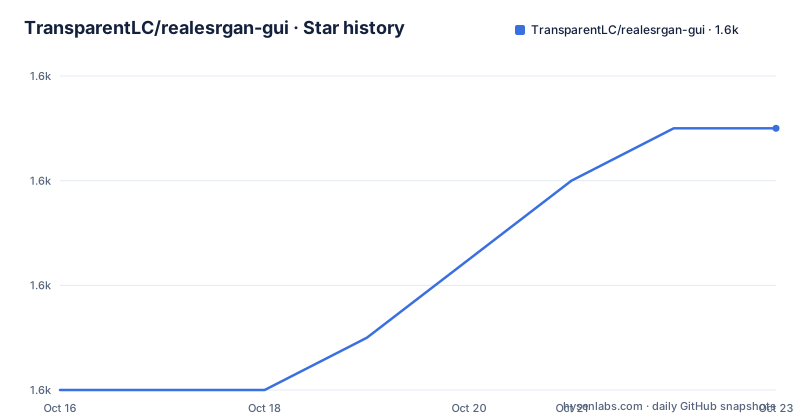
- TransparentLC/realesrgan-gui1,555 ★ · +5
| Repository | 2026-10-16 | 2026-10-23 |
|---|---|---|
| TransparentLC/realesrgan-gui | 1.6k | 1.6k |
5 Stars in the last 7 days, measured from the daily GitHub snapshot. Compare with other projects
Editorial analysis
Why Real-ESRGAN GUI wraps the command-line upscaler
Real-ESRGAN GUI addresses a specific desktop problem: users want the image upscaling functions of Real-ESRGAN-ncnn-vulkan without assembling a terminal command for every image. The application is written in Python with tkinter and presents the command-line program through a graphical interface. Its documented targets are Windows 10 or later, Ubuntu 22.04 or later, and macOS Monterey or later.
The project is intended for people who work directly with images in a file explorer or image-editing workflow. It supports ordinary pictures and animated GIFs, while drag-and-drop input is useful when processing several files or directories. The interface also follows the operating system language where a translation exists. Simplified Chinese, Traditional Chinese, and English are documented, with English used when a translation is missing.
This is not a general image editor. The documented feature set centers on model-based enlargement, output sizing, input and output paths, GIF handling, and related desktop presentation. There is no evidence in the README that it includes cropping, layer editing, metadata controls, batch scripting, or a command-line API of its own. Real-ESRGAN GUI should therefore be judged as a focused upscaling front end rather than a replacement for a full image editor.
How flexible sizing changes the Real-ESRGAN processing path
The underlying Real-ESRGAN models enlarge input images by fixed factors, generally ranging from 2x to 4x depending on the selected model. Real-ESRGAN GUI adds arbitrary output dimensions by calling Real-ESRGAN more than once and then applying a conventional downsampling algorithm.
The README gives a concrete example for a 640x360 source and a requested 2x result. The application first enlarges the image to 1280x720 with a 2x model, enlarges that result to 2560x1440, and downsamples the second result to 1600x900. The final ordinary resampling step is important. The requested dimensions are not produced by a custom model trained for every possible target size. A target size between model factors therefore adds intermediate processing and a final resize.
Lanczos is the default downsampling algorithm, although the interface allows another algorithm to be selected. This design gives the user direct control over final width or height, but it also means that a custom output size changes the processing route. Users comparing results should therefore distinguish between outputs generated by a native model factor and outputs that include conventional resampling.
For GIF files, the application separates every frame, records each frame's duration, enlarges the frames individually, and combines them afterward. This makes animated input part of the same workflow, but it does not imply that every animation edge case is handled. The README does not document a policy for frames with missing timing data, duplicate timing values, disposal methods, or transparency.
Installing bundled releases on Windows, Ubuntu, and macOS
For Windows, download the latest `realesrgan-gui-windows-bundled-v*.7z` from Releases, extract it, and open `realesrgan-gui.exe`. The reader should see the desktop application without having to install Python or resolve the declared dependencies first.
On Ubuntu, download `realesrgan-gui-ubuntu-bundled-v*.tar.xz`, extract it, and open `realesrgan-gui`. The documented platform target is Ubuntu 22.04 or later. The README says other Linux distributions may work, but it does not claim tested support for them.
For macOS Monterey or later, download `realesrgan-gui-macos-appbundle-v*.tar.xz`. After extraction, the following commands make the packaged executables runnable and remove the archive's quarantine attributes from the application bundle:
chmod u+x "Real-ESRGAN GUI.app/Contents/MacOS/realesrgan-gui"
chmod u+x "Real-ESRGAN GUI.app/Contents/MacOS/realesrgan-ncnn-vulkan"
xattr -cr "Real-ESRGAN GUI.app"
The reader can then open `Real-ESRGAN GUI`. The README warns that the author could not test macOS-related issues without an available macOS device. That caveat matters because the application bundle, tkinter, architecture selection, and executable permissions are all platform-sensitive.
Bundled archives should not be confused with the smaller archives. The Windows and Ubuntu archives without `bundled` do not include the Real-ESRGAN-ncnn-vulkan executable or official models. Users choosing those archives must obtain the engine from the linked Real-ESRGAN release and extract it into the GUI program's directory. Actions artifacts are similarly described as code-based builds that omit the engine and official models.
Running main.py with Python 3.10 or later
A source installation is appropriate for users who need to inspect or modify the Python application. The README requires Python 3.10 or later. From a source checkout, install the dependencies declared by the repository:
pip install -r requirements.txtThe dependencies are platform-specific in several places. `pillow` handles image work, `tkinterdnd2` supplies drag-and-drop support, `babel` supplies locale names, and `darkdetect` controls theme detection where it is available. Windows also receives `comtypes`, non-macOS systems receive `notify-py`, and macOS receives `darkdetect[macos-listener]`.
Real-ESRGAN-ncnn-vulkan must also be extracted into the project directory. After those prerequisites are present, start the source application with:
main.pyThe documented source workflow does not state a command-line interface for processing files. A first real use therefore takes place in the GUI: open the application, select an image or directory through the documented drag-and-drop capability, select the desired enlargement dimensions, choose an available model, and inspect the generated file. The README does not document exact mouse clicks, interface labels, or supported model directory paths, so it would be misleading to invent a step-by-step sequence beyond those documented actions.
The macOS source and packaging path has additional constraints. The repository's build notes require Python 3.11 for local app packaging because Python 3.10 supplies tk 8.5 while the latest commit requires tk 8.6. Homebrew users may need `python-tk`. Apple silicon users are directed toward an `arm64` single-architecture build, while an `x86_64` build is described as smaller but similar in performance to `universal2`.
Real-CUGAN and the upscayl backend substitution
Real-ESRGAN GUI can also use Real-CUGAN rather than Real-ESRGAN. The README presents this as a model option and notes that some users prefer its enlargement results for certain content. It does not make Real-CUGAN the default or claim that it is superior for every image, so users still need to compare representative inputs.
The backend status deserves attention. According to the README, Real-ESRGAN-ncnn-vulkan has not been updated since April 2022. The project recommends `upscayl/upscayl-ncnn` as an alternative branch that is still maintained. A new release of that binary can be extracted into the GUI program's directory under the name `upscayl-bin` on macOS or `upscayl-bin.exe` on Windows, after which it takes priority over the original executable.
That substitution changes the maintenance and compatibility boundary. The GUI remains the same Python application, but the command-line binary it launches comes from a different project. The README does not document a formal compatibility matrix between every GUI build and every upscayl release. Users relying on this path should inspect the application directory after extraction and confirm which executable the GUI actually invokes. The documented priority behavior provides a migration route, but it is not proof that all versions have matching command-line options or output behavior.
License, maintenance, and operational limits
The repository is licensed under `AGPL-3.0`. That identifier matters when an organization plans to modify the application and distribute it or make modified versions available to users over a network. This is a licensing consideration rather than legal advice, and the repository's `LICENSE` file should be reviewed for the exact obligations that apply to a particular deployment.
The last push was on 2026-05-02. The repository is not archived, but that fact alone does not establish that every underlying upscaler dependency is current. The README itself identifies an older Real-ESRGAN-ncnn-vulkan backend and provides the upscayl substitution route. Maintenance work may therefore involve both the Python interface and the external binary or models placed beside it.
There are several practical limits. The README does not document hardware requirements, output file size controls, batch processing through a public API, resumable jobs, cancellation semantics, or rollback behavior. It also does not promise support for every Linux distribution. The project is not a suitable choice for a server-side image pipeline that requires a documented programmatic interface, deterministic job control, or a clear unattended deployment contract.
Real-ESRGAN GUI and Real-CUGAN are better considered alternatives when the goal is to compare model families through a desktop interface. The README's related projects point to RealSR-NCNN-Android for Android and vs-realesrgan for video through Vapoursynth. Those approaches differ in execution environment: mobile native integration, video-processing integration, or this Python desktop GUI. A real alternative must therefore be selected by deployment target, not just by feature labels.
Editorial conclusion
Real-ESRGAN GUI fits desktop users who want repeatable image or GIF upscaling without invoking Real-ESRGAN-ncnn-vulkan from a terminal. It is a poor choice for unattended pipelines, users requiring a newly maintained command-line backend, or macOS users who need packaging support beyond the repository's documented workflow. Before adoption, verify that your target operating system has a compatible bundled release, confirm which Real-ESRGAN or upscayl binary and models will be used, and inspect a small output for dimensions, image quality, and animated-frame timing.
Frequently asked questions
How do I install Real-ESRGAN GUI?
On Windows and Ubuntu, download and extract the latest bundled archive named in the README, then launch the packaged executable. For source use, install Python 3.10 or later, run `pip install -r requirements.txt`, place Real-ESRGAN-ncnn-vulkan in the project directory, and execute `main.py`.
Does Real-ESRGAN GUI support GIF files?
Yes. The README says the application separates GIF frames, records their durations, enlarges each frame, and combines the processed frames.
Can Real-ESRGAN GUI enlarge an image to an arbitrary size?
Yes, but the documented method calls Real-ESRGAN multiple times and finishes with conventional downsampling. The default downsampling algorithm is Lanczos, and the README says other algorithms can be selected.
Does Real-ESRGAN GUI work with Real-CUGAN?
Yes. The README says Real-ESRGAN GUI can use Real-CUGAN for enlargement and points to configuration instructions in its Real-CUGAN section.
Which license applies to Real-ESRGAN GUI?
The repository identifies its license as `AGPL-3.0`. Review the repository's `LICENSE` file for the complete terms before modifying or distributing the application.
Official sources
Add this badge to your README
If you maintain this project, the badge below links readers to this analysis and shows its maintenance status from the daily GitHub snapshot. Paste the markdown into your README; add ?metric=license or ?metric=stars to the image URL for a different field.

[](https://hysenlabs.com/projects/transparentlc-realesrgan-gui)Star history chart for your README
[](https://hysenlabs.com/projects/transparentlc-realesrgan-gui)Was this useful?