tensorrtllm_backend: the C++ moved out and the repository kept the README
The Triton TensorRT-LLM Backend
At a glance
- What is it?
- The Triton backend for serving TensorRT-LLM models, whose C++ implementation and tests have been relocated into the TensorRT-LLM repository itself. What remains here is documentation, a dockerfile directory, a submodule reference and a format config for code that is no longer in the tree.
- Who is it for?
- tensorrtllm_backend suits someone who wants TensorRT-LLM models served through Triton's HTTP and gRPC surface rather than through a standalone process, and who reads the getting-started page and then works in the TensorRT-LLM repository, which is where the code now lives. It does not suit someone looking for a versioned backend they can pin, because this repository publishes no releases and the version you actually run is the container tag you choose.
- Can I use it commercially?
- Yes. Apache-2.0 is a permissive licence: you can use, modify and sell software built on it, as long as you keep its copyright and licence notices.
- Is it still maintained?
- Yes. The repository last received commits 11 days ago.
- What is it written in?
- GitHub does not report a main language for this repository.
Answers come from the project's GitHub data, last synced on November 14, 2026, and from our analysis. They are not legal advice.
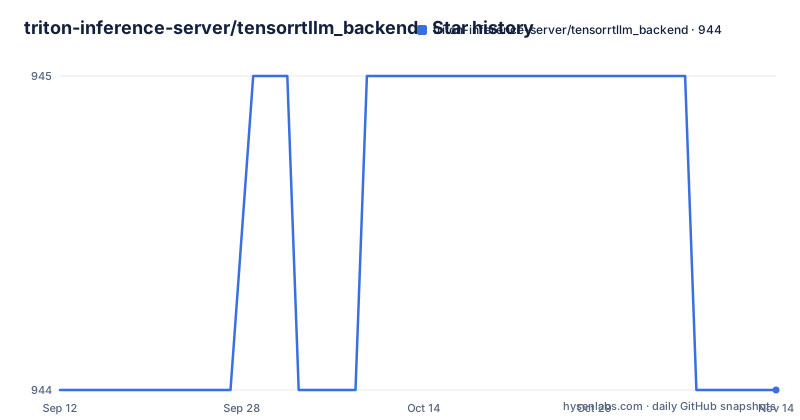
Star history
- triton-inference-server/tensorrtllm_backend944 ★ · +0
| Repository | 2026-09-12 | 2026-11-14 |
|---|---|---|
| triton-inference-server/tensorrtllm_backend | 944 | 944 |
0 Stars in the last 63 days, measured from the daily GitHub snapshot. Compare with other projects
Editorial analysis
The implementation moved and this repository is the signpost
The first note on the page is the most important line in it. The Triton backend source code and its tests have been moved into the TensorRT-LLM repository, under a `triton_backend` directory. What this repository still describes is therefore a component whose code you have to get somewhere else. The page keeps the original framing intact, saying the goal is to let you serve TensorRT-LLM models with Triton Inference Server, and that an `inflight_batcher_llm` directory contains the C++ implementation supporting inflight batching and paged attention. The root listing is consistent with a repository that has been hollowed out to a pointer: `.clang-format`, `.github/`, `.gitignore`, `.gitmodules`, `.pre-commit-config.yaml`, `LICENSE`, `README.md`, `dockerfile/`, `docs/`, `images/` and a single entry named `tensorrt_llm`. A C++ format configuration survives in a tree that no longer holds the C++.
Running from the wrong directory produces a bindings import error
The launch instructions carry a warning box with a specific failure mode in it. The server is started with a script from the upstream repository:
python3 TensorRT-LLM/triton_backend/scripts/launch_triton_server.py \
    --model_repo=TensorRT-LLM/triton_backend/all_models/llmapi/
The warning says to run this from the directory where you ran `git clone`, which is the parent of the cloned `TensorRT-LLM` folder, and explicitly not from inside it. The stated consequence of getting that wrong is an error reading `ModuleNotFoundError: No module named 'tensorrt_llm.bindings'`. That is worth knowing precisely because the failure names the Python package rather than the working directory, so the obvious first thing to try is reinstalling the package when the real cause is where you are standing. The note is the kind of detail that usually lives in an issue tracker, and its presence on the front page is the one sign that the migration is still settling.
The container tag is a calendar version you have to replace
The first command on the getting-started page pins a specific image and then tells you to discard the pin:
docker run --rm -it --net host --shm-size=2g --ulimit memlock=-1 --gpus all \
    -v ~/.cache/huggingface:/root/.cache/huggingface \
    nvcr.io/nvidia/tritonserver:25.12-trtllm-python-py3 bash
The instruction that follows is to replace `25.12` with the latest tag from the NGC container catalogue. So the version in the documentation is correct when written and stale on any given day, which is the ordinary way to keep a getting-started page readable. Two details in the command are worth keeping for other reasons. The Hugging Face cache directory is mounted from the host so that a model you download once is reused across container runs, and the shared memory and memory lock flags are set because the inference runtime needs both. The path continues to use a PyTorch-flavoured image with the LLM API, and the page's framing for it is that it serves any Hugging Face model directly with no engine compilation required.
Nine decoding modes and three parallelism axes, listed as contents
The table of contents is effectively the feature matrix, and it is long. Model deployment covers multi-instance support in two named modes, leader and orchestrator, along with multi-node support and MIG support. Model parallelism is described as three axes together: tensor parallelism, pipeline parallelism and expert parallelism. The decoding section lists its modes in one heading, and the count is eight: top-k, top-p, top-k top-p, beam search, Medusa, ReDrafter, lookahead and Eagle, with speculative decoding given its own subsection underneath. Alongside them sit separate sections for scheduling, key-value cache, chunked context, quantization, and LoRa. Two details in that list are the kind that reveal the scope. Expert parallelism implies mixture-of-experts models are a first-class case rather than an afterthought, and two of the decoding modes are named after published speculative decoding methods.
There are no releases, so the container tag is the version
This repository publishes nothing on GitHub. There is no tag, no release note and no version file in the root listing. For a backend that is consumed as a container image rather than as a source dependency, that is defensible, because what a user pins is the NGC tag and the Triton release it is built against, not a version string in this repository. The recent activity tells the same story: the default branch was pushed on 2026-10-02, which is a day before the current date, so the repository is not dormant even though it has no releases. What a reader loses is the ability to ask what changed. There is no changelog to read, and the documentation's own version-bearing instruction, replace `25.12` with the latest tag, is the only place a version number appears at all.
Configuration is one YAML file that maps straight onto constructor arguments
The model configuration path is short and worth reading exactly, because it removes a layer of indirection. You edit a single file, `all_models/llmapi/tensorrt_llm/1/model.yaml`, and set one key:
model: TinyLlama/TinyLlama-1.1B-Chat-v1.0The value is any Hugging Face model identifier or a local path. The stated mapping is that every key in that file corresponds directly to an argument of the LLM constructor, which is where key-value cache, quantization and parallelism are configured. For gated models such as the Llama family, a token is exported into the environment first. That design has a clear consequence: there is no second vocabulary of backend-specific options to learn, so anything the underlying library can do is reachable from the config file, and anything you cannot express there is not a backend limitation but a library one.
Cancellation is a second request carrying the first request's id
The last documented interaction is how to stop a request already in flight, and the mechanism is worth noting because it is not a separate endpoint. You start a long-running request and record the identifier you gave it, passed as a header:
curl -X POST localhost:8000/v2/models/tensorrt_llm/generate \
    -H "triton-request-id: my-req-1" \
    -d '{"text_input": "Write a very long essay about the history of AI", "sampling_param_max_tokens": 500}' &
You then send a second request to the same endpoint with a stop flag and the same request id, and the running one is cancelled. The page frames it as a single idea: send a second request with stop set and the same request id you used in the original. So cancellation costs an extra HTTP call rather than a control channel, which means it works through any client that can make a request, and it depends on the caller having kept the identifier it generated.
Editorial conclusion
tensorrtllm_backend suits someone who wants TensorRT-LLM models served through Triton's HTTP and gRPC surface rather than through a standalone process, and who reads the getting-started page and then works in the TensorRT-LLM repository, which is where the code now lives. It does not suit someone looking for a versioned backend they can pin, because this repository publishes no releases and the version you actually run is the container tag you choose. Check four things first. Check that you cloned TensorRT-LLM rather than this repository, because the launch script lives in the upstream tree. Check the directory you run the launch script from, since running inside the cloned folder produces a missing bindings import. Check the container tag, which the documentation hardcodes to a calendar version and tells you to replace with the current one from the NGC catalogue. And check which parallelism and decoding options your model and GPU actually support, because the feature surface is broad and the page is a contents list rather than a support matrix. The licence is Apache-2.0 and the default branch was pushed on 2026-10-02.
Frequently asked questions
What is TensorRT LLM used for?
It is the library this backend serves. The goal of the Triton backend is to let you serve TensorRT-LLM models through Triton Inference Server, with inflight batching and paged attention supported by the C++ implementation, so the models are reachable over Triton's own HTTP and gRPC endpoints.
Is TensorRT.LLM open source?
The backend repository is Apache-2.0 licensed. Separately, its own documentation notes that the Triton backend source code and tests have moved into the TensorRT-LLM repository under a triton_backend directory, so the code being served is maintained in the upstream project rather than here.
How do I serve a model with the Triton TensorRT-LLM backend?
Start the container from NGC with the trtllm-python image, clone TensorRT-LLM, set the model key in the model.yaml under all_models/llmapi, then run the launch script with the model repository path. Run that script from the parent of the cloned folder, because running inside it causes a missing tensorrt_llm.bindings import error.
How do I cancel an in-flight request in Triton?
Send a second POST to the same generate endpoint with a stop flag set to true and the same request id used in the original request, passed as the triton-request-id header. The original request is then cancelled.
Official sources
Add this badge to your README
If you maintain this project, the badge below links readers to this analysis and shows its maintenance status from the daily GitHub snapshot. Paste the markdown into your README; add ?metric=license or ?metric=stars to the image URL for a different field.

[](https://hysenlabs.com/projects/triton-inference-server-tensorrtllm-backend)Star history chart for your README
[](https://hysenlabs.com/projects/triton-inference-server-tensorrtllm-backend)Was this useful?