Comp AI: three Bun versions, two Node floors, and a hard-coding escape hatch
AI Native platform to get companies compliant - Vanta & Drata Alternative
At a glance
- What is it?
- trycompai/comp is an AGPL-3.0 compliance platform monorepo, built with Next.js, Prisma, Trigger.dev and Upstash. Its manifest declares version 1.50.0 while its tags read v3.111.1, the workspace pins Prisma 7 while the migrator image installs 6, and the setup guide tells contributors to hard-code OAuth secrets into source if environment variables fail to load.
- Who is it for?
- Comp AI fits a team that wants a self-hostable compliance workflow with the evidence collection and policy work already wired to a database, and that is prepared to finish the deployment work the guide hands you. It is not a turnkey product, and the guide makes that plain in ways worth reading before you start.
- Can I use it commercially?
- Yes, with strict conditions. AGPL-3.0 is a network copyleft licence: if people use a modified version over a network, for example as a hosted service, you must offer them its source code under the same licence.
- Is it still maintained?
- Yes. The repository last received commits 1 day ago.
- What is it written in?
- Mainly TypeScript, according to GitHub's language statistics.
Answers come from the project's GitHub data, last synced on November 15, 2026, and from our analysis. They are not legal advice.
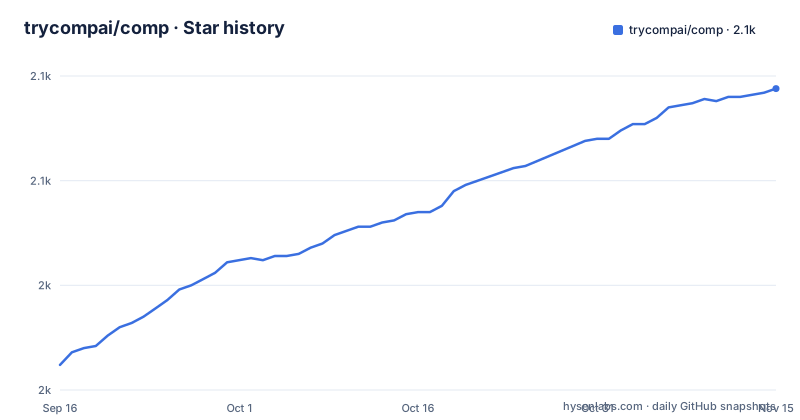
Star history
- trycompai/comp2,094 ★ · +132
| Repository | 2026-09-16 | 2026-11-15 |
|---|---|---|
| trycompai/comp | 2k | 2.1k |
132 Stars in the last 60 days, measured from the daily GitHub snapshot. Compare with other projects
Editorial analysis
The manifest says 1.50.0 and the newest tag says v3.111.1
Version tracking in this repository is visibly untidy, and it is the first thing to notice. The root manifest declares version 1.50.0, while the release list tops out at v3.111.1 from 2026-08-05, with v3.111.0 a week earlier. Those two numbering systems have nothing to do with each other, so neither the checkout nor the tag tells you what a given deployment corresponds to. The third entry in the same release list makes it stranger rather than simpler: device-agent-v1.0.9-staging.114, titled Device Agent v1.0.9 with a staging build number, sitting alongside the version tags. The repository carries the tooling that would normally prevent this, with semantic-release in devDependencies, a release configuration file, commitlint config, a gitmessage template, husky hooks and a githooks directory. So the release process is automated in several places and still emits tags from more than one series, which is worth confirming with whoever maintains it before you pin anything.
Three Bun builds and two Node floors, none of them agreed on
Runtime requirements are stated three times and they do not match. The manifest's engines field says node >=18. The prerequisites in the guide say Node.js 20.x or newer, Bun 1.1.36 or newer, and Postgres 15.x or newer. The manifest's packageManager field names [email protected]. And the container is built from oven/bun:1.2.8, which is a third Bun build, older than the one the manifest declares. So a developer following the prerequisites, a CI system honouring packageManager and a deployment built from the Dockerfile are all on different runtimes, and the gap between 1.1.36, 1.2.8 and 1.3.4 is exactly the kind of difference that shows up as a lockfile or a script flag incompatibility rather than as an obvious failure. Picking one and documenting it is the smallest useful fix here.
The documented fallback is to hard-code secrets into source files
This is the passage to read carefully before anyone sets up a deployment. The guide warns that some environment variables may not load correctly from a .env file, and in that case instructs the reader to hard-code the values directly in the relevant files, with a pointer to a section on doing exactly that. Two destinations are named. The Google OAuth client id and secret belong in comp/apps/portal/src/app/lib/auth.ts. The Redis URL and token belong in comp/packages/kv/src/index.ts, which is the module the Upstash client reads from. Separately, the Trigger.dev project id is not an environment variable at all: you edit comp/apps/app/trigger.config.ts and set a project field with a masked example value. The advice is practical, and following it puts an OAuth client secret and a live Redis credential into files that are version controlled. Anything you deploy this way should have those values rotated and moved to real secret management afterwards.
The database starts on postgres, postgres, and needs a manual function fix
The database instructions name a database called comp with the username postgres and the password postgres, and show the statement to change it:
ALTER USER postgres WITH PASSWORD 'new_password';A default password of postgres in a compliance product's setup guide is exactly the sort of thing that survives into a deployment, so treat that line as mandatory rather than optional. There is also a second, less common failure documented with its error text, a database hint reading that no function matches the given name and argument types, and its fix is a manual run of a SQL file against the server:
psql "postgresql://postgres:<your_password>@localhost:5432/comp" -f ./packages/db/prisma/functionDefinition.sqlThe expected output is a single line, CREATE FUNCTION. That is a database migration delivered as a manual step with a hard-coded path, which means an automated deployment has to special-case it.
The workspace runs Prisma 7 and the migrator image installs Prisma 6
The database layer is split across two dependency sets, and the split is by design rather than by accident. The workspace devDependencies pin the Prisma adapter for PostgreSQL at 7.6.0. The migrator stage of the Dockerfile does something different: it writes a minimal package file on the fly, containing Prisma and the Prisma client at 6.14.0, the published database package at 1.3.4, and zod at 3.25.7, then installs only those. The dependency stage explains the second half of the arrangement in a comment: the local database package is excluded and the published one is used instead, and the install runs with postinstall scripts disabled and Prisma's postinstall generation skipped. The compose file follows the same logic, with the seeder generating a client against a schema inside node_modules rather than from the workspace copy. So a major version apart, the tooling generating the client and the tooling running migrations are deliberately different, which is coherent and also means the Prisma major version is not a single fact you can look up.
Four services, two health checks, and one env var listed twice
The compose file defines four services from three build targets. The migrator and the seeder both build the migrator target, with the seeder additionally generating a Prisma client and running the seed script. The app service maps 3000 to 3000, starts a server file, restarts unless stopped, and health-checks an api health path. The portal service maps host 3002 to container 3000 and health-checks the site root, and it defines no command of its own, so it relies entirely on its image's default entry point. Logs are capped at ten megabytes with five files kept and compression on. The environment file shows how much configuration this is: two Resend secrets and a long list of sender and recipient addresses, two separate S3 buckets for questionnaire uploads and the knowledge base, a Trigger key, an OpenAI key described as covering AI chat plus generated policies, risks and vendors, a Firecrawl key that may be self-hosted, a trust portal URL on port 3008, and a Chrome extension origin alongside the application origins. One variable, the Trigger secret key, appears twice in that file with the same comment.
Five assistant configuration surfaces at the root of a compliance platform
The root of the repository is where this project says the most about itself. Alongside the expected files, there is a .agents directory, a .claude directory, a .codeium directory, a .cursor directory, a cursorrules file, an MCP configuration, an opencode configuration, a skills lock file, an AGENTS.md and a CLAUDE.md. That is five or six distinct assistant surfaces in one tree, which tells you the maintainers expect daily work through coding agents. The rest of the root is a monorepo with apps and packages orchestrated by turbo, a Dockerfile with named stages, a compose file, a deploy shell script, an AWS buildspec, a release configuration, a commitlint config, a syncpack config for dependency version alignment, and three documents that a compliance tool should have: SECURITY.md, a self-hosting guide and a review document. There is also an integrations catalogue directory and a tasks directory, so the product's scope reaches well past the four frameworks named in the pitch.
Editorial conclusion
Comp AI fits a team that wants a self-hostable compliance workflow with the evidence collection and policy work already wired to a database, and that is prepared to finish the deployment work the guide hands you. It is not a turnkey product, and the guide makes that plain in ways worth reading before you start. Before you deploy it, check four things. Which runtime you standardise on, since the manifest, the prerequisites and the container name three different Bun builds and two different Node floors. Which Prisma you get, since the workspace and the migrator image disagree by a major version. Whether your secrets live in environment files, because the documented fallback is to write an OAuth client secret and a Redis token into source. And whether the default database credentials, which are postgres on postgres, have been changed before anything else reaches that port.
Frequently asked questions
What is Comp AI and which frameworks does it target?
It is an open-source compliance platform, published under the repository trycompai/comp and described as an alternative to Vanta and Drata. It targets frameworks including SOC 2, ISO 27001, HIPAA and GDPR, and automates evidence collection, policy management and control implementation while you keep control of your data and infrastructure.
What do I need to run Comp AI locally?
The prerequisites are Node.js 20.x or newer, Bun 1.1.36 or newer and Postgres 15.x or newer. The documented sequence copies three environment example files, clones the repository, installs with bun install, brings up the database with the docker script and runs migrations, generates Prisma types for each app, and starts everything from the root with bun run dev.
Which external services does a Comp AI deployment need?
The example environment names Resend for email, an S3 compatible bucket for attachments with separate buckets for questionnaire uploads and the knowledge base, Trigger.dev for background jobs with a self-hosted option, an OpenAI key for AI chat and auto-generated policies, risks and vendors, Firecrawl for research, Redis through Upstash, and a Google OAuth client. Each has a named variable in the example file.
What is Comp AI's licence and how is it released?
The repository is AGPL-3.0. Releases include version tags such as v3.111.1 and also a staging tag for a device agent build, while the manifest declares version 1.50.0, so the tag, the manifest and the release stream do not share a numbering scheme.
Official sources
Add this badge to your README
If you maintain this project, the badge below links readers to this analysis and shows its maintenance status from the daily GitHub snapshot. Paste the markdown into your README; add ?metric=license or ?metric=stars to the image URL for a different field.

[](https://hysenlabs.com/projects/trycompai-comp)Star history chart for your README
[](https://hysenlabs.com/projects/trycompai-comp)Was this useful?