tuva-core: three names for one dbt package, and a collation setting that makes data quality checks pass silently
Main repo including core data model, data marts, data quality tests, and terminology sets.
At a glance
- What is it?
- A dbt package that maps claims and clinical data into a common analytics model across six warehouses, distributed as Core plus eight optional packages. Two details are worth reading before you install: a full paragraph about SQL Server that the supported-platform list does not include, and five feature variables that must be typed booleans rather than environment values.
- Who is it for?
- Tuva Core suits a warehouse team that wants one claims and clinical model instead of per-source pipelines, and that will pin a release tag rather than track the default branch. Before you start, decide whether you are on an adapter the package lists, because the SQL Server guidance is the sharpest warning in the repository and applies to a platform the support statement does not claim.
- Can I use it commercially?
- Yes. Apache-2.0 is a permissive licence: you can use, modify and sell software built on it, as long as you keep its copyright and licence notices.
- Is it still maintained?
- Yes. The repository last received commits 1 day ago.
- What is it written in?
- Mainly Python, according to GitHub's language statistics.
Answers come from the project's GitHub data, last synced on October 22, 2026, and from our analysis. They are not legal advice.
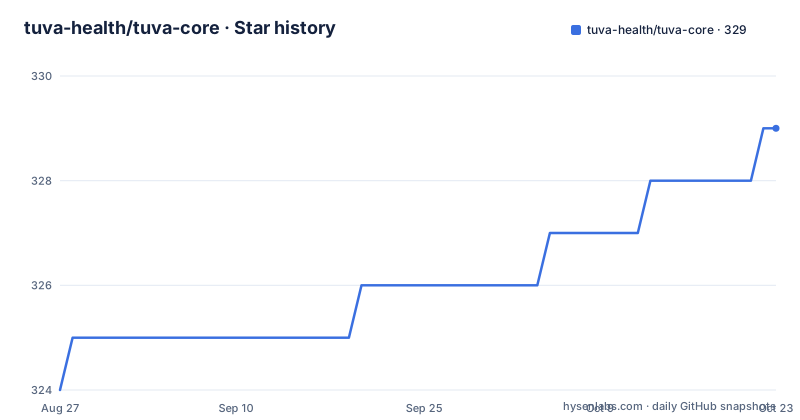
Star history
- tuva-health/tuva-core329 ★ · +5
| Repository | 2026-08-27 | 2026-10-22 |
|---|---|---|
| tuva-health/tuva-core | 324 | 329 |
5 Stars in the last 56 days, measured from the daily GitHub snapshot. Compare with other projects
Editorial analysis
The repository, the dbt project and the Hub package have three names
The repository is `tuva-health/tuva-core`. The dbt project name is still `the_tuva_project`, kept that way for package compatibility. The identifier you would write in a Hub install is `tuva-health/the_tuva_project`, which puts the organisation, the project and a literal separator into one string.
The old name has not been retired everywhere. The build command is selected by package name:
dbt build --select package:the_tuva_projectSo the selector you use every day still contains the pre-rename identifier. A developer who renames the repository, copies a command from a newer issue, or greps the tree for the project name will land in the same place the README warns about.
There is a good reason for the compatibility hold, and it is stated: existing installs reference the project by its old name, and a silent break would be worse than an ugly name. It is still worth knowing that the repository name is the only one of the three that a newcomer is likely to guess correctly.
The description covers the pieces the package owns: a core data model, data marts, data quality tests and terminology sets. The layer table breaks that into seven areas, an Input Layer that parent projects map source data into, a Normalized Layer for type casting and terminology normalization, Claims Preprocessing, the Core Data Model outputs, Data Quality, Metadata and parity, and Data Assets.
The default branch is explicitly not a release, and the install wants a tag
One sentence does the work: a version on the default branch is not a formal release. Production projects should use an immutable version published in GitHub Releases.
The install instructions are correspondingly strict. A parent project's `packages.yml` should carry the git URL and an exact tag including the `v` prefix, with a published release written as `revision: "v1.0.0"`. An exact forty character commit is offered as an alternative when you want to identify a reviewed development revision. Mutable branch names are advised against.
One useful detail is stated rather than assumed: git installation does not require the release to be indexed by dbt Hub, so a project can consume a tagged release before, or without, a Hub listing. The alternative Hub form is offered for when the version is available there, with a warning to use one form per package and not both.
The release history explains why the warning matters. Version 0.18.0 had a release candidate in April 2026 and shipped in May. Version 1.0.0 arrived on 2026-09-08, four months later. The last push is 2026-09-27, nineteen days after the tag, so the branch has moved past the release by a fair margin and any statement about what a version contains refers to the tag, not to the head.
A whole paragraph about SQL Server, a platform the support list omits
The most operationally serious paragraph in the file is about a warehouse the support statement does not name.
The supported platforms are Snowflake, Databricks, BigQuery, Microsoft Fabric, Redshift and DuckDB. SQL Server is not among them. Then the README spends a paragraph on SQL Server deployments and how they must use a case-sensitive database collation.
The mechanism is worth stating exactly, because the failure is silent. Logical Data Quality compares values against exact lowercase literals, and the example given is a membership test on a sex column with the literals `male`, `female` and `unknown`. Under the SQL Server default collation, which is case-insensitive, the value `MALE` compares equal to `male`. The check therefore passes a value it should reject, and the README's word for it is that those checks silently report an invalid value as valid instead of failing.
The remedy has a timing constraint that matters more than the setting. Set the collation when the database is created. Changing it afterwards requires rebuilding the affected objects, which on a warehouse with large tables is not a metadata operation.
So a reader has a detailed, correct warning about a platform outside the claimed support matrix, and no statement anywhere about whether SQL Server deployments are supported at all.
Data quality is opt-in and the variables must be typed booleans
The parent project exposes a flag and five feature variables:
flags:
  require_ref_searches_node_package_before_root: true

vars:
  claims_enabled: true
  clinical_enabled: false
  provider_attribution_enabled: false
  data_quality_enabled: false
  use_coderx_enterprise: false
Read the defaults as the shape of a fresh install. Claims on, clinical off, provider attribution off, data quality off. So the structural and logical checks are not running until somebody turns them on, which is also why the collation trap in the previous section is invisible by default.
The flag above the variables is named for a node package lookup that has to be resolved before the root project, and the file gives its name without explaining when it is needed or what happens without it. It is the only flag in the block and the only unexplained one.
The variable typing rule is stricter than it first appears. Feature variables must be native unquoted YAML booleans. Quoted values and direct `env_var()` calls are strings, and strings are rejected. The stated workaround for environment-driven workflows is to generate typed YAML or JSON before invoking dbt.
That is a real constraint for anyone running this in CI, where setting an environment variable is the obvious thing to try. The repository makes you render a file instead.
Eight optional packages and no umbrella switch to turn them on
Core keeps the common transformation path and the rest is distributed as independently installable packages, eight of them, each in its own repository: AHRQ quality indicators, the CCSR diagnosis and procedure groupers, CMS chronic conditions, CMS HCC scoring with recapture and suspecting, an FHIR preprocessing extension, emergency-department classification, quality measures with retained readmissions, and a semantic layer of dimensions and facts.
Each one owns its models, tests, data assets, documentation, compatibility and release lifecycle. There is no umbrella enable variable: installing a standalone package enables that package.
Two dependency rules catch people out. The parent project installs Core explicitly, because the standalone packages do not pull it in for you. And the semantic layer requires the sibling packages listed in its own installation instructions, so it is the one package with a dependency list rather than a single repository.
The medication terminology has two modes. CodeRx Open is the default. Setting the enterprise flag switches every CodeRx consumer to user-managed `packages`, `drugs` and `classes` relations in a `coderx` schema in the target database. Nothing in the package creates those relations, so the enterprise path assumes they already exist.
Existing third-party dependencies are left alone. Packages such as `dbt_utils` can keep resolving through Hub, which is what makes this composable with an existing project rather than a closed world.
Fourteen tables carry extension columns and five naming contracts are fixed
Four breaking-change contracts are listed, and they are all about shape rather than content.
Public fields ending in `_flag` are nullable binary integers: one for true, zero for false, and null meaning unknown or not applicable. Categorical values use `_code` or `_status` instead of the same suffix. So the three-state answer is encoded in the column name and the type together, and a null flag is never a false.
The location and practitioner tables stay source-native rather than being conformed, and their public keys are composite: location with its data source, practitioner with its data source. Any join has to carry the source column, which is the cost of not inventing a surrogate key the warehouse does not have.
Extension columns flow only between fourteen same-named Input Layer and Core tables: appointment, condition, eligibility, encounter, immunization, lab_result, location, medical_claim, medication, observation, patient, pharmacy_claim, practitioner and procedure. They explicitly do not reach derived outputs such as cost, member month, the person identifier crosswalk, or utilization. So a connector that adds a column to a claim table will not find it propagated into the cost model, and that is the rule rather than an oversight.
The last contract is a temporal one. Open eligibility spans keep a null end date rather than being capped at the current run date, so a re-run does not silently truncate an open span.
The complete breaking-change catalogue and upgrade guidance are said to live in the external documentation site, not in the repository.
Local testing runs against a parent project that installs nothing
The development path uses a directory named `integration_tests` as the local parent dbt project. It imports the working checkout rather than a published release, maps versioned synthetic data into the Input Layer, and exercises Core without installing any of the standalone packages.
That last clause is the interesting one. The eight optional packages have no local equivalent, so anything touching the CCSR groupers, the CMS condition logic, the emergency-department classification or the semantic layer cannot be exercised by the integration project at all.
Configuration is the ordinary dbt kind: pick a supported adapter in the profile file under the home directory, then run a wrapper script from the repository root. The wrapper's name is cut off in this copy of the file, which is the one command a new contributor cannot look up here.
The root holds eleven entries, and the documentation is not among them. There is a gitignore, the agent instruction file, the licence, the readme, the dbt project file, the packages file, and the directories holding macros, models, seeds, scripts and the integration project.
So no contributing guide, no changelog, no security policy, and no documentation directory. Every explanation of a variable, a connector or the Input Layer contract is on an external site, which for a package whose main risk is a silently mis-shaped column is the wrong file to be missing.
Editorial conclusion
Tuva Core suits a warehouse team that wants one claims and clinical model instead of per-source pipelines, and that will pin a release tag rather than track the default branch. Before you start, decide whether you are on an adapter the package lists, because the SQL Server guidance is the sharpest warning in the repository and applies to a platform the support statement does not claim. Read the data quality variables before you assume the checks are running, since they are off by default, and remember that the breaking-change catalogue lives on an external documentation site rather than in the repository.
Frequently asked questions
What is Tuva Core?
A dbt package that transforms claims, clinical and other healthcare data into a common analytics and AI-ready data model inside your own cloud warehouse. It requires dbt 1.10.5 through 2.x and supports Snowflake, Databricks, BigQuery, Microsoft Fabric, Redshift and DuckDB. It is not a hosted service.
How do I install Tuva Core in a dbt project?
From the parent project's `packages.yml`, pointing at the git URL with an exact published tag including the `v` prefix, for example `revision: "v1.0.0"`, then run `dbt deps`. Git installation does not require the release to be indexed by dbt Hub. Mutable branch names are advised against for production, and the README states that a version on the default branch is not a formal release.
Why does Tuva Core warn about SQL Server collation?
Because Logical Data Quality compares values against exact lowercase literals such as `male`, `female` and `unknown`. Under SQL Server's default case-insensitive collation those checks silently report an invalid value as valid instead of failing. A case-sensitive collation such as `SQL_Latin1_General_CP1_CS_AS` has to be set when the database is created, since changing it later requires rebuilding affected objects. SQL Server is not in the listed set of supported platforms.
Are Tuva Core's data quality tests on by default?
No. `data_quality_enabled` defaults to false, along with clinical and provider attribution, while claims defaults to true. Both structural and logical data quality are described as opt-in, so the checks do not run until the variable is set, and the variable must be an unquoted YAML boolean because quoted values and `env_var()` expressions are rejected as strings.
How do I add the optional Tuva packages such as CCSR or the semantic layer?
Add each one to the same root `packages.yml` with its own repository URL and published tag, then run `dbt deps`. The parent project must install Core explicitly because the standalone packages do not pull it in, and the semantic layer additionally requires the sibling packages listed in its own installation instructions. There is no umbrella enable variable.
Official sources
Add this badge to your README
If you maintain this project, the badge below links readers to this analysis and shows its maintenance status from the daily GitHub snapshot. Paste the markdown into your README; add ?metric=license or ?metric=stars to the image URL for a different field.

[](https://hysenlabs.com/projects/tuva-health-tuva-core)Star history chart for your README
[](https://hysenlabs.com/projects/tuva-health-tuva-core)