SceneView: six ways to install, and two of them ship at different versions
AI-first 3D & AR SDK for Android (Jetpack Compose + Filament), Apple (SwiftUI + RealityKit) and the web. Opens glTF/GLB, 3MF, STL, OBJ and PLY on Android and USDZ on Apple, at real size in AR. An assistant reads llms.txt and writes code that compiles first try; also an MCP server and a ChatGPT/Codex plugin.
At a glance
- What is it?
- SceneView is a 3D and AR SDK that puts a model on screen without a game engine, using Filament on Android, RealityKit on Apple, and Filament.js on the web. The interesting parts are the seams: a Swift Package floor that sits thirteen releases behind the rest, two platforms marked Alpha, a Compose Multiplatform build that drops AR entirely, and an AI surface spread across a directory and four editor config files.
- Who is it for?
- SceneView is a good fit if you want a model on screen inside a Compose or SwiftUI app without adopting a game engine, and if you can live inside one platform's release cadence. Android is the one marked Shipped and Stable, so treat that as the reference implementation and port toward the others.
- Can I use it commercially?
- Yes. Apache-2.0 is a permissive licence: you can use, modify and sell software built on it, as long as you keep its copyright and licence notices.
- Is it still maintained?
- Yes. The repository received new commits within the last day.
- What is it written in?
- Mainly Kotlin, according to GitHub's language statistics.
Answers come from the project's GitHub data, last synced on November 15, 2026, and from our analysis. They are not legal advice.
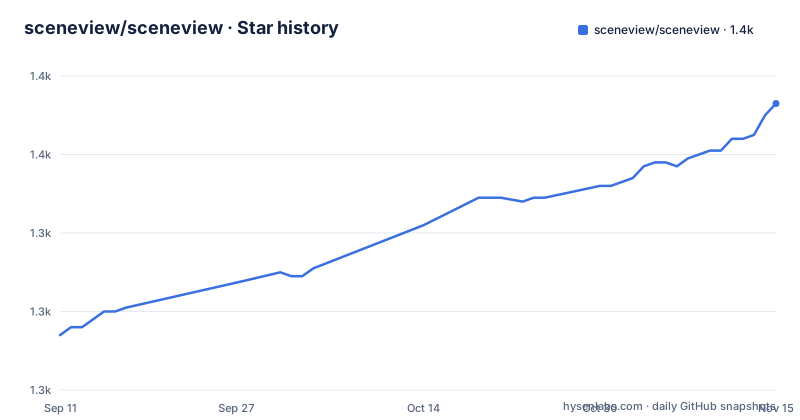
Star history
- sceneview/sceneview1,373 ★ · +59
| Repository | 2026-09-11 | 2026-11-15 |
|---|---|---|
| sceneview/sceneview | 1.3k | 1.4k |
59 Stars in the last 65 days, measured from the daily GitHub snapshot. Compare with other projects
Editorial analysis
Six artifacts, six version floors, and only one of them is a match
The quick start pins the Android coordinates at the current release:
// build.gradle.kts
implementation("io.github.sceneview:sceneview:4.52.0")
AR is a second coordinate that includes the 3D module, so you add arsceneview rather than swapping sceneview out. Compose Multiplatform uses sceneview-compose in commonMain, Flutter is flutter_sceneview at ^4.52.0, React Native is @sceneview-sdk/react-native, and the web build loads from npm as sceneview-web. Five artifacts, all tracking the same number as the Android one.
The sixth is the odd one out. Swift Package Manager is pointed at https://github.com/sceneview/sceneview.git from 4.39.0, and the Apple demo in the runs-on table is marked Alpha while Android is marked Shipped and Stable. So an Apple developer following the same document reads a version floor thirteen releases behind the number every other section quotes, and the web HTML sample pins its CDN scripts to the v4.52.0 tag by hand. The mismatch is not hidden, but it is easy to miss, because the same page repeats 4.52.0 five times before it mentions the exception.
A repository built around one number also ships the number in two more forms. SceneViewSwift.podspec and Package.swift sit at the root for CocoaPods and Swift Package Manager consumers, and the web sample does not use npm at all: it pulls filament.js and sceneview.js from a CDN path pinned to the v4.52.0 tag, so a web integrator has no dependency entry to bump. Every route arrives at a version, and only the Apple route arrives at a floor.
Filament calls must run on the main thread, and the composable is what enforces it
The Android sample wraps a model loader in a composable that returns nothing until the file is ready:
@Composable
fun ModelScreen() {
    SceneView(modifier = Modifier.fillMaxSize()) {          // orbit camera + default lighting
        rememberModelInstance(modelLoader, "models/helmet.glb")?.let { instance ->
            ModelNode(modelInstance = instance, scaleToUnits = 1.0f, autoAnimate = true)
        }
    }
}
Two rules are attached to those lines. rememberModelInstance returns null while the model loads and triggers a recomposition once it does, so the null check is the normal path rather than an error case. And the file is explicit that calling modelLoader.createModel* from a background coroutine is wrong, because Filament calls must run on the main thread, with rememberModelInstance handling that for you.
The second rule is the one that matters when you move fast. Nothing in the type system stops you from loading a model in a coroutine, and the result is not a compile error but a rendering problem that surfaces later. The composable is the whole safety mechanism, which is a reasonable design and also a single point of failure: any code path that reaches the loader directly opts out of the threading guarantee the sample is built on. The asset itself lives at src/main/assets/, and scaleToUnits is what puts the model at real size rather than at Filament's default.
In SwiftUI, .contentID decides whether your model ever appears
The Apple sample carries a load-bearing modifier that looks like boilerplate:
SceneView { root in
    if let model { root.addChild(model.entity) }
}
.contentID(model != nil)      // re-run the builder once the model has loaded
.environment(.studio)
.cameraControls(.orbit)
.task { model = try? await ModelNode.load("helmet.usdz") }
The content closure runs once unless its contentID changes. The model is assigned inside a task, so it starts as nil and becomes non-nil after the async load. Without the contentID line, the closure has already run, the scene is already built, and a model that finishes loading afterwards is never added. The failure is silent: no error, no log, an empty stage.
So the one line in that snippet that is not about appearance is the line that decides whether the app works. It is also the kind of detail that only shows up at runtime, on a device, with a model large enough that the load is not instant, which is why the comment sits next to it. RealityKit does the rendering here rather than Filament, and the studio environment plus orbit camera control are the two other things the sample sets, so on Apple the SDK surface is smaller than the Kotlin one.
The Compose Multiplatform artifact is a viewer with no AR in it
The multiplatform dependency is one line in commonMain:
implementation("io.github.sceneview:sceneview-compose:4.52.0")and the usage is one call:
SceneViewer(model = ModelSource.Asset("models/helmet.glb"), modifier = Modifier.fillMaxSize())The note under it is where the scope is defined: a viewer by design, load, orbit, light, tap, and no AR. That is the whole feature list, stated in four verbs.
This matters because the platform story reads as one thing and the artifact is another. The header claims AR across Android, Apple and the web, and the Android AR sample creates an anchor from a detected horizontal plane inside onSessionUpdated. None of that is available through sceneview-compose, so a team that adopted the multiplatform module for shared code has given up the anchor and plane detection that made the Android sample interesting, and gained portability across desktop and iOS in return. The scope is stated plainly rather than buried, and the AR-specific starting point is delegated to a type called AutoPlacementScene for tap-free, grounded placement, which is the one AR path still reachable from a multiplatform codebase. The React Native and Flutter bridges are described the same way, as bridging a subset of the native API, with the covered surface deferred to a README inside each bridge directory. Three of the seven documented entry points therefore come with a shortened contract, and the shortening is documented rather than discovered later.
The AI surface is a directory, an npm package, and four editor config files
AI-first is defined as one specific thing: an assistant that reads llms.txt or talks to the MCP server writes SceneView code that works on the first try, and when it does not, the API or the doc gets fixed. The server installs like this:
claude mcp add sceneview -- npx -y sceneview-mcp   # Claude Code
codex  mcp add sceneview -- npx -y sceneview-mcp   # Codex
The repository backs that up with more than a prompt file. At the root there is llms.txt, an mcp/ directory, a gpt/ directory, gemini-extension.json, smithery.yaml, .mcp.json, .cursorrules and .windsurfrules, plus .agents/, .claude/ and .codex-plugin/. AGENTS.md and CLAUDE.md sit beside them, and DESIGN.md, MIGRATION.md and ROADMAP.md document the project itself. That is seven editor and agent surfaces maintained in one repository.
The claim worth testing is the second half of the promise. Fixing the API or the doc when generated code fails is a maintenance commitment, not a build feature, and the release history is the place to check it: v4.50.0 and v4.51.0 both landed on 2026-09-30 and v4.52.0 followed on 2026-10-02, so minor versions are shipping daily. Whether a failed snippet triggers a doc change or a version bump is something the changelog answers and the README does not.
Two of the three shipped platforms are marked Alpha
The runs-on table is the shortest honest summary in the file. Each row pairs a published package with something you can open today:
| Platform | Status | |---|---| | Android | Shipped and Stable | | iOS | Shipped and Alpha | | Web | Shipped and Alpha |
The footnote under the table begins by defining Shipped as released and published, and stops there. So the definition is partial, and the boundary between Shipped and Alpha is not spelled out in the text available here.
What the table does make clear is that the demo apps are built from samples/ and that any of them opens from a link of the form https://sceneview.github.io/open?demo=<id>, with Cosmos, the galaxy the catalogue opens on, offered as a starting point and Rerun AR Replay, a real AR session rebuilt in 3D, offered as a second. That the two Alpha platforms ship live demos while Android ships a Play Store listing is the practical shape of the table: everything is demonstrable, one thing is declared stable.
The Apple row points at a Swift package rather than a registry, and the web row at an npm package rather than a bundle URL. A single column header covering install, another covering something you can open, and a third left empty in every row, which is where a capture of the running sample would sit. So the table is built to be filled in as evidence lands, and the evidence column is still blank across all three platforms.
parity-manifest.yml and an android-tv-demo sit outside the platform table
The root listing is wider than the three platforms above. It includes parity-manifest.yml, which by name is a record of what matches across platforms and by implication a promise that parity is not uniform. It includes arsceneview-depth-ml/, a directory named for depth estimation, which the platform table and the quick start never mention. It includes pro/, telemetry-worker/, tools/, device-qa-artifacts/, marketing/, branding/ and website-static/.
The samples directory makes the same point. Alongside android-demo, ios-demo, web-demo, desktop-demo, flutter-demo and react-native-demo there is android-tv-demo, and also common/, recipes/, screenshots/, COVERAGE.html and MULTIPLATFORM.md. A TV sample is a distinct form factor with its own input model, and no row in the runs-on table mentions it.
So there are two documents describing this project: a README that presents three platforms with clear stability labels, and a tree that contains a TV sample, a depth machine learning module, a pro directory, a telemetry worker and a parity manifest. Neither is wrong, and nothing here suggests the extras are abandoned. It does mean the README is a summary written for someone deciding whether to try the thing, and the tree is the honest inventory of what is being built.
changelog.d/ holds changelog fragments alongside the CHANGELOG.md at the root, which is the shape a daily minor release cadence needs. The last push landed on 2026-10-02, the same day as the v4.52.0 tag, so the tag and the tip of main are close together right now.
Editorial conclusion
SceneView is a good fit if you want a model on screen inside a Compose or SwiftUI app without adopting a game engine, and if you can live inside one platform's release cadence. Android is the one marked Shipped and Stable, so treat that as the reference implementation and port toward the others. Before you commit, check four things. The Apple package starts at 4.39.0 while every other artifact in the file is pinned at 4.52.0, so Apple developers are reading a floor, not a match. The iOS and Web rows are both Alpha. The Compose Multiplatform artifact is a viewer with no AR at all, which matters if a single shared codebase was the reason to reach for it. And Flutter and React Native are described as bridging a subset of the native API, with the scope deferred to per-bridge READMEs rather than stated here. The llms.txt and MCP server are a genuine differentiator for code generation, though the project's own promise that a wrong snippet gets fixed by changing the API or the doc is a commitment you can only judge by watching the changelog.
Frequently asked questions
sceneform vs sceneview
The README does not compare itself to SceneForm, so it makes no direct claim. What it states about itself: Android runs on Jetpack Compose with Filament and ARCore, Apple on SwiftUI with RealityKit and ARKit, and the browser on Filament.js with WebXR, with Flutter, React Native and Compose Multiplatform bridges on top. It is Apache 2.0 licensed, Android is marked Shipped and Stable, iOS and Web are marked Alpha.
Which model formats does SceneView open?
On Android it opens glTF and GLB, 3MF, STL, OBJ and PLY, and on Apple it opens USDZ at real size in AR. The quick start samples use models/helmet.glb on the Kotlin side and helmet.usdz in the SwiftUI example.
How do I add SceneView to an Android project?
Add io.github.sceneview:sceneview:4.52.0 for the 3D viewer, or io.github.sceneview:arsceneview:4.52.0 for AR, which includes the 3D module. Compose Multiplatform projects use io.github.sceneview:sceneview-compose:4.52.0 in commonMain instead.
Does the SceneView MCP server work with more than one assistant?
The file shows two, one command each: claude mcp add sceneview -- npx -y sceneview-mcp for Claude Code, and codex mcp add sceneview -- npx -y sceneview-mcp for Codex, with a link to a section covering other clients. The server is published to npm as sceneview-mcp, and llms.txt sits at the root of the repository as the other input.
Can I use AR from a Compose Multiplatform codebase?
Not through sceneview-compose, which is a viewer by design offering load, orbit, light and tap with no AR. The Android AR path uses ARSceneView with plane detection and anchors created from a horizontal plane inside onSessionUpdated, and AutoPlacementScene is the starting point for placement without a tap.
How much of SceneView is available in Flutter and React Native?
A subset of the native API, with the covered surface delegated to per-bridge READMEs in the flutter/ and react-native/ directories. The packages are flutter_sceneview at ^4.52.0 on pub.dev and @sceneview-sdk/react-native on npm, both loading a model from a path and controlling the camera.
Official sources
Add this badge to your README
If you maintain this project, the badge below links readers to this analysis and shows its maintenance status from the daily GitHub snapshot. Paste the markdown into your README; add ?metric=license or ?metric=stars to the image URL for a different field.

[](https://hysenlabs.com/projects/sceneview-sceneview)Star history chart for your README
[](https://hysenlabs.com/projects/sceneview-sceneview)Was this useful?