Twoslash: type information generated into documentation
Markup for generating rich type information in your documentations ahead of time.
At a glance
- What is it?
- Twoslash is a markup format for TypeScript code samples in documentation, where the compiler resolves the types ahead of time and the result is written into the page. It ships as a family of packages covering Shiki, VitePress, ESLint, Vue and Svelte, and it is the successor to the older @typescript/twoslash package.
- Who is it for?
- Twoslash fits a documentation site where TypeScript examples are expected to be correct and verified, and it fits a team already using Shiki or VitePress, since the integration packages are part of the same workspace. It does not fit a docs site whose examples are not TypeScript, and it does not fit a project that wants the type information to be produced at page load rather than ahead of time, because that is the opposite of what the format is for.
- Can I use it commercially?
- Yes. MIT is a permissive licence: you can use, modify and sell software built on it, as long as you keep its copyright and licence notices.
- Is it still maintained?
- Yes. The repository last received commits 16 days ago.
- What is it written in?
- Mainly TypeScript, according to GitHub's language statistics.
Answers come from the project's GitHub data, last synced on November 6, 2026, and from our analysis. They are not legal advice.
Star history
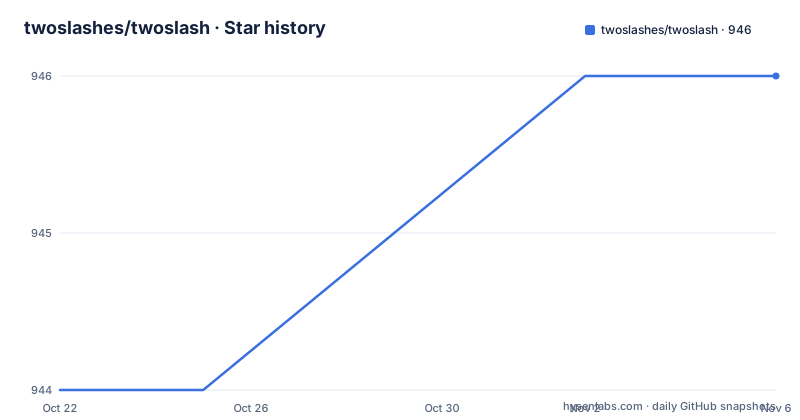
- twoslashes/twoslash946 ★ · +2
| Repository | 2026-10-22 | 2026-11-06 |
|---|---|---|
| twoslashes/twoslash | 944 | 946 |
2 Stars in the last 15 days, measured from the daily GitHub snapshot. Compare with other projects
Editorial analysis
A markup format, not a documentation framework
Twoslash is described as a markup format for TypeScript code, ideal for creating self-contained code samples which let the TypeScript compiler do the extra leg-work. The repository description is more compact still: markup for generating rich type information in your documentations ahead of time.
Those two phrases set the scope precisely. Twoslash does not render your documentation, choose a theme, or ship a site generator. It is a notation that you put inside code fences, and the tooling around it reads that notation, asks the TypeScript compiler what the code actually means, and writes the answers into the page.
The result is documentation where the type information is not maintained by hand. When a signature changes, the type shown in the documentation changes with it, and when the sample stops compiling, the failure surfaces at build time rather than in a support ticket. The self-contained part matters too: the sample carries its own imports and context, so it does not depend on the surrounding prose to be understood.
The idea was inspired by the fourslash test system, which is the mechanism TypeScript's own test suite uses to write type-level assertions. Twoslash takes that idea out of the test harness and puts it in documentation, where a reader gets the same kind of type assertions as an inline comment or a hover tooltip would give in an editor.
The monorepo is a family of adapters, not one package
The repository is a pnpm workspace, and the package list in the root package.json tells you how the project is shaped.
The core package is twoslash, marked as a workspace dependency, and around it sit twoslash-cdn, twoslash-eslint, twoslash-remote, twoslash-svelte and twoslash-vue, each also a workspace package. The names describe the surfaces they cover: a browser delivery path, a linting integration, a remote execution path, and framework integrations for Svelte and Vue.
Alongside them sit the Shiki packages, and this is the second half of the story. The dev dependencies include shiki itself, @shikijs/twoslash, @shikijs/vitepress-twoslash, @shikijs/markdown-it and @shikijs/transformers. Shiki is the syntax highlighter, and the @shikijs/twoslash package is the bridge between a Shiki code block and the Twoslash processing, while @shikijs/vitepress-twoslash is the VitePress integration and @shikijs/markdown-it the Markdown-it one.
The older @typescript/twoslash package is still listed as a dev dependency, and the README states that this project is the successor of @typescript/twoslash, which lived in the TypeScript website repository. A migration guide is published alongside the documentation. That tells you the ecosystem already had a first generation, and that a project still on it has both a working setup and a reason to move.
The rest of the workspace is standard: TypeScript, Vitest, ESLint with the @antfu/eslint-config, Vite, VueUse, Preact and Svelte for the documentation site, plus lz-string and mlly, and a twoslash package for the docs build itself.
The compiler does the work, and that is the whole design
Understanding what happens at build time explains both the value and the constraints of the format.
The type information is generated ahead of time, which means the TypeScript compiler is invoked on the sample during the documentation build. The @typescript/vfs package is in the dependency list, a virtual file system for TypeScript, which is what allows a set of in-memory files to stand in for a project on disk while the compiler resolves the sample. The typescript package itself is a dependency, obviously, since it is the compiler doing the resolution.
The three-step flow is therefore: the sample is written with Twoslash markers, the compiler is run against it to obtain the real types and any errors, and the results are injected into the rendered code block. The reader sees a code sample with hover-style type information and, in the failure case, a compiler error that a developer cannot ignore because the build stops.
That mechanism is the trade-off. The guarantee that a sample is correct comes from the compiler refusing to accept a broken one, and the cost is that the sample has to be real TypeScript that compiles in the project's own type environment. A snippet that only makes sense with a particular tsconfig, a particular set of ambient types or a particular import alias may not resolve in the documentation build without extra configuration, and the documentation for that configuration lives in the docs directory of the repository rather than in the README.
The twoslash-remote and twoslash-cdn packages point at a second architecture. If the resolution is done elsewhere and the result is delivered to the page, the build no longer needs to compile the sample on the machine that renders the documentation. The twoslash-cdn name suggests delivery through a content delivery network, and the presence of lz-string in the dependency list is consistent with compressing type payloads, since the type information for a sample can be sizeable.
The lint package is where the daily value sits
Two of the workspace packages deserve separate attention because they change the day-to-day work rather than the build.
The first is twoslash-eslint. The repository lints itself with ESLint using the @antfu/eslint-config, and there is an eslint.config.js at the root, so linting is part of the project's own workflow rather than an afterthought. The presence of a dedicated Twoslash lint package means the same verification that the build performs on documentation samples can be applied to source files, which is the difference between a sample that was checked once and a rule that fires on every change.
The second is the framework packages, twoslash-svelte and twoslash-vue. Each framework has its own type semantics, and a framework specific package keeps the compilation environment for the sample aligned with the framework the reader is actually using, which is where a generic setup would otherwise produce type information that does not match the real project.
Neither package's README is in the repository listing, and the root README does not describe their options, so the practical detail lives in the published documentation site at twoslash.netlify.app. The package names in the workspace are still the fastest way to know what exists, and the JSDocs reference in the README badge points at the generated API reference for the core package.
The docs site is part of the workspace too. The root scripts run the documentation development server and the documentation build with pnpm -C docs, and the site is deployed with netlify.toml, which is how the documentation and the migration guide are published from the same repository.
Tests, benchmarks and the release path
The repository shows the working habits of the maintainers, and they are visible in the scripts.
Testing is Vitest, with the test script running vitest and a separate bench script running vitest bench --run, so performance work has a home rather than being mixed into the test suite. Coverage uses @vitest/coverage-v8. The build script is a recursive pnpm build across the workspace, and typecheck runs tsc on its own, which is the check that catches type errors in the packages themselves before any documentation is generated.
Formatting and linting are handled by ESLint with lint-staged and simple-git-hooks wired up through the prepare script, so the checks run on commit rather than only in continuous integration. Releases go through bumpp with the -r flag, and the version in the root package.json is 0.3.9, matching the published tag. The docs directory, the packages directory, the bench directory and a vitest.config.ts at the root complete the picture.
The published history is short and regular. Recent tags are v0.3.9 from 2026-06-22, v0.3.8 from 2026-04-16 and v0.3.7 from 2026-04-10. The last push was on 2026-06-22, and the version number is still below 1.0, which is worth remembering when you pin it in a documentation build that runs in continuous integration.
Licensing is the MIT License, with the copyright line naming Orta Therox, Anthony Fu and Microsoft Corporation. The earlier @typescript/twoslash package carried the same lineage, so a team moving from one to the other is not changing the terms of use.
Where Twoslash is the wrong tool
There are clear cases where Twoslash does not help, and they follow from the mechanism rather than from a missing feature.
The first is documentation that is not TypeScript. The format is built on the TypeScript compiler, so a docs site whose examples are Python, Go or plain shell has nothing to gain from it.
The second is a sample that cannot compile on its own. Because the resolution happens ahead of time against a real type environment, a snippet that depends on context from the surrounding project needs that context to be supplied to the documentation build. If maintaining that context costs more than the type information is worth, the format is the wrong investment.
The third is a build that cannot afford the compiler step. The type information is generated ahead of time, which means a documentation build that runs the compiler over every sample. On a large docs site with many samples, that is extra build time and an extra failure mode, and the alternative architecture of resolving elsewhere and delivering the result, which is what the remote and CDN packages are for, moves that cost to a different place rather than removing it.
The fourth is a team that does not want the samples to be checked. Some documentation deliberately shows incomplete or illustrative code. Twoslash's value is that the samples are correct, and if correctness is not the goal, the format only adds a build step and a notation to learn.
The last is a version-stability expectation. At 0.3.x, with the migration guide still relevant for anyone coming from the older @typescript/twoslash package, a documentation build that breaks on a Twoslash upgrade is a real cost. Pinning the version in your documentation pipeline is the practical answer, and the CHANGELOG and the migration guide are where to check what changed before you move.
Editorial conclusion
Twoslash fits a documentation site where TypeScript examples are expected to be correct and verified, and it fits a team already using Shiki or VitePress, since the integration packages are part of the same workspace. It does not fit a docs site whose examples are not TypeScript, and it does not fit a project that wants the type information to be produced at page load rather than ahead of time, because that is the opposite of what the format is for. Before adopting it, read the migration guide at twoslash.netlify.app/guide/migrate if you are coming from @typescript/twoslash, check that the twoslash version you pin matches your Shiki setup, and try one sample in the twoslash-vitepress-twoslash package before converting a whole documentation site.
Frequently asked questions
What is Twoslash and what does it add to a code sample?
Twoslash is a markup format for TypeScript code that creates self-contained samples and lets the TypeScript compiler resolve the type information ahead of time, so the rendered documentation shows real types instead of hand-written ones. The idea was inspired by the fourslash test system, and the project is the successor of the older @typescript/twoslash package.
Which integrations does the Twoslash project ship?
The pnpm workspace contains twoslash as the core package plus twoslash-cdn, twoslash-eslint, twoslash-remote, twoslash-svelte and twoslash-vue, and the Shiki side includes shiki, @shikijs/twoslash, @shikijs/vitepress-twoslash, @shikijs/markdown-it and @shikijs/transformers. The published documentation site is at twoslash.netlify.app.
How do I migrate from @typescript/twoslash to Twoslash?
The README states that this project is the successor of @typescript/twoslash, which lived in the TypeScript website repository, and a migration guide is published with the documentation at twoslash.netlify.app/guide/migrate. The older package is still listed among the repository dev dependencies, and both are covered by the same MIT licence.
What licence is Twoslash under and how often is it released?
The project is under the MIT License, with the copyright line naming Orta Therox, Anthony Fu and Microsoft Corporation. Recent tags are v0.3.9 from 2026-06-22, v0.3.8 from 2026-04-16 and v0.3.7 from 2026-04-10, and the last push was on 2026-06-22, with the version still below 1.0.
Official sources
Add this badge to your README
If you maintain this project, the badge below links readers to this analysis and shows its maintenance status from the daily GitHub snapshot. Paste the markdown into your README; add ?metric=license or ?metric=stars to the image URL for a different field.

[](https://hysenlabs.com/projects/twoslashes-twoslash)Star history chart for your README
[](https://hysenlabs.com/projects/twoslashes-twoslash)Was this useful?