kubefwd: one loopback address per service, and why every example needs sudo
Bulk port forwarding Kubernetes services for local development.
At a glance
- What is it?
- kubefwd bulk port forwards the services in a Kubernetes namespace, giving each one its own 127.x.x.x address and writing the names into /etc/hosts so local code can connect with in-cluster URLs. The price is root access, and the documentation is not fully consistent about what the subcommand is called.
- Who is it for?
- Use kubefwd when you develop against a cluster and want one command to reach every service in a namespace by its in-cluster name, especially when several of them would collide on localhost. Do not reach for it when you cannot run with sudo on the workstation, since the host file and loopback interface work both need root, and use kubectl port-forward for a single service where you want no host file changes at all.
- Can I use it commercially?
- Yes. Apache-2.0 is a permissive licence: you can use, modify and sell software built on it, as long as you keep its copyright and licence notices.
- Is it still maintained?
- Yes. The repository last received commits 5 days ago.
- What is it written in?
- Mainly Go, according to GitHub's language statistics.
Answers come from the project's GitHub data, last synced on November 15, 2026, and from our analysis. They are not legal advice.
Star history
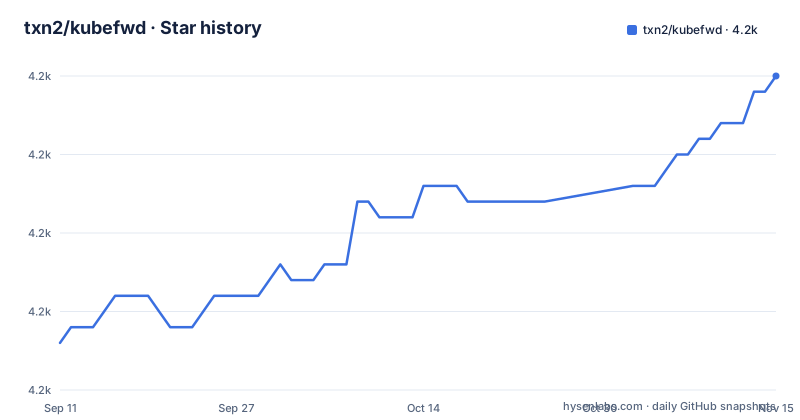
- txn2/kubefwd4,185 ★ · +17
| Repository | 2026-09-11 | 2026-11-15 |
|---|---|---|
| txn2/kubefwd | 4.2k | 4.2k |
17 Stars in the last 65 days, measured from the daily GitHub snapshot. Compare with other projects
Editorial analysis
One 127.x.x.x address per service is the mechanism, not a detail
kubefwd discovers the services in a namespace, assigns each one a distinct loopback address, writes the service names into /etc/hosts, and then establishes the forwards through the Kubernetes API. That single design choice is what removes port conflicts: two services that both listen on 8080 get two different local addresses instead of fighting over one port.
Once the host file is updated, the connection strings your code already uses work unchanged.
curl http://api-service:8080
mysql -h database -P 3306
redis-cli -h cache -p 6379
The examples are the point. Nothing in the application has to be switched between a local configuration and a cluster one, because resolution happens in the host file rather than in the app's own settings. The project frames this as removing environment-specific connection setup, and the comparison table makes the same claim against kubectl port-forward, which handles one service per command and binds to localhost only.
Every documented invocation runs under sudo
The requirements list two things: kubectl configured with cluster access, and root or sudo access for /etc/hosts and the network interfaces. The second requirement explains why every command in the documentation is prefixed the same way.
sudo -E kubefwd svc -n default --tuiThe -E flag keeps your environment, so the kubeconfig resolution done as your user still applies when the binary runs as root. Filtering is done through ordinary kubectl style flags, so a label selector or a comma separated list of namespaces changes what gets forwarded.
sudo -E kubefwd svc -n default,staging --tuisudo -E kubefwd svc -n default -l app=api --tuiInside the terminal interface, ? opens the help and q quits. Since the process needs to write to a system file and create loopback interfaces, running it unprivileged is not a configuration mistake to fix later; it is the reason the tool cannot be installed in a way that avoids root entirely.
The container example names a subcommand the CLI examples never use
All of the shell examples call the subcommand svc. The container example calls it services.
docker run -it --rm --privileged \
  -v "$HOME/.kube:/root/.kube:ro" \
  txn2/kubefwd services -n my-namespace --tui
The container run needs two flags that make sense together: --privileged, because the same interface and host file work has to happen inside the container, and a read-only mount of your kubeconfig directory, because the container talks to the cluster with your credentials and does not need to write them back.
The subcommand difference is not explained anywhere in the documentation. If you script kubefwd, treat the subcommand as something to verify against the binary you actually installed rather than copying whichever line you found first, since both spellings appear in the same page and one of them may be stale.
Four install paths, three different sources of the binary
macOS goes through homebrew with a single command, `brew install kubefwd`. Windows has two, `winget install txn2.kubefwd` and `scoop install kubefwd`, which differ in package identity because the winget identifier is namespaced by publisher. Linux has none of that: you download a .deb, an .rpm or a .tar.gz from the releases page yourself.
brew install kubefwdThe release archives are what the container image and the package managers are built from, so a Linux user is the one who has to care about which archive matches their distribution. The build inputs are visible in the repository: two Dockerfiles, one Alpine and one Ubuntu, a goreleaser configuration, and a packaging readme alongside them.
Whichever route you take, the result is the same binary, and the same rule applies afterwards. Installation does not grant the privileges the tool needs at run time, so every invocation still needs sudo.
A REST endpoint and an MCP server sit behind one flag
The command line tool is not the only way to drive kubefwd. One flag turns on a local HTTP API for programmatic control, and the same binary carries an integration for AI assistants named Claude Code and Cursor in the project description.
sudo -E kubefwd svc -n default --tui --apiThe dependencies confirm both surfaces rather than just the docs claiming them. The HTTP side is a gin server, and the assistant side is the official Model Context Protocol Go SDK at version 1.8.0, which is what lets an external tool call into the forwarder rather than scrape the terminal interface.
The packaging around that integration is more developed than a single flag suggests. The repository carries a smithery.yaml and a server.json, both of which are registry descriptors, an mcpb directory for the MCP bundle format, and a glama.json for another directory. So if you are wiring kubefwd into an assistant workflow, you are using a packaged MCP server that also happens to have a TUI.
The config example is in the repository, the option reference is not
The tree contains example.fwdconf.yml, a configuration file for the tool, plus DESIGN.md, a docs directory and an mkdocs.yml. None of that appears in the README. What the README points you to instead is a documentation site with separate pages for configuration, advanced usage, the API reference and troubleshooting.
So the repository and the website divide the information differently. Design rationale and a worked configuration file are versioned with the code; the list of flags and their behaviour is published separately, and the README's own link list is the only pointer to it.
The runtime has one dependency that shapes all of this: the tool links against k8s.io/kubectl and the cli-runtime library, so cluster access, context selection and resource loading go through the same machinery kubectl itself uses. That is also why a working kubectl configuration is listed as a hard requirement rather than a convenience.
make verify is the default target and it hashes your working diff
The Makefile's default goal is verify, and its comment tells you to run it before pushing because it performs the same checks as the CI pipeline: version check, tidy check, lint, test, build, action pin validation and a patch coverage report. The versions it pins are golangci-lint v2.12.1 and a required Go of 1.26, and the module file agrees, declaring go 1.26.0.
Two details are unusual enough to notice. Patch coverage has a threshold of 50 measured against origin/master, matching the target in the codecov configuration. And the last step writes a sentinel file containing a hash of your staged and unstaged diff, which a pre-commit review hook then reads to confirm that verify actually ran against the code being committed.
The default branch is master, and so is the coverage base, which is one of the few places where the two are guaranteed to agree.
Releases moved to v1.25.x while the Kubernetes libraries sit at 0.37
The three most recent tags are v1.25.16 from June 20, 2026, v1.25.15 from May 29, 2026 and v1.25.14 from April 22, 2026. The last push to the repository is dated October 3, 2026, two days before this article, so work continues between releases rather than stopping at a tag.
The interesting part is the pairing of that release numbering with the dependency list. The module requires k8s.io/api, client-go, cli-runtime, kubectl and klog at version 0.37.0, while the project's own tags run in a 1.25 series. Nothing in the documentation maps one numbering scheme onto the other, so neither number tells you which Kubernetes release the binary was tested against.
Licensing is Apache 2.0 with a NOTICE file at the root, and the project names the company that sponsors it. Contribution policy is narrow by design: bug fixes, tests and documentation are welcome, while feature development is limited to maintainers.
Editorial conclusion
Use kubefwd when you develop against a cluster and want one command to reach every service in a namespace by its in-cluster name, especially when several of them would collide on localhost. Do not reach for it when you cannot run with sudo on the workstation, since the host file and loopback interface work both need root, and use kubectl port-forward for a single service where you want no host file changes at all. Before you commit to a version, check that the subcommand your script passes matches the one your binary expects, because the documentation mixes svc and services, and check the configuration example that ships in the repository rather than assuming the documented defaults cover it.
Frequently asked questions
What exactly is port forwarding in kubefwd?
It is how kubefwd reaches services in your cluster from the workstation: it discovers the services in a namespace, gives each one a unique 127.x.x.x address, writes the names into /etc/hosts and opens the forwards through the Kubernetes API, instead of forwarding one service at a time to localhost.
Does kubefwd need root access?
Yes. The stated requirements are a kubectl configured with cluster access and root or sudo, because the tool writes to /etc/hosts and sets up network interfaces. Every example therefore starts with sudo -E.
How do I install kubefwd on Linux?
There is no package manager entry documented for Linux. You download a .deb, an .rpm or a .tar.gz from the releases page, while macOS uses brew install kubefwd and Windows uses winget install txn2.kubefwd or scoop install kubefwd.
What is the subcommand for forwarding services with kubefwd?
The shell examples all use svc, for example sudo -E kubefwd svc -n default --tui, while the container example uses services in the same command position. The documentation does not explain the difference.
Can kubefwd forward only part of a namespace?
Yes. The command accepts a comma separated list of namespaces and a label selector, so you can forward every service in a namespace or narrow it down with something like -l app=api.
Can an AI assistant drive kubefwd?
The project lists MCP support for Claude Code and Cursor, and the module depends on the Model Context Protocol Go SDK. The repository also ships smithery.yaml, server.json, an mcpb directory and glama.json as registry and bundle descriptors.
Official sources
Add this badge to your README
If you maintain this project, the badge below links readers to this analysis and shows its maintenance status from the daily GitHub snapshot. Paste the markdown into your README; add ?metric=license or ?metric=stars to the image URL for a different field.

[](https://hysenlabs.com/projects/txn2-kubefwd)Star history chart for your README
[](https://hysenlabs.com/projects/txn2-kubefwd)Was this useful?