rayshader: turning an elevation matrix into a lit 3D scene in R
R Package for 2D and 3D mapping and data visualization
At a glance
- What is it?
- rayshader is an R package that turns a base R matrix of elevations into shaded maps and rgl 3D scenes, with composable shadow functions, generated overlays and an STL export. It is a rendering layer for terrain data you already have.
- Who is it for?
- rayshader is the right tool when your terrain is already a numeric matrix and you want a figure with real lighting rather than a flat choropleth, and it is the wrong tool when you need a basemap, projections or interactive web maps. Its strength is composability: any combination of shadow layers through add_shadow, any overlay through generate_ functions, then either an rgl scene or a path traced render.
- Can I use it commercially?
- Not without permission. GitHub finds no licence file in the repository, and without a licence all rights are reserved by default: you may read the code but not reuse it. Check the README, or ask the authors, before using it.
- Is it still maintained?
- Yes. The repository last received commits 29 days ago.
- What is it written in?
- Mainly R, according to GitHub's language statistics.
Answers come from the project's GitHub data, last synced on October 25, 2026, and from our analysis. They are not legal advice.
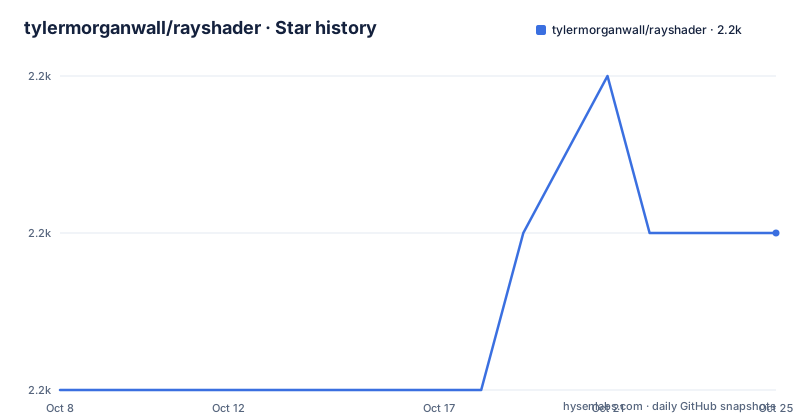
Star history
- tylermorganwall/rayshader2,183 ★ · +1
| Repository | 2026-10-08 | 2026-10-25 |
|---|---|---|
| tylermorganwall/rayshader | 2.2k | 2.2k |
1 Stars in the last 17 days, measured from the daily GitHub snapshot. Compare with other projects
Editorial analysis
An elevation matrix goes in, shadow maps come out
The interface is a plain base R matrix, and that choice shapes everything else. rayshader does not fetch basemap tiles, project coordinates or manage vector layers. It takes numbers, row by row, and treats them as a height field. If your elevation data arrives as a raster you have to convert it to a matrix first, and if it arrives as something like an sf object the conversion is your code's job.
From that matrix, the package calculates shadow layers. ray_shade() produces a global shadow map from a user specified light direction, and by default it also scales light intensity at each point by the dot product of the mean ray direction and the surface normal. The same normal calculation is available on its own as lamb_shade(), and ray_shade() takes a lambert argument to turn that behaviour off when you want raw cast shadows.
That separation is the core idea. Shadows are not one rendering step but a set of independent arrays that you combine yourself. ambient_shade() adds ambient occlusion, which darkens valleys relative to flat ground and ridges. texture_shade() implements the method Leland Brown describes in Texture Shading: A New Technique for Depicting Terrain Relief, and height_shade() is the blunt version that maps elevation straight to colour. add_shadow() is the function that takes any two of these and blends them at a weight you choose, which means the look of a map is a decision you make in code rather than a preset.
A function list that does not add up to the number it claims
The README opens the mapping section with the line Rayshader has seven functions related to mapping, and then lists nine: ray_shade(), sphere_shade(), ambient_shade(), texture_shade(), height_shade(), lamb_shade(), add_shadow(), add_overlay() and create_texture(). Both facts are in the same document, and neither the README nor the pkgdown site in the tree corrects the other.
It matters more than a normal counting slip, because it tells you something about how the surface is grouped. The shading functions and the composition functions are counted together even though they do different jobs. The first six produce arrays, the last three take arrays and combine or attach them. Reading the list as two families rather than one flat list of seven is the more useful interpretation.
sphere_shade() is the odd one out in the first group. It maps an RGB texture onto a hillshade by spherical mapping and carries seven built in palettes: imhof1, imhof2, imhof3, imhof4, desert, bw and unicorn. The texture can be loaded from an image or built with create_texture(), which takes five colours, a highlight, a shadow, a left fill light, a right fill light and a centre colour for flat areas, then interpolates corner colours you do not supply.
Overlays are arrays you generate before you draw anything
The generate_ family exists so that map furniture can be drawn in projected, correct positions rather than pasted on at the end. generate_contour_overlay() returns contour lines. generate_altitude_overlay() builds a semi transparent hillshade whose transparency varies with altitude, which is a nicer way to show relief on a map that already has hypsometric colour. generate_waterline_overlay() does the same trick with a waterline, taking either a height map or a boolean matrix.
generate_scalebar_overlay() is the one worth reading closely, because it handles a case people forget. It takes an extent, computes a bar of the length you asked for and places it at an x/y proportion across the map. If the map is not projected and is in latitude and longitude, it falls back to the geosphere package to work out the real length on the ground. A scale bar computed from unprojected degrees is usually wrong, and the package accounts for that.
The vector overlays follow one convention. generate_line_overlay() takes an sf object with LINESTRING geometry, generate_point_overlay() takes POINT, generate_polygon_overlay() takes POLYGON, and generate_label_overlay() calls maptools::placeLabel() with either an sf object or manual x/y coordinates and labels. add_overlay() is what puts any 3 or 4 layer RGB or RGBA array on the current map, honouring alpha channel transparency or, if the overlay is opaque, letting you name one colour to treat as fully transparent.
From an rgl scene to a path traced render and an STL file
The 2D shading functions above are half the package. The other half turns the same matrix into a 3D scene in an rgl device, and then optionally re-renders it properly.
render_highquality() does the re-rendering. It renders the scene with a built in path tracer powered by the rayrender package, which is the option for realistic light transport rather than the fast shaded preview. render_depth() adds a depth of field post processing effect where you set focal distance, focal length and f stop, plus aperture shape and bokeh intensity, and it either plots to the local device or writes to a file when given a filename. The README describes this as a cinematic effect for directing attention to a region, which is an honest description of what a shallow depth of field does to a terrain figure.
The scene also gets annotation and export. render_label() places text at an x and y coordinate at a specified z in matrix units, either relative to the elevation at that point, which is the default, or absolute. render_water() adds a transparent water layer after the rgl device exists, and can replace an existing one. render_path() and render_points() take latitude and longitude or coordinates in the extent's reference system and elevate by a constant offset above the height map when you do not supply an altitude. The overview at the top of the README also promises STL export for 3D printing and OBJ export.
There is a water detection path for the 2D maps too: detect_water() uses a flood fill to find bodies of water above a minimum area you set, and add_water() colours them, either with your own colour or a palette name from sphere_shade() so the water matches the terrain.
Installing from GitHub and the system libraries Ubuntu expects
The install path the README documents is devtools from GitHub, which is what you want when you need work that has not been released.
devtools::install_github("tylermorganwall/rayshader")The cost of that route is the system libraries. On Ubuntu the README lists a specific set that has to be present before the package will build.
libpng-dev libjpeg-dev libfreetype6-dev libglu1-mesa-dev libgl1-mesa-dev pandoc zlib1g-dev libicu-dev libgdal-dev gdal-bin libgeos-dev libproj-devRead that list as a description of what rayshader actually pulls in. GL and GLU are the rgl windowing layer, freetype and the image libraries are for texture and label rendering, and GDAL, GEOS and PROJ come in with the sf and maptools work that the overlay functions depend on. That is a heavier footprint than a typical plotting package, and on a machine without them the failure comes from the compiler rather than from R.
The repository has a src/ directory, so there is compiled C++ in the build, and tests/ and tools/ alongside it. Documentation is generated through pkgdown, with _pkgdown.yml, a pkgdown/ directory and build_gh_pages_rayshader.R in the tree, and the homepage for the project is rayshader.com, which is where the rendered function reference lives rather than in the README.
No releases, no declared license, and a lot of optional machinery
Two facts about the repository are worth stating plainly because they affect adoption. GitHub reports no license for tylermorganwall/rayshader, and there are no published releases. The last push was on 2026-09-27, so the code is being worked on, but there is no tagged version to install and no licence text the metadata could resolve. The DESCRIPTION file in the tree is where the package declares its own dependencies and its version, and that file, not the repository metadata, is what you would read to find out who may use the code.
The other thing to understand is that most of this package is optional machinery. The core is a matrix and ray_shade(). Everything else is a layer you may never call. A reader who wants a publication quality terrain figure needs ray_shade(), add_shadow(), add_overlay() and at least one generate_ function. render_highquality(), the STL export, the OBJ export and the depth of field post processing exist for figures going into a specific kind of presentation, and each one adds either a dependency or a rendering cost.
Compare it to what you would otherwise reach for. A general purpose mapping library gives you projection handling, vector data and interactive output, none of which rayshader does, and a path tracer such as rayrender operates on geometry rather than on elevation matrices. rayshader is narrower and sits between them, converting numeric terrain into a lit picture.
Editorial conclusion
rayshader is the right tool when your terrain is already a numeric matrix and you want a figure with real lighting rather than a flat choropleth, and it is the wrong tool when you need a basemap, projections or interactive web maps. Its strength is composability: any combination of shadow layers through add_shadow, any overlay through generate_ functions, then either an rgl scene or a path traced render. Two things to settle before depending on it. GitHub reports no license for the repository and no releases are published, so treat the DESCRIPTION file and a pinned commit as your source of truth for both. Start with generate_scalebar_overlay and generate_contour_overlay, since a 3D scene without a scale bar and contours is hard to read.
Frequently asked questions
What input does rayshader need to make a map?
A base R matrix of elevations, with the light direction supplied by the user. ray_shade() turns that matrix into a global shadow map and can scale intensity by the surface normal, and you can turn that off with the lambert argument. The package does not read basemap tiles or handle projections for you.
How do I combine hillshade layers in rayshader?
Each shading function produces its own array: ray_shade(), lamb_shade(), ambient_shade(), texture_shade() and height_shade(). add_shadow() takes two of those arrays and blends them, scaling the second one by a weight you specify, or handling it as an RGB matrix when the second layer is a colour array.
Does rayshader work with sf objects?
Yes, for overlays and for 3D annotations. generate_line_overlay(), generate_point_overlay() and generate_polygon_overlay() take sf objects with LINESTRING, POINT and POLYGON geometry, and generate_label_overlay() can take an sf object or manual coordinates and calls maptools::placeLabel(). The elevation surface itself still has to be a matrix.
Can rayshader export the 3D model for printing?
The README describes a built in STL export for 3D printable output, plus export to OBJ. It also notes that scenes can be exported through those formats after being built in the rgl device, and that render_highquality() re-renders a scene with the rayrender path tracer first.
Official sources
Add this badge to your README
If you maintain this project, the badge below links readers to this analysis and shows its maintenance status from the daily GitHub snapshot. Paste the markdown into your README; add ?metric=license or ?metric=stars to the image URL for a different field.

[](https://hysenlabs.com/projects/tylermorganwall-rayshader)Star history chart for your README
[](https://hysenlabs.com/projects/tylermorganwall-rayshader)Was this useful?