monaco-languageclient: wiring the Monaco editor to a language server
A toolbox for building web applications with editors utilizing language servers.
At a glance
- What is it?
- The monaco-languageclient repository is a toolbox of four packages that connect the Monaco editor to a language server, with a WebSocket JSON-RPC transport and a React wrapper, shipped by TypeFox and aligned to a specific monaco-editor and vscode version pair. Its real selling point is that the examples are runnable, so the distance between the documentation and a working editor is short.
- Who is it for?
- monaco-languageclient suits a team building a browser-based code editor that needs completion, diagnostics and go-to-definition from a real language server, because the packages align the Monaco editor, the VS Code API layer and the LSP transport for you, and the examples show the server process for each language.
- Can I use it commercially?
- Yes. MIT is a permissive licence: you can use, modify and sell software built on it, as long as you keep its copyright and licence notices.
- Is it still maintained?
- Yes. The repository last received commits 24 days ago.
- What is it written in?
- Mainly TypeScript, according to GitHub's language statistics.
Answers come from the project's GitHub data, last synced on November 6, 2026, and from our analysis. They are not legal advice.
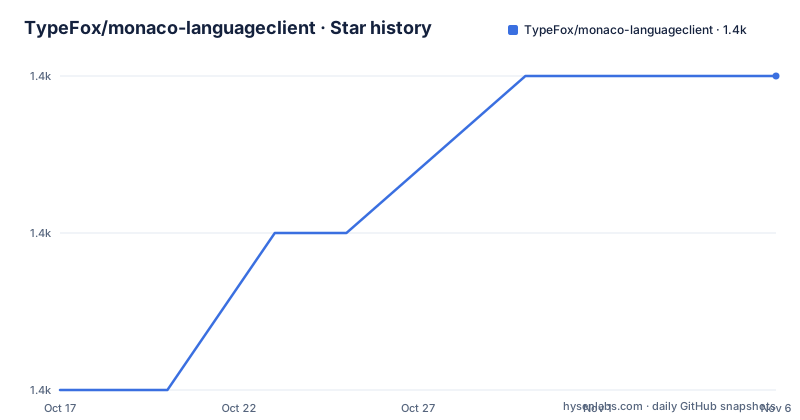
Star history
- TypeFox/monaco-languageclient1,375 ★ · +2
| Repository | 2026-10-17 | 2026-11-06 |
|---|---|---|
| TypeFox/monaco-languageclient | 1.4k | 1.4k |
2 Stars in the last 20 days, measured from the daily GitHub snapshot. Compare with other projects
Editorial analysis
Four packages, and the problem each one removes
The repository description is plain: a toolbox for building web applications with editors utilizing language servers. The README expands it into four packages under one roof.
monaco-languageclient connects the Monaco editor with language servers, and it is the core of the set.
vscode-ws-jsonrpc implements communication between a jsonrpc client and server over WebSocket. That is the transport, and it is separated out because the transport is the part that varies with your deployment.
@typefox/monaco-editor-react makes the editor and language client available within a React component, which is the part that varies with your framework.
And monaco-languageclient-examples provides the examples used in the repository and by the verification projects.
The split is the design. The editor-to-language-client part is the hard, reusable piece. The transport is a WebSocket JSON-RPC client and server, which is the piece you replace when your language server runs in a different place. The React wrapper is convenience, and it is versioned separately so that the core does not have to depend on React.
The result is that a project with no backend at all can still run the examples, since the README says the examples not requiring a backend are available via GitHub Pages.
Version alignment is explicit, and it is the thing to check
The README publishes the current package versions and what they line up with, and this is the section to read before anything else.
monaco-languageclient is at 11.0.3 with a release date of 2026-10-15. @typefox/monaco-editor-react is at 8.0.3, also released 2026-10-15. vscode-ws-jsonrpc is at 4.0.3, also 2026-10-15. monaco-languageclient-examples is a private package.
Those are aligned with @codingame/monaco-vscode-api at 37.6.0, vscode at 1.138.0 and monaco-editor at 0.57.0.
The alignment is stated rather than implied, which is a small but important difference from most editor tooling. The monaco-vscode-api package is the layer that reimplements the VS Code extension host API on top of Monaco, and it is what makes it possible to run language servers written against the VS Code API inside a browser. Pinning the numbers tells you exactly which upstream release your stack is expected to work against.
The full compatibility table with all previous versions is linked from docs/versions-and-history.md, and that same document holds the important project changes and notes about the history.
The last push was on 2026-10-15, the same day as those releases, and the repository has no GitHub releases, so the version history is in the per-package changelogs and in the npm registry rather than in GitHub release entries. Each package has its own CHANGELOG: one for monaco-languageclient, one for vscode-ws-jsonrpc, one for @typefox/monaco-editor-react and one for the examples.
The examples are the documentation
The examples list in the README is long enough to describe the supported languages without a separate compatibility table, and each entry names a language server you can actually start.
There is a JSON language client and language server example. A Python language client and pyright language server example. A Groovy language client and language server example. A Java language client and language server example. A Cpp and clangd example. An Application Playground. A Langium grammar DSL example, a Langium MiniLogo DSL example, and a statemachine DSL created with Langium. And a browser example.
There is also a group of purely monaco-editor related examples, listed separately.
The server processes are named as their own section, and they are the JSON Language Server, the Pyright Language Server, the Graalpy Debugger, the Groovy Language Server and the Java Language Server.
What this list tells you is that the project is aimed at people who want to put a real IDE-like experience in a browser tab, and that the team maintains working servers for the popular language server implementations rather than leaving you to wire each one up. The Graalpy Debugger and the Langium DSL examples are the two most unusual entries, and they are the most revealing: a debugger example implies the transport can carry the heavier LSP request types, and the Langium examples imply the intended audience includes people building domain-specific languages.
The examples double as the test suite. The monaco-languageclient-examples package is used by the verification projects, and there is a verify/ directory in the repository alongside a knip.json configuration for unused dependency detection.
Getting a dev environment running, and the tools it assumes
The README recommends mise-en-place to set up correct versions of required tools like node and npm, and points at the troubleshooting guide for the details.
That recommendation is a signal about the build. The repository ships a mise.toml, a package.json with a type of module, npm workspaces over the four packages, and a set of scripts that cover the whole lifecycle.
The build itself is a TypeScript project reference build.
npm run buildThat script runs clean and then tsc --build tsconfig.build.json --verbose, and there are per-package variants for building just the client, just the React wrapper, just the WebSocket transport or just the examples.
The version reporting scripts are a nice touch for a project with this many moving upstream versions.
npm run report:versionsThat runs three sub-reports in turn, for node, npm and the toolchain, then for vite and vitest, and finally for tsc. When a language server behaves differently from expectation, being able to confirm the exact vite, vitest and tsc versions in one command is the difference between a five minute fix and an afternoon.
The linting is done with oxlint, with a type-aware variant at npm run lint and a plain oxlint variant under a name the README spells as lint:notypese. Formatting is handled by a .oxfmtrc.json configuration and the format script, and the repository also has an .editorconfig, a .vscode/ directory, a LICENSE.header file, and a vitest.config.ts with vitest.shims.d.ts for the test environment.
WebSocket JSON-RPC, and the deployment question it pushes at you
The transport package is the one that determines how much of the architecture you have to own.
The WebSocket approach has a virtue. The language server runs as a separate process, the browser connects to it over a WebSocket, and the JSON-RPC messages pass through unchanged. The alternative, running the language server in the browser itself through a WebAssembly build, is possible for some servers and impossible for others, since a server that needs a JVM or a Python interpreter cannot be shipped that way.
The cost is that you now have a server to deploy, a WebSocket endpoint to secure, and a session lifecycle to manage. The README's table of contents lists server processes as a separate group, and the examples include start scripts for the individual servers, with npm run start:example:server:groovy and npm run start:example:server:jdtls among them.
That is a real trade and it should be made explicitly. A self-contained editor with no backend is simpler to deploy and has no server to secure, but it is limited to language servers that can be compiled to WebAssembly, and to the subset of the language server protocol that works in that environment.
The other thing worth noting is that the packages are versioned independently and released on the same day, which suggests the team ships them together but expects you to depend on them separately. The React wrapper at 8.0.3 against a client at 11.0.3 is a sign that the wrapper is not tied to the core's version, and that a project using React can upgrade the wrapper without touching the client.
Official docs, migration guide, and the VS Code integration path
Since monaco-languageclient version 10 the project has built an official documentation site under docs/, and the README notes it will be continuously extended. There is a migration guide at docs/migration.md maintained for major version upgrades.
The existence of a migration guide for major versions is the important signal. A package at 11.0.3 that has crossed ten major releases has changed its API repeatedly, and the guide is what a team reads before moving from one major to the next.
There is a VS Code integration section in the table of contents, and the repository topic list includes vscode, which points at the same idea from the other direction. The monaco-vscode-api layer lets code written for the VS Code extension host run inside Monaco, and the VS Code integration work is likely about making that path easier.
The licenses section in the table of contents covers the licences of the packages, and the repository root has both a LICENSE file and a LICENSE.header, the latter being the header applied to individual source files, which is the convention for a project with per-file or per-package licensing.
The project also has a CONTRIBUTING.md, a CHANGELOG.md at the root, and a scripts/ directory, and the README carries a PRs Welcome badge, which is a reasonable signal about who the maintainers want to hear from.
Editorial conclusion
monaco-languageclient suits a team building a browser-based code editor that needs completion, diagnostics and go-to-definition from a real language server, because the packages align the Monaco editor, the VS Code API layer and the LSP transport for you, and the examples show the server process for each language. It is the wrong tool if you want a self-contained editor with no server process, because the whole design assumes a language server exists somewhere, and it is the wrong choice if you need to run against a language server older than the documented compatibility table. Before you adopt it, read the compatibility table in docs/versions-and-history.md, and check the release dates of the packages against the monaco-editor version you plan to use, since the alignment is explicit and versioned rather than loose.
Frequently asked questions
What is monaco-languageclient and what does it do?
It is a package that connects the Monaco editor to language servers over the Language Server Protocol. The repository also ships vscode-ws-jsonrpc for WebSocket JSON-RPC transport, @typefox/monaco-editor-react as a React wrapper, and a monaco-languageclient-examples package of runnable examples.
Which versions of monaco-editor and vscode does monaco-languageclient target?
The README states the current packages monaco-languageclient 11.0.3, @typefox/monaco-editor-react 8.0.3 and vscode-ws-jsonrpc 4.0.3 are aligned with @codingame/monaco-vscode-api 37.6.0, vscode 1.138.0 and monaco-editor 0.57.0. A full compatibility table is in docs/versions-and-history.md.
How do I set up a development environment for monaco-languageclient?
The README recommends mise-en-place to set up the correct versions of node and npm, and the repository ships a mise.toml. The build is run with npm run build, which cleans and then runs tsc --build tsconfig.build.json --verbose.
Which language servers are covered by the monaco-languageclient examples?
The server processes section names the JSON Language Server, the Pyright Language Server, the Graalpy Debugger, the Groovy Language Server and the Java Language Server, with further examples covering Cpp with clangd and several Langium-based DSLs.
Is there a migration guide for monaco-languageclient?
Yes. The README states that a migration guide is maintained for major version upgrades, at docs/migration.md, and that important project changes and notes about the history are in docs/versions-and-history.md.
Official sources
Add this badge to your README
If you maintain this project, the badge below links readers to this analysis and shows its maintenance status from the daily GitHub snapshot. Paste the markdown into your README; add ?metric=license or ?metric=stars to the image URL for a different field.

[](https://hysenlabs.com/projects/typefox-monaco-languageclient)Star history chart for your README
[](https://hysenlabs.com/projects/typefox-monaco-languageclient)Was this useful?