Swap the voice detector, the transcriber and the model independently
🥰 Building AI-based conversational avatars lightning fast ⚡️💬
At a glance
- What is it?
- AIAvatarKit is a Python avatar runtime whose pitch is a single streaming speech-to-speech pipeline with four replaceable stages, six voice activity detectors, a separate menu of semantic turn-end gates, adapters that own only transport so a conversation can move from a phone call to a messaging app mid-thread, and a built-in application that asks permission before installing an optional turn-taking model rather than pulling it silently.
- Who is it for?
- It fits a developer building a voice interface who needs to change one stage without rewriting the pipeline, whether that means a different transcription provider for one market or a local model for latency. Three things to check first.
- Can I use it commercially?
- Yes. Apache-2.0 is a permissive licence: you can use, modify and sell software built on it, as long as you keep its copyright and licence notices.
- Is it still maintained?
- Yes. The repository last received commits 27 days ago.
- What is it written in?
- Mainly Python, according to GitHub's language statistics.
Answers come from the project's GitHub data, last synced on November 15, 2026, and from our analysis. They are not legal advice.
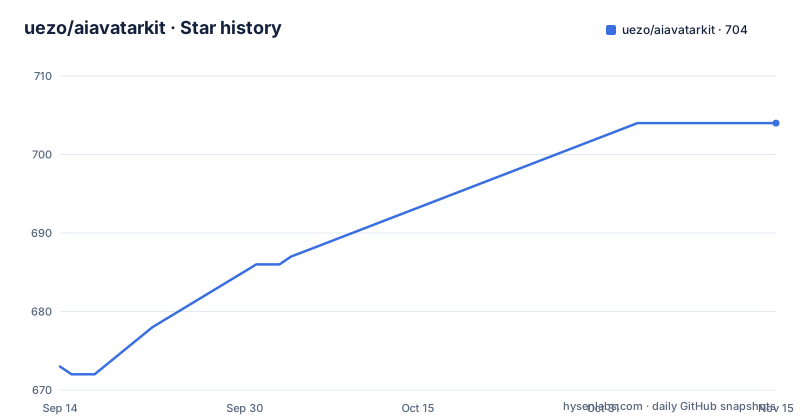
Star history
- uezo/aiavatarkit704 ★ · +31
| Repository | 2026-09-14 | 2026-11-15 |
|---|---|---|
| uezo/aiavatarkit | 673 | 704 |
31 Stars in the last 62 days, measured from the daily GitHub snapshot. Compare with other projects
Editorial analysis
One pipeline, and adapters that own only transport
The architecture is one object, and the diagram is small enough to hold in your head.
A single speech-to-speech pipeline turns what a user says into what the avatar says and does. Inside it, four stages run in order: voice activity detection, then transcription, then the language model with its tools and agent behaviour, then speech synthesis. A second output leaves the model stage for the face, the animation and on-screen artefacts, which is how a chart or a map appears while the avatar is describing it.
Every stage streams into the next. That single property is what the latency claim rests on, and it also means a stage can begin work before the previous one has finished.
The transport is separated. An adapter wraps the pipeline for exactly one channel, and the documentation is explicit that an adapter owns transport concerns and nothing else. The shipped adapters cover a WebSocket, HTTP, telephony and messaging, and the reason to split them this way is stated as a user-facing behaviour: several adapters can attach to the same pipeline instance, so someone can hang up a phone call, open a messaging app, and find the conversation still there.
That is a genuine architectural choice rather than a slogan. Most voice stacks bind the conversation to the socket, and moving channels loses the thread.
The latency claim comes from guessing before you finish speaking
The headline number is under one second from the end of speech to the first audio, and it is described as measured rather than as a target.
Two mechanisms produce it, and both are about doing work early.
The first is parallel streaming through the whole pipeline. Because each stage streams into the next, transcription can emit partial results while the model is still forming a response, and synthesis can begin on the first sentence of the answer rather than the whole of it.
The second is speculative transcription. The documentation says the system runs the transcription stage speculatively, which means it is working on audio that has not yet been confirmed as speech. That is only viable because of the guard that sits in front of it: a voice activity detector decides whether the user has actually finished their turn.
And that is where the third behaviour comes from. The pipeline gives a spoken nod before the answer itself. So the sub-second figure is measured against a moment where the avatar has already made a sound, and the acoustic latency the user perceives starts before the model has produced anything meaningful.
That is a legitimate technique, and it is also a design commitment: the avatar is always talking, so a turn-end decision that is too eager produces an avatar that interrupts you. Which is why the next section is about how many ways this project lets you change that decision.
Turn-taking is two menus, not one
The voice activity section is the longest table in the documentation, and splitting it in two is the useful part.
The first menu is speech detection: a local neural detector, the same one in a streaming variant, two cloud speech services as detectors, one further local detector, and a plain volume threshold marked as legacy. Six options spanning local to hosted, which is the sensible spread because this stage decides whether to transcribe at all and is on the critical path for latency.
The second menu is where the design work is, and it has two distinct axes that are easy to conflate.
Turn-end gates are semantic. They decide whether the user has finished their sentence. The options are a semantic model, the one the default application uses, a filler-only gate that reacts only to the specific case where a user says something like er or um, a gate that calls the language model to make the decision, a session hold, and a custom one.
Turn-taking gates are session-level. They decide who speaks next across a whole conversation. The options are a fast gate, a session allowance, combinations of multiple gates, and a custom one.
The distinction matters because they fail differently. A bad turn-end gate interrupts a user mid-thought. A bad turn-taking gate produces a conversation where one side never gets a turn, or where both speak at once. A project that offered only one knob would let you fix one of those and break the other.
The first launch asks before installing a model
The quick start is worth reading closely, because one interaction in it is a small design decision with a real lesson in it.
Requirements are three things: Python 3.11 or newer, an API key for one provider, and a reachable voice synthesis server compatible with a well-known Japanese engine, at its default address. That last requirement is external, and the documentation repeats it in the custom application path as a note not to forget to start it first.
The whole start is three commands:
pip install aiavatar
export OPENAI_API_KEY=sk-xxx
aiavatar
Then the prompt. The built-in application uses a semantic turn-end gate, and if the optional packages that gate needs are missing, the command asks before installing them: additional dependencies are required to enable semantic detection, install them now, yes or no.
Answer yes and it installs the extra into the current environment and continues startup automatically. Answer no and it starts without that gate, with the local detector and the filler gate still enabled.
That is the correct behaviour and it is rare. Most installers either pull the dependency silently or refuse to start. This one degrades: you lose semantic turn detection, you keep a working local detector and a narrower filler filter, and the application comes up either way.
The consequence for deployment is the thing to plan around. An unattended container start has to have already answered the question, one way or the other, or the process will sit at a prompt.
Configuration precedence is documented as a stack
The environment template explains itself better than most, and the rules it states are worth copying even if you never install this package.
First, what the settings are for. They configure the built-in command line application, and only when you have not supplied your own application script. The comment says so, because a project that has both a built-in app and a script mode has to be clear about which is in charge.
Second, the precedence chain, in order. Command line options override their corresponding environment variables. Component-specific provider settings override the shared provider values. And the shared values are themselves overridden by anything already present in the process environment, because the command loads its environment file from the working directory without replacing variables that are already set.
That last rule is the correct one and it is frequently got wrong. An environment file that clobbers an exported variable makes a container's explicit configuration impossible.
Third, the value conventions. Booleans accept four spellings, which is generous but harmless. Required-key handling is described too: when the key is absent an interactive prompt asks for it securely, and a non-interactive start fails rather than hanging, which is the right behaviour for both a developer and a service.
And the file carries the instruction never to put real credentials in the example, because it is committed.
Speech detection ships in the box; the turn-end model does not
The dependency list is short, and it draws a line that explains the architecture.
Nine runtime dependencies. Among them are the local neural voice detector and its inference runtime, which are not optional. So the base install includes a working speech detector, and the menu of alternatives in the documentation is about swapping that default for something else rather than about whether you have one.
Four optional extras sit alongside. Two of them are for turn-taking models and are listed with an identical set: the inference runtime, a transformer library, and a model hub client. Another is for a local numerical library. Two more are the same package under two names, one spelled out and one abbreviated, which is a small blemish but a real one for anyone scripting against the extras.
The compatibility marker is also informative. One dependency is declared only for Python 3.13 and later, which is what you do when a module was removed from the standard library and you ship a community replacement for the new versions while leaving the old ones alone.
And the entry point is a single console command pointing at the command module, with package data for two static asset trees. One of those two is marked legacy, which means the current admin panel and its predecessor are both shipped. That is a choice with a cost, measured in image size and in a second interface to keep working.
Two feature documents and a compatibility shim for old tools
The repository layout tells you how the project documents itself, and there is a pattern worth noting.
There are two feature documents at the root, one prose and one table. A project that maintains both a narrative description and a matrix of the same features has usually found that different readers need different shapes, one for someone deciding whether to try it and one for someone checking a specific capability.
There is a separate documentation directory with one file per subsystem, which is where those linked component tables live: one page per voice detector, one per turn-end gate family, one per transcription provider, and one per language model backend. So a reader looking for the Azure transcription option gets a page about Azure transcription rather than a line in a list.
Then the compatibility shim. There is a small setup script whose entire body is a comment and a single call, stating that it exists for tools that still expect one, and that the real configuration lives in the modern manifest. That is four lines to avoid breaking every tool that shells out to setup.py.
There is also a manifest file for including non-Python data, an agent instruction file at the root, and a test directory. The examples are seven directories, one per deployment shape: telephony two ways, a local audio path, an on-demand node path, transcription-focused, and a WebSocket one. Those are the seven things this library is actually used for, which is more informative than the feature list.
The install note exists for people following two-year-old blog posts
One note in the quick start tells you what to do when something does not work, and it is more honest than most.
If steps from a technical blog do not behave as expected, the note says the blog may be based on a version prior to a specific release, that some features may be limited as a result, and that you can try downgrading to a named earlier version to match the environment the blog describes.
It names that version explicitly. So the project is acknowledging two things at once: that its interface has changed across a major feature boundary, and that a significant amount of the material about it online is now stale.
That is worth taking seriously as an evaluator, because it bounds how much you should trust third-party tutorials for this project. The release history explains why: a long sequence of small releases this year, with the current one in the 0.9 series and the last of the 0.8 series in the middle of the year. A library moving that fast accumulates outdated guides faster than it accumulates stable documentation.
The project's own answer is the linked getting-started page, which covers the command line options, the script mode and every setting of the built-in application. So the guidance is: read that rather than a blog post, and if you must follow a blog post, check which version it describes before you trust it.
Editorial conclusion
It fits a developer building a voice interface who needs to change one stage without rewriting the pipeline, whether that means a different transcription provider for one market or a local model for latency. Three things to check first. A voice activity detector and its inference runtime are hard dependencies rather than optional, so the base install is larger than a text-first agent. The semantic turn-taking model is optional and the first launch will ask whether to install it, which means an unattended deployment has to answer that prompt before the process starts. And the project asks you to pin a version when you are following older material, since the documented downgrade target is several minor versions behind the current release.
Frequently asked questions
What is AIAvatarKit?
It is an Apache-2.0 licensed Python package, distributed as aiavatar, for building AI conversational avatars with a streaming speech-to-speech pipeline. Voice activity detection, transcription, the language model and speech synthesis are separate replaceable modules, and channel adapters own only transport so one conversation can move between a web app, a phone call, a messaging app, a metaverse world or a local device.
What does AIAvatarKit need to run?
Python 3.11 or newer, an API key for one model provider, and a reachable voice synthesis server compatible with VOICEVOX at its default local address. Install with pip install aiavatar, export the API key, run the aiavatar command, and open the local address it prints, with the admin panel under the admin path of the same server.
How does AIAvatarKit decide when the user has finished speaking?
Through a two-part mechanism. Speech detection has six implementations, from a local neural detector to a legacy volume threshold. Turn-end is then handled by semantic gates, with options for a semantic model, a filler-only filter, a model-based decision, a session hold, or a custom gate, while a separate menu handles session-level turn-taking. The built-in application uses the Namo Turn semantic gate.
Why does the aiavatar command ask to install dependencies on first run?
Because the semantic turn-end gate it uses needs optional packages. Answer yes and it installs the extra into the current environment and continues startup; answer no and it starts without that gate while keeping the local detector and the filler gate enabled. The base install already includes the speech detector, so either answer leaves you with a working application.
How do configuration values resolve in AIAvatarKit?
In a documented order: command line options override environment variables, component-specific provider settings override the shared provider values, and the environment file is loaded from the working directory without replacing variables already present in the process environment. Boolean values accept four spellings, and when the API key is absent an interactive prompt collects it securely while a non-interactive start fails instead of hanging.
Official sources
Add this badge to your README
If you maintain this project, the badge below links readers to this analysis and shows its maintenance status from the daily GitHub snapshot. Paste the markdown into your README; add ?metric=license or ?metric=stars to the image URL for a different field.

[](https://hysenlabs.com/projects/uezo-aiavatarkit)Star history chart for your README
[](https://hysenlabs.com/projects/uezo-aiavatarkit)Was this useful?