Understudy: a local TypeScript agent that learns a desktop task from one demonstration
An understudy watches. Then performs.
At a glance
- What is it?
- understudy-ai/understudy is an open-source local agent that drives the GUI, browser, shell and messaging apps, and can be taught a task by showing it once. This piece covers teach mode, the macOS limits, model setup and how mature the project is.
- Who is it for?
- Understudy suits a Mac user who wants to demonstrate a desktop workflow once and replay it from a chat message, using their own model API keys. It is a poor fit if you need GUI control on another operating system or a tagged release to pin.
- Can I use it commercially?
- Yes. MIT is a permissive licence: you can use, modify and sell software built on it, as long as you keep its copyright and licence notices.
- Is it still maintained?
- Yes. The repository last received commits 159 days ago.
- What is it written in?
- Mainly TypeScript, according to GitHub's language statistics.
Answers come from the project's GitHub data, last synced on November 25, 2026, and from our analysis. They are not legal advice.
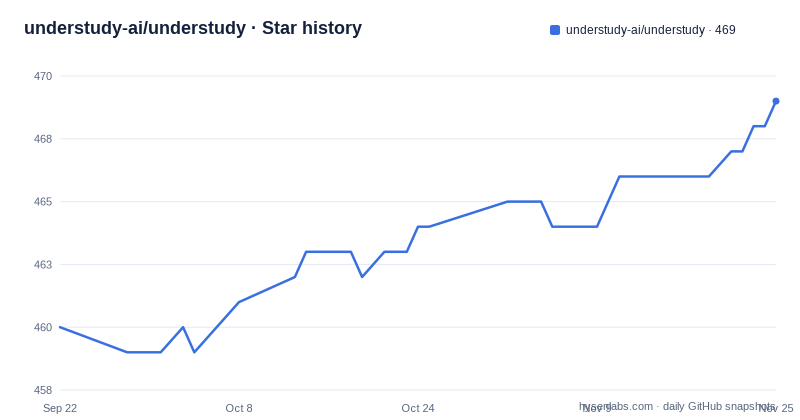
Star history
- understudy-ai/understudy469 ★ · +9
| Repository | 2026-09-22 | 2026-11-25 |
|---|---|---|
| understudy-ai/understudy | 460 | 469 |
9 Stars in the last 64 days, measured from the daily GitHub snapshot. Compare with other projects
Editorial analysis
Teach mode stores the intent of a demonstration, not screen coordinates
The core idea is teach by demonstration. You start with `/teach start` and perform a task once. In the demo, that task is searching Google Images for a person, downloading a photo, removing the background in Pixelmator Pro, exporting it and sending it via Telegram. Understudy records the intent, not the coordinates, so the resulting skill is meant to survive UI redesigns, window resizing and even a switch to a different app. You can then refine the generated skill interactively and invoke it in plain language.
On replay, the agent generalizes. Google Image search becomes browser automation and downloads become shell commands, while native app control, Pixelmator Pro in this case, stays GUI-driven. The consequence is that a replay is not a literal playback: the agent chooses a different mechanism per step, so you should check each replayed step the first time. The repository includes a published skill from this demo under examples/published-skills as a sample of what teach produces.
GUI control is marked macOS only in the project's own table
The comparison table in the README gives the GUI and computer use row for Understudy as Yes (macOS). The demos are recorded on macOS with GPT-5.4 via Codex from OpenAI, and the README says they also work with Claude, Gemini and other providers. The most elaborate demo uses iPhone Mirroring on a Mac to install and explore an app on a real iPhone.
The limit is direct. The browser and shell parts of the story are not tied to an operating system in the visible text, but the desktop GUI claim is stated for macOS, so a Linux or Windows machine should not expect the same computer use behaviour. Contributors can also see the cost of testing it: package.json has scripts such as `test:gui:real` that only run when `UNDERSTUDY_RUN_REAL_GUI_TESTS=1` is set, which means real GUI tests are opt-in and need a live desktop.
Eight messaging channels turn a phone message into desktop work
Remote dispatch is the second demo. You send a message from your phone through Telegram, and Understudy receives it on your Mac, converts a file to PDF, opens desktop Telegram, finds the right contact and sends it, all through GUI automation. The built-in channels named are Telegram, Discord, Slack, WhatsApp, Signal, LINE, iMessage and Web.
The design has a consequence worth stating. The phone is only the trigger. The work happens on the Mac, through the desktop app, so the machine has to be running with the agent available when the message arrives. The package description calls the project a local-first teachable GUI agent runtime with gateway, web UI, channels and tools, and `.env.example` lists an optional `UNDERSTUDY_GATEWAY_TOKEN` for browser or CLI clients, so the gateway can be protected by a token.
Bring your own model: four provider keys and a default of openai-codex with gpt-5.4
Understudy does not ship a model. The `.env.example` file lists API key variables for Anthropic, OpenAI, Google and MiniMax, and sets the defaults:
UNDERSTUDY_DEFAULT_PROVIDER=openai-codex
UNDERSTUDY_DEFAULT_MODEL=gpt-5.4
The keys are ANTHROPIC_API_KEY, OPENAI_API_KEY, GOOGLE_API_KEY and MINIMAX_API_KEY, each left empty in the example. So the cost of running it is the cost of whichever provider you choose. The comparison table says the same about price: an open-source runtime plus your own API keys. If you change provider, change both default variables together, since the default model name belongs to the default provider. A model that is weak at reading screens will affect GUI work more than shell work, but the repository text gives no measurements, so test your own choice.
The App Critic pipeline splits deterministic workers from agentic skills
The largest demo combines everything. One prompt starts a six-stage pipeline. The agent browses the real App Store in Chrome, installs Snapseed on a real iPhone through iPhone Mirroring, explores the app, composes a narrated vertical video locally with FFmpeg, uploads it to YouTube and cleans up the device. The README gives about one hour and zero human intervention.
The structure is called workspace artifact composition. A playbook orchestrates two kinds of parts: workers, which are deterministic browser and device automation, and skills, which are agentic subagents that make their own decisions. Each stage runs as a separate child session with its own context. Only the exploration stage is genuinely agentic, guided by 51 quality-gate rules while it navigates an unfamiliar app. The limit is that this is one showcased run. The text does not say how often the pipeline succeeds, and it publishes its own recording of a single result.
The comparison with OpenClaw, Cowork and Vy is the author's snapshot from March 26, 2026
The Why Understudy table compares four products across five capabilities, and it is labelled as a snapshot as of March 26, 2026, written conservatively from official docs. It lists OpenClaw as partial on GUI because of browser automation, with 20 plus channels and an MIT licence. It lists Cowork as Yes on GUI, with 50 plus MCP connectors that are not a messaging inbox, at Pro $20 per month and Max $100 to $200 per month. Vy from Vercept is listed as supporting Watch and Repeat and as discontinued on March 25, 2026. Understudy claims 8 built-in messaging channels and teach by demonstration.
Treat it as a vendor table. It was written by the project, it is dated, and the competitors' rows may have changed since. The useful signal is which axes the author thinks matter: GUI control, teaching, channels, open source and payment model.
Version 0.3.0, no GitHub releases, and a last push on 2026-06-19
The package is published as @understudy-ai/understudy with a `understudy` binary pointing at understudy.mjs, at version 0.3.0. The repository has no GitHub releases, so there is nothing tagged to pin from the releases page, and the last push was 2026-06-19. It is a pnpm workspace with apps, packages, skills, tests and examples directories, built with `pnpm -r --stream run build` and tested with vitest. A playbook end-to-end test runs in a synthetic mode or a live mode.
The README frames growth through five layers, using a new hire's journey from watching on day one to anticipating needs at month six. That is a design aspiration, not a feature checklist. With a pre-1.0 version number, expect behaviour to change between commits, and read CHANGELOG.md before upgrading.
Editorial conclusion
Understudy suits a Mac user who wants to demonstrate a desktop workflow once and replay it from a chat message, using their own model API keys. It is a poor fit if you need GUI control on another operating system or a tagged release to pin. Before depending on it, read its own comparison table as the author's claim, and try the teach flow on a task you can afford to see fail.
Frequently asked questions
What is Understudy?
Understudy is an open-source local AI agent that operates your computer, including the GUI, browser, shell and messaging apps, from a single instruction. It can be taught a task by demonstration.
How to use Understudy?
Bring your own model by setting a provider API key, then give it an instruction in plain language or send it a message through a channel such as Telegram. To teach a task, start with /teach start and demonstrate it once.
What is an understudy in this project's naming?
The README explains the name with a theater image: an understudy watches the lead, learns the role, and steps in when needed. The software follows the same pattern of watching a task and then performing it.
Official sources
Add this badge to your README
If you maintain this project, the badge below links readers to this analysis and shows its maintenance status from the daily GitHub snapshot. Paste the markdown into your README; add ?metric=license or ?metric=stars to the image URL for a different field.

[](https://hysenlabs.com/projects/understudy-ai-understudy)Star history chart for your README
[](https://hysenlabs.com/projects/understudy-ai-understudy)Was this useful?