The samples README says main is AR Foundation 6.3, its own table says 6.4, and the repository takes no pull requests
Example content for Unity projects based on AR Foundation
At a glance
- What is it?
- unity-technologies/arfoundation-samples is Unity's official sample content for AR Foundation, with a last push to main on 2026-09-03 and no releases. Three details decide whether it is useful to you: the version mapping between branches and Unity releases, the fact that pull requests are declined, and the rule that a GitHub issue without a Unity bug ID gets closed.
- Who is it for?
- These samples are the right starting point if your Unity version is listed in the branch table and you want one minimal scene per AR Foundation feature rather than a tutorial series. Check the version mapping before anything else, because the file states two different AR Foundation versions for the main branch, so the package version in the project manifest is the one to trust.
- Can I use it commercially?
- Check first. The repository uses a licence we do not classify automatically, so read its LICENSE file before any commercial use.
- Is it still maintained?
- Yes. The repository last received commits 72 days ago.
- What is it written in?
- Mainly C#, according to GitHub's language statistics.
Answers come from the project's GitHub data, last synced on November 14, 2026, and from our analysis. They are not legal advice.
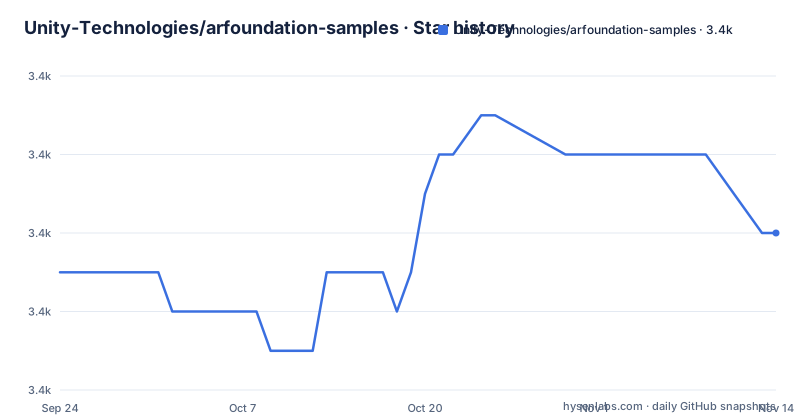
Star history
- Unity-Technologies/arfoundation-samples3,436 ★ · +1
| Repository | 2026-09-24 | 2026-11-14 |
|---|---|---|
| Unity-Technologies/arfoundation-samples | 3.4k | 3.4k |
1 Stars in the last 51 days, measured from the daily GitHub snapshot. Compare with other projects
Editorial analysis
The prose says main is AR Foundation 6.3 and the table says 6.4
There is one sentence in the version section that does not agree with the table immediately below it.
The sentence says the main branch of this repository uses AR Foundation 6.3 and is compatible with Unity versions 6000.0 and newer.
The table says Unity 6.4, which is 6000.4, maps to AR Foundation 6.4 on the main branch. Unity 6.3 LTS, 6000.3, maps to the 6.3 branch. Unity 6.0 LTS maps to 6.0, Unity 6.5 beta maps to 6.5, and 2022.3, which the table marks as Enterprise licence only, maps to 5.2.
So by the table, a Unity 6.3 LTS user is sent to the 6.3 branch and main is the 6.4 line. By the sentence, main is 6.3 and works from 6000.0 upward.
Both cannot be right, and the difference is not cosmetic. A project opened from main against the wrong AR Foundation package will either fail to resolve the package or open with mismatched APIs, and the reader has two sentences telling them different things.
The reliable answer is in the project manifest rather than in the README. The repository is a Unity project with a Packages directory, so the package version it actually depends on is written down there.
Three different Unity and package versions appear in the documentation links
The links in this file are not all pointing at the same version of anything, and the spread is wider than the version table suggests.
The opening paragraph links to the AR Foundation manual at version 6.4, in the package documentation for [email protected].
The section about understanding the sample code links to the samples page in the user manual at version 6.5, in [email protected].
The build instructions link to the Build Profiles window reference under documentation version 6000.2, which is the Unity editor documentation rather than the package documentation, and therefore a different numbering scheme in the same file.
Add the 6.3 in the version sentence and the file contains four distinct version references: 6.3, 6.4, 6.5 and 6000.2.
None of this is unusual for a document maintained alongside several release branches, since a link written for the newest branch will drift as branches move. But it means the links cannot be used to infer which version the project you cloned actually is. They tell you where the current documentation lives, not what is in the manifest.
The plug-in versions in the platform table do not track the AR Foundation version
The first table maps four targets to four plug-ins, and the versions sit at three different places on their own release trains.
Android uses the Google ARCore XR Plug-in at version 6.4. iOS uses the Apple ARKit XR Plug-in at version 6.4. Meta Quest uses Unity OpenXR: Meta at version 2.4. Android XR uses Unity OpenXR: Android XR at version 1.0.
So the two XR plug-ins that ship on the AR Foundation release train are at 6.4, matching the number in the table row for the main branch, while the two OpenXR plug-ins are at 2.4 and 1.0. Those are independent package lines with their own schedules, and they have not moved in step with AR Foundation.
The practical consequence is that a Meta Quest target and an Android XR target are not version-coupled to the AR Foundation version at all. If you are upgrading AR Foundation, the question of whether your Quest build needs a separate plug-in upgrade is answered by the OpenXR package's own release notes, not by the table above.
The design intent is stated: each AR Foundation feature is used in a minimal sample scene with example code you can modify or copy into your project. The plug-in layer underneath is where the version arithmetic lives.
Pull requests are not accepted, and a contributing file is still in the root
The last section of the README is unambiguous: the project is not accepting pull requests at this time. If you find an issue with the samples or want to request a new sample, submit a GitHub issue.
That is unusual for a sample repository and it has a practical meaning for how you use this content. You are a consumer here, not a contributor. The workflow the file describes is: open the project, copy the scene you need into your own project, and modify it there. The samples are described as example code you can modify or copy into your project, and with pull requests closed that is the only route the file offers.
The top-level listing contains a CONTRIBUTING.md. That is not a contradiction on its face, since a contributing guide can explain a closed contribution process and the routes that remain available, but it does mean the file you are pointed at for the rules is not the same as the rules stated in the README.
There is also a LICENSE.md in the root, while the repository settings record no licence value. Between those two, the licensing position is something to read in the file rather than infer.
A GitHub issue without a Unity bug ID will be closed
The bug reporting section is the most specific instruction in the file and it sets a rule rather than offering an alternative.
To report a bug in AR Foundation, file a bug through Unity's official bug reporting process. You may also submit a GitHub issue, but the file states those issues are unofficial, and that the project will close your GitHub issue if it does not contain an official bug ID number.
So the GitHub tracker is a signpost, not a queue. An issue filed there without an ID from Unity's own system gets closed, which means the number in the title is load-bearing rather than cosmetic.
The recommendation is stated with a reason: the best way to ensure an issue is addressed is to file it through the official process. Which is fair, since a vendor bug tracker is where a framework defect can actually be scheduled, and a sample repository has no power to fix the framework itself.
Feature requests take a third route. Those go to Unity's XR Roadmap, where you click the AR Foundation tab and scroll to Submit a New Idea. Three destinations, one of them a git host the maintainers explicitly describe as unofficial.
The repository is a Unity project you open, not a package you import
The top-level listing is short and makes the delivery model clear: .github/, .gitignore, Assets/, CONTRIBUTING.md, LICENSE.md, Packages/, ProjectSettings/ and README.md.
`ProjectSettings/` and `Packages/` are the two directories that decide this. They are what a Unity editor needs to recognise a folder as a project, so this repository is not a collection of loose scenes or an importable asset package. It is a project you clone and open.
The build instructions match that model and are three steps. Install Unity 6000.0 or newer and clone the repository. Open the Unity project at the root. Then, as with any Unity project, use the Build Profiles window, select your target platform and build. The file recommends the device build as a helpful introduction to AR Foundation for a first-time user, which is a fair description of what a sample scene does.
All sample scenes live in the `Assets/Scenes` folder, and the documentation for how each one works is not in this repository at all. It is published as part of the AR Foundation user manual, which the README links per version.
So the project teaches by example and explains by external reference, which is why the version mapping is the part worth checking carefully before you start.
The branch table is a compatibility contract and it is the only current document here
Put together, the branch table is what a reader actually needs from this repository, and it is doing more work than the prose around it.
Five rows, each pairing a Unity version with an AR Foundation version and a branch: 6.5 for Unity 6.5 beta at 6000.5, 6.4 for Unity 6.4 at 6000.4 on main, 6.3 for Unity 6.3 LTS at 6000.3, 6.0 for Unity 6.0 LTS at 6000.0, and 5.2 for 2022.3, which is marked as Enterprise licence only.
That last marker is the row people miss. There is a whole AR Foundation generation, 5.x, reachable only from a Unity version that the table restricts to Enterprise licences. Anyone on a current free or Pro Unity licence looking for a 5.x sample path has none here.
The ordering of the table is by Unity version descending, and each branch is a full repository rather than a tag, so a clone of the right branch is the correct starting point rather than an afterthought.
The gap between this table and the sentence above it is the one thing to resolve first, because everything else in the file routes you to a branch chosen from this list.
Editorial conclusion
These samples are the right starting point if your Unity version is listed in the branch table and you want one minimal scene per AR Foundation feature rather than a tutorial series. Check the version mapping before anything else, because the file states two different AR Foundation versions for the main branch, so the package version in the project manifest is the one to trust. And read the contribution section early: this repository does not accept pull requests, so a change you want to make is a GitHub issue and a local copy, not a patch.
Frequently asked questions
What is AR Foundation?
A Unity package that enables multi-platform augmented reality apps with Unity. This repository holds the official AR Foundation samples, one minimal scene per feature, which you can download, build to a device and use as a starting point.
Which AR Foundation version does the main branch use?
The README is inconsistent. One sentence says the main branch uses AR Foundation 6.3 and needs Unity 6000.0 or newer, while the version table maps Unity 6.4 to AR Foundation 6.4 on main, and Unity 6.3 LTS to the 6.3 branch. Check the Packages manifest for what the clone actually depends on.
How do I build the AR Foundation samples to a device?
Install Unity 6000.0 or newer, clone the repository, open the Unity project at its root, then use the Build Profiles window to select a target platform and build. The sample scenes are in the Assets/Scenes folder.
Can I send a pull request to arfoundation-samples?
No. The README states the project is not accepting pull requests at this time, and asks you to submit a GitHub issue for a sample problem or a request for a new sample instead. Copying a scene into your own project is the documented route.
How do I report a bug in AR Foundation?
Through Unity's official bug reporting process. You may also open a GitHub issue, but the README says those are unofficial and will be closed if they do not contain an official bug ID number. Feature requests go to Unity's XR Roadmap instead.
Official sources
Add this badge to your README
If you maintain this project, the badge below links readers to this analysis and shows its maintenance status from the daily GitHub snapshot. Paste the markdown into your README; add ?metric=license or ?metric=stars to the image URL for a different field.

[](https://hysenlabs.com/projects/unity-technologies-arfoundation-samples)Star history chart for your README
[](https://hysenlabs.com/projects/unity-technologies-arfoundation-samples)Was this useful?