Unity's Graphics repository is a mirror updated every few weeks, and its compatibility list skips package version 9
Unity Graphics - Including Scriptable Render Pipeline
At a glance
- What is it?
- The public home of the Scriptable Render Pipeline packages, with two pipelines split by platform and a three-scheme branch layout keyed to Unity release eras. The README opens by sending bug reports elsewhere and then explains that development happens in a repository you cannot see.
- Who is it for?
- This repository fits a team that needs to read pipeline source, check out a specific package version against a specific editor, or vendor a fork of the render pipeline into a project, which the README supports with a documented tag scheme. Three things to know first.
- Can I use it commercially?
- Check first. The repository uses a licence we do not classify automatically, so read its LICENSE file before any commercial use.
- Is it still maintained?
- Yes. The repository last received commits 12 days ago.
- What is it written in?
- Mainly C#, according to GitHub's language statistics.
Answers come from the project's GitHub data, last synced on November 14, 2026, and from our analysis. They are not legal advice.
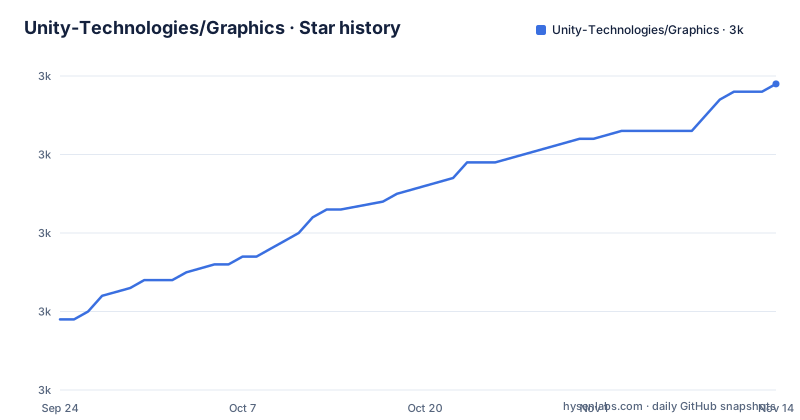
Star history
- Unity-Technologies/Graphics3,029 ★ · +30
| Repository | 2026-09-24 | 2026-11-14 |
|---|---|---|
| Unity-Technologies/Graphics | 3k | 3k |
30 Stars in the last 51 days, measured from the daily GitHub snapshot. Compare with other projects
Editorial analysis
The first two notes send your issues elsewhere and your commits nowhere
The README opens with two notices, and both change what this repository is for.
The first says reported issues have been migrated to a separate bug tracker, and that further issues can only be logged there, with a link to a page explaining how. So the issue tracker on this repository is not the route, whatever the repository's own interface suggests.
The second is the one that matters most for reading the history. It states that development by Unity developers happens in a private repository, and that changes are mirrored from that private repository to this public one every few weeks. A forum thread is offered as the place to discuss the mirroring itself.
That single sentence bounds what any reader can infer from this tree. A commit here is a copy of a commit made elsewhere, arriving on a cadence measured in weeks. The author and the authoring date are not recoverable from the public history, the ordering within a mirror interval is whatever the mirror produced, and there is no way to tell from the public repository whether a change has been made but not yet mirrored. A fork taken from here is a fork of a lagging snapshot.
The text that follows says Unity is committed to open and transparent development for the pipelines and that you can browse this repository to see what features are currently in development. That claim and the mirroring note are both true at once, and the second one sets the resolution of the first.
Vendoring happens several times per Unity release, and the tag marks the vendoring point
The packages here are distributed to projects as core packages inside the Unity editor, and the README describes how a checkout becomes a shipped version.
Vendoring happens multiple times in each Unity release. It happens from the latest changeset of the release branch for each Unity release, and a tag is generated on the changeset that was used to vendor a specific release.
Two consequences follow. First, one Unity release does not correspond to one point in this history: there are several vendoring points per release, so a Unity version maps to a set of tags rather than to a single commit. Second, the tag marks a vendoring event, not a feature boundary. A tag named for an editor version says which changeset was copied into that editor, and nothing more about what changed.
This is also why the README offers a specific way to answer the question that follows from it. If you need to know whether a given changeset is included in a given Unity version, you search the tags for that Unity version: on the hosting site, open the branch drop-down, click the tags tab, and type a version such as 2021.2 to list every changeset tagged to it.
That is the mechanism to rely on when checking whether a fix you found in this repository has actually shipped in an editor you use.
Three branch naming schemes, and the one called master is the development branch
Release branches are defined by naming scheme, and there are three of them for three different eras of the editor.
The branch named master is used for main development, and it always maps to the latest alpha release of the editor.
A branch named for a Unity version with a staging suffix maps to beta and released versions of that editor. The example given is a 2021.1 staging branch mapping to Unity 2021.1.
A third pattern, built from the package major version with an x, an x and a release suffix, is used for Unity 2020.x and below. The example is a package 10 release branch mapping to the 2020.3 long term support release.
So the branch whose name usually signals stability carries the least stable content here, and stability lives on a branch named after either the editor version or the package version. Reading the repository the usual way, where master is what you integrate, gives you the wrong branch.
The split also tells you when each scheme applied. The staging pattern covers the versions the packages have been core packages for, and the package-version pattern covers the era when they were not, which the README explains separately.
The README tells you to clone into three different directories
There are two documented ways to get the package source into a project so you can modify it, and a third instruction for the sample scenes, and they name three different destinations.
The first method is to clone the repository into any folder on your computer and install it as a local package into the project. The second is to clone the repository inside a Packages folder in your Unity project. Both of those put the source where the package manager will pick it up.
The desktop application walkthrough then says to navigate to your Unity project's base folder before cloning. That is the project root, one level above the Packages folder the previous method named.
And the sample scenes section, which is a separate concern entirely, says to clone the repository into the project's Assets folder.
Three destinations in one document. The first two are about making the packages editable and they differ in a way that matters, because a local package and a package inside the Packages folder are found by different mechanisms. The third is about importing scenes rather than packages, and reusing the same repository for it is why the instructions collide.
One prerequisite appears only in the desktop walkthrough, where it is noted that the Git LFS extension is required.
The checkout command names a 2021.1 tag while the compatibility table runs to 2023.3
After cloning, the instruction is to check out a specific tag, and the one printed is a Unity 2021.1 patch build:
git clone https://github.com/Unity-Technologies/Graphics
git checkout 2021.1.16f1.2801 (or the latest tag)
The parenthetical is the operative part, since it tells you to substitute the newest tag instead. The concrete example was not updated to match.
The distance is measurable from the same document. The compatibility table further down lists Unity 2023.3 as compatible with package version 17, and works back through 2023.2, 2023.1, 2022, 2021.2, 2021.1 and then down to 2019.1. So the printed example is a 2021.1 build while the table covers two further years of editor releases.
The console command block has a small inconsistency of its own. Three of its four commands are preceded by a single space after the prompt marker, and the fourth has two, so a reader copying the block line by line ends up with a stray leading space on the checkout.
None of this blocks using the repository. It does mean the first thing a new user runs is two years behind the newest editor the document discusses.
The compatibility list skips package version 9, and its own heading has no row
The version table is introduced with a claim about which editor era it covers, and then does not quite cover it.
The heading says the packages on Unity 2020.3 LTS and below. It explains that on those versions the packages were not core packages but regular ones, so different versions could be installed against different editors. And then the list itself begins at Unity 2023.3 and walks down, ending at 2019.1.
Within that list there is a gap. The sequence runs from package version 17 down through 16, 15, 14, 13, 12, 11, then 10 for Unity 2020.2, then straight to 8 for Unity 2020.1. There is no 9 anywhere in the table.
Two other things about the table. Unity 2020.3, the version named in its own heading, has no row at all, and neither does any version between 2020.2 and 2023.3 other than the three 2023 rows and the 2022 ones. And the text calls the list a guideline for major versions, noting that several minor versions often work for a given editor.
Given both of those, the list is a starting point rather than an answer, and the README says where the real answer is. To find the exact minor version, open the package manager window, find the core render pipeline library, and open its version list. On older editors you may need to reveal preview packages first, through an advanced button and a menu item.
Five packages are documented and a sixth sits in the tree
The README names five packages and links each to its documentation: render pipeline core, the high definition pipeline, the universal pipeline, the shader graph, and the visual effect graph. Each link points at the documentation for the latest package version.
The repository root holds a sixth package directory, a post-processing one, named with the same package prefix convention as the five. It is not in the README's list, and no documentation link is given for it here.
The two pipelines the README does describe are split by what they can run on. The universal pipeline is described as being for use on all platforms. The high definition pipeline is described as being for use on platforms compatible with compute shaders. That is the only stated difference between them, and it is a hardware requirement rather than a quality setting, which is worth knowing before choosing between them for a target device.
The rest of the root is the machinery around those packages: a Packages directory at the top level, which is the same location the modification instructions tell you to clone into, alongside templates, several test projects, a tests directory and a tools directory. There is a file documenting folder changes that nothing in the README links to, a continuous integration directory belonging to Unity's internal build system, a repository configuration file, and a text editor project file committed at the root.
Editorial conclusion
This repository fits a team that needs to read pipeline source, check out a specific package version against a specific editor, or vendor a fork of the render pipeline into a project, which the README supports with a documented tag scheme. Three things to know first. It is a mirror, so the commit you see is not the commit that was written, and the lag is stated in weeks rather than hours. The branch named master is the development branch and tracks the alpha editor, while released editors sit on a differently named branch, so the word master here means the opposite of what it usually means. And the compatibility list in the README is a guideline for major versions with a gap in it, so the exact minor version has to come from the editor's own package manager rather than from the document.
Frequently asked questions
What is the Unity Scriptable Render Pipeline?
A Unity feature providing two pre-built pipelines: the Universal Render Pipeline, described as usable on all platforms, and the High Definition Render Pipeline, described as for platforms compatible with compute shaders. This repository holds the packages, with the README naming render pipeline core, the two pipelines, Shader Graph and Visual Effect Graph.
Which Unity version does the master branch of Unity Graphics target?
The README states that master is used for main development and always maps to the latest alpha release. Beta and released versions map to a branch named for the Unity version with a staging suffix, and Unity 2020.x and below map to a branch named from the package major version with a release suffix.
How do I find the right version of the render pipeline packages for my Unity version?
Start from the compatibility list in the README, which the text calls a guideline for major versions and which has no entry for 9.x.x. For the exact minor version, open the Package Manager window, find the Core RP Library entry, and choose See all versions; on older editors you may need to enable Show preview packages first.
Where do I report a bug in Unity's render pipeline packages?
Not on this repository. The README's first note states that reported issues have been migrated to a separate bug tracker and that further issues can only be logged there, and it links a page explaining the reporting process.
Official sources
Add this badge to your README
If you maintain this project, the badge below links readers to this analysis and shows its maintenance status from the daily GitHub snapshot. Paste the markdown into your README; add ?metric=license or ?metric=stars to the image URL for a different field.

[](https://hysenlabs.com/projects/unity-technologies-graphics)Star history chart for your README
[](https://hysenlabs.com/projects/unity-technologies-graphics)Was this useful?