jiti wraps every imported module in a Proxy, and that is the default
Runtime TypeScript and ESM support for Node.js
At a glance
- What is it?
- jiti lets Node run TypeScript and ES modules directly, with no build step, and it advertises itself as zero dependency. Its most consequential option is also its most expensive: interop compatibility, which turned on by default in version 2.1, wraps every imported module in a Proxy and costs tens of nanoseconds per property access. The file warns about it in a callout and tells you to turn it off in hot paths.
- Who is it for?
- jiti fits a toolchain that wants to import TypeScript at runtime without a bundler, or that wants one loading path in development and in continuous integration, and that is willing to depend on a transpiler that is not the platform's own. Two things to check before you rely on it.
- Can I use it commercially?
- Yes. MIT is a permissive licence: you can use, modify and sell software built on it, as long as you keep its copyright and licence notices.
- Is it still maintained?
- Yes. The repository last received commits 1 day ago.
- What is it written in?
- Mainly TypeScript, according to GitHub's language statistics.
Answers come from the project's GitHub data, last synced on November 16, 2026, and from our analysis. They are not legal advice.
Star history
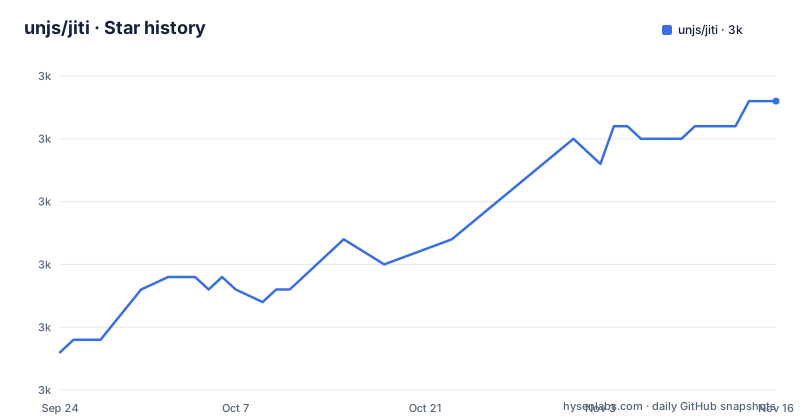
- unjs/jiti2,988 ★ · +20
| Repository | 2026-09-24 | 2026-11-16 |
|---|---|---|
| unjs/jiti | 3k | 3k |
20 Stars in the last 53 days, measured from the daily GitHub snapshot. Compare with other projects
Editorial analysis
A minor version changed module interop for everyone
There is a callout near the top of the file that is about compatibility rather than about features.
It says that to enhance compatibility, version 2.1 and later enabled the default-interop option using a new Proxy method. It then says that if you migrated to 2.0.0 earlier, this might have caused behaviour changes, and asks you to report any upgrade problems so they can be investigated.
So the option that is now on by default was introduced inside a minor version, applies to every module the tool loads, and is documented as a possible source of behaviour change rather than as an opt-in. Anyone who pinned a version before that and upgraded without reading this paragraph got a different module shape.
The option itself is described as combining module exports with the default export using an internal Proxy to improve compatibility with mixed CommonJS and ESM usage, with a link to the implementation. That is the whole point of it: a module written as CommonJS and imported from ESM code should still appear to have a default export, and the Proxy is how that is faked.
The default option costs 25 to 50 nanoseconds per access
The option's own entry carries a warning, and it is the most concrete number in the file.
It says the option wraps all imported modules in a Proxy, which adds roughly 25 to 50 nanoseconds of overhead per property access. For hot paths where module exports are accessed very frequently, it recommends turning the option off, either in the options object or through its environment variable.
Two things follow. First, the cost is per property access rather than per module, so it scales with how your code reads exports rather than with how many modules you load. A tool that reads an export once at startup pays nothing measurable; a loop that reads one in a hot function pays every iteration.
Second, the phrase all imported modules is doing real work. There is no allow list and no opt-out per module in the visible documentation. You either accept the Proxy on everything or you turn the behaviour change off entirely and go back to whatever mismatch you were trying to solve.
That is a genuine trade rather than a free default, and the file is unusually candid about it.
A second entry point that deliberately does less
The package publishes four entry points, and one of them exists to let you stop depending on the tool.
You can alias the package to its native entry point, which drops the runtime's own resolution function and its own dynamic import support, and the file explains why: to ease the ecosystem's transition to native runtime support by giving you the same API from jiti.
So the API surface stays the same and the implementation underneath changes from a transpiling loader to the platform's own loader. The migration is a change to one specifier in your dependencies, not a change to your calling code.
That is an unusual thing for a package to offer and it tells you something about how the maintainers see the tool's future. The same pattern appears in the documentation structure: the current branch is described as the active development branch, and the previous major version's documentation and code live on a separate branch, so there is a v1 branch and a v2 branch and this file is the v2 one.
A third entry point, for a static variant, sits alongside them, which the visible part of the file names without explaining.
An option typed as a String whose default is a boolean
The options reference is laid out uniformly: type, default, environment variable, description. Two entries break the pattern, and one of them breaks it in a way that would matter if you were generating configuration from the documentation.
The runtime module cache option is listed with the type String. Its default is written as true. Its description says it is enabled by default, that disabling it allows editing code and importing the same module multiple times, and that when enabled the tool integrates with the runtime's native CommonJS cache store.
So the prose, the default and the described behaviour all agree that it is a boolean, and the declared type says otherwise. Passing the string true rather than the boolean true is what a reader following the type column would do, and the file does not say whether that works.
The transform option has a related mismatch in the other direction. Its type is Function and its default is named as a library, described as lazily loaded, with a link to the source file for details. A default that is a lazily imported dependency is not a value of the declared type either.
Both are documentation defects rather than behaviour bugs, but a project whose selling point is that you can configure it from environment variables makes those defects slightly more expensive.
Zero dependencies, with two of them loaded on demand
The features list claims the package is slim and has zero dependencies. The options section then names two libraries.
The transform option's default is a transpiler, loaded lazily. And the TypeScript path resolution option is implemented on top of a separate package for reading TypeScript configuration.
Both are consistent with the claim if you read it as being about what you install. A lazily loaded transform is not a dependency of the default install path in the way a hard dependency would be, and the path resolver is only needed if you turn that option on.
The file is also careful about a related case. One option takes a list of modules to always load with the runtime's native require rather than transforming, and its default contains exactly one entry: the TypeScript package itself. A companion option takes a list of modules to transform regardless of their syntax, and its default is empty.
So by default, one specific module inside your dependencies is exempted from the tool's own handling, everything else in your dependencies goes through the same logic as your own code, and the transpiler itself is only paid for when there is something to transpile.
Two bundler configs and a benchmark on three runtimes
The build script section describes a package that is being built two ways.
The main build cleans and then runs one bundler. A second script cleans and runs a different one, with its own configuration file. Both configurations sit at the root of the tree, so the package is currently buildable with either, and the alternative is a first-class script rather than a leftover.
The benchmark script is more interesting, because it runs the same benchmark file three times:
"bench": "node test/bench.mjs && deno -A test/bench.mjs && bun --bun test/bench.mjs"Once on Node, once on Deno with its permission flag set, and once on Bun with its own compatibility flag set. So the performance work is done against three runtimes rather than the one the package targets.
There is also a script that runs the package's own command line entry point with two environment variables set, one for debug logging and one for a JSX flag, which is how the maintainers smoke-test the binary they ship.
The release script deserves a note on its own. It builds, runs the tests, and then runs a changelog tool with a flag that releases and pushes, before publishing. So the release is a git operation as well as a registry operation, performed by one command.
Three of the four entry points are ESM only
The exports map in the package manifest is the part to read if you are consuming this from CommonJS.
The main entry has both conditions. Under import it points at one type declaration and one module file; under require it points at a different type declaration and a CommonJS file. That is the shape you want, and the two type files have different extensions so that each module system gets declarations it can read.
The other three entries have an import condition and no require condition. The register entry points at a type declaration and a module file. The native entry does the same. The static entry does the same. There is a fallback field that older resolvers use, and it is only present on the main entry.
So a CommonJS project can require the package and get both the module and the declarations, and cannot require the other three subpaths. Two of them are documented as install-time tools, one as the native migration path, and the file does not say that requiring them is unsupported, which means you find out from the resolver.
The manifest also carries both a legacy main field and a legacy module field alongside the exports map, and a typesVersions block that maps the three subpaths to their declaration files for resolvers that predate exports.
Editorial conclusion
jiti fits a toolchain that wants to import TypeScript at runtime without a bundler, or that wants one loading path in development and in continuous integration, and that is willing to depend on a transpiler that is not the platform's own. Two things to check before you rely on it. Read the interop option before you profile anything, because it is on by default, it wraps every module rather than only the awkward ones, and the file gives a measured cost per property access. And decide whether you are using jiti or waiting to stop using it, because the package deliberately ships a second entry point that delegates to the runtime's own resolution and import, which is the intended migration path rather than a curiosity.
Frequently asked questions
What is Jiti used for?
Runtime TypeScript and ESM support for Node.js. It replaces the dynamic import with an asynchronous method and the require call with a synchronous one that is marked deprecated, so TypeScript and ES module syntax can be loaded directly without a build step. It also registers as a global ES module loader, which requires Node above version 20.
What is JITI?
The package is a runtime TypeScript and ESM loader for Node.js that advertises itself as slim with zero dependencies. Its feature list covers module interoperability, a synchronous API marked deprecated, custom resolve aliases, syntax detection to avoid unnecessary transforms, integration with the runtime's own module cache, filesystem transpilation with on-disk caches, ESM loader registration, and opt-in JSX.
Is Jiti open source?
The package manifest declares the MIT licence and there is a licence file at the root of the repository. The file also states that a default interop option changed behaviour in version 2.1 and asks users who hit upgrade problems to report them, which is a different kind of statement about what is settled and what is not.
How do I turn off jiti's default interop Proxy?
Set the interop option to false in the options object, or set its environment variable to false. The file recommends this for performance-critical hot paths that access module exports frequently, because the option wraps all imported modules in a Proxy at roughly 25 to 50 nanoseconds per property access.
How do I migrate away from jiti?
Alias the package to its native entry point, which uses the runtime's own resolution and dynamic import while keeping the same API, which the file describes as easing the transition to native runtime support. Previous major version documentation and code live on a separate branch in the repository.
Official sources
Add this badge to your README
If you maintain this project, the badge below links readers to this analysis and shows its maintenance status from the daily GitHub snapshot. Paste the markdown into your README; add ?metric=license or ?metric=stars to the image URL for a different field.

[](https://hysenlabs.com/projects/unjs-jiti)Star history chart for your README
[](https://hysenlabs.com/projects/unjs-jiti)Was this useful?