Mounting Unlayer's email builder with react-email-editor
Drag-n-Drop Email Editor Component for React.js
At a glance
- What is it?
- react-email-editor is Unlayer's official React component for a drag-and-drop email editor. It hands your app a ref to the Unlayer instance and a small set of callbacks for loading, saving and exporting designs.
- Who is it for?
- Adopt it when your users must design email inside a React app and your team is willing to own the code around a wrapper that is only a mount point. Leave it if you need the editor on a server, deep imports into the build output, or storage for templates, because none of that exists here.
- Can I use it commercially?
- Yes. MIT is a permissive licence: you can use, modify and sell software built on it, as long as you keep its copyright and licence notices.
- Is it still maintained?
- Yes. The repository last received commits 18 days ago.
- What is it written in?
- Mainly TypeScript, according to GitHub's language statistics.
Answers come from the project's GitHub data, last synced on October 4, 2026, and from our analysis. They are not legal advice.
Star history
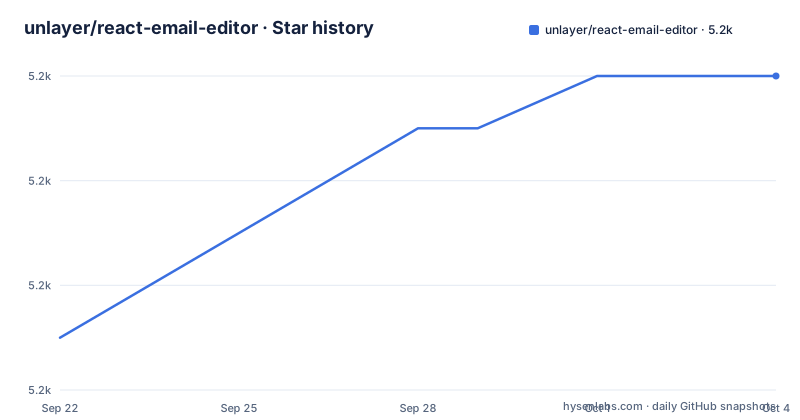
- unlayer/react-email-editor5,232 ★ · +5
| Repository | 2026-09-22 | 2026-10-04 |
|---|---|---|
| unlayer/react-email-editor | 5.2k | 5.2k |
5 Stars in the last 12 days, measured from the daily GitHub snapshot. Compare with other projects
Editorial analysis
Mounting the editor through a ref, not through props
The component takes no design as input. It renders Unlayer's editor, puts the instance on `emailEditorRef.current.editor`, and leaves every design decision to your own code. Install it beside an existing React build:
npm install react-email-editor --saveReact arrives as a peer dependency at `>=16.8` rather than a direct one, so the install does not pull a second copy of React into your tree. What the wrapper adds is a typed handle:
import React, { useRef } from 'react';
import { createRoot } from 'react-dom/client';

import EmailEditor, { EditorRef, EmailEditorProps } from 'react-email-editor';

const App = (props) => {
  const emailEditorRef = useRef<EditorRef>(null);

  const exportHtml = () => {
    const unlayer = emailEditorRef.current?.editor;

    unlayer?.exportHtml((data) => {
      const { design, html } = data;
      console.log('exportHtml', html);
    });
Note where the ref is read in that snippet: inside a click handler, not during render. The ref is still null on the first pass, so the optional chaining is load bearing. Drop it and the handler throws before the editor ever reports ready.
onLoad and onReady mark two different moments
Two lifecycle props fire in sequence, and the difference decides where your first design load belongs. `onLoad` is called when the editor instance is created. `onReady` is called when the editor has finished loading, and the example in the docs marks that as the point where you can load a template. A design handed to the instance between those two events can land before the canvas is ready to display it, so put your `loadDesign` call in `onReady`.
Everything else goes through the ref, not through props. The package does not type or wrap the Unlayer methods, it passes the object straight through, which is why logging `emailEditorRef.current.editor` in the console is the documented way to find out what is available.
loadDesign, saveDesign and exportHtml are the whole data flow
Three methods carry data in and out. `loadDesign` takes the design JSON and loads it into the editor. `saveDesign` takes a callback and hands the design JSON back through it. `exportHtml` takes a callback and returns the design HTML and the JSON together, so one call covers both persistence and preview. The callback receives `design` and `html` as separate fields, and the JSON you get back is the same shape you feed into `loadDesign`.
The gap is worth knowing before you plan an architecture on this. The six documented props contain no autosave callback, no change event and no undo hook. If your product needs to react while a user is still editing, you either wrap the instance yourself or treat the editor as a black box that only speaks when asked.
minHeight wants a CSS string and options leave your hands
Six props configure the wrapper. `editorId` is the optional HTML div id of the container the editor mounts into. `minHeight` is a string that defaults to `500px`, so it takes `'600px'` and not `600`. `onLoad` and `onReady` are the two lifecycle callbacks. `options` is an object passed straight to the Unlayer editor instance, defaulting to `{}`, and `style` styles the container, also `{}`.
That `options` hole is the entire configuration surface, and it is also where the wrapper stops helping you. The list of editor options is not kept in this repository, it lives in Unlayer's builder documentation, so what you configure there is versioned against a service this package does not pin. Nothing in the wrapper checks those keys either, so a misspelled option name is a setting that quietly does nothing instead of an error at build time.
The exports map blocks react-email-editor/dist and 2.0 raises the floor
Version 2.0 shipped on 2026-07-06 as a modernization release. The component API did not change, but four things did. React `>=16.8` and Node `>=18` are now enforced at install time, even though React 15 through 16.7 never worked with the hooks-based component in 1.7.x. Deep imports such as `react-email-editor/dist/...` are blocked by the new `exports` map, which lists only `.` and `./package.json`. The published code is ES2019, so a toolchain that cannot parse it fails at parse time, and your choices are staying on 1.x or transpiling `node_modules`.
The repository's own scripts show how the maintainers build it:
npm run build
npm run start
npm run typecheck
`build` runs `tsup`, `start` runs `tsup --watch`, and `typecheck` runs `tsc --noEmit`.
Unmount destroys the editor and an unsaved design goes with it
This is the 2.0 change with the longest tail: editors are now destroyed on unmount, described as a long-standing leak fix. Before it, an instance could outlive the React tree that made it. Now tearing down the component tears down the editor, and any design you never passed to `saveDesign` leaves with it.
That turns `saveDesign` from a convenience into a lifecycle obligation. If your route unmounts on navigation, or a parent swaps the editor out of the tree, you have to persist the design before that happens or come back to an empty canvas. The props list has no `beforeUnmount` hook to hang a save on, so the timing is yours to get right.
Client only, because the editor needs a DOM to mount into
The editor renders into the DOM, so the component is client only. The published bundle carries the `'use client'` directive, which means that with the Next.js App Router you can import it directly from any Client Component and skip the `next/dynamic` workaround. The other side of that convenience is that it cannot run on a server: a Server Component cannot hold this editor, and any server rendered pass has to hand off to a client boundary.
Tests need the same treatment, which is why the development dependencies carry `jsdom` at `^29.1.1` and `@testing-library/react` at `^16.3.2`. If your test suite has no DOM, mounting the component is not going to work, and there is no headless mode to switch to.
One runtime dependency, no storage and no sending
The packaging states what this is: a mount point. `files` publishes only `dist`, `sideEffects` is `false`, and the single runtime dependency is `@unlayer/types` at `^1.448.0`. There is no server, no API client and no database in the package, which means template storage, sending and authentication all stay in your application. The demo under `demo/` is a Vite app, and `npm run netlify-build` builds it by moving into that folder, installing, and running its build.
Upgrades are cheap and infrequent. The last push was on 2026-10-04, `v2.1.3` shipped the same day after `v2.1.2` on 2026-08-11, and the project is MIT licensed with no archive flag. Read `CHANGELOG.md` before moving off 1.x, since the packaging changes land at install time rather than at build time, where a failing build is easier to read than a failing install.
Editorial conclusion
Adopt it when your users must design email inside a React app and your team is willing to own the code around a wrapper that is only a mount point. Leave it if you need the editor on a server, deep imports into the build output, or storage for templates, because none of that exists here. Read CHANGELOG.md and test an unmount before you ship, since 2.0 destroys editors on unmount and that turns saveDesign into a lifecycle obligation.
Frequently asked questions
Is there a React email editor available for React apps?
Yes. react-email-editor is Unlayer's official React component for embedding a drag-and-drop email editor, published on npm as `react-email-editor` and installed with `npm install react-email-editor --save`. It requires React `>=16.8` and Node `>=18`.
What editor for React does react-email-editor give me?
A wrapper around Unlayer's drag-and-drop editor. You mount the component, read the instance from `emailEditorRef.current.editor`, and call `loadDesign`, `saveDesign` or `exportHtml` on it. The package does not wrap or type the Unlayer methods themselves.
Is react email editor free to use?
The wrapper is MIT licensed and installs from npm at no cost. The documentation does not state a price for Unlayer's editor service itself, so check unlayer.com before you commit to running it in a product.
What is a React email in react-email-editor?
It is a design object plus the HTML rendered from it. `exportHtml` returns both in one callback, and the project states the output is tested against Gmail, Apple Mail, Outlook and Yahoo! Mail.
Official sources
Add this badge to your README
If you maintain this project, the badge below links readers to this analysis and shows its maintenance status from the daily GitHub snapshot. Paste the markdown into your README; add ?metric=license or ?metric=stars to the image URL for a different field.

[](https://hysenlabs.com/projects/unlayer-react-email-editor)Star history chart for your README
[](https://hysenlabs.com/projects/unlayer-react-email-editor)