unplugin-icons: one import specifier in front of 150 icon collections
🤹 Access thousands of icons as components on-demand universally.
At a glance
- What is it?
- unplugin-icons resolves Iconify collections at build time, so an import such as ~icons/carbon/accessibility turns into a component for React, Vue, Svelte, Solid or vanilla output. The costs are a separate icon-data install, an ESM-only package, and a Node 20 floor from v24.0.0.
- Who is it for?
- unplugin-icons earns its place when an app needs icons from many collections and nobody wants to vendor one icon package per framework: one import specifier, build-time resolution, and only the referenced icons in the bundle. It also costs a second install for the icon data, an ESM-only package, a Node 20 floor from v24.0.0, and two major versions so far in 2026.
- Can I use it commercially?
- Yes. MIT is a permissive licence: you can use, modify and sell software built on it, as long as you keep its copyright and licence notices.
- Is it still maintained?
- Yes. The repository last received commits 73 days ago.
- What is it written in?
- Mainly TypeScript, according to GitHub's language statistics.
Answers come from the project's GitHub data, last synced on November 22, 2026, and from our analysis. They are not legal advice.
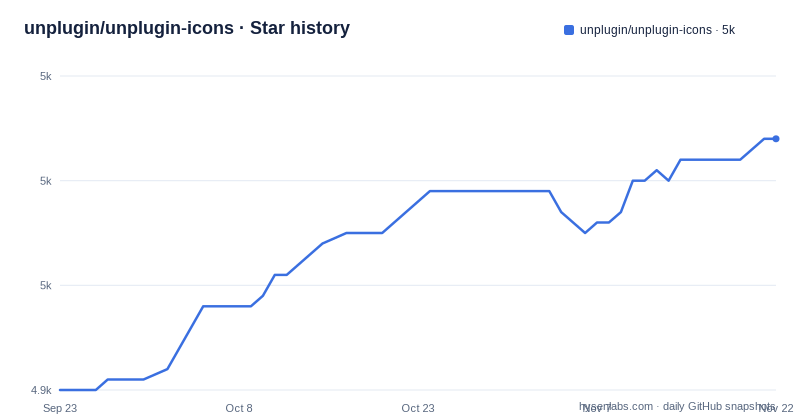
Star history
- unplugin/unplugin-icons4,964 ★ · +24
| Repository | 2026-09-23 | 2026-11-22 |
|---|---|---|
| unplugin/unplugin-icons | 4.9k | 5k |
24 Stars in the last 60 days, measured from the daily GitHub snapshot. Compare with other projects
Editorial analysis
One specifier, ~150 collections, only what you import
The whole interface is one import specifier: write `~icons/{collection}/{icon}` and the plugin resolves it at build time into a component for whichever framework compiler you configured, so the same icon name can be used in React, Vue, Svelte, Solid or vanilla output. The catalogue behind it is Iconify, roughly 150 popular sets with over 200,000 icons, logos and emojis. Reach is described as any set, any major build tool (Vite, Webpack, Rollup, Nuxt, Rspack) and any combination of them, with the build layer delegated to unplugin and new framework compilers accepted under ./src/core/compilers. On-demand is the payoff: only the icons you reference are bundled. Because resolution happens at build time, the icons ship with the page, which the file calls out as SSR and SSG friendly with no more FOUC, and size, color and animation stay yours to set with styles and classes. The React sample is the shortest complete picture:
import IconAccessibility from '~icons/carbon/accessibility'
import IconAccountBox from '~icons/mdi/account-box'

function App() {
  return (
    <div>
      <IconAccessibility />
      <IconAccountBox style={{ fontSize: '2em', color: 'red' }} />
    </div>
  )
}
Icon data is a second install with three different costs
Installing the plugin is one command, and it is the easy part:
npm i -D unplugin-iconsThe data is a separate decision with three answers, and the file recommends the heaviest one. Option A, `npm i -D @iconify/json`, pulls every set at roughly 120MB of node_modules while still bundling only used icons into production: convenient, and slow to install on a cold CI cache. Option B trims it to what you name, `npm i -D @iconify-json/mdi @iconify-json/carbon`, which keeps the list of collections in your source and the list of installed packages as two things you must keep in step by hand. Option C is marked experimental and hands the work to the plugin at build time:
Icons({
  autoInstall: true, // Auto-detects npm/yarn/pnpm
})
With autoInstall your build installs packages itself.
ESM-only and Node 20 arrive before the first icon
Two runtime constraints show up before anything renders. The package is ESM-only, so your project needs `"type": "module"` in package.json or .mjs file extensions, and a CommonJS config file will not load it. From v24.0.0 it also requires Node 20 or above, because unplugin v3.0.0 requires Node 20 or above; that note is attached to v24.0.0 rather than to the v23 releases published on 2026-01-14. Vue CLI users meet both at once: the note there says you need vue.config.mjs with ES module syntax and @vue/cli-service ^5.0.8, and the plugin enters through the webpack build inside configureWebpack. The name carries history as well, since vite-plugin-icons has been renamed to unplugin-icons with a migration guide section kept for people arriving under the old name, and searching for the older package name is a fair way to end up on stale instructions.
Twelve framework type entries, one documented compiler option
The published surface is wider than the quick start implies. package.json declares the root entry plus ./vite, ./rollup, ./webpack, ./rspack, ./esbuild, ./rolldown, ./nuxt, ./resolver, ./loaders and ./types, then a dedicated type entry per framework: ./types/astro, ember, preact, qwik, raw, react, solid, svelte, svelte3, svelte4, svelte5 and vue. Four Svelte majors with their own type paths say the support matrix is deliberate, and the framework list names Vanilla, Web Components, React, Vue 3, Vue Vapor, Solid and Svelte. The compiler flag appears in the configuration examples as `compiler: 'svelte'` in the SvelteKit and Svelte + Vite configs, and the README points to a Frameworks section for further setup. The list also closes with the words and more plus a contribute link, which is an invitation rather than a specification of what is supported.
Auto importing needs a resolver handed to another plugin
Icons written straight into a template do not come for free, and the wiring is explicit:
import IconsResolver from 'unplugin-icons/resolver'
import ViteComponents from 'unplugin-vue-components/vite'
IconsResolver goes into the resolvers array of ViteComponents, so a second plugin owns the discovery. Nuxt carries the same split across generations: Nuxt 2 and Nuxt Bridge register unplugin-icons/nuxt through a buildModules array, while Nuxt 3 and 4 register it through modules.
Twenty example projects are the real support matrix
The examples directory answers the framework question better than the prose does, and it is worth reading before you commit. Eighteen projects sit side by side: astro and astro-vue, next, nuxt4, rspack-vue3, sveltekit, webpack and webpack-ember, plus vite variants for ember, preact, qwik, react, solid, svelte, vanilla, vue3, vue3-legacy and web-components. examples/README.md publishes them as StackBlitz playgrounds, so you can open one in a browser before you clone anything. The awkward entries carry the most information: a legacy Vue 3 variant and a separate Ember-on-webpack project imply older combinations are still exercised rather than merely tolerated. The gap behaves the same in both directions. Choose a framework with no directory here and the first person to run it is you, with no reference project to diff a broken build against.
Two major versions a year, and v24 was a migration
Two major versions have shipped in 2026. v23.0.0 and v23.0.1 were both published on 2026-01-14, hours apart, and v24.0.0 followed on 2026-09-11, the same day as the last push to the default branch main; the repository is not archived. The Node 20 floor arrives with v24.0.0, so moving from 23 to 24 is a migration rather than a patch. The one piece of migration guidance the file points to covers the earlier rename from vite-plugin-icons, and the habit behind it applies just as well to a major bump. Two breaking windows a year are affordable only if you read release notes on a calendar.
Docs are one file, an icon browser and a blog post
Everything documented about this plugin lives in the top level file, in anchor links inside it, in a browser at icones.js.org, and in a blog post by the author linked as the story behind the tool. There is no docs directory at the repository root: the entries are src/, types/, test/, examples/, scripts/, .github/, .vscode/, CONTRIBUTING.md, eslint.config.js, tsconfig.json, tsdown.config.ts, pnpm-workspace.yaml and pnpm-lock.yaml, and the package is built with tsdown. The Custom icons section is linked from the features list, so the hook exists, but its options stay unseen until you open it.
Editorial conclusion
unplugin-icons earns its place when an app needs icons from many collections and nobody wants to vendor one icon package per framework: one import specifier, build-time resolution, and only the referenced icons in the bundle. It also costs a second install for the icon data, an ESM-only package, a Node 20 floor from v24.0.0, and two major versions so far in 2026. Before adopting, check four things against your own project: whether your build config is ESM, which framework compiler covers your Svelte, Vue Vapor or Ember case, whether the collection named in your import exists in the data package you installed, and whether a build step that runs npm, yarn or pnpm for you belongs in your CI.
Frequently asked questions
What is the difference between unplugin-icons and Iconify?
Iconify is the data and unplugin-icons is the build-time resolver on top of it. The file names Iconify as the icon data source supporting 100+ sets, about 150 popular sets and over 200,000 icons, and the data is installed separately with @iconify/json, individual @iconify-json/* packages, or the experimental autoInstall option.
How do I install unplugin-icons in a project?
Two installs: `npm i -D unplugin-icons`, then a data package such as @iconify/json or individual @iconify-json/* sets. The package is ESM-only, so the project needs `"type": "module"` or .mjs extensions, and v24.0.0 requires Node 20 or above because unplugin v3.0.0 does.
How do I import one icon with unplugin-icons?
Follow the `~icons/{collection}/{icon}` convention, for example `import IconAccessibility from '~icons/carbon/accessibility'`, and use the result as a component. Auto importing is also supported, but it requires unplugin-vue-components plus IconsResolver from unplugin-icons/resolver.
Does unplugin-icons work with both Nuxt 2 and Nuxt 4?
Yes, with different config shapes. Nuxt 2 and Nuxt Bridge register unplugin-icons/nuxt through a buildModules array entry, and Nuxt 3 and 4 register it through modules. A separate path runs the resolver through unplugin-vue-components in the Nuxt vite plugins.
Which unplugin-icons version is current and what changed in v24?
v24.0.0, published 2026-09-11, after v23.0.1 and v23.0.0 which were both published on 2026-01-14. v24.0.0 requires Node 20 or above since unplugin v3.0.0 requires it, and the package has been ESM-only.
Which frameworks have example projects in the repository?
Eighteen: astro and astro-vue, next, nuxt4, rspack-vue3, sveltekit, webpack and webpack-ember, plus vite variants for ember, preact, qwik, react, solid, svelte, vanilla, vue3, vue3-legacy and web-components. examples/README.md publishes them as StackBlitz playgrounds.
Official sources
Add this badge to your README
If you maintain this project, the badge below links readers to this analysis and shows its maintenance status from the daily GitHub snapshot. Paste the markdown into your README; add ?metric=license or ?metric=stars to the image URL for a different field.

[](https://hysenlabs.com/projects/unplugin-unplugin-icons)Star history chart for your README
[](https://hysenlabs.com/projects/unplugin-unplugin-icons)Was this useful?