loom has four verbs, two prefixes, and an installer that stops rather than overwriting
Loop engineering for agentic software delivery.
At a glance
- What is it?
- A delivery harness that runs inside your coding agent as an MCP server, keeps the state of a change in a project-local directory instead of a chat transcript, and closes its own loop by feeding verification findings back into the next repair. The install path is the part with the most character: one piped command per agent, a checksum step, a doctor run, and a refusal to delete anything it cannot prove it owns.
- Who is it for?
- loom fits a team that wants a coding agent to leave an inspectable trail behind a change: recorded requirements, recorded results, verification findings and a repair history that a later session can resume from. It does not fit a quick one-off edit, since the loop it runs is built for work that needs more than a first pass.
- Can I use it commercially?
- Yes. Apache-2.0 is a permissive licence: you can use, modify and sell software built on it, as long as you keep its copyright and licence notices.
- Is it still maintained?
- Yes. The repository last received commits 12 days ago.
- What is it written in?
- Mainly Rust, according to GitHub's language statistics.
Answers come from the project's GitHub data, last synced on November 22, 2026, and from our analysis. They are not legal advice.
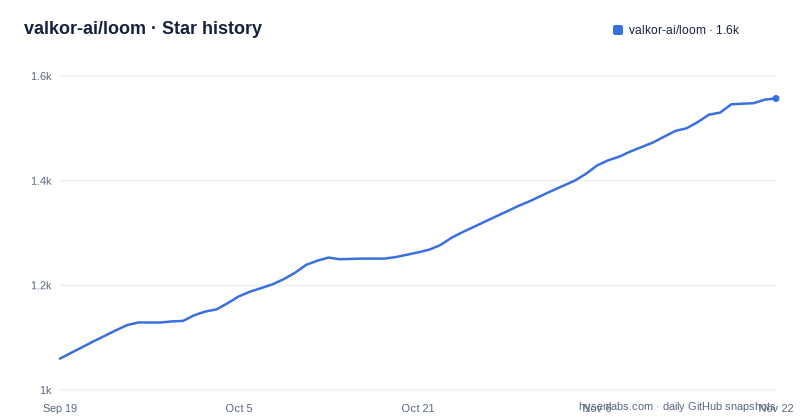
Star history
- valkor-ai/loom1,557 ★ · +497
| Repository | 2026-09-19 | 2026-11-22 |
|---|---|---|
| valkor-ai/loom | 1.1k | 1.6k |
497 Stars in the last 64 days, measured from the daily GitHub snapshot. Compare with other projects
Editorial analysis
Four verbs, and the prefix is the only thing that changes per agent
The entry points are laid out as a table with two columns, one for Codex and one for Claude Code or OpenCode, and four rows.
The verbs are the same everywhere: build, to add a feature or an app; continue, to resume an interrupted delivery; review, to review and repair a change; and deploy, to validate a local preview. The argument is the same too, passed as natural text after the verb.
What differs is the sigil. Codex addresses the plugin with an at sign, and the other two use a slash. So the identical request is typed four ways, and a team standardising on a runbook needs to know which prefix the agent in front of them wants.
There is one more piece of plumbing worth knowing: the Rust MCP server is started by the agent's MCP registration, so you never launch it yourself. It comes up when the agent starts a session, which is also why the file tells you to open a new agent session after installing or updating the plugin. Until you do, the session in front of you is still holding the previous registration in memory.
The verification command follows the same rule: a status command, read-only, prefixed per agent. And in a project that has never used Loom, the result is a not initialised marker, which the file is explicit is a valid smoke check rather than a failure.
One command per agent, and two different installation styles
There are four bash commands, and they differ only in the flag. Install for every supported agent on the machine at once:
curl -fsSL https://github.com/valkor-ai/loom/releases/latest/download/install.sh | bash -s -- --agent allInstall for one agent, and the URL does not change, only the value of the flag:
curl -fsSL https://github.com/valkor-ai/loom/releases/latest/download/install.sh | bash -s -- --agent codexcurl -fsSL https://github.com/valkor-ai/loom/releases/latest/download/install.sh | bash -s -- --agent claude-codeThe fourth accepted value is the OpenCode agent, and a fifth flag installs all of them.
The Windows path is a different shape rather than a translation. Instead of piping a downloaded script into a shell, it fetches the PowerShell script to a file, then runs that file with an agent parameter:
Invoke-WebRequest https://github.com/valkor-ai/loom/releases/latest/download/install.ps1 -OutFile install.ps1
.\install.ps1 -Agent codex
So on one platform you are executing a script you never saw, and on the other you are executing a script that is sitting on your disk where you can read it first. Both reach a release asset through the same latest download URL, so the two paths can serve different builds without either being obviously wrong.
The installer verifies a checksum, builds an isolated Python runtime, and runs a doctor check
The quick start describes the install sequence in one sentence, and the sentence is seven steps long.
The installer detects your operating system and CPU and downloads the release package that matches. It then verifies the package against a checksum asset published alongside it, so a corrupted or substituted download fails before anything is written.
After verification it installs the Rust MCP server, creates an isolated Python runtime for Loom's own algorithms, writes the registration entry into the agent's MCP configuration, refreshes the local plugin, and finally runs a doctor command from the freshly installed setup binary.
Four observations. The checksum is checked against a separate asset rather than an embedded constant, which means the trust root is the release itself rather than the script, which is a reasonable trade and worth knowing. The Python runtime is isolated rather than installed into your system interpreter, so nothing in your existing environment is touched by the algorithms. The MCP registration is a write into a file your agent owns, which is the one step with a blast radius outside the project. And the doctor run at the end means a successful exit code from the installer is not the same thing as a working installation.
Prerequisites are short and one of them is easy to miss: a supported coding agent installed locally, and Docker, which only the deploy command needs.
Upgrading means rerunning the command, and it refuses to delete what it cannot prove
There is no separate upgrade command. Running the same install command again is the upgrade path, which is a small decision with a large convenience payoff: there is one thing to remember.
The interesting behaviour is what happens to files left over from an earlier design. The installer removes Loom-owned legacy CLI plugin artifacts before putting in the MCP runtime, so the migration from a command line plugin model to an MCP model is handled for you rather than left as broken files in your agent directory.
Then the rule that makes the whole thing defensible: if it finds files it cannot prove are Loom-owned, it stops and tells you what to remove manually instead of overwriting user files. That is an installer choosing to fail rather than guess, in a place where guessing would mean deleting somebody's configuration.
There is a third mode for contributors. A local build flag builds the Rust MCP server and the setup binary from a checkout, writes the same package layout a release would produce, and then installs through the same setup binary and runs doctor. The file recommends it specifically after local bug fixes, so that the installer, the package layout, the MCP registration and the plugin refresh get verified together rather than one at a time.
That combination, checksum verification, explicit ownership, a doctor run and a reproducible local mode, is more care than most installers of this kind show.
The loop closes by feeding findings back into the next repair
The delivery sequence is seven steps: clarify the scope, plan the work, build it, run checks, repair failures, preview the result, and leave a handoff.
What makes it a loop rather than a pipeline is one sentence about recursive self-improvement. Test and review findings guide the next repair, and the updated result is checked again. So the mechanism on show is re-verification feeding back into the repair step, with the state of that exchange recorded rather than forgotten.
It is worth being precise about the claim, because the phrase invites a stronger reading than the description supports. What is described is a feedback loop over artifacts: checks produce findings, findings produce repairs, repairs are re-checked. Nothing in the file describes the tool rewriting its own source.
The delivery model table shows where the record lives at each stage. Scope and design keeps confirmed requirements, decisions and task boundaries. Execution keeps task specific context, write targets and recorded results. Verification keeps tests, runtime checks, previews and review findings. Repair and handoff keeps repair requests, re-verification, and the project state for the next person or session.
The last row is the one that matters for anything handed to a colleague: the handoff is a state, not a summary.
State lives in a project directory, so a new session resumes instead of guessing
Every delivery writes to a project-local directory, and five kinds of record go into it: requirements, task progress, results, runtime facts, and repair history.
The reason given is the one that matters in practice. A new session can pick up the actual state of the work instead of reconstructing it from chat history. Scrolling a transcript to work out what an agent decided three hours ago is the failure mode this replaces, and the distinction is between a record that was written down and a conversation that has to be re-read.
The same directory is where the full artifacts stay. The routing description says as much, drawing a box around Loom with a note that the complete artifacts remain in that directory rather than being pushed somewhere else.
Two practical details. You do not initialise the directory by hand: starting a delivery from the agent creates it when needed, which means the directory appears as a side effect of your first build rather than as a setup step. And the status command is read-only, so calling it to check whether things work has no effect on state, which is what makes it usable as a smoke test in a fresh project.
The initialised marker appearing there is therefore the expected result of testing the install, not a symptom.
Context is selected per task rather than loading one large skill every turn
The stated design decision is about what goes into the model's window. Loom selects technical references and context for the current task rather than loading the entire repository or a large generic skill into every turn.
The shared references it draws from cover five areas: architecture, APIs, language and framework work, review, and browser verification.
The routing diagram shows the shape. Your coding agent, whether that is Codex, Claude Code, OpenCode or something later, sits at the top and passes down a delivery goal, repository context, logs, tests and preview evidence. Below that is the Loom box, containing a dynamic workflow router, then a request manifest, then an agent read plan, which is the thing the agent actually consumes.
Three stages, and the last one is small by design. The router decides what kind of work this is, the manifest turns that into a concrete request, and the read plan is the narrowed set of things to read. That is a different shape from a system that ships one large instruction file, and it is the mechanism behind the claim about not loading everything each turn.
The assets directory, the scripts directory, a tests directory and a plugins directory in the repository match that layout: a plugin to register with the agent, scripts for the install and test flows, tests in two languages, and assets for the documentation.
The core moved from TypeScript to Rust in July 2026, and the tests run in two languages
The news section has two entries, both from July 2026. The first is that the MCP runtime moved from TypeScript to Rust, with the stated reason being to make the core smaller and faster. The second is support for Godot projects through a Godot MCP server, with its own setup guide.
The manifest explains the first entry. The package is named loom, carries version 0.3.0 to match the published tag, is marked private so it is not distributed as a registry package, and its scripts run two separate test stacks: the Rust tests go through a node script that delegates to cargo with an explicit manifest path under the source tree, and the Python tests run under pytest against a tests directory. There is a serial variant that simply calls the full run.
So a project whose product is a Rust binary and an agent plugin is tested in Rust and Python, with the Python side covering the algorithms that run in the isolated runtime the installer creates.
One hosting detail is worth a glance. The technical report is linked as a PDF on a public blob storage endpoint rather than from a documentation site or the repository itself. A document served from object storage can be replaced without a commit, so the version of the report you read is not tied to the version of the code you cloned, and the file names it as a version zero report.
The branch was pushed on 29 September 2026, eleven days after the 0.3.0 tag, and the archive flag is off.
Editorial conclusion
loom fits a team that wants a coding agent to leave an inspectable trail behind a change: recorded requirements, recorded results, verification findings and a repair history that a later session can resume from. It does not fit a quick one-off edit, since the loop it runs is built for work that needs more than a first pass. Three things to check first. Expect the delivery to be slower than a single prompt, because scope, execution, verification and handoff are separate stages with recorded output at each one. Know that the installer writes to your agent configuration and creates a separate Python runtime, so read what it does before running it. And on upgrade, note that it removes its own legacy plugin files but will stop rather than touch anything it cannot attribute to itself.
Frequently asked questions
How do I install loom for Claude Code?
Pipe the release installer into a shell with the agent flag set to claude-code, or on PowerShell download install.ps1 to a file and run it with the same agent parameter. The installer detects your OS and CPU, verifies the package checksum, installs the Rust MCP server, creates an isolated Python runtime, writes the agent registration and runs a doctor check.
Will the loom installer overwrite my own files when it upgrades?
It removes its own legacy command line plugin artifacts first, but if it finds files it cannot prove are Loom-owned it stops and tells you what to remove manually instead of overwriting user files. Running the same install command again is the upgrade path.
What does loom keep in the project-local .loom directory?
Requirements, task progress, results, runtime facts and repair history. The point is that a new session resumes from the recorded state of the work instead of reconstructing it by re-reading chat history, and you do not create the directory by hand.
What should I check after installing loom?
Run the read-only status command inside your agent, prefixed with the at sign in Codex and a slash in Claude Code or OpenCode. In a project that has not used Loom yet, a not initialised marker is a valid result: it means the plugin command is available and no delivery has been started.
What do I need before using loom?
One supported coding agent installed locally, which is Codex, Claude Code or OpenCode, and Docker, which is needed only for the deploy command that validates a local preview. You do not start the Rust MCP server yourself, since the agent's MCP registration starts it.
Official sources
Add this badge to your README
If you maintain this project, the badge below links readers to this analysis and shows its maintenance status from the daily GitHub snapshot. Paste the markdown into your README; add ?metric=license or ?metric=stars to the image URL for a different field.

[](https://hysenlabs.com/projects/valkor-ai-loom)Star history chart for your README
[](https://hysenlabs.com/projects/valkor-ai-loom)Was this useful?