EC2Instances.info ships its data as a www folder, not an API
Amazon EC2 instance comparison site
At a glance
- What is it?
- A comparison site for EC2 instance metrics and pricing, built as a Next app in next/ and fed by a Go scraper that reads three cloud APIs. Forking it means running the scraper, the four redirect rules and the Open Graph background yourself.
- Who is it for?
- Fork EC2Instances.info only if you intend to host it and can hand the scraper AWS, Azure and GCP credentials; if you just want the numbers, the hosted site already serves them. The last push was on 2026-10-30 with Vantage staff named as maintainers, but there are no GitHub releases, so no tag to pin.
- Can I use it commercially?
- Yes. MIT is a permissive licence: you can use, modify and sell software built on it, as long as you keep its copyright and licence notices.
- Is it still maintained?
- Yes. The repository last received commits 2 days ago.
- What is it written in?
- Mainly TypeScript, according to GitHub's language statistics.
Answers come from the project's GitHub data, last synced on November 23, 2026, and from our analysis. They are not legal advice.
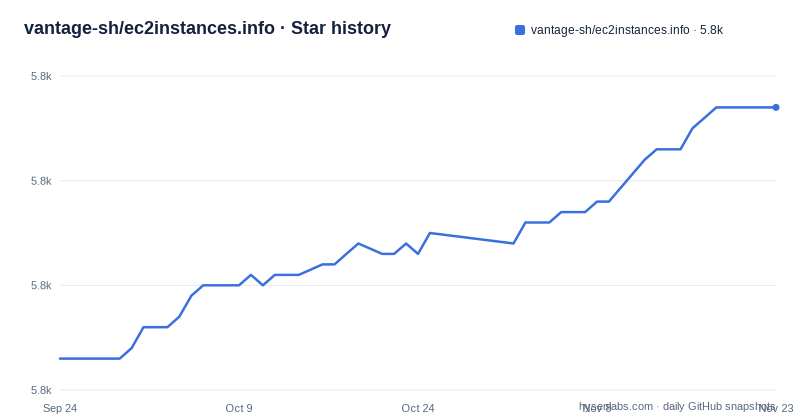
Star history
- vantage-sh/ec2instances.info5,787 ★ · +24
| Repository | 2026-09-24 | 2026-11-23 |
|---|---|---|
| vantage-sh/ec2instances.info | 5.8k | 5.8k |
24 Stars in the last 60 days, measured from the daily GitHub snapshot. Compare with other projects
Editorial analysis
The root package.json exists to pin prettier 3.5.3
Open the root package.json before planning an install and you find it marked private with exactly one devDependency, prettier 3.5.3. That is the whole root Node package. The application sits one level down in next/, which carries its own package.json, its own Dockerfile.base and the .nvmrc you are told to match, and the static export lands in next/out for the build to copy into www. The Makefile never uses the root package for anything except formatting. That is why the first instruction for a new contributor is to run npm ci in the repository root: not to get the application, but to get the formatter. The format path is written twice over, once per language. make format depends on gofmt and prettier, and each of those builds the ec2instances-format image from Dockerfile.format before running a single tool inside it, gofmt -w . against the scraper and prettier --write . against the tree.
make all compresses www before the target that creates it
The all target is the release pipeline written on one line: fetch-data compress-www generate-images next write-updated-at. Read in that order and the second step arrives early. compress-www runs tar -cvzf www_pre_build.tar.gz www and then moves the archive into www/, while the mkdir -p www that creates that directory sits in the very next target, generate-images, and nothing in the chain declares a dependency between the two. Extracting www_pre_build.tar.gz in the repository root produces the directory it expects, which is what the local setup asks you to do when you are not touching the scraper. The rest is blunt in the notes: a full build is not needed for development, it can mess with file permissions in the next folder and leave you cleaning the build output and temp folders there, and it takes about 30 minutes. The final step, write-updated-at, only writes the epoch into www/updated_at.
One Go scraper, three clouds, and a timeline you do not host
The scraper is written in Go and fetches from AWS, Azure and GCP APIs, so credentials are the price of entry and they arrive through the environment. AWS wants AWS_ACCESS_KEY_ID and AWS_SECRET_ACCESS_KEY in a .env file that is gitignored, attached to an IAM user whose policy allows ec2:DescribeInstanceTypes, ec2:DescribeSpotPriceHistory, ec2:DescribeInstanceTypeOfferings, elasticache:DescribeEngineDefaultParameters, rds:DescribeDBEngineVersions and rds:DescribeOrderableDBInstanceOptions with Resource set to "*". Azure wants AZURE_TENANT_ID, AZURE_CLIENT_ID, AZURE_CLIENT_SECRET and AZURE_SUBSCRIPTION_ID, with a guide at docs/setting-up-azure.md. GCP wants GCP_PROJECT_ID, GCP_CLIENT_EMAIL and GCP_PRIVATE_KEY, with docs/setting-up-gcp.md. Then one script:
./fetch_data.shYou need it only when the scraper changes or you want to test against new API data. One field comes from outside all three clouds: date_introduced is enriched on every scrape from the public instancetyp.es timeline, so launch dates are only as current as that file.
Skipping the scraper: the dev server path inside next/
Most people who touch this repository never run the scraper, and the setup notes hand them a short path instead. Pull the latest CI artifact into the repository root:
curl -L https://instances.vantagestaging.sh/www_pre_build.tar.gz | tar -xzf -Then move into the next directory, switch Node with nvm use, running nvm install first if next/.nvmrc has changed or this is your first time, and continue:
npm ci
npm run init
npm run dev
Before opening a pull request the notes ask for npm run check-types to catch type issues while the change is still fresh, even though CI runs the same check at build time, and for make format in the root. Branch discipline is part of the workflow here: pull requests target develop, which is staging, while main is production.
deployment/index.ts and worker.js carry your redirect rules
A release build hands you a www folder of static files and then asks your web server to enforce four rules, because the URLs assume them. /index.html and /index must redirect to /, trailing slashes must redirect away, any path ending .html must either 404 or redirect to the site without it, and a 404 must show a 404 while displaying the content of /404.html. None of that runs inside the Next application. The logic lives in deployment/index.ts and worker.js, described as a mix of a scripted push to R2 and a small Cloudflare Worker, with wrangler.jsonc at the repository root for the Worker half. Serve www/ from a plain static host without those rules and the status codes will be wrong on exactly the paths the site generates itself.
MIT stops at the Open Graph background image
The repository carries an MIT licence, and it comes with one documented exception that a fork has to deal with. Open Graph images are generated against a background, and the default background is not MIT licensed, so OPENGRAPH_URL has to point at a URL serving a 1911x1156 JPEG whenever you are not Vantage deploying to production. Two more variables decide what a public deployment shows: DENY_ROBOTS_TXT=1 keeps the build from being indexed, and NEXT_PUBLIC_REMOVE_ADVERTS=1 strips adverts. Both are opt-in, so the default build of a fork allows indexing, carries adverts, and ships a background image the fork has no rights to. SLACK_WEBHOOK_URL is the third optional switch and the only one that matters for operations, since scraping warnings are sent there.
instanceskv falls back to a copy hosted by Vantage
NEXT_PUBLIC_INSTANCESKV_URL is the quiet dependency in the build. It is optional, and leaving it unset makes the build use the version hosted by Vantage, so a fork that never thinks about it is calling someone else's deployment at runtime. Point it at your own instanceskv and you own that data path. The rest of the environment surface is mostly Sentry: NEXT_PUBLIC_SENTRY_DSN together with SENTRY_ORG, SENTRY_PROJECT and SENTRY_AUTH_TOKEN, all four required once the DSN is set. NEXT_PUBLIC_URL carries the public base URL. The next target passes a fixed list of variables into its container, so adding one costs a Makefile edit as well as a shell export. There are no GitHub releases in this repository, so a fork has no tag to pin; the last push was on 2026-10-30 and the project status names Vantage employees as the people maintaining and hosting the site.
Editorial conclusion
Fork EC2Instances.info only if you intend to host it and can hand the scraper AWS, Azure and GCP credentials; if you just want the numbers, the hosted site already serves them. The last push was on 2026-10-30 with Vantage staff named as maintainers, but there are no GitHub releases, so no tag to pin. Before forking, budget for the four web server redirect rules, point OPENGRAPH_URL at your own 1911x1156 JPEG because the default background is not MIT licensed, and decide whether NEXT_PUBLIC_INSTANCESKV_URL should point at your own deployment or keep calling Vantage's.
Frequently asked questions
What does it take to run the EC2Instances.info scraper locally?
The scraper is written in Go and fetches from AWS, Azure and GCP APIs, so you need credentials for each provider: AWS_ACCESS_KEY_ID and AWS_SECRET_ACCESS_KEY, the four AZURE_ variables, and GCP_PROJECT_ID, GCP_CLIENT_EMAIL, GCP_PRIVATE_KEY. Once they are in the environment, run ./fetch_data.sh from the repository root.
Can I develop EC2Instances.info without cloud credentials?
Yes, if you are not touching the scraper. Extract the latest CI artifact into the repository root, then inside the next directory run nvm use, npm ci, npm run init on your first run and npm run dev to start the development server.
What licence covers EC2Instances.info, and what does it leave out?
The repository is MIT licensed, but the notes state the default background used for Open Graph image generation is not MIT licensed. Anyone other than Vantage deploying to production has to set OPENGRAPH_URL to their own 1911x1156 JPEG, and DENY_ROBOTS_TXT=1 plus NEXT_PUBLIC_REMOVE_ADVERTS=1 are there if the fork should not be indexed or should not show adverts.
Official sources
Add this badge to your README
If you maintain this project, the badge below links readers to this analysis and shows its maintenance status from the daily GitHub snapshot. Paste the markdown into your README; add ?metric=license or ?metric=stars to the image URL for a different field.

[](https://hysenlabs.com/projects/vantage-sh-ec2instances-info)Star history chart for your README
[](https://hysenlabs.com/projects/vantage-sh-ec2instances-info)Was this useful?