react-globe.gl for React WebGL globe visualizations
React component for Globe Data Visualization using ThreeJS/WebGL
At a glance
- What is it?
- react-globe.gl is a React binding for globe.gl, adding spherical 3D data layers rendered through Three.js and WebGL. It suits application developers who need globe-based maps without building the rendering layer themselves.
- Who is it for?
- Adopt react-globe.gl when geographic data benefits from a spherical presentation and the application already uses React, especially for arcs, country layers, labels, heatmaps or custom Three.js content. Do not choose it when a conventional two-dimensional map or non-React framework is the primary requirement.
- Can I use it commercially?
- Yes. MIT is a permissive licence: you can use, modify and sell software built on it, as long as you keep its copyright and licence notices.
- Is it still maintained?
- Yes. The repository last received commits 175 days ago.
- What is it written in?
- Mainly HTML, according to GitHub's language statistics.
Answers come from the project's GitHub data, last synced on November 7, 2026, and from our analysis. They are not legal advice.
Star history
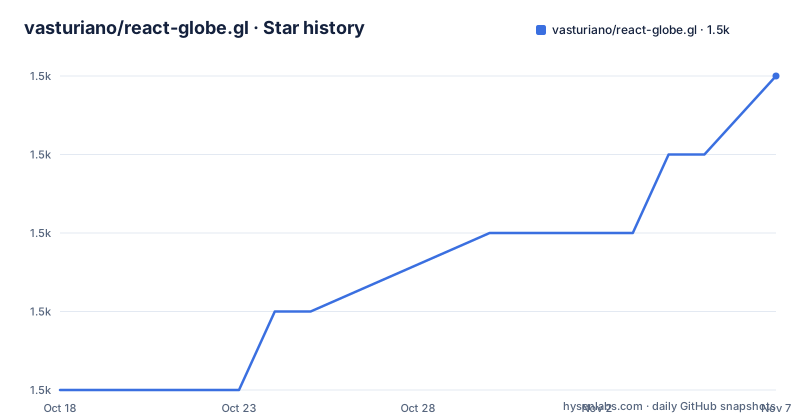
- vasturiano/react-globe.gl1,472 ★ · +4
| Repository | 2026-10-18 | 2026-11-07 |
|---|---|---|
| vasturiano/react-globe.gl | 1.5k | 1.5k |
4 Stars in the last 20 days, measured from the daily GitHub snapshot. Compare with other projects
Editorial analysis
Why react-globe.gl targets geographic React interfaces
react-globe.gl addresses a specific presentation problem: placing geographic data on a three-dimensional sphere inside a React application. It is intended for developers who have locations, country regions, routes, paths, density values or other spatial records and want those records rendered as a globe rather than as a flat map. The audience is narrower than a general mapping audience. The component is useful when the spatial arrangement itself is part of the visualization, such as showing arcs between distant cities or country polygons raised from the globe.
The repository describes the component as React bindings for globe.gl. That division matters. globe.gl supplies the globe UI component, while react-globe.gl connects that component to React. This is not a general dashboard widget or a data-processing package. It does not fetch, clean or reconcile geographic datasets by itself. The examples show that the component can carry several visualization layers, including world population, airline routes, submarine cables, hexed polygons, population heatmaps, cities, satellites, clouds and moon landing sites.
Those examples expose the practical fit more clearly than the package description alone. A product team choosing this library is choosing a spherical WebGL scene in which geographic records become visible objects. It is less suitable for an administrative map where readers mainly need to search, compare regions in a fixed rectangular frame or work with a conventional map interaction model. A globe changes orientation, perspective and visual emphasis, so the decision should be based on whether that representation improves comprehension of the data.
The globe.gl, react-kapsule and React dependency chain
The mechanism visible in package.json is a dependency chain centered on globe.gl. react-globe.gl declares globe.gl under the ^2.46 range, prop-types 15 and react-kapsule under ^2.5. React is a peer dependency, so the consuming application supplies React rather than receiving a production React dependency through this package. The repository is an ES module package whose default export resolves to dist/react-globe.gl.mjs, with type declarations at dist/react-globe.gl.d.ts.
Based on the repository layout, the src directory contains the component implementation, Rollup configuration files build distributable formats, and example directories demonstrate complete visualization cases. The package metadata identifies Three.js and WebGL rendering through globe.gl, while the project description names the spherical projection. In practical terms, application data is supplied to a React-facing globe component, mapped into one or more visualization layers, and drawn in a WebGL scene. The examples show that one globe can present different kinds of data simultaneously. Airline routes demonstrate arcs, the heatmap example demonstrates density rendering, and world cities demonstrates labels or markers.
This architecture keeps geographic rendering separate from the user's React state and interface code, but it also adds a rendering boundary. Updating data requires converting records into the shapes expected by the selected layer. The README does not provide a complete data-format reference, so an adopter should inspect the source for the exact example that resembles the intended dataset. The broad range of examples demonstrates visual concepts, not proof that every common geospatial format can be loaded directly.
Installing react-globe.gl and starting from the Basic example
The README directs readers to the hosted examples and links each preview to its source under the repository's example directory.
A first use can begin with the hosted Basic example. Open the Basic page and move to its linked source file in the repository. That source is the authoritative starting point for the import, component construction and data shape used by this project. The reader should see the smallest available globe example before moving to a more specific case such as Arc Links, Choropleth, Heatmap or Map Labels.
For contributors who already have a local checkout, package.json defines a build command that can verify whether Rollup can produce the distributable files:
npm run buildThis command removes the existing dist directory and invokes Rollup. It is a repository build operation, not a documented installation procedure for an application, and package.json does not state expected output beyond the package's dist entries. It also does not describe browser launch, asset serving or WebGL diagnostics.
The practical first-use check is therefore visual and source based: inspect the Basic example, identify the imported component and its data array, then compare that shape with the dataset to display. If the intended feature is a custom layer or post-processing effect, move directly to the Custom Layer or Glitch Post-Processing Effect example rather than assuming the Basic page covers those cases.
Layer choices for routes, regions, heatmaps and markers
The example catalog shows that react-globe.gl is best understood as a set of geographic layers rather than one fixed chart. Arc Links and airline-route examples fit origin-destination relationships. Choropleth and elevated polygon examples fit country-level values or regional comparisons. Heatmap and population-heatmap pages focus on distributed intensity. Map Labels and HTML Markers provide different approaches to naming or locating places. Path Lines, Ripple Rings and click-generated arcs cover time-varying or interactive-looking event displays.
The distinction affects data preparation. An arc requires endpoints that can be positioned on the sphere. A polygon layer requires geographic boundaries. A heatmap requires point or coordinate data, while labels require positions and text. The README links examples but does not document one universal schema covering all of them. Developers should choose the example closest to the intended visual grammar and use its source rather than converting every dataset into a guessed structure.
Customization extends beyond changing colors. The repository includes Custom Globe Styling, Custom Layer, Tiles, a Tiled Map Engine, earth shielding, satellites, clouds and solar terminator examples. That catalog shows that the component can host more than static country maps. It does not mean that every custom rendering concern has the same API. Each example may rely on different Three.js concepts, assets or integration code, and the README does not explain their compatibility requirements. A feature should therefore be judged by its corresponding example rather than by the existence of the layer name.
WebGL rendering, package boundaries and real failure modes
The clearest limitation is that react-globe.gl is a rendering component, not a mapping application. It does not replace data cleaning, projection decisions, geographic accuracy validation or interaction design. A visually correct globe can still mislead if coordinates, country identifiers or derived values are wrong. The component also assumes a WebGL-capable browser environment because the project explicitly depends on Three.js and WebGL rendering. The README provides no fallback renderer, compatibility table or diagnostic procedure, so unsupported or constrained WebGL environments remain an adoption risk.
The spherical projection also changes analytical behavior. Locations near the visible hemisphere compete with locations on the far side, and the camera angle affects which relationships are immediately apparent. This representation works well for global networks and spatial distribution, but it is a poor fit when users need a stable regional frame, printed geography or precise local navigation. Users comparing countries may also find interaction requirements different from those of a conventional map interface.
Package integration has another boundary. React is a peer dependency, while globe.gl, react-kapsule and prop-types are runtime dependencies. An application must supply compatible React code and account for the bundle created by the React and WebGL stack. The MIT license covers react-globe.gl, but package.json does not state the licenses of the entire transitive rendering stack. Organizations with automated license policies should inspect the dependencies and shipped bundle separately. This is a compliance and distribution check, not legal advice.
Maintenance signals and the choice against globe.gl
The repository is not archived, and its last push was on 2026-05-16. That date indicates recent source activity in the recorded project history, but it does not establish release cadence or guarantee compatibility with future React and Three.js versions. GitHub has no releases for this repository, so consumers cannot rely on release notes to understand upgrade changes. Version information instead comes from package.json, where the project version is 2.38.0 and several dependency declarations use caret ranges.
The closest direct alternative is globe.gl itself. The README identifies globe.gl as the UI component and react-globe.gl as its React bindings. A project already written directly against globe.gl can avoid the React wrapper when it does not need React component integration. The trade-off is specific: globe.gl is the lower-level UI choice, while react-globe.gl is intended to make that globe usable through React bindings. The README does not provide a direct feature or performance comparison, so it does not support claiming that either package renders faster or offers more layers.
The README also links to a react-three-fiber component. That is a different React integration path, but it gives no implementation details beyond identifying it as a component. It should be inspected when an application already standardizes on react-three-fiber, rather than treated as a drop-in equivalent based only on the link. For non-React projects or applications that need a flat map, neither this wrapper nor globe.gl is the clearest starting point.
Editorial conclusion
Adopt react-globe.gl when geographic data benefits from a spherical presentation and the application already uses React, especially for arcs, country layers, labels, heatmaps or custom Three.js content. Do not choose it when a conventional two-dimensional map or non-React framework is the primary requirement. Before adoption, verify that the required example layer matches the intended data, inspect browser WebGL support, and confirm the licensing and dependency implications of globe.gl, Three.js and the application bundle. The first project-specific check should be whether the hosted Basic example and its linked source provide the intended interaction model.
Frequently asked questions
What is react-globe.gl used for?
It is a React component for data visualization layers on a 3D globe rendered with Three.js and WebGL. The examples include arcs, polygons, heatmaps, labels, clouds, satellites and other geographic displays.
Does react-globe.gl include React, and what does it depend on?
React is a peer dependency, so the application supplies it. Runtime dependencies listed in package.json are globe.gl, prop-types 15 and react-kapsule.
How do I start using react-globe.gl?
The README does not document an installation command. It directs users to the hosted Basic example and its linked source file, which is the documented starting point for an initial implementation.
Official sources
Add this badge to your README
If you maintain this project, the badge below links readers to this analysis and shows its maintenance status from the daily GitHub snapshot. Paste the markdown into your README; add ?metric=license or ?metric=stars to the image URL for a different field.

[](https://hysenlabs.com/projects/vasturiano-react-globe-gl)Star history chart for your README
[](https://hysenlabs.com/projects/vasturiano-react-globe-gl)Was this useful?