workflow-builder-template runs a production migration inside its build script
Visual AI workflow automation platform
At a glance
- What is it?
- This is a starter for a visual AI workflow builder: a drag-and-drop canvas, a generated TypeScript export with a workflow directive, and a plugin discovery step that rewrites the integration list into the README. It is private and never released, and the package manifest states a licence that GitHub's API does not report. The script table in the documentation is a subset of what the manifest defines.
- Who is it for?
- workflow-builder-template is a starting point rather than a product, and it is generous: canvas, auth, database, code generation and a plugin scaffold are all present. Four things to check before you build on it.
- Can I use it commercially?
- Check first. The repository uses a licence we do not classify automatically, so read its LICENSE file before any commercial use.
- Is it still maintained?
- Yes. The repository last received commits 3 days ago.
- What is it written in?
- Mainly TypeScript, according to GitHub's language statistics.
Answers come from the project's GitHub data, last synced on November 13, 2026, and from our analysis. They are not legal advice.
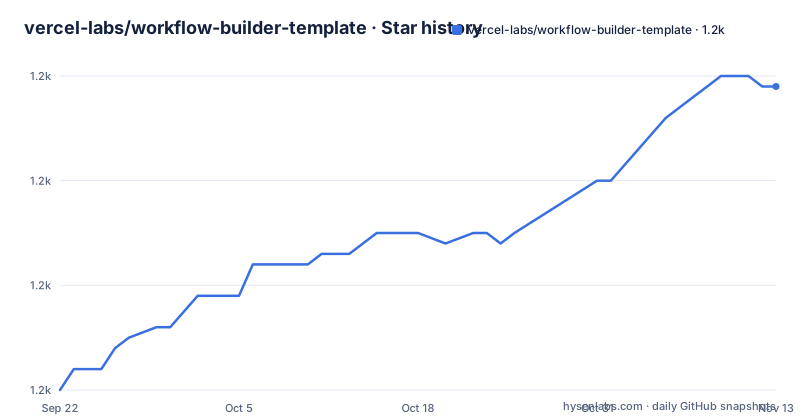
Star history
- vercel-labs/workflow-builder-template1,239 ★ · +29
| Repository | 2026-09-22 | 2026-11-13 |
|---|---|---|
| vercel-labs/workflow-builder-template | 1.2k | 1.2k |
29 Stars in the last 52 days, measured from the daily GitHub snapshot. Compare with other projects
Editorial analysis
The build script runs a production migration before it compiles anything
Two script definitions carry a surprise. The development script is the expected one: run plugin discovery, then start the framework dev server. The build script is not.
"build": "tsx scripts/migrate-prod.ts && pnpm discover-plugins && next build",A production migration script runs first, before the build even begins. The name of the file is the whole warning: whatever database the environment points at will be migrated as a side effect of producing a build artefact. That is a defensible choice for a platform that wants migrations applied on deploy, and it is a sharp edge for anyone building a preview or a fork, where the same command runs against whatever environment variables happen to be present. The manifest does define a separate migration script for the database tooling, so the migration story exists twice over.
Linting runs through npx at the latest version while a formatter config is committed
The two quality scripts are the check and fix pair, and neither calls a local binary.
"check": "npx ultracite@latest check",
"fix": "npx ultracite@latest fix",
Every invocation downloads the newest published version of the tool and runs it, in a repository that otherwise pins its dependencies carefully. The tech stack table names the tool as the combined formatter and linter, and the tree holds a config file for the underlying formatter with a JavaScript-with-comments extension. So the rules are committed and the thing that enforces them is not. Type checking, by contrast, is a local binary with no network fetch, which makes the asymmetry easy to miss: one check is reproducible and the other is whatever the registry served that day.
The integration list in the documentation is written there by a script
The list of action nodes is fenced inside two HTML comments that name the script responsible. The opening comment says the block is auto-generated and not to be removed, and the closing one marks the end. Fourteen integrations are listed inside, from a mail sender and a ticket tracker through to payments, a scraping service and several others. Two scripts maintain it: one discovers what plugins exist, and one scaffolds a new one, and the discovery script is chained onto both the dev and the build commands, so the block is refreshed as a side effect of running either. The plugin directory at the top of the tree is where those definitions live. The practical consequence is that the documentation is partly a build output committed to the repository, and it will disagree with the code whenever someone adds a plugin without committing the regenerated block.
The documented script table lists eight of the fourteen the manifest defines
The development section prints a table of commands, and it is a useful list: the dev server, the build, type checking, linting, formatting, and three database commands for generating migrations, pushing the schema and opening the studio. Six scripts are missing from it. The database migration command is absent even though the two neighbouring database commands are present, which is the omission most apt to bite someone. Also missing are the start command for a production server, both of the plugin scripts that the dev and build commands depend on, and both end-to-end test scripts. The end-to-end pair has a Playwright config in the tree and a flag for a UI mode, so the capability is configured and simply not written down.
The licence is stated one way in the manifest and nowhere the tooling can agree on
Three artefacts in this repository talk about licensing and they do not line up. The manifest declares Apache-2.0 in its licence field. A licence file sits at the top of the tree. And the licence field that GitHub's own API exposes is empty, which is the state a tool reading the API sees. Nothing on the page resolves it, and this is not a hypothetical for a template, because the whole point is that someone copies it. One mitigating detail: the manifest also sets the package as private, so nothing is published to a registry from here. That does not settle what a downstream user may do with the code, which is exactly what a licence file is for.
The manual path needs a database you supply, the one-click path creates one
Two deployment routes with different requirements sit next to each other. The one-click route deploys to a hosted platform and the page describes what happens: a hosted Postgres instance is created and connected to the project, you are prompted for a set of environment values, and the application is usable afterwards. The manual route lists three prerequisites, one of which is simply a PostgreSQL database, alongside a Node version and a package manager. So the same template asks you for a database in the documented local setup and provides one in the hosted setup. The environment file for the local case holds four values: a database URL with a username, a password and a database name inline, an auth secret and its URL, and an AI key whose name says gateway while the example value beside it is described as an OpenAI key.
The generated code example calls two functions the node list does not contain
Code generation is the feature that makes the template more than a diagram editor, and the export shape is an exported async function with a directive string as its first statement. The example in the documentation destructures a subject and a body out of one call and then passes them into a second call, returning all three values. Neither of those two functions is in the action node list on the same page. That list names a mail sender with one operation, send an email, and an AI gateway with generate text and generate image. A function that composes an email body and a function called send email are not the same thing, and the first is not a listed operation at all. Read the example as the shape of the output rather than as code that runs, since nothing on the page shows where those two would come from.
One dependency is pinned to an exact patch and a dead-code config has no script
The manifest pins almost everything with a caret and pins exactly one package to a patch version, which is the framework itself. That is the sensible choice for the framework, since a major framework version changes the build, and it is a little odd next to the linter that fetches its latest version on every run. Two other files in the tree point at tooling the scripts never call. One is a config for a dead-code and unused-export checker, with no script in the manifest that runs it. The other is a file recording a pinned Node version, while the prerequisites say Node 18 or newer and the stack lists a much newer framework and React version beside it. Neither is a problem on its own, but both mean the tree holds more configuration than the scripts exercise.
Editorial conclusion
workflow-builder-template is a starting point rather than a product, and it is generous: canvas, auth, database, code generation and a plugin scaffold are all present. Four things to check before you build on it. The build script invokes a production migration script before compiling, so decide where that runs and make sure it cannot fire against a real database from a contributor's laptop. The lint command pulls the latest version of its tool over the network on every run, so CI results are not reproducible. The generated TypeScript example calls two functions that do not appear in the project's own node list, so read it as a shape rather than as working code. And the licence is stated one way in the manifest and nowhere else that the tooling can see.
Frequently asked questions
What does workflow-builder-template actually give me?
A visual builder with a drag-and-drop canvas, workflow execution with logs, authentication, a Postgres schema through an ORM, a code editor, and generation of workflows from a natural-language prompt. Workflows can be exported as executable TypeScript carrying a workflow directive.
Does the build step touch a database?
The build script runs a production migration script before invoking the plugin discovery and the framework build. The manifest also defines a separate migration command for the database tooling, so the migration path exists twice.
How does workflow-builder-template handle integrations?
Through plugins. A discovery script runs before both the dev and build commands and regenerates a marked block in the README listing every action node it found, and a second script scaffolds a new plugin. Fourteen integrations are listed in the committed block.
What licence is workflow-builder-template under?
The manifest declares Apache-2.0 and a licence file is present at the top of the tree, while the licence field GitHub's API exposes is empty. The page does not reconcile the three, and the manifest also marks the package as private.
What do I need before running it locally?
Node.js 18 or newer, the pnpm package manager, and a PostgreSQL database you supply yourself, connected through a database URL in the environment file. The one-click hosted route creates a Postgres instance for you and prompts for the remaining environment values.
Official sources
Add this badge to your README
If you maintain this project, the badge below links readers to this analysis and shows its maintenance status from the daily GitHub snapshot. Paste the markdown into your README; add ?metric=license or ?metric=stars to the image URL for a different field.

[](https://hysenlabs.com/projects/vercel-labs-workflow-builder-template)Star history chart for your README
[](https://hysenlabs.com/projects/vercel-labs-workflow-builder-template)Was this useful?