vercel/nft for Node.js Dependency File Tracing
Node.js dependency tracing utility
At a glance
- What is it?
- vercel/nft statically traces Node.js source files to identify runtime dependencies, including files from node_modules and assets. It is a fit for build and packaging systems that need dependency lists without bundling or webpack.
- Who is it for?
- Use vercel/nft when a Node.js build or packaging pipeline needs a traced file list without changing the application's module structure. Do not choose it when a compiled bundle or TypeScript transform is required, because the README says the TypeScript compiler is not included.
- Can I use it commercially?
- Yes. MIT is a permissive licence: you can use, modify and sell software built on it, as long as you keep its copyright and licence notices.
- Is it still maintained?
- Yes. The repository last received commits 1 day ago.
- What is it written in?
- Mainly JavaScript, according to GitHub's language statistics.
Answers come from the project's GitHub data, last synced on November 7, 2026, and from our analysis. They are not legal advice.
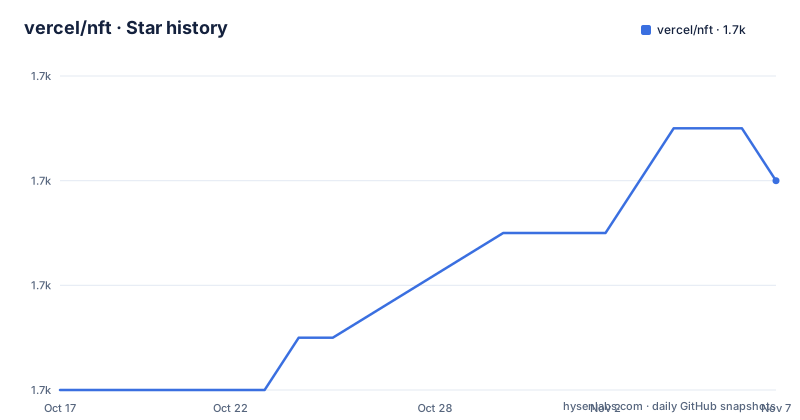
Star history
- vercel/nft1,682 ★ · +4
| Repository | 2026-10-17 | 2026-11-07 |
|---|---|---|
| vercel/nft | 1.7k | 1.7k |
4 Stars in the last 21 days, measured from the daily GitHub snapshot. Compare with other projects
Editorial analysis
A file list for deployment, without a new bundle
vercel/nft addresses dependency collection for Node.js applications. It determines which source files, package files under node_modules, and related assets may be needed when the application runs. The intended user is a build or packaging system that needs a deployable file set but does not want to replace the application's module loading behavior.
The project is different from a conventional bundler. The README compares it with @vercel/ncc and states that nft performs no bundling and does not rely on webpack. It also says that assets and binaries are not moved into a new output structure. That distinction matters for applications that depend on runtime file locations, native modules, package metadata, or files discovered through filesystem expressions. The output is a traced file list, not a newly compiled application bundle.
This makes nft useful when the surrounding build system already handles compilation and packaging, and the missing piece is precise dependency discovery. It is less suitable as a replacement for a compiler or bundler. Its result is also conservative by default: the documentation says that as much analysis as possible is performed to avoid leaving out files that may be needed.
How tracing follows a Node.js application
The public entry point is nodeFileTrace. A caller supplies one or more source files and receives an object containing fileList. The traced paths can include application code, dependencies from node_modules, and assets referenced by the application.
The mechanism is based on parsing and analyzing source references rather than executing the application. The options documentation identifies support for package exports and imports fields, including the node, require, import, and default conditions. The analyzer also handles file-reference expressions such as __dirname and __filename, pure expressions that can affect glob analysis, and patterns such as a directory assembled from a dynamic value. These features explain why the output can contain more than the literal modules named in import statements.
The caller controls the filesystem context. By default, base is process.cwd(), and processCwd defaults to base. Files above base are ignored. processCwd is important for code that uses path.resolve('./relative') or calls process.cwd(), because those operations can influence which assets the analyzer believes the application will access. This is static analysis of Node.js resolution behavior, not a record of every file that happened to exist during a particular execution.
The package's package.json also exposes a CLI binary named nft, but the README excerpt does not document its command syntax. The documented JavaScript API is therefore the reliable starting point for a tutorial.
Installing @vercel/nft and tracing two entry files
The README documents installation from npm. The package name is scoped, so the install command includes the @vercel scope.
npm i @vercel/nftAfter installation, import nodeFileTrace and pass the source files that should serve as the trace roots. The following example uses the exact entry files shown in the README.
const { nodeFileTrace } = require('@vercel/nft');
const files = ['./src/main.js', './src/second.js'];
const { fileList } = await nodeFileTrace(files);
The returned fileList contains the files that the tracer considers potentially necessary. It can include node_modules modules and assets used by application code. The example uses top-level await in a CommonJS-style require statement, so the surrounding project or module configuration must support the syntax used by the calling file.
For a build integration, the useful next step is to pass fileList into the packaging stage that already exists in the project. The README does not prescribe a particular deployment command, archive format, or output directory, so those details belong to the integrating build system rather than to nft.
Conditions and runtime resolution options
Package resolution is configurable because the same dependency can expose different files under different conditions. By default, nft traces the node, require, import, and default conditions as defined by a package. A caller can provide a custom condition list.
const { fileList } = await nodeFileTrace(files, {
  conditions: ['node', 'production'],
});
The README specifies an important constraint here: when an exact custom condition list is supplied, node should be explicitly included if it is needed. The require, import, and default conditions are always traced as defined, regardless of custom conditions.
Node.js 22 and newer also receive special treatment for the module-sync condition. The documentation states that module-sync is enabled by default when tracing with those Node.js versions. Setting moduleSyncCatchall traces both the module-sync branch and the normal runtime or fallback branch.
const { fileList } = await nodeFileTrace(files, {
  moduleSyncCatchall: true,
});
For packages with exports, nft can also avoid tracing the main or index field. The exportsOnly option reduces the output when targeting Node.js 12.17.0 or newer. These settings should match the runtime and package targets of the application. Choosing conditions that do not correspond to deployment can either omit a required branch or include an unnecessary one.
Analysis controls, ignores, and filesystem hooks
nft provides several controls for applications that use dynamic paths. The analysis option can disable analysis globally with false, or accept an object with individual settings. The documented settings control glob emission, analysis of __filename and __dirname references, and evaluation of known pure expressions.
const { fileList } = await nodeFileTrace(files, {
  analysis: {
    emitGlobs: true,
    computeFileReferences: true,
    evaluatePureExpressions: true,
  },
});
The default is to perform as much analysis as possible. Turning analysis off can make a trace smaller, but the documentation does not promise that every runtime file will then be discovered. That is the central trade-off for dynamic applications.
The ignore option can skip a file and consequently prevent analysis of that file for further references. It accepts relative paths from base, globs, or a function.
const { fileList } = await nodeFileTrace(files, {
  ignore: ['./node_modules/pkg/file.js'],
});
For custom resolution, readFile, stat, readlink, and resolve can be supplied as hooks. A custom resolve hook must return one or more absolute paths. A hook can call the exported resolve function for cases it does not handle, forwarding its additional arguments. This extension point is useful for build systems with nonstandard aliases, but it also transfers resolution correctness to the integrating code. The TypeScript integration has a similar boundary. nft can resolve .ts files internally, but its README says the TypeScript compiler and transform layer require separate integration through readFile.
Concurrency, caching, maintenance, and operational limits
File I/O concurrency is an explicit operational concern. The README warns that tracing a large project can process many files simultaneously and that unrestricted concurrency may lead to out-of-memory problems. The default is 1024. A caller can increase the value, but the documentation warns that higher values increase memory risk.
const { fileList } = await nodeFileTrace(files, {
  fileIOConcurrency: 2048,
});
A cache object can persist the file cache between builds. The README shows an empty cache being passed to two calls. The excerpt is truncated before it explains cache invalidation, so the available documentation does not establish when cached entries expire or how they are invalidated. A build integration should not assume persistence semantics beyond the documented purpose of reusing the cache between builds.
The repository is not archived, and its last push was on 2026-08-18. Recent releases include 1.11.0 on 2026-08-18, 1.10.2 on 2026-05-28, and 1.10.0 on 2026-05-27. The package metadata identifies the project as MIT licensed. That license designation is relevant when reviewing redistribution terms, but this review does not provide legal advice. Upgrade planning must also account for changes in Node.js conditions, package exports, and the documented experimental status of the paths option.
Editorial conclusion
Use vercel/nft when a Node.js build or packaging pipeline needs a traced file list without changing the application's module structure. Do not choose it when a compiled bundle or TypeScript transform is required, because the README says the TypeScript compiler is not included. Verify first that the configured base, processCwd, export conditions, ignore rules, and analysis settings match the target runtime and deployment layout.
Frequently asked questions
Does vercel/nft bundle my Node.js application?
No. The README says that vercel/nft performs dependency tracing without bundling and without relying on webpack. It returns a file list for the caller to use in its own build or packaging process.
How do I install vercel/nft and trace Node.js source files?
Install it with `npm i @vercel/nft`, then import `nodeFileTrace` and pass the source files to trace. The README's example returns `{ fileList }` for `['./src/main.js', './src/second.js']`.
Does vercel/nft compile TypeScript files?
The internal resolver supports `.ts` files, but the README states that the TypeScript compiler and transform layer are not included. A separate integration through the `readFile` hook is required for that transform layer.
Official sources
Add this badge to your README
If you maintain this project, the badge below links readers to this analysis and shows its maintenance status from the daily GitHub snapshot. Paste the markdown into your README; add ?metric=license or ?metric=stars to the image URL for a different field.

[](https://hysenlabs.com/projects/vercel-nft)Star history chart for your README
[](https://hysenlabs.com/projects/vercel-nft)Was this useful?