vanilla-lazyload: data- attributes, 2.4 kB, and no runtime dependencies
LazyLoad is a lightweight, flexible script that speeds up your website by deferring the loading of your below-the-fold images, backgrounds, videos, iframes and scripts to when they will enter the viewport. Written in plain "vanilla" JavaScript, it leverages IntersectionObserver, supports responsive images and enables native lazy loading.
At a glance
- What is it?
- vanilla-lazyload defers below-the-fold images, animated SVGs, videos and iframes until they approach the viewport, using IntersectionObserver and a set of data- attributes instead of the real ones. It ships with no runtime dependencies at all, warns you against using background images for content, and still documents an Internet Explorer escape hatch at version 17.9.0.
- Who is it for?
- vanilla-lazyload suits a static or server-rendered site that ships real content images below the fold and wants deferral without adding a framework or a runtime dependency. It does not suit a React application that already renders through its own lifecycle, and it is not a replacement for the browser's native loading attribute, which it can enable rather than replace.
- Can I use it commercially?
- Yes. MIT is a permissive licence: you can use, modify and sell software built on it, as long as you keep its copyright and licence notices.
- Is it still maintained?
- Yes. The repository last received commits 21 days ago.
- What is it written in?
- Mainly JavaScript, according to GitHub's language statistics.
Answers come from the project's GitHub data, last synced on November 25, 2026, and from our analysis. They are not legal advice.
Star history
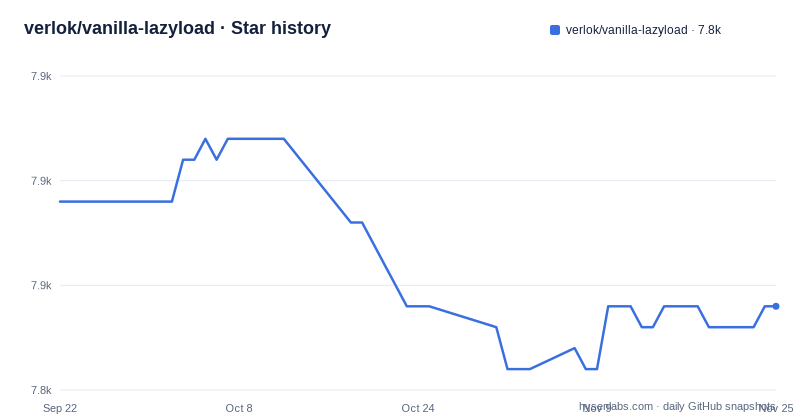
- verlok/vanilla-lazyload7,849 ★ · -5
| Repository | 2026-09-22 | 2026-11-25 |
|---|---|---|
| verlok/vanilla-lazyload | 7.9k | 7.8k |
-5 Stars in the last 64 days, measured from the daily GitHub snapshot. Compare with other projects
Editorial analysis
The contract is data- attributes, so the real ones never load
Lazy loading here is an attribute rename. Instead of `src`, you write `data-src`, and the library swaps it back when the element approaches the viewport. That is the whole idea, and it is why the script works on markup it did not generate.
A plain lazy image is the shortest case. Add `class="lazy"` and `data-src`, and the browser has nothing to fetch until the observer fires.
The same pattern covers the elements people forget. An animated SVG becomes an `object` element with `data-src="lazy.svg"`. A video gets `data-src` on the element and on each `source`, plus `data-poster` for the poster image, which the README notes is lazily loaded too. An iframe is `<iframe class="lazy" data-src="lazyFrame.html"></iframe>`.
If you want something visible before the real file arrives, you put a tiny image in `src`, for example `src="lazy_10.jpg"`. The placeholder loads immediately and the real asset replaces it.
The README tells you not to use background images for content
There is an IMPORTANT note between the image examples and the background examples, and it is advice rather than API. To display content images on your pages, always use the `img` tag, because that benefits SEO and the accessibility of your website.
The test offered for deciding is unusually concrete: would your website user like to see those images when printing out the page? If the answer is yes, they are content images and you should avoid background images to display them.
That is why the background examples are so elaborate and still carry a warning. There is `data-bg` for a single image, `data-bg-hidpi` for a HiDPI screen, `data-bg-multi` for several backgrounds and a gradient in one declaration, `data-bg-multi-hidpi` for the same on a HiDPI screen, and `data-bg-set` for CSS image-set syntax including a multi-background form.
None of that makes a content image crawlable or printable. It is for decoration, and the README is drawing that line before you copy a snippet.
Responsive and WebP selection work by prefixing srcset and sizes too
Because the library swaps attributes rather than parsing markup, responsive images come along for free as long as you prefix them. A responsive image uses `data-srcset` and `data-sizes`, and the HiDPI form goes through `picture` with `source` elements keyed on media queries:
<picture>
  <source media="(min-width: 1200px)" data-srcset="lazy_1200.jpg 1x, lazy_2400.jpg 2x" />
  <source media="(min-width: 800px)" data-srcset="lazy_800.jpg 1x, lazy_1600.jpg 2x" />

</picture>
Automatic WebP selection is the same trick with a type check, where `data-sizes="100w"` is passed alongside the width descriptors:
<picture>
  <source
    type="image/webp"
    data-srcset="lazy_400.webp 400w,
      lazy_800.webp 800w"
    data-sizes="100w"
  />

</picture>
In each case the low quality placeholder still goes in `src` on the `img` tag, for example `src="lazy_10.jpg"`, so the browser has something to paint while it waits.
Put the script before </body>, or call update() after you inject markup
Instantiation is a constructor with your settings:
var lazyLoadInstance = new LazyLoad({
  // Your custom settings go here
});
The placement rule is the part that bites. To be sure the DOM for your lazy content is ready when you instantiate LazyLoad, place the script tag right before the closing `</body>` tag.
If the markup arrives later, and the README calls out an AJAX call as the example, you ask the instance to look again:
lazyLoadInstance.update();The same warning applies to the `async` variant. If you cannot put the tag before `</body>`, LazyLoad could be executed before the browser has loaded all the DOM, and you will need `update()`.
The current recommended version is 19.1.3, served from jsDelivr, and if you need Internet Explorer 11 you have to stay on 17.9.0 or below. An upgrade guide lives in UPGRADE.md.
An async script needs its options on window before the tag loads
There is a self-initialising path, and its ordering requirement is strict. To use an `async` script you must define the options before including the script, because once the file is fetched and parsed it initialises itself from what it finds.
The global is `window.lazyLoadOptions`, and its shape depends on how many instances you want. An empty object gives a single instance:
<script>
  // Set the options globally
  // to make LazyLoad self-initialize
  window.lazyLoadOptions = {
    // Your custom settings go here
  };
</script>
An array of objects, `[{}, {}]`, gives multiple instances with different options. There is also a documented variant for getting the instance reference back, which requires putting the `addEventListener` code before the async script.
So there are three ways in: instantiate yourself, self-initialise globally, or self-initialise and capture the instance. The README shows each one with the ordering constraint written next to it, which is where most of the friction in a quick start comes from.
No runtime dependencies, and the published tarball is three entries
The manifest has a `dependencies` block with nothing in it. Everything the library needs at run time is in the 2.4 kB file itself, and the package publishes `dist`, `typings` and `CHANGELOG.md`.
Three entry fields cover the module formats: `main` and `browser` both point at `dist/lazyload.min.js`, and `module` points at `dist/esm/lazyload.js`. Types come from `typings/lazyload.d.ts`, and `sideEffects` is false so a bundler can drop the import when nothing is lazy loaded.
The tooling around it is more conventional than the library. `build` runs `rollup -c`, `dev` adds `--watch`, `test` runs jest for units and then playwright for end to end tests, and `serve` starts an http-server on port 4200. The development dependencies include both jest and jest-environment-jsdom alongside `@playwright/test`.
The repository root carries the usual project files plus `demos/`, `tests/`, `typings/`, `utils/` and a `bower.json`, which dates the project to an era when a bower manifest was still worth shipping.
The ESM example still points at 19.0.3, and IE11 stops at 17.9.0
Two version details in the documentation are worth knowing before you copy a snippet.
The first is the ES module import, which reads:
<script type="module">
  import LazyLoad from "https://cdn.jsdelivr.net/npm/[email protected]/+esm";
</script>
Version 19.0.3, while the rest of the page, including the recommended version and the async script example, says 19.1.3. If you paste that block as it stands you get an older build than the one the document recommends.
The second is the browser floor. Internet Explorer 11 is supported only in 17.9.0 or below, so a page that must still open in IE needs a different pin from every other page.
Dates complete the picture. The releases are 19.1.3 on 2024-04-02, 19.0.5 on 2024-03-28 and 18.0.0 on 2024-03-19, and the manifest still reads 19.1.3, while the last push to master was on 2026-10-20. The branch keeps moving and the published version has not, so a fix on master is not in the package you install.
Editorial conclusion
vanilla-lazyload suits a static or server-rendered site that ships real content images below the fold and wants deferral without adding a framework or a runtime dependency. It does not suit a React application that already renders through its own lifecycle, and it is not a replacement for the browser's native loading attribute, which it can enable rather than replace. Verify three things before you commit: that the page's content images use the img tag, since the README explicitly warns against background images for content for SEO and accessibility, that your script tag sits immediately before the closing body tag or that you call `lazyLoadInstance.update()` after injecting markup, and which version you install, since the recommended release is 19.1.3 and Internet Explorer needs 17.9.0 or below.
Frequently asked questions
What does lazyload do?
It defers the loading of below-the-fold images, animated SVGs, videos and iframes until they enter the viewport. LazyLoad does this with IntersectionObserver and data- attributes such as data-src, data-srcset and data-bg, written in plain vanilla JavaScript in a 2.4 kB file, and it can also enable native lazy loading.
How do I install vanilla-lazyload?
From a CDN with `<script src="https://cdn.jsdelivr.net/npm/[email protected]/dist/lazyload.min.js"></script>`, then create an instance with `new LazyLoad({...})`, or import it as an ES module. It is also on npm as vanilla-lazyload, has no runtime dependencies, and needs version 17.9.0 or below if you must support Internet Explorer 11.
Does vanilla-lazyload handle markup added after the page loads?
Not automatically. The README says to place the script tag right before the closing body tag, and if more DOM arrives later, for example through an AJAX call, to call `lazyLoadInstance.update()` so LazyLoad checks the DOM again. With an async script that fires before the DOM is complete, the same update call is the fix.
Official sources
Add this badge to your README
If you maintain this project, the badge below links readers to this analysis and shows its maintenance status from the daily GitHub snapshot. Paste the markdown into your README; add ?metric=license or ?metric=stars to the image URL for a different field.

[](https://hysenlabs.com/projects/verlok-vanilla-lazyload)Star history chart for your README
[](https://hysenlabs.com/projects/verlok-vanilla-lazyload)Was this useful?