vladmandic/sdnext: six acceleration backends behind four launch scripts
SD.Next: All-in-one WebUI for AI generative image and video creation, captioning and processing
At a glance
- What is it?
- SD.Next is a Python web interface for diffusion image and video work, and its distinguishing claim is breadth of hardware support rather than a new sampler. CUDA, ROCm, ZLUDA, Intel IPEX, OpenVINO and Apple MPS are all listed, the dependency file mixes exact pins with floating packages, and the manifest still says version 0.0.0 with no GitHub releases.
- Who is it for?
- SD.Next fits an artist or researcher whose hardware is unusual enough that the official path does not cover it, or who wants quantization and CPU-GPU balancing to stretch a small card. It does not fit someone who wants a stable version number to pin, since the project manifest carries 0.0.0 and publishes no GitHub releases, so the changelog is the only history.
- Can I use it commercially?
- Yes. Apache-2.0 is a permissive licence: you can use, modify and sell software built on it, as long as you keep its copyright and licence notices.
- Is it still maintained?
- Yes. The repository received new commits within the last day.
- What is it written in?
- Mainly Python, according to GitHub's language statistics.
Answers come from the project's GitHub data, last synced on November 15, 2026, and from our analysis. They are not legal advice.
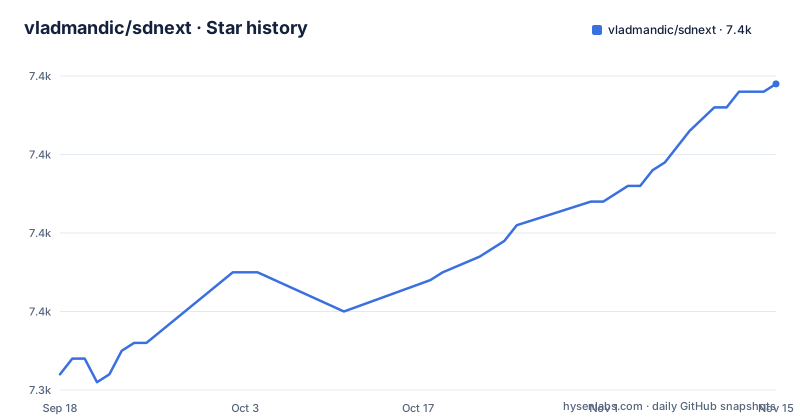
Star history
- vladmandic/sdnext7,379 ★ · +37
| Repository | 2026-09-18 | 2026-11-15 |
|---|---|---|
| vladmandic/sdnext | 7.3k | 7.4k |
37 Stars in the last 58 days, measured from the daily GitHub snapshot. Compare with other projects
Editorial analysis
Four launch scripts cover three operating systems
The quick start is a clone and a launcher:
git clone https://github.com/vladmandic/sdnext
cd sdnext
./webui.sh # Linux/Mac
webui.bat  # Windows
webui.ps1  # PowerShell
Those three shell entry points sit beside `webui.py` in the repository root, with `launch.py` as the Python entry the npm scripts call and `installer.py` for the built-in installer that handles updates and dependency management.
Eight acceleration paths, and AMD has two
The hardware list is the reason to look at this project. nVidia GPUs run on CUDA on Windows and Linux. AMD GPUs run on ROCm on both, and on Windows they also run on ZLUDA. Intel Arc runs through OneAPI with IPEX XPU libraries. Anything compatible with OpenVINO works on Windows and Linux, including CPUs. Apple M1 and M2 hardware on macOS uses the MPS support built into Torch. Docker recipes exist for four of these: CUDA, ROCm, Intel IPEX and OpenVINO.
SDNQ and balanced offload answer the same problem
Two features target the constraint most people hit, which is not enough video memory. The readme offers SDNQ quantization and attention, together with CPU/GPU offloading, to manage memory. Automatic model download is a third convenience: pick a model from the list of reference models and it is fetched and ready, or add your own and it is detected and appears in the interface.
The dependency file mixes exact pins with floating packages
`requirements.txt` is sorted by intent rather than alphabetically. The first entry is pinned and carries a comment explaining why: `setuptools==77.0.3` is required for Python 3.12 or newer. A block labelled standard follows with names only, including anyio, filetype, GitPython, lark, piexif, psutil, pyyaml, voluptuous, orjson, websockets and httptools, so those float. A block labelled versioned then pins the serving and machine learning stack exactly, with fastapi 0.124.4, uvicorn 0.52.4, accelerate 1.15.0, huggingface_hub 2.3.0, pandas 2.3.1, protobuf 7.36.2, pytorch_lightning 2.6.6, Pillow 13.0.0 and others. The one pin that stands out is `urllib3==1.26.19`, still on the 1.x line while everything around it is current. Lint tools close the file unpinned.
The manifest says 0.0.0 and there are no GitHub releases
Version tracking is the confusing part. The project metadata file names the project SD.Next and sets its version to 0.0.0, and the repository has no GitHub releases at all. The history lives in `CHANGELOG.md` at the root and in a changelog page on the documentation site, and the readme points to it for feature history and release notes. A comparison badge links the master and dev branches. Around that sit a security policy, a code of conduct, a citation file, an agents file and a to-do file, so the repository carries its own process documents.
npm scripts exist to run the Python application
The Node side is not a separate application, it is tooling around a Python program. The manifest is private, requires Node 24 or newer, pins pnpm 12.11.2 and points its main entry at the built interface module under `ui/dist`. The start script activates a virtual environment and runs `launch.py` with debug enabled, and the test script runs the same entry with a test flag, so the application itself is the test harness. Lint chains five tools in order: pre-commit, eslint across three trees, tsc across the same three, ruff, and pylint. There are also convenience scripts that grep the source for to-do comments and for debug environment variables, which is a quick way to see what is unfinished and which flags exist.
Two extension directories and a localisation script
Extensions live in two places, `extensions/` and `extensions-builtin/`, and the build tooling treats them separately: eslint and tsc each run three times, once for the core tree and once for each built-in extension. Localisation is a script too, running a Node file under `test/`, which fits a project the readme says offers multiple themes and interface languages. The rest of the tree follows the same division of labour: `modules/` and `pipelines/` for the Python internals, `configs/` for configuration, `cli/`, `ui/`, `data/` and `models/` for the surrounding pieces, plus `constraints.txt`, `scripts/`, a `wiki` entry, and editor and lint configuration in the form of an editor directory, a markdownlint file and a pre-commit config.
Editorial conclusion
SD.Next fits an artist or researcher whose hardware is unusual enough that the official path does not cover it, or who wants quantization and CPU-GPU balancing to stretch a small card. It does not fit someone who wants a stable version number to pin, since the project manifest carries 0.0.0 and publishes no GitHub releases, so the changelog is the only history. Before installing, read the page for your specific backend, and check the requirements file for the pins your Python version needs.
Frequently asked questions
What is SD next?
SD.Next is an open-source server application and web interface for AI image and video generation, captioning and processing, working with a wide range of diffusion models and licensed Apache-2.0. It builds on the original codebase from AUTOMATIC1111's Stable Diffusion WebUI.
how to install sdnext
Clone the repository and run the launcher for your system: webui.sh on Linux or Mac, webui.bat on Windows, or webui.ps1 in PowerShell. There is also a built-in installer with automatic updates and dependency management, and Docker recipes for CUDA, ROCm, Intel IPEX and OpenVINO.
What platforms can sdnext run on?
nVidia on CUDA, AMD on ROCm or ZLUDA on Windows, Intel Arc through OneAPI with IPEX, OpenVINO-compatible devices, and Apple M1 and M2 through MPS.
Official sources
Add this badge to your README
If you maintain this project, the badge below links readers to this analysis and shows its maintenance status from the daily GitHub snapshot. Paste the markdown into your README; add ?metric=license or ?metric=stars to the image URL for a different field.

[](https://hysenlabs.com/projects/vladmandic-sdnext)Star history chart for your README
[](https://hysenlabs.com/projects/vladmandic-sdnext)Was this useful?