VOICEVOX: the editor repository, and what it pins
A free, medium-quality text-to-speech software and editor for VOICEVOX.
At a glance
- What is it?
- This repository is the VOICEVOX editor, an Electron and Vue application, while the speech synthesis engine and its core live in separate repositories. What the tree pins down is more specific than the feature story: a single Node major, an engine described as JSON inside an env var, and snapshot tests that only run on Windows.
- Who is it for?
- VOICEVOX suits a contributor who wants to work on the editor side of a Japanese text to speech project and is willing to run an engine binary alongside it. The tree tells you what that costs before you start: Node 24 only, an engine path configured through one env var, three test environments decided by filename, and a visual regression suite that only runs on Windows.
- Can I use it commercially?
- Check first. The repository uses a licence we do not classify automatically, so read its LICENSE file before any commercial use.
- Is it still maintained?
- Yes. The repository received new commits within the last day.
- What is it written in?
- Mainly TypeScript, according to GitHub's language statistics.
Answers come from the project's GitHub data, last synced on November 15, 2026, and from our analysis. They are not legal advice.
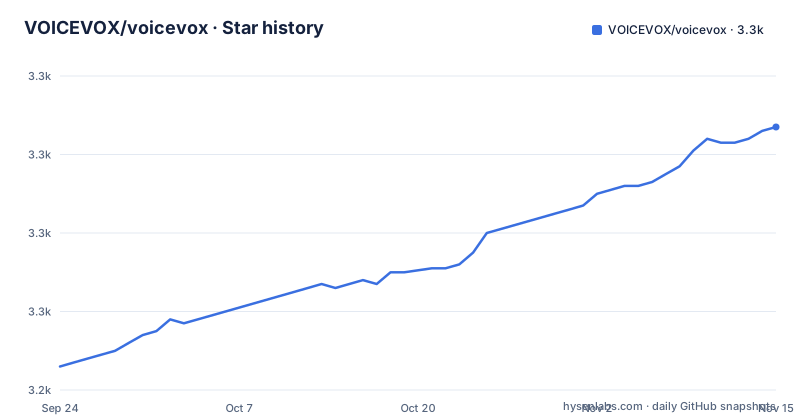
Star history
- VOICEVOX/voicevox3,307 ★ · +61
| Repository | 2026-09-24 | 2026-11-15 |
|---|---|---|
| VOICEVOX/voicevox | 3.2k | 3.3k |
61 Stars in the last 52 days, measured from the daily GitHub snapshot. Compare with other projects
Editorial analysis
This repository is the editor, and the README says so in its first section
The scope is settled before any tooling appears. This is the editor for VOICEVOX, the speech synthesis engine is a separate repository, the core is another one, and the first section addressed to users states that the page here is for development and that usage questions belong on the official site. The text is Japanese throughout, including the document that maps the whole system, `docs/全体構成.md`.
The stack is named in the same place: the editor is built with Electron, TypeScript, Vue and Vuex. The project itself flags this as the reason a separate guide exists, since a Vuex store spread across an Electron main process and a renderer is not a layout you can hold in your head from the dependency list. `docs/コードの歩き方.md` is offered as the map, and a design guidelines document sits next to it.
One contribution rule is worth carrying into any issue you pick up: to avoid two people working the same issue, announce it on the issue or open a draft pull request first. For a repository this size, that is the difference between a week of work and a duplicate.
One Node major, one exact pnpm, and a fork before anything else
The runtime is pinned more tightly than most projects of this kind. package.json declares an engine range of >=24.11.1 and below 25, so Node 24 is the only supported major, with a lower bound inside it. The package manager is pinned to an exact release, [email protected], alongside a lockfile, a workspace file, a .npmrc and a .pnpmfile.cjs. The README points at the version recorded in .node-version and suggests a version manager such as nvs or nvm, including its automatic switching.
The install sequence is two commands, and the first is marked as a first time only step:
npm i -g pnpm # 初回のみ
pnpm i
Then the repository is forked and cloned, which means a contributor is expected to work from their own fork rather than from a shared checkout. That matters for two later steps in this repository, both of which need write access somewhere: producing a build artifact through a workflow, and pushing updated snapshots back to a branch.
There is also an optional step for coding agents. `pnpm run setup-agents` writes the files that Codex CLI or Claude Code use, and the script behind it is a generator called rulesync, with its configuration in rulesync.jsonc and its output directory .rulesync.
The engine is a JSON array inside an environment variable
The editor does not bundle an engine. `.env.example` describes the engine as a JSON array in VITE_DEFAULT_ENGINE_INFOS, and each entry carries a uuid, a name, an executionEnabled flag, an executionFilePath, an executionArgs list and a host:
[
    {
        "uuid": "074fc39e-678b-4c13-8916-ffca8d505d1d",
        "name": "VOICEVOX Engine",
        "executionEnabled": true,
        "executionFilePath": "vv-engine/run.exe",
        "executionArgs": [],
        "host": "http://127.0.0.1:50021"
    }
]
Three details follow from that default. The example path ends in run.exe, so it names a Windows binary that does not exist on the other two platforms, which is why the README then spells out a macOS path inside the application bundle, a Linux path inside the tar.gz from Releases, and a way to reach the AppImage's contents by mounting it. The host is plain http on the loopback address, which is right for a local engine and wrong the moment you point it elsewhere. And if you already run an engine API server, you do not set a path at all: you set executionEnabled to false instead, which is also the case when the product version of VOICEVOX is already running. The README warns separately that path separators must be forward slashes.
A unit test's runtime is decided by its filename
The test suite under ./tests/unit is not homogeneous, and the environment is not chosen in a config file. It comes from the file name:
- `.node.spec.ts` runs in a Node.js environment - `.browser.spec.ts` runs in a browser environment using Chromium - `.spec.ts` runs in a browser environment emulated by happy-dom
That is stated as a note rather than as a convention to follow, which makes it the kind of rule that surprises people. A test that fails only in CI is often a test whose suffix sends it to a different runtime than the developer expected. The commands are `pnpm run test:unit`, a watch mode, a Vitest UI mode, and the same run with `--update` to refresh snapshots.
Above that sits the Storybook test run, since the unit target covers both the tests under ./tests/unit and the Storybook tests. Playwright drives the browser and Electron end to end suites, and the two are separated by target: browser end to end for interface and speech synthesis work that does not need Electron, and Electron end to end for the cases that include starting and stopping the engine. Some browser tests that rewrite engine settings are restricted to CI.
Snapshots only refresh on Windows, unless a workflow does it for you
Visual regression testing is described twice, once for the browser end to end suite and once for Storybook, and both currently run on Windows only. The local update command refreshes only the operating system matching the machine you are on, so a contributor on Linux or macOS can run the comparison and cannot regenerate the images it compares against.
The other route is a workflow, and it needs write access. You enable Actions on your fork, set the workflow permissions to read and write, choose the Test workflow, pick your branch and tick the option to update snapshots. The same thing from a terminal:
gh workflow run test.yml -R (ユーザー名)/voicevox --ref (ブランチ名) -f update_snapshots=trueWhen the workflow finishes, the updated screenshots are committed for you. After you pull that commit, the tests need to run again, which the README solves with an empty commit:
git commit --allow-empty -m "(テストを再実行)"
git push
Automating that last push needs a fine grained token with read and write on repository contents for your fork, stored as a repository secret named PUSH_TOKEN. The token instructions are the only place in this document where write credentials are described, and they are described in detail.
Two workflows, one of which publishes artifacts to a release
The badges at the top of this document point at two workflows, build.yml and test.yml, and they do different jobs.
The build workflow is what a contributor without a local toolchain uses. You enable Actions on your fork, start build.yml through workflow_dispatch, and the resulting artifact is uploaded to Releases. That is the route for producing the packaged application without setting up the Electron toolchain yourself, and it is also why the build workflow has to run on a fork rather than on the upstream repository.
The test workflow is the one the snapshot update goes through, and it is the one that needs write permissions because it commits images back to a branch.
For running the editor locally there are three documented variants of one command: `pnpm run electron:serve` for an environment that is convenient to develop in, the same command with `--mode production` for one closer to the build, and the same command with `--` followed by arguments. A browser mode exists as well, and it is marked as still in development: it needs a speech synthesis engine started separately, and it currently expects that engine to be running on your own machine.
Dependency licenses are merged from two files, and one is fetched by hand
The editor ships a license report for its dependencies, and it is assembled from two sources rather than one. The engine's licenses are not part of this repository: they are generated inside the engine repository, where the file is called licenses.json, and it has to be brought over as engine_licenses.json. The merge then takes both inputs:
# get licenses.json from voicevox_engine as engine_licenses.json

pnpm run license:generate -o voicevox_licenses.json
pnpm run license:merge -o public/licenses.json -i engine_licenses.json -i voicevox_licenses.json
The comment above the commands is the whole manual step, and it is easy to read past. In a workflow the report is produced automatically during the build, so a stale engine file is a local problem rather than a release problem. Run by hand, the report reflects whatever engine file you last copied, which is a reasonable trade for a panel that wants to ship the list, and a trap for anyone auditing it.
The tooling around that is small and lives in the repository: a generate script and a merge script under tools/, both run through tsx.
The repository carries its own lint plugin, a vendored typo checker and an import check
Several quality gates are in-tree rather than pulled from a registry, which is worth knowing before you change build configuration.
Linting runs through a flat configuration file, eslint.config.ts, and the project ships its own plugin in an eslint-plugin directory next to it. Because the lint command runs with a cache, a file called .eslintcache appears at the repository root, and the README says to delete it when ESLint is upgraded or the configuration changes, which is the usual symptom of a lint result that disagrees with the source.
The typo checker is a vendored binary rather than a downloaded one, and the script points at it inside the repository, with its configuration in _typos.toml. Formatting and linting are two separate commands, and the README asks for both before a pull request.
There is also a script named for checking suspicious imports, which runs from the same tools directory as the license scripts, and an OpenAPI generation step driven by openapi.json and openapitools.json at the root. The engine's API contract is therefore a generated artifact in this repository, which is what keeps the editor and the engine agreeing on endpoints.
Editorial conclusion
VOICEVOX suits a contributor who wants to work on the editor side of a Japanese text to speech project and is willing to run an engine binary alongside it. The tree tells you what that costs before you start: Node 24 only, an engine path configured through one env var, three test environments decided by filename, and a visual regression suite that only runs on Windows. Two items deserve a decision rather than a skim. The dependency license file is merged from two sources, one of which you fetch by hand, so a local license report is only as current as your last manual step. And the version field in package.json is a placeholder, the newest release is dated 2026-04-30, and two license files sit at the root while the recorded license names nothing, so check which text governs the code before you build on it. Users who want the application itself should use the official site rather than this repository.
Frequently asked questions
What does the VOICEVOX repository actually build?
It builds the VOICEVOX editor, an Electron, TypeScript, Vue and Vuex application. The speech synthesis engine and its core are separate repositories, and the README here is written for developers, with end users pointed at the official site.
What do I need before I can run the VOICEVOX editor from source?
The Node.js version recorded in .node-version, which package.json restricts to 24, pnpm installed globally once and then pnpm i in the repository, and a .env file copied from .env.example with executionFilePath pointed at an engine binary for your platform.
How do I point the VOICEVOX editor at an engine API server I started myself?
Set executionEnabled to false in VITE_DEFAULT_ENGINE_INFOS instead of setting executionFilePath, and change host if the endpoint is not the default. The example default is http://127.0.0.1:50021.
Why does my VOICEVOX unit test run in a different environment than I expected?
The environment follows the file name. A .node.spec.ts file runs in Node.js, a .browser.spec.ts file runs in Chromium, and a plain .spec.ts file runs in a browser environment emulated by happy-dom.
Can I update VOICEVOX screenshots from Linux or macOS?
Not with the local command, because the visual regression tests run on Windows only and a local update refreshes only the operating system matching your machine. The other route is the Test workflow on GitHub with the update snapshots option enabled.
Official sources
Add this badge to your README
If you maintain this project, the badge below links readers to this analysis and shows its maintenance status from the daily GitHub snapshot. Paste the markdown into your README; add ?metric=license or ?metric=stars to the image URL for a different field.

[](https://hysenlabs.com/projects/voicevox-voicevox)Star history chart for your README
[](https://hysenlabs.com/projects/voicevox-voicevox)Was this useful?