Voilà gives every visitor a kernel, and hides the code by default
Voilà turns Jupyter notebooks into standalone web applications
At a glance
- What is it?
- Voilà renders a Jupyter notebook as a standalone web application and gives each connected visitor a dedicated kernel for widget callbacks. Two defaults decide what a browser can see and do: input cells are stripped and frontend execute requests are refused.
- Who is it for?
- Voilà fits teams who already live in notebooks and want to publish a dashboard without writing a frontend, and who accept that every browser session costs a kernel. By default it does not show a notebook's source or accept execute requests from the front-end, and it relies on the widget libraries available to its kernel.
- Can I use it commercially?
- Check first. The repository uses a licence we do not classify automatically, so read its LICENSE file before any commercial use.
- Is it still maintained?
- Yes. The repository last received commits 5 days ago.
- What is it written in?
- Mainly Python, according to GitHub's language statistics.
Answers come from the project's GitHub data, last synced on November 22, 2026, and from our analysis. They are not legal advice.
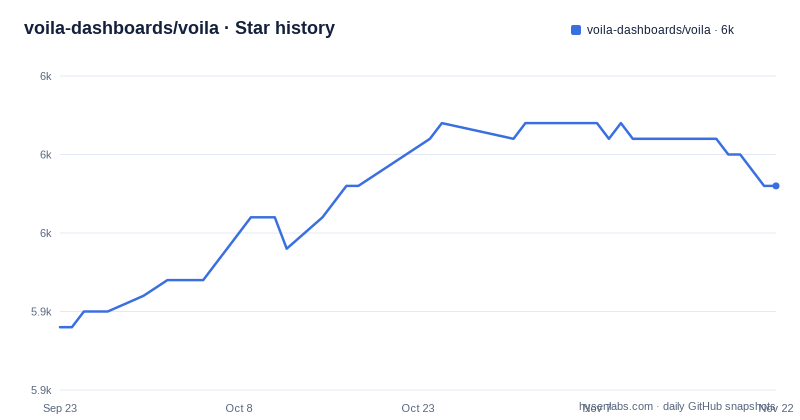
Star history
- voila-dashboards/voila5,953 ★ · +9
| Repository | 2026-09-23 | 2026-11-22 |
|---|---|---|
| voila-dashboards/voila | 5.9k | 6k |
9 Stars in the last 60 days, measured from the daily GitHub snapshot. Compare with other projects
Editorial analysis
One kernel per visitor, not one converted HTML file
The mechanism that separates Voilà from a notebook export is stated early and is worth reading twice: each user connecting to the Voilà tornado application gets a dedicated Jupyter kernel, and that kernel executes the callbacks fired by changes in Jupyter interactive widgets. A notebook converted to plain HTML ships rendered output and nothing left to run it. A Voilà app keeps a live kernel behind the page, which is why a widget in one visitor's tab can redraw downstream output for that visitor alone. Two people opening the same dashboard do not share state, because they are not talking to the same kernel. The cost sits on the same axis. Live execution means a running kernel per session, which is a different operational shape from serving a folder of static files, and it is the single fact to weigh before choosing this route.
Two defaults decide what a visitor ever sees
Voilà ships with two restrictions switched on, and both concern what a browser client is permitted to do. The first disallows execute requests from the front-end, which prevents the execution of arbitrary code through the page. The second runs with the `strip_sources` option, which strips the input cells out of the rendered notebook, so a visitor sees results and widgets but not the code behind them. Setting `strip_sources` to False puts the sources back into the app. Together these defaults make the out-of-the-box deployment a look and interact surface rather than a programming environment: a visitor cannot re-run a cell, cannot edit one, and a page cannot ask the kernel for work the notebook never contained. Any project needing either capability has to change configuration the README names without walking through, including how execute permission would be granted.
pip install voila also brings a JupyterLab preview
Two installation routes are documented. From conda-forge:
mamba install -c conda-forge voilaOr from PyPI:
pip install voilaThe PyPI route has a side effect worth knowing before you run it. Starting with JupyterLab 3.0, the JupyterLab preview extension is installed automatically after `pip install voila`, and it displays a Voilà preview of the open notebook in a side pane. Installing that extension from source is a separate command:
jupyter labextension install @voila-dashboards/jupyterlab-previewPython 3.10 is the floor, taken from `requires-python = ">=3.10"` in pyproject.toml, and the classifiers cover 3.10 through 3.14 with JupyterLab 3 and JupyterLab 4.
One notebook or a whole directory of notebooks
Running `voila bqplot.ipynb` renders that single notebook as a standalone app. Running `voila` with no argument serves the directory of notebooks in the working directory instead, which is how a folder becomes a small site of dashboards. The example sequence in the documentation does the environment work first and then the rendering:
mamba env update -f .binder/environment.yml
cd notebooks/
voila bqplot.ipynb
That ordering is the point. The environment file supplies what the notebook needs, and Voilà does not install it. Anything the notebook imports to draw itself has to be present in the environment serving it. Everything else sits behind `voila --help`, which is where options such as specifying an alternate port number are found rather than spelled out in the guide.
As a server extension it hangs off the base url plus voila
The second mode attaches Voilà to a Jupyter server rather than running it standalone, with either notebook or jupyter_server. Enabling it takes one of two commands:
jupyter serverextension enable voila
jupyter server extension enable voila
The two spellings are not alternatives to pick between at random: the first targets the notebook server, the second targets jupyter_server. Once enabled, the Voilà app is not a separate site. It is reachable from the base url with `voila` suffixed to it, so access control is whatever the parent Jupyter server already enforces rather than anything Voilà adds. That distinction matters when you plan the deployment. Standalone, the tornado application is the entire server and whatever sits in front of it is your responsibility. Attached, it inherits that server's lifecycle and its rules about who may connect, which is the only access story this path describes.
The kernel owns the widget libraries, not Voilà
Because it is built on Jupyter's standard formats and protocols, Voilà is agnostic to the language of the notebook. The documentation demonstrates that with a dashboard powered by the C++ Jupyter kernel xeus-cpp together with xleaflet, and the reasoning extends to any kernel that speaks the protocol. The boundary this draws is sharp. The kernel supplies the widget libraries, and Voilà renders whatever the kernel emits. If ipyleaflet or bqplot is missing from the serving environment, no Voilà setting substitutes for the library. The Voilà Gallery collects live dashboards built this way, and its examples lean on ipywidgets, ipyleaflet, ipyvolume, bqplot and ipympl. Treat that list as the compatibility surface a new notebook has to fit inside rather than as a sample of what is possible.
Bounded dependency ranges next to a TypeScript frontend
Most of the runtime dependencies are capped on both ends, which is the real constraint when this lands inside an existing Jupyter stack:
dependencies = [
    "jupyter_client>=7.4.4,<9",
    "jupyter_core>=4.11.0",
    "jupyter_server>=1.18,<3",
    "jupyterlab_server>=2.3.0,<3",
    "nbclient>=0.4.0",
    "nbconvert>=6.4.5,<8",
    "traitlets>=5.0.3,<6",
    "websockets>=9.0",
]
A jupyter_server 3, an nbconvert 8 or a traitlets 6 or newer leaves this release unsatisfiable, so an environment holding newer majors is a resolution failure rather than a slowdown. The build runs through hatchling, whose own build requirements pin `jupyterlab==4.5.10`. Alongside the Python code the repository carries a frontend under `packages/` in a yarn workspace driven by lerna, with eslint and jest for the TypeScript, plus `requirements-visual-test.txt` and `ui-tests/` for appearance checks. Releases stay on the 0.5 line: v0.5.13 on 2026-09-04, v0.5.12 on 2026-04-22, v0.5.11 on 2025-08-25, with the last push on 2026-10-05. The licence is BSD-3-Clause under a shared copyright model where every contributor keeps copyright in their own contribution.
Editorial conclusion
Voilà fits teams who already live in notebooks and want to publish a dashboard without writing a frontend, and who accept that every browser session costs a kernel. By default it does not show a notebook's source or accept execute requests from the front-end, and it relies on the widget libraries available to its kernel. Before deploying, confirm your own concurrency behaves with a kernel per visitor, check that the notebook still reads correctly with `strip_sources` set to False, and pin a version: the newest release is v0.5.13 from 2026-09-04 and the project is still on the 0.5 line.
Frequently asked questions
How do I install Voilà for Jupyter?
Two routes are documented: `pip install voila` from PyPI, or `mamba install -c conda-forge voila` for a conda or mamba environment. Python 3.10 or newer is required, and the project is still published on the 0.5 line, with v0.5.13 released on 2026-09-04.
Does `pip install voila` also set up the JupyterLab preview?
Yes, from JupyterLab 3.0 onward the preview extension installs automatically after `pip install voila`, and it shows a Voilà preview of the notebook in a side pane. To install that extension from source instead, run `jupyter labextension install @voila-dashboards/jupyterlab-preview`.
How do I use Voilà with a Jupyter notebook?
Run `voila` with the notebook path, for example `voila bqplot.ipynb`, or run `voila` with no argument to serve a directory of notebooks. Each visitor who connects gets a dedicated Jupyter kernel that executes the callbacks fired by widget changes. Options such as an alternate port number are listed by `voila --help`.
Can Voilà run inside an existing Jupyter server?
Yes, as a server extension with either notebook or jupyter_server. Enable it with `jupyter serverextension enable voila` or `jupyter server extension enable voila`, and the Voilà app is reachable from the base url with `voila` suffixed to it.
Official sources
Add this badge to your README
If you maintain this project, the badge below links readers to this analysis and shows its maintenance status from the daily GitHub snapshot. Paste the markdown into your README; add ?metric=license or ?metric=stars to the image URL for a different field.

[](https://hysenlabs.com/projects/voila-dashboards-voila)Star history chart for your README
[](https://hysenlabs.com/projects/voila-dashboards-voila)Was this useful?