OpenSwarm's npm package ships the Python project, and its two dependency lists have already drifted apart
Claude code for everything except coding
At a glance
- What is it?
- A terminal-first multi-agent system that produces slide decks, research, charts, documents, images and video, published to npm as a tarball full of Python agent directories. The packaging is the interesting part: two entry points, a postinstall patch, and a build config referencing a module the tree does not contain.
- Who is it for?
- Fit this if you want file producing agents rather than a chat box, if you are willing to hand a prompt to a system that fans out across eight specialists, and if the model providers named in the configuration are ones you already pay for. The output formats are the reason to look: HTML decks exported to PowerPoint, Word and PDF documents, charts, images and video, all from a terminal.
- Can I use it commercially?
- Yes. MIT is a permissive licence: you can use, modify and sell software built on it, as long as you keep its copyright and licence notices.
- Is it still maintained?
- Yes. The repository last received commits 113 days ago.
- What is it written in?
- Mainly Python, according to GitHub's language statistics.
Answers come from the project's GitHub data, last synced on November 15, 2026, and from our analysis. They are not legal advice.
Star history
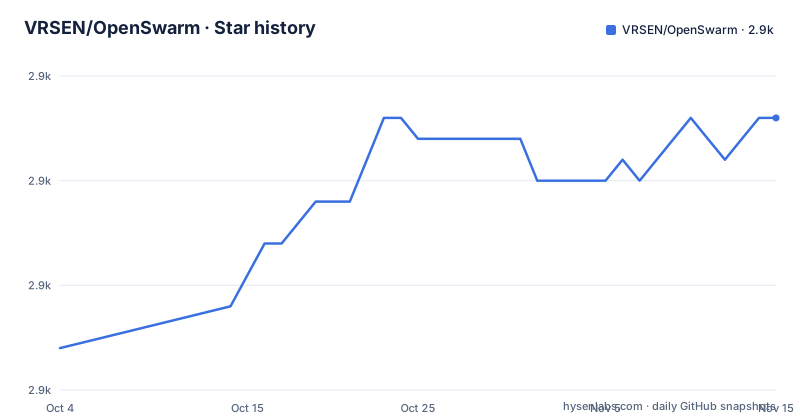
- VRSEN/OpenSwarm2,873 ★ · +11
| Repository | 2026-10-04 | 2026-11-15 |
|---|---|---|
| VRSEN/OpenSwarm | 2.9k | 2.9k |
11 Stars in the last 42 days, measured from the daily GitHub snapshot. Compare with other projects
Editorial analysis
The npm tarball contains the Python project and two entry points
Installing with `npx @vrsen/openswarm` installs a package whose payload is mostly Python source directories.
npx @vrsen/openswarmThe manifest maps a `bin` entry called `openswarm` to `./bin/openswarm`, a script that is made executable at install time. The `files` array then lists what actually ships: the `bin/` directory, three configuration files, `run_utils.py`, `swarm.py`, `config.py`, `helpers.py`, `server.py`, `shared_instructions.md`, the `shared_tools/` directory, the `orchestrator/` directory, and then one directory per agent, seven of them, followed by `patches/`, `pyproject.toml`, `package.json` and `package-lock.json`. Three negations at the end keep out `__pycache__`, `.pyc` files and `node_modules`.
So a user who typed one command into a terminal ends up with a Python project unpacked into their working directory, and the `requirements` in the README, Node.js 20 plus Python 3.12, explain why: the JavaScript in this package exists to run the Python in it.
There is a second entry point with the same name. The Python packaging declares `[project.scripts] openswarm = "run_utils:main"`, so `openswarm` resolves to a Node bin shim through npm and to a Python console script through pip, pointing at two different files.
The three names at the root are worth noting too: `openswarm.config.mjs`, `openswarm.marketplace.json` and `openswarm.product-env.json`, all three shipped in the tarball.
The postinstall patches one dependency and ignores a chmod failure
One script field does two jobs at install time, and its error handling is not symmetric.
The `postinstall` field is a single inline `node -e` program rather than a file. It builds two paths, one to `node_modules/dom-to-pptx` and one to `node_modules/patch-package/index.js`. If both exist, it runs the patch-package command line through `execFileSync` with the standard streams inherited, so the patch output appears in the install log. Then it attempts to make `bin/openswarm` executable with mode `0755`, inside a `try` block whose `catch` is empty.
So a failure to patch aborts the install, because the patch call sits outside any error handling, while a failure to set the executable bit is swallowed and the install continues. That asymmetry is the right way round if you consider which failure produces a working install, since a missing executable bit on the entry script is exactly the kind of thing that a filesystem or permission quirk causes and that a user can fix by hand.
The patch itself is why `patches/` is in the shipped file list. The HTML to PowerPoint conversion is a third party package that is modified at install time rather than vendored or forked, which means the behaviour of the slides agent depends on a patch file travelling with the package and on `patch-package` resolving correctly against whatever version of the converter npm installed.
Both of those two npm packages are pinned to exact versions, `dom-to-pptx` at 1.1.5 and the sibling CLI at 1.4.43 for the terminal UI, while `patch-package` itself floats on a caret range.
Two dependency lists, and the plain requirements file is missing two packages
The project declares its Python dependencies twice, and the two declarations are not the same set.
The `pyproject.toml` lists about forty packages under `dependencies`, with exact pins on the framework and the integration client: `agency-swarm[fastapi,jupyter,litellm]` at 1.10.5, `composio` at 0.15.0, `composio-openai-agents` at 0.15.0, and `moviepy` held below 2. Everything else uses a lower bound, from `pandas>=2.0.0` through `weasyprint` and `cairosvg` with no bound at all.
The `requirements.txt` in the same repository repeats that list, and the exact pins match. It is organised by consumer rather than alphabetically, with comments saying which piece of the system needs each group: Jupyter, IPython and nbformat for the IPython interpreter tool, Pillow for the image loading tool, and the PowerPoint group including `python-pptx`, `defusedxml`, `pdf2image` and `markitdown[pptx]` for the slides agent.
Two packages appear in the first list and not the second: `python-dotenv` and `rich`. Both are runtime requirements rather than conveniences, one for reading the environment file the Docker route depends on and one for terminal output.
The drift is small today and structural in nature. A plain requirements file next to a full project declaration is two places to update, and nothing in the repository's scripts enforces that they agree, which is how a contributor ends up debugging a missing import locally and not in a container built from the other file.
The project names also differ across the two ecosystems: the npm package is `@vrsen/openswarm` and the Python distribution is `open-swarm`.
The build config names a top-level module the repository does not contain
The packaging section lists six modules by name, and one of them is not in the tree.
[tool.setuptools]
py-modules = ["agency", "swarm", "helpers", "config", "server", "run_utils"]
Five of those six are visible as files at the top of the repository: `swarm.py`, `helpers.py`, `config.py`, `server.py` and `run_utils.py`. The sixth, `agency`, is not among the entries, and there is no `agency.py` and no `agency/` directory listed.
The exclusion list next to it tells the same story from the other direction. It excludes `agentswarm-cli*`, `venv*`, `.venv*`, `.agency_swarm*`, `node_modules*`, `*.node_modules*`, `activity*`, `mnt*`, `pptx*` and `slides`. The virtual environment patterns and the node_modules patterns are ordinary. The rest are directories that exist in the developer's working layout rather than in the published repository: a sibling checkout of the terminal UI, and local working directories for activity, mounts, generated PowerPoint files and slides.
So the packaging is written for a machine where OpenSwarm sits next to at least one other checkout and where four scratch directories have accumulated. That is a normal thing for a project assembled alongside its own framework, and it is also why a `pip install` from a clean checkout of this repository alone would ask for a module that is not there.
The package data rule is broader still, matching markdown, JSON and MJS files in every package plus anything named `agency-*`, which is how the shared instruction file and the three root configuration files travel with an installed agent.
Four ways to spell the telemetry switch
There is one telemetry preference and it can be expressed four different ways, which tells you how many layers it has to cross.
Setting `ENABLE_TELEMETRY=0` turns it off. So does `OPEN_SWARM_TELEMETRY=0`, so does `AGENTSWARM_TELEMETRY=0`, and so does passing `--no-telemetry` on the command line. Three environment variable names for one setting is a compatibility surface rather than an accident: the first name reads as the project level default, the second as this specific application, and the third as the framework underneath it, which is the same framework the package depends on at an exact version.
The practical risk is narrow but real. A user who reads one layer's documentation and sets the name that layer mentions gets the behaviour they asked for, and a user who sets only one of the three has no way to tell from the outside which layer they covered. The command line flag has the opposite property, since it is unambiguous and reaches whatever code is reading arguments.
The rest of the configuration surface is small and mostly about credentials. The wizard is said to handle authentication, dependencies and configuration, and at least one of two keys is required, one for a video and text model provider and one for the other. Four further keys are optional and each unlocks a named capability: a large integration catalogue for the assistant, image and video generation for another provider, video editing and effects through a third, and web search for the research agent. The stated behaviour when a key is missing is that the tool degrades rather than failing.
docker-compose mounts two host directories and one of them is not in the repository
The container route is four lines of compose configuration and two of them are volumes.
cp .env.example .env        # Add your API keys
docker-compose up --build
The service is named `openswarm`, builds from the repository root, maps port 8080 to port 8080, and reads its configuration from a `.env` file that you create from the example. Two host directories are mounted into the container, `./mnt` mapped to `/app/mnt` and `./uploads` mapped to `/app/uploads`.
Neither of those directories appears in the repository listing, so both are created empty the first time compose runs. One of them, `mnt`, is also named in the packaging exclusion list, which tells you it is a scratch directory the build is expected to leave out of any distribution; `uploads` appears in neither the tree nor the exclusion list.
Port 8080 is the same port the non-container API server uses, since the developer section runs `python server.py` and notes that it serves on `localhost:8080`. So the containerised and local routes are the same interface on the same port, which makes switching between them a matter of how it was started rather than a different configuration.
The compose file is named `docker-compose.yml` with a hyphen, and the command uses the hyphenated form, which is the older convention rather than the compose specification name.
The agent table names the models, and the orchestrator is forbidden from answering
The one part of the README written as a specification rather than a pitch is the agent table, and it is where the concrete commitments live.
The orchestrator routes every user request to the right specialists and never answers directly, which the table describes as pure coordination. That is a hard constraint on the design rather than a preference, and it is the reason there are eight agents instead of one generalist.
The virtual assistant handles everyday work and is the only agent wired to an external integration catalogue, which the table credits with more than ten thousand integrations by way of named examples including a mail provider, a chat platform, a code host and a marketing platform. Deep research does web research with citations. The data analyst analyses structured data, builds charts and runs statistical models, and the table says all of it happens inside an isolated IPython kernel, which is the one agent with an explicitly isolated execution environment. The slides agent generates complete HTML decks and then exports them to PowerPoint, so HTML is the intermediate format rather than a rendering afterthought. The docs agent produces Word documents and PDFs from outlines or raw content.
The two media agents name their providers rather than their capability. Image generation goes through two named Google models and one image service. Video generation goes through a video model from OpenAI, one from Google, and one from the same image service, and the same agent also edits and combines existing clips.
So the model dependency is not abstract: enabling the video agent means paying at least one of three providers.
Editorial conclusion
Fit this if you want file producing agents rather than a chat box, if you are willing to hand a prompt to a system that fans out across eight specialists, and if the model providers named in the configuration are ones you already pay for. The output formats are the reason to look: HTML decks exported to PowerPoint, Word and PDF documents, charts, images and video, all from a terminal. Four things to weigh before the first run. What it costs, because the code is MIT and free to install while every run needs at least one of two API keys and four more unlock the rest. How much of your prompt data leaves the machine, since the image and video agents are wired to three named providers and the assistant to a large integration broker. Which dependencies you actually get, because the two dependency lists in the repository already differ by two packages and a fresh install runs a patch against one of them. And whether the setup wizard's promise holds on your machine, since it is asked to create or repair a Python 3.12 virtual environment for you the first time and there is no offline path described.
Frequently asked questions
What is OpenSwarm?
An MIT licensed multi-agent system that produces slide decks, research reports, data visualizations, documents, images and videos from prompts typed into a terminal. It is built on Agency Swarm, installs with npx @vrsen/openswarm, and coordinates eight agents through an orchestrator that never answers a request directly.
How do I install OpenSwarm?
With npx @vrsen/openswarm. You need Node.js 20 or newer and Python 3.12 or newer, and the setup wizard is said to handle authentication, dependencies and configuration, including creating or repairing an isolated project virtual environment.
Is OpenSwarm free to run?
The code is MIT licensed and installs with one command. Running it is not cost free: at least one of OPENAI_API_KEY or ANTHROPIC_API_KEY is required, and four optional keys unlock an external integration catalogue, Google image and video generation, advanced video editing through fal.ai, and web search for the research agent.
How do I turn off telemetry in OpenSwarm?
Set ENABLE_TELEMETRY=0, OPEN_SWARM_TELEMETRY=0 or AGENTSWARM_TELEMETRY=0, or pass the --no-telemetry flag. Three environment variable names are accepted for the one preference, which covers the project, the application and the framework underneath it.
Which agents are in the OpenSwarm team?
Eight, with an orchestrator that routes requests and never answers directly. The specialists are a virtual assistant, deep research, a data analyst working inside an isolated IPython kernel, a slides agent that builds HTML decks and exports them to PPTX, a docs agent, an image generation agent, and a video generation agent.
How do I run OpenSwarm as a server?
Either run python server.py, which serves on localhost:8080, or use docker-compose up --build after copying .env.example to .env. The compose service maps the same port 8080 and mounts two host directories, ./mnt and ./uploads, into the container.
Official sources
Add this badge to your README
If you maintain this project, the badge below links readers to this analysis and shows its maintenance status from the daily GitHub snapshot. Paste the markdown into your README; add ?metric=license or ?metric=stars to the image URL for a different field.

[](https://hysenlabs.com/projects/vrsen-openswarm)Star history chart for your README
[](https://hysenlabs.com/projects/vrsen-openswarm)Was this useful?