vue-termui: Vue 3 components rendered into a real terminal through OpenTUI
The Modern Terminal UI Framework
At a glance
- What is it?
- vue-termui lets you write terminal applications as Vue 3 components, rendered by the OpenTUI native engine, but it runs on FFI, so the runtime requirements are Node 26.3 with an experimental flag or Bun.
- Who is it for?
- vue-termui suits a frontend team that already writes Vue and wants to ship a terminal interface with the same component model, and it does not suit a project that has to run on the Node versions most CI images still ship.
- Can I use it commercially?
- Yes. MIT is a permissive licence: you can use, modify and sell software built on it, as long as you keep its copyright and licence notices.
- Is it still maintained?
- Yes. The repository last received commits 13 days ago.
- What is it written in?
- Mainly TypeScript, according to GitHub's language statistics.
Answers come from the project's GitHub data, last synced on November 7, 2026, and from our analysis. They are not legal advice.
Star history
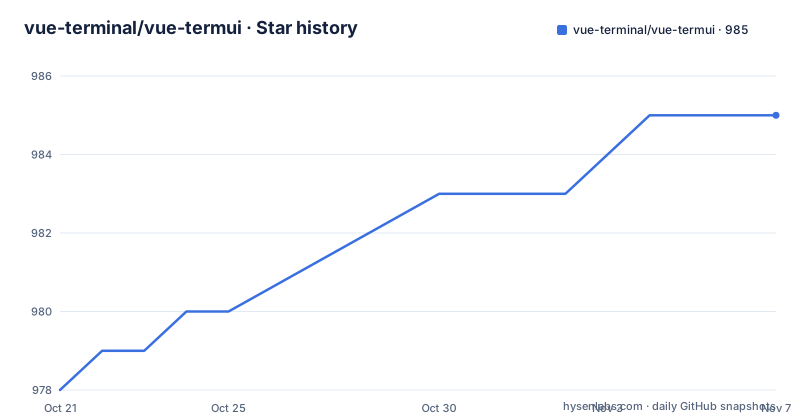
- vue-terminal/vue-termui985 ★ · +7
| Repository | 2026-10-21 | 2026-11-07 |
|---|---|---|
| vue-terminal/vue-termui | 978 | 985 |
7 Stars in the last 17 days, measured from the daily GitHub snapshot. Compare with other projects
Editorial analysis
Components are rendered by OpenTUI, not by a terminal emulator
The pitch is that you build a terminal application the way you build a web application. You write Vue 3 components, with a template, a script block and reactive state, and the framework renders them into the terminal. Underneath, the rendering goes through OpenTUI's native engine rather than through a web view or a screen-scraping terminal emulator, which is why the project describes itself as a custom renderer with opentui among its keywords. The consequence is that the terminal becomes a real rendering target with its own layout and drawing primitives, rather than a stream of escape sequences assembled by hand. For a team that already lives in Vue, that reuse is the whole value proposition: the same component mental model, the same tooling, and a different output device.
The FFI requirement is the first thing that will bite you
This is the constraint that decides adoption before any feature does, and the project flags it as important. vue-termui renders through OpenTUI's native engine, which requires FFI. That means the app has to run with Node 26.3 or later and the --experimental-ffi flag, with --disable-warning=ExperimentalWarning added to silence the notice, or under Bun, which supports FFI natively. The flag appears in the package scripts too, where the dev and coverage scripts set NODE_OPTIONS to those two flags before running vitest. So this is not a case of installing a package and running it. The runtime needs a foreign function interface to reach the native engine, and if your production environment is pinned to a Node version without that capability, the framework is simply unavailable there. Bun is the clean path if you control the runtime.
Scaffolding a project takes one command
Getting started has two entry points, depending on whether you are starting fresh or adding to something that exists.
npm create vue-termui@latestThat scaffolds a new app. The project also publishes a create-vue-termui package that released alongside the framework, with version 0.3.0 on the same day as v0.3.0 itself, on 2026-08-18. For an existing project the dependency itself is added with a package manager.
pnpm add vue-termuiThe repository is a pnpm workspace, with pnpm-workspace.yaml and a pnpm-lock.yaml at the root, and the packages directory holds the scoped packages under the @vue-termui name. The published package is vue-termui at version 0.3.0, MIT licensed, distributed as an ES module with dist, LICENSE and README.md as its files, and it exposes two entry points: the main module and ./vite.
A Vue app becomes a terminal app in three pieces
The first piece is the component, and it looks like ordinary Vue. Box is a container, Text is a run of characters, onKeyDown registers a key handler and useExit returns a function that quits.
<!-- App.vue -->
<script setup lang="ts">
import { Box, Text, onKeyDown, useExit } from 'vue-termui'

const exit = useExit()
onKeyDown((key) => key.name === 'q' && exit())
</script>

<template>
  <Box border>
    <Text>Hello from the terminal! Press <Text bold>q</Text> to quit.</Text>
  </Box>
</template>
The second piece is the entry point, where createApp comes from vue-termui rather than from vue, and mounting is awaited.
// main.ts
import { createApp } from 'vue-termui'
import App from './App.vue'

const app = await createApp(App)
app.mount()
The third piece is the build. Single file components are compiled by a Vite plugin, so your build tool is fixed.
// vite.config.ts
import { defineConfig } from 'vite'
import vueTermui from 'vue-termui/vite'

export default defineConfig({
  plugins: [vueTermui()],
})
The example apps show the range the authors had in mind
The examples directory is the best argument for the framework, because each one is a different shape of terminal program. There is a file manager, a kanban board, a music player, a system monitor and a lazygit-style interface. Five of them, and they cover the cases that usually make people abandon TUI frameworks: a file browser with navigation, a board with draggable state, a media player with playback state, a live dashboard of machine metrics, and a wrapper around a git client. A system monitor in particular is the kind of program that needs a real rendering model, since it repaints continuously. The playground directory is a separate workspace package for interactive development, and the session-player directory suggests that recorded sessions are part of the workflow for inspecting how a terminal program actually behaves.
Keyboard and focus guidance are still open work
The project's own to-do list is worth reading, because it names the gaps. Two items are unchecked: adding focus management guidance to the vue-termui skill, and adding keyboard handling guidance to the same skill. A skill in this context is a packaged set of instructions for an AI coding assistant, and the repository carries a skills directory alongside CLAUDE.md, AGENTS.md and a .claude directory. The gaps are about guidance rather than about missing API, since onKeyDown and useExit exist and are demonstrated in the example. Still, for a framework whose whole appeal is a component model, the ergonomics of moving focus and handling keys are where a terminal UI lives or dies, and the project has not finished writing that down. The same honesty shows in the todo entries tracked in todos.json and in the .size-limit.js configuration, which suggests the team watches the published bundle size.
Monorepo tooling, a CI gate and a MIT licence
The build and test story is visible in package.json. The build uses tsdown, the dev and coverage scripts run vitest with the FFI flags injected through NODE_OPTIONS, types are checked with tsc --build, linting uses oxlint with an oxfmt formatter, and a simple-git-hooks prepare script installs the git hooks. The test script chains lint, format check, a full workspace build, a playground build, coverage and type tests, so a pull request has to pass all of it. A vitest.config.ts and a tsdown.config.ts sit at the root, alongside tsconfig.json and its build and common variants. Continuous integration runs from a workflow in .github, and renovate.json is present for dependency updates, with the changelog kept in CHANGELOG.md. The licence is MIT, the version is 0.3.0, and the previous release v0.2.0 came on 2026-07-09, so the project is moving in the 0.x line with a version below one, which is the usual signal that the API can still move.
Editorial conclusion
vue-termui suits a frontend team that already writes Vue and wants to ship a terminal interface with the same component model, and it does not suit a project that has to run on the Node versions most CI images still ship. Verify three things first: that the runtime you target can enable FFI, since the renderer calls into a native engine, that your build tool is Vite, because the plugin at vue-termui/vite is what compiles the single file components, and that the keyboard handling you need is covered, since the project still lists keyboard and focus guidance as open work in its skill file. The licence is MIT, the current version is 0.3.0, and the last push was on 2026-08-27.
Frequently asked questions
How do I install vue-termui?
Scaffold a new app with npm create vue-termui@latest, or add the package to an existing project with pnpm add vue-termui. The current version is 0.3.0.
What runtime does vue-termui need?
The renderer goes through OpenTUI's native engine, which requires FFI. Run with Node 26.3 or later using --experimental-ffi and --disable-warning=ExperimentalWarning, or use Bun, which supports FFI natively.
Which build tool does vue-termui support?
Vite. The vue-termui/vite plugin compiles the .vue single file components, and the plugin is registered in vite.config.ts with plugins: [vueTermui()].
What example applications ship with vue-termui?
The examples directory holds a file manager, a kanban board, a music player, a system monitor and a lazygit-style interface.
Official sources
Add this badge to your README
If you maintain this project, the badge below links readers to this analysis and shows its maintenance status from the daily GitHub snapshot. Paste the markdown into your README; add ?metric=license or ?metric=stars to the image URL for a different field.

[](https://hysenlabs.com/projects/vue-terminal-vue-termui)Star history chart for your README
[](https://hysenlabs.com/projects/vue-terminal-vue-termui)Was this useful?