Vue skills under two names, eight bundles, and a keep rule that only prints two rows
Agent skills for Vue 3 development
At a glance
- What is it?
- The vuejs-ai/skills repository packages eight agent skills for Vue 3 work, installs through an npx command or a Claude Code marketplace, and asks you to prefix prompts with use vue skill so the skill fires at all. What its own pages give away is the naming split between vuejs-ai/skills and vue-skills, the self-declared hallucination risk, and an eval matrix whose only two rows are keep and remove.
- Who is it for?
- Treat this as an experiment rather than a dependency. It is worth trying if you write Vue 3 with Composition API and TypeScript and want documented patterns such as shallowRef for primitive reactive state or MaybeRefOrGetter parameters in a reusable composable, and the eight bundles are small enough to read before installing.
- Can I use it commercially?
- Yes. MIT is a permissive licence: you can use, modify and sell software built on it, as long as you keep its copyright and licence notices.
- Is it still maintained?
- Yes. The repository last received commits 30 days ago.
- What is it written in?
- GitHub does not report a main language for this repository.
Answers come from the project's GitHub data, last synced on November 22, 2026, and from our analysis. They are not legal advice.
Star history
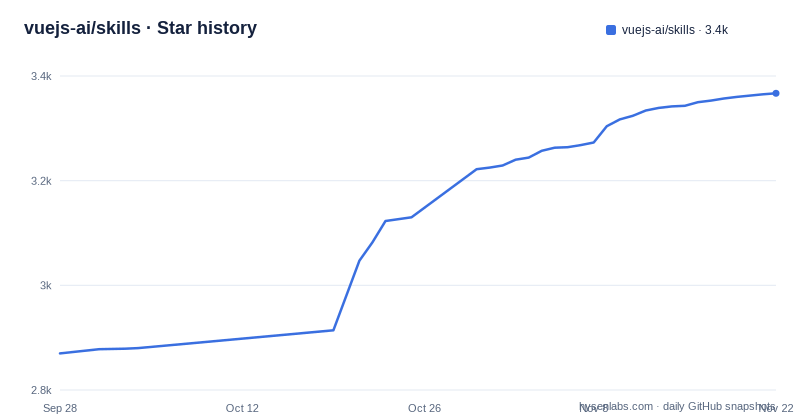
- vuejs-ai/skills3,367 ★ · +497
| Repository | 2026-09-28 | 2026-11-22 |
|---|---|---|
| vuejs-ai/skills | 2.9k | 3.4k |
497 Stars in the last 55 days, measured from the daily GitHub snapshot. Compare with other projects
Editorial analysis
The page calls it vue-skills and the repository calls it vuejs-ai/skills
Two names for one thing run through the two install paths. The repository is vuejs-ai/skills, described as agent skills for Vue 3 development, while the heading on its own page reads vue-skills, and the marketplace identifiers in every plugin command end in @vue-skills. The npx path names the repository:
npx skills add vuejs-ai/skillsand the Claude Code path names the marketplace:
# Add marketplace
/plugin marketplace add vuejs-ai/skills
So a reader following the marketplace commands is installing from a marketplace called vue-skills out of a repository called vuejs-ai/skills, and only one of the two names appears in each command. The tree holds .claude-plugin/, skills/, AGENTS.md, CLAUDE.md and LICENSE, which matches the two delivery mechanisms, and the repository's own metadata carries no primary language and no homepage, with no GitHub releases either.
The project calls itself an early experiment that may carry hallucinations
The first thing the page does is qualify itself. A banner marks the repository an early experiment and a community project, and the sentence under it says the skills are derived from real-world issues but may be incomplete because of hallucinations, with a request for feedback. The same paragraph says that if the project proves valuable, the author plans to propose transferring it to the Vue organization so the wider community can use it. That is a stated intention rather than a completed move: the skills still sit under the vuejs-ai organisation, and the bundle identifiers carry the vue- prefix rather than a vuejs- one. For a reader the practical consequence is about expectations. A pattern here is a suggestion generated from reported issues and checked by an automated pass, not a specification pulled from Vue's own documentation.
One npx command for everything, or pick bundles from the marketplace
The two routes differ in how much control they give you. The npx form takes the repository and nothing else, so it does not name a skill, while the marketplace route can take everything at once or name skills one by one:
# Install all skills at once
/plugin install vue-skills-bundle@vue-skills

# Install individual skills
/plugin install vue-best-practices@vue-skills

# Install multiple skills
/plugin install vue-best-practices@vue-skills vue-router-best-practices@vue-skills
The last line installs two named bundles in a single command, which makes selective installation a per-command decision rather than a per-machine one. The tree explains where those identifiers come from: .claude-plugin/ at the root is the marketplace definition, and skills/ holds the bundles themselves. Nothing on the page says what the bundle contains, whether the bundle is a directory or an archive, or how many files a single skill directory holds.
Without the prefix, whether the skill fires depends on your wording
The usage section is short and blunt about reliability. For the most reliable results it asks you to prefix the prompt with use vue skill, written out as:
Use vue skill, <your prompt here>The stated reason is that this explicitly triggers the skill and keeps the model on the documented patterns, while without the prefix skill triggering may be inconsistent depending on how closely your prompt matches the skill's description keywords. That places the burden on the When to use column of the skills table, since those short descriptions are what the wording is matched against. Note also that the prefix names no particular skill: with eight bundles installed, use vue skill does not say whether the request goes to the router guide, the Pinia guide or the testing guide.
Six of the eight bundles are named after a library or an API
The table of available skills carries a name, a when to use line and a description. vue-best-practices covers Vue 3 with the Composition API and TypeScript, listing best practices, common gotchas, SSR guidance and performance. vue-options-api-best-practices covers the Options API with data() and methods, this context, lifecycle and TypeScript. vue-router-best-practices is scoped to Vue Router 4 with navigation guards, route params and route-component lifecycle, and vue-pinia-best-practices to Pinia for store setup, reactivity and state patterns. The remaining four break the naming pattern: vue-testing-best-practices for Vitest, Vue Test Utils and Playwright, vue-jsx-best-practices framed as syntax differences from React JSX, vue-debug-guides for runtime errors, warnings, async error handling and hydration issues, and create-adaptable-composable for MaybeRef and MaybeRefOrGetter input patterns.
A rule survives only if the model fails without it, and the matrix prints two rows
The methodology section splits skills into two types. A capability skill is one the model cannot solve without, addressing version-specific issues, undocumented behaviour, recent features or edge cases outside its training data. An efficiency skill is one the model can solve but not well, supplying optimal patterns and consistent approaches. Validation is described as two automated eval runs, a baseline without the skill installed and a with-skill run, and the stated rule is that a rule is kept only if it enables the model to solve problems it could not solve without it. The printed table then has two rows: fail then pass is kept, pass then pass is considered removed. There is no row for a rule that passes on its own and fails once the skill is installed, which is the regression case the two runs could detect.
Development happens on dev while main is reserved for published skills
The contributing section is a four step flow with an unusual branch rule: development happens on the dev branch, the main branch is reserved for published skills only, a feature branch is created from dev, the pull request targets dev, and after approval maintainers sync dev into main through a GitHub Action when they are ready to publish. Since the repository's default branch is main, a plain clone therefore lands on the published subset rather than on the working state. The examples make that visible, because every demo link points into the dev branch, such as the todo app tree and its with-skills subdirectory holding App.vue, a components folder and useTodos.ts. The last push on this repository is dated 2026-05-30, and 11 issues are open.
One bundle is credited to another project under a different name
The create-adaptable-composable skill carries an attribution line: it is original from create-agnostic-composable in the serkodev/vue-skills repository. So the skill shipped here is a renamed import, and the name in this table is not the name it had upstream. The three related projects listed at the end of the page are antfu/skills for Vue, Vite and Nuxt, vueuse/vueuse-skills for VueUse, and onmax/nuxt-skills for Nuxt, and the repository that this skill came from is not among them. The demo for it asks for a reusable composable for controlling hidden state, and the resulting signature shows what the skill contributes: inputs typed as MaybeRef or MaybeRefOrGetter, a target element that may be null or undefined, and a syncAria option.
Editorial conclusion
Treat this as an experiment rather than a dependency. It is worth trying if you write Vue 3 with Composition API and TypeScript and want documented patterns such as shallowRef for primitive reactive state or MaybeRefOrGetter parameters in a reusable composable, and the eight bundles are small enough to read before installing. Check three things first: whether the skill fires when you want it, since triggering without the use vue skill prefix depends on prompt wording; whether a rule you rely on came from a rule that failed its baseline, because the stated criterion keeps only skills that change a failing result into a passing one; and where the code you get comes from, since development happens on the dev branch while main holds only published skills and the demos are linked from dev. The page also states that skills may be incomplete because of hallucinations, so treat every pattern as a suggestion to check against your own code.
Frequently asked questions
How do I install the vuejs-ai skills for Vue 3 development?
Two routes. One command takes the repository as a whole, npx skills add vuejs-ai/skills. Claude Code users can add the marketplace with /plugin marketplace add vuejs-ai/skills and then install vue-skills-bundle@vue-skills for everything, or name bundles individually such as /plugin install vue-best-practices@vue-skills, including two in one command.
How do I make a vuejs-ai skill trigger reliably?
Prefix the prompt with use vue skill, written as Use vue skill, followed by your request. The page says this explicitly triggers the skill, while without the prefix triggering may be inconsistent depending on how closely the prompt matches the skill's description keywords.
Which skills does vuejs-ai/skills contain?
Eight: vue-best-practices, vue-options-api-best-practices, vue-router-best-practices, vue-pinia-best-practices, vue-testing-best-practices, vue-jsx-best-practices, vue-debug-guides and create-adaptable-composable, each with a when to use line naming the API or problem it covers.
Where does development happen in the vuejs-ai/skills repository?
On the dev branch. Feature branches are cut from dev and pull requests target dev, while the main branch, which is the default, is reserved for published skills only. Maintainers sync dev into main through a GitHub Action when they are ready to publish, and the demo links in the page point at the dev branch.
Where did the create-adaptable-composable skill come from?
It is credited as original from create-agnostic-composable in the serkodev/vue-skills repository, so it is a renamed import rather than a skill written here. The related projects the page lists are antfu/skills, vueuse/vueuse-skills and onmax/nuxt-skills, and that source repository is not among them.
Official sources
Add this badge to your README
If you maintain this project, the badge below links readers to this analysis and shows its maintenance status from the daily GitHub snapshot. Paste the markdown into your README; add ?metric=license or ?metric=stars to the image URL for a different field.

[](https://hysenlabs.com/projects/vuejs-ai-skills)Star history chart for your README
[](https://hysenlabs.com/projects/vuejs-ai-skills)Was this useful?