Vue Storefront ships an Express middleware on npm while its GitHub repo holds one README
Alokai is a Frontend as a Service solution that simplifies composable commerce. It connects all the technologies needed to build and deploy fast & scalable ecommerce frontends. It guides merchants to deliver exceptional customer experiences quickly and easily.
At a glance
- What is it?
- The vuestorefront/vue-storefront repository contains a single README and no source tree, while the framework itself is published as @vue-storefront packages under the Alokai brand. This is what that split means if you are picking a frontend for an ecommerce project.
- Who is it for?
- Vue Storefront fits teams that already run a Node service and want a working ecommerce frontend wrapped around a known commerce API, and it fits badly anyone who expects to vendor a framework from GitHub or to deploy to static hosting.
- Can I use it commercially?
- Not without permission. GitHub finds no licence file in the repository, and without a licence all rights are reserved by default: you may read the code but not reuse it. Check the README, or ask the authors, before using it.
- Is it still maintained?
- Yes. The repository last received commits 159 days ago.
- What is it written in?
- GitHub does not report a main language for this repository.
Answers come from the project's GitHub data, last synced on November 15, 2026, and from our analysis. They are not legal advice.
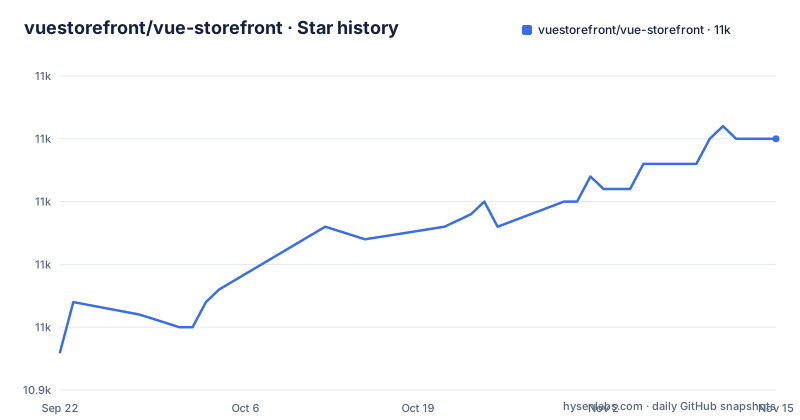
Star history
- vuestorefront/vue-storefront10,965 ★ · +17
| Repository | 2026-09-22 | 2026-11-15 |
|---|---|---|
| vuestorefront/vue-storefront | 10.9k | 11k |
17 Stars in the last 54 days, measured from the daily GitHub snapshot. Compare with other projects
Editorial analysis
One top-level README, and the code is published to npm instead
The repository named vuestorefront/vue-storefront has exactly one top-level entry: README.md. There is no source tree, no package.json, and no LICENSE file at the root, and both the primary language field and the license field are left empty. If you clone it expecting a framework to read, you end up with a document that points somewhere else. The packages carry their own version numbers under a @vue-storefront scope, so auditing the code means reading the published packages. The page also leans on a claim of 3500+ live stores and a wall of badges, one of which sends a coverage service at a next branch while the default branch is main, so even the status decoration is describing a branch this repository does not treat as its default. Plan your review time accordingly, because there is nothing here to grep.
The npm scope says vue-storefront while the product says Alokai
The naming split is the first thing that trips up a search. The product is Alokai, described as a Frontend as a Service for composable commerce with a homepage at alokai.com, yet the packages named in the recent releases are @vue-storefront/middleware at 5.4.0, @vue-storefront/sdk-axios-request-sender at 3.0.0, and @vue-storefront/changesets at 3.0.0. The scope you install and the name you search are different strings. The social links show the same drift: the top block links to a VueStorefront YouTube channel, while the later block links to useAlokai profiles alongside dev.to/vue-storefront and a vue-storefront LinkedIn page.
Alokai Middleware is an Express server, so static hosting is off the table
The load-bearing piece is Alokai Middleware, described as the Express.js server used to connect the frontend application with the ecommerce platform and other integrations, and GraphQL sits next to it in the tech stack. That fixes the deployment shape: a Node process that stays running and holds the connection to your commerce backend. You cannot build the storefront, push the output onto a static host, and walk away the way you can with a pure frontend. Keeping commerce credentials on the server side is a real benefit, but it also means file-drop static platforms and pure edge functions are not a match unless you adapt them yourself, and that adaptation is your work, not a documented recipe. Docker and Yarn both appear in the tech stack, yet no Dockerfile or compose file shows up among the repository entries, so the container setup lives somewhere this repository does not reveal.
Nuxt and Next share one list, but Storefront UI is Vue only
The out-of-the-box list names Nuxt.js as the Vue.js framework used to build the application and Next.js as the React.js framework used to build the application, then names Storefront UI as the Vue.js UI components library and the Alokai Theme as a fully functional theme based on that library. Read together, the two paths are not equally furnished. On the Nuxt path you inherit a component library written for Vue and a working theme. On the Next path, the README does not say whether that library and theme apply, and it names no React component set.
Two documentation sites, one of them pinned to a v2 path
Two documentation destinations sit in the same README. The Documentation link goes to docs.alokai.com, while the link offered for the list of available integrations goes to docs.vuestorefront.io/v2/integrations, held at a v2 path under the older brand's domain. A version-pinned path is a promise that the page stays as it was, which is useful for pinning an older architecture and unhelpful when you are trying to learn the current one. The backend-agnostic promise leans on that integration list, because the claim that Alokai is compatible with any backend that has an API cannot be checked from this repository: there is no integration code here, only the claim and the link. Read the version segment of that link before you trust what you find there.
No install command, no license file, and contribution rules filed elsewhere
There is no install command anywhere in the project's own documentation: no npm install line, no scaffolding command, no yarn invocation, and no stated Node version requirement. For a project whose tech stack includes Yarn, Docker, TypeScript, and Jest, that absence is conspicuous, and it means a reader has to leave for docs.alokai.com before touching a terminal. The same gap runs through governance. No LICENSE file sits at the root, the license field is empty, and the contribution instructions point to a Contributing Guide and a Code of Conduct hosted in a separate vuestorefront/.github repository. Nothing here tells you whether the middleware and the theme are safe to ship inside a commercial storefront, so treat licensing as unverified until you read the terms attached to the exact packages you install.
Release history ends in April 2025 while the last push is dated June 2026
The repository is not archived, and its last recorded push to the main branch is dated 2026-06-09. The most recent releases tell a different and older story: @vue-storefront/middleware 5.4.0 on 2025-04-23, @vue-storefront/sdk-axios-request-sender 3.0.0 on 2025-04-02, and @vue-storefront/changesets 3.0.0 on 2025-04-02. A gap of more than a year between the newest recorded package release and the newest recorded commit means the release feed is not a picture of what the main branch holds today. Any tutorial, snippet, or dependency range that pins middleware 5.4.0 may lag the code pushed in June 2026, and none of the version numbers available here will warn you about that. Look up the published version on npm before you pin it, and expect to make that check again when the middleware moves past 5.x.
Editorial conclusion
Vue Storefront fits teams that already run a Node service and want a working ecommerce frontend wrapped around a known commerce API, and it fits badly anyone who expects to vendor a framework from GitHub or to deploy to static hosting. Before committing, check three things this repository leaves open: the license terms for the middleware and theme packages, the npm version that corresponds to the June 2026 commit, and which of the two documentation sites carries the integration list you need.
Frequently asked questions
what is vue storefront
It is Alokai, a Frontend as a Service solution for composable commerce that connects the technologies needed to build and deploy ecommerce frontends. The frontend reaches your commerce backend through Alokai Middleware, an Express.js server, and the components come from Storefront UI, a Vue.js library, with a ready-made theme built on top of it.
vue storefront vsf
Both strings point to the same project. The product name in use is Alokai, but the published packages sit under a @vue-storefront scope, so a vsf reference and a vue-storefront reference lead back to the same middleware and the same Express server.
What exactly is Vue?
The project does not define Vue itself anywhere. It names Vue.js in the tech stack, calls Nuxt.js the Vue.js framework used to build the application, and describes Storefront UI as the Vue.js UI components library, so Vue shows up as the view layer under the Nuxt option.
What is vuex used for?
Nothing in this project names Vuex. The data-handling pieces actually described are GraphQL in the tech stack and Alokai Middleware, the Express.js server that connects the frontend application with the ecommerce platform and other integrations.
Is Vue.js still widely used?
The project does not answer that. Its tech stack lists Vue.js and Nuxt.js right next to React.js and Next.js, and the repository's primary language field is empty, so no usage figures arrive with it. Adoption evidence has to come from elsewhere.
vue storefront alternatives
The project names no competing storefront. Its answer to that question is a link to the list of available integrations plus the claim that Alokai is compatible with any backend that has an API, so any comparison starts from which commerce platforms you can connect rather than from a feature table.
Official sources
Add this badge to your README
If you maintain this project, the badge below links readers to this analysis and shows its maintenance status from the daily GitHub snapshot. Paste the markdown into your README; add ?metric=license or ?metric=stars to the image URL for a different field.

[](https://hysenlabs.com/projects/vuestorefront-vue-storefront)Star history chart for your README
[](https://hysenlabs.com/projects/vuestorefront-vue-storefront)Was this useful?