devcontainers/spec: The Metadata Format Behind Development Containers
Development Containers: Use a container as a full-featured development environment.
At a glance
- What is it?
- The devcontainers/spec repository defines devcontainer.json and the surrounding metadata model that tools use to turn a container into a full development environment. It is a specification, not a runtime, and that distinction shapes everything about adopting it.
- Who is it for?
- Adopt devcontainers/spec indirectly: it is the contract you are already relying on when you write a devcontainer.json for the CLI, a CI task, or an editor integration. Do not adopt it as a library, a server, or a runtime.
- Can I use it commercially?
- Yes, with credit. CC-BY-4.0 allows commercial use as long as you credit the authors and indicate what you changed. It is written for creative content, so check how it applies to any code.
- Is it still maintained?
- Activity is slowing. The repository last received commits 8 months ago.
- What is it written in?
- GitHub does not report a main language for this repository.
Answers come from the project's GitHub data, last synced on November 15, 2026, and from our analysis. They are not legal advice.
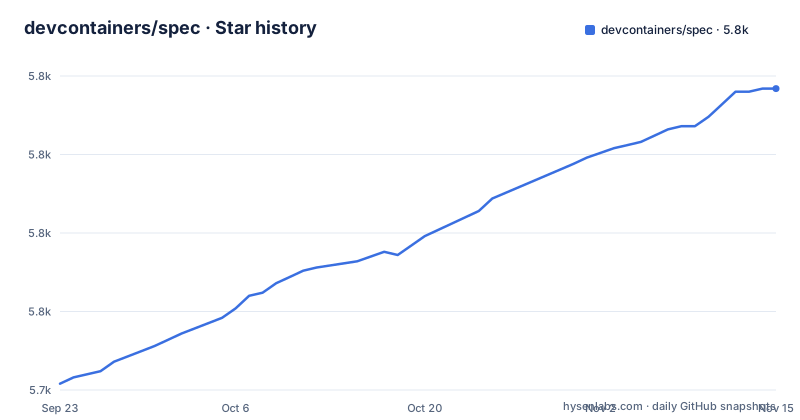
Star history
- devcontainers/spec5,821 ★ · +94
| Repository | 2026-09-23 | 2026-11-15 |
|---|---|---|
| devcontainers/spec | 5.7k | 5.8k |
94 Stars in the last 53 days, measured from the daily GitHub snapshot. Compare with other projects
Editorial analysis
What devcontainers/spec actually solves, and for whom
This repository exists because container-based development had no shared configuration format. Each tool that wanted to run your code inside a container invented its own way to describe the image, the mounted source tree, the ports, and the commands to run after startup. The specification's stated goal is to find ways to enrich existing formats with development-specific settings while still offering a simplified, un-orchestrated single container option, so the same description can serve as a coding environment or as a CI and testing environment.
The audience is narrow and technical. It is tool authors who need a stable object model to parse, and secondarily developers who want to understand what the properties in their devcontainer.json mean rather than copying snippets. If you only want a working environment in your editor, you rarely need this repository at all: you need a tool that implements it. The README points to the open-source CLI reference implementation for that, and to devcontainers/ci for a GitHub Action and an Azure DevOps Task that reuse the same setup in continuous integration.
devcontainer.json and the devcontainer.metadata image label
The first format in the specification is devcontainer.json, described in the README as a structured JSON with Comments (jsonc) metadata format that tools can use to store the configuration required to develop inside local or cloud-based containerized coding. JSON with comments matters in practice: it lets a configuration carry inline explanation without a separate documentation file, and it means a strict JSON parser will reject a valid devcontainer.json.
The README states that the same structured data can be embedded in images and other formats while retaining a common object model for consistent processing. The concrete example given is a devcontainer.metadata image label, which ties settings directly to a container image so that a tool reading the image can discover the configuration without a file in the repository. That is the architectural idea worth understanding: the file and the image label are two carriers for one model, and a tool that only reads files will not see metadata attached to an image.
The repository's layout reflects this. Schemas live in schemas/, the normative text lives in docs/specs, and proposals/ holds active proposals that have not been folded into the specification. The README also notes that the CLI implementation supports Docker Compose alongside the single container option, so the model is not limited to the un-orchestrated case even though that case is the stated baseline.
Getting a first devcontainer.json running
There is nothing to install from this repository. It ships documentation and schemas, and the README directs anyone who wants to use the format to the CLI reference implementation, the CI action, or a product that integrates the metadata. That repository is where the working code lives; the specification repository is where the format is written down.
The README describes devcontainer.json as jsonc, so comments are permitted inside it.
The README does not print a command line for starting an environment, and it does not document flags, ports or environment variables. It states only that the CLI reference implementation can be used directly or integrated into product experiences to deliver the structured metadata benefits, and that it supports Docker Compose and a simplified, un-orchestrated single container option. Consult the CLI repository for the exact invocation rather than guessing at one here.
The same file can be reused outside local development. The README notes that a GitHub Action and an Azure DevOps Task are available in devcontainers/ci for running a repository's dev container in continuous integration builds, which lets you reuse the same setup for local development and for building and testing your code in CI.
Where the specification stops and your tooling begins
The most common mismatch is expecting the spec repository to answer operational questions. It does not document rollback of a container, cache invalidation, or what happens when a lifecycle command fails halfway. Those behaviours belong to the implementation you chose, and the README says as much by routing non-spec feature requests to the CLI repository and spec-maintained Features and Templates to their own repositories.
A second boundary is Features. The specification defines how metadata is structured, but the README explicitly separates spec-maintained Features and Templates from the specification itself, listing devcontainers/features and devcontainers/templates as the places to report issues. Teams that treat the spec repository as the source of truth for a specific Feature will file issues in the wrong place and wait.
A third limitation is that the format is not a runtime. Nothing in this repository starts a container, mounts a volume, or forwards a port. If you need those things and have no implementing tool, this repository gives you a schema and prose, not a working environment. That is a deliberate scope, but it makes the specification useless in isolation.
Dev Containers versus Docker Compose and plain Dockerfiles
The honest comparison is not against Docker as a runtime, since a dev container is still a container. It is against the two things teams use today: a Dockerfile plus a shell script, and a Docker Compose file.
A Dockerfile describes how to build an image and nothing about the developer's workspace. Everything else, which directories are mounted, which ports appear on the host, which command runs after creation, lives in documentation or in someone's shell history. The specification's contribution is putting that metadata in one structured file with a defined object model, so a tool can read it and a second tool can read the same file.
Compose overlaps more directly. The README says the CLI supports integrating with Docker Compose, so the choice is not either/or: a project can keep a Compose file for services and use devcontainer.json for the development-specific settings layered on top. The difference is intent. Compose describes a set of services to run; the specification describes an environment a person develops inside, including the un-orchestrated single container case that Compose does not address well. If your project genuinely needs several coordinated services, Compose remains the right tool for the topology, and the specification is the right tool for the developer-facing metadata.
Maintenance, licence, and what upgrading costs you
The repository is not archived, and the last push was on 2026-03-20. Treat the specification as stable rather than fast-moving. The repository has no published GitHub releases, which fits a document-and-schema project: changes arrive as commits and proposals rather than versioned artifacts you install.
That has a real consequence for upgrade cost. A Git commit can pin a historical specification snapshot, but the compatibility surface is the object model and schemas in schemas/, and actual behavior depends on the implementing tool. When the specification adds a property, your tool may ignore it silently. When the specification changes the meaning of a property, your existing devcontainer.json keeps parsing and behaves differently. Neither case produces an error at the point of change, so the practical check is reading docs/specs for the properties you depend on after a tool upgrade, not after a spec commit.
The licence is Creative Commons Attribution 4.0 International, with the README carrying a Microsoft copyright line. CC-BY-4.0 is a content licence, not a software licence, which matches a repository of prose and schemas. Attribution is the operative condition if you reproduce specification text. The repository also contains a LICENSE-CODE file, which suggests code in the repository may be covered differently from the documentation; check both files before reusing anything, and treat this as a pointer rather than legal advice.
Editorial conclusion
Adopt devcontainers/spec indirectly: it is the contract you are already relying on when you write a devcontainer.json for the CLI, a CI task, or an editor integration. Do not adopt it as a library, a server, or a runtime. Before committing a configuration, read the specification pages under docs/specs for the exact properties you use, and check how your tool merges devcontainer.json with image-label metadata and whether it supports the properties you rely on. If you need a working implementation, the spec repository is the wrong place to look and the CLI repository is the right one.
Frequently asked questions
What are Dev Container Features?
The README distinguishes spec-maintained Features from the specification itself and lists devcontainers/features as the repository for them. The specification defines how development-specific metadata is structured; the Features repository holds the maintained Feature definitions that build on it.
Can I use Dev Containers on Windows?
The README does not address Windows specifically. It describes the format as usable for local or cloud-based containerized coding and names the CLI reference implementation as the way to apply it, but it makes no platform claim, so confirm support with whichever tool you use.
What are the key differences between Dev Containers and Docker Containers?
A development container is still a container. The difference the README draws is that the specification adds common development-specific settings, tools and configuration on top of existing formats, and offers a simplified, un-orchestrated single container option aimed at coding environments and continuous integration rather than deployment.
Official sources
Add this badge to your README
If you maintain this project, the badge below links readers to this analysis and shows its maintenance status from the daily GitHub snapshot. Paste the markdown into your README; add ?metric=license or ?metric=stars to the image URL for a different field.

[](https://hysenlabs.com/projects/devcontainers-spec)Star history chart for your README
[](https://hysenlabs.com/projects/devcontainers-spec)Was this useful?