weaviate/recipes is a link table first and a notebook collection second
This repository shares end-to-end notebooks on how to use various Weaviate features and integrations!
At a glance
- What is it?
- Weaviate Recipes collects end-to-end examples in four categories: datasets, integrations, Weaviate features and Query Agent. Its README links to the categories and lists example integrations and features, while installation and connection details are left to the individual notebooks and documentation.
- Who is it for?
- This is the place to start if you already run Weaviate and want a working notebook for one specific partner or one specific feature, because the four directories are organised by exactly that distinction and the Query Agent modes are explained well enough to choose between. It is not a tutorial and not a reference: the README names no client version, no install step and no cluster, and the integration table gives you a name without a path to the notebook behind it.
- Can I use it commercially?
- Not without permission. GitHub finds no licence file in the repository, and without a licence all rights are reserved by default: you may read the code but not reuse it. Check the README, or ask the authors, before using it.
- Is it still maintained?
- Yes. The repository last received commits 25 days ago.
- What is it written in?
- Mainly Jupyter Notebook, according to GitHub's language statistics.
Answers come from the project's GitHub data, last synced on November 15, 2026, and from our analysis. They are not legal advice.
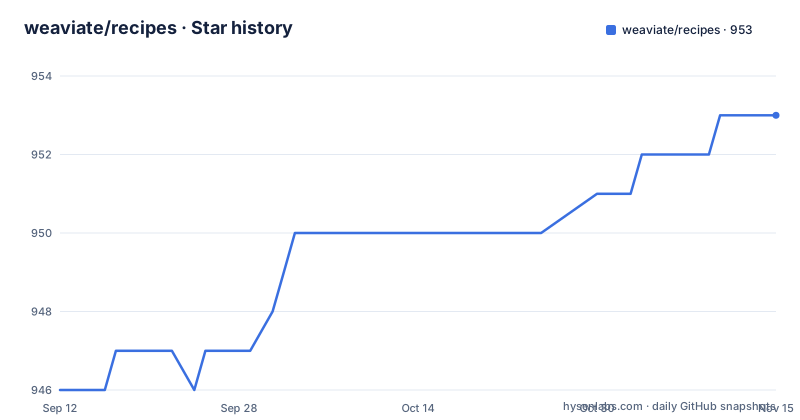
Star history
- weaviate/recipes953 ★ · +7
| Repository | 2026-09-12 | 2026-11-15 |
|---|---|---|
| weaviate/recipes | 946 | 953 |
7 Stars in the last 64 days, measured from the daily GitHub snapshot. Compare with other projects
Editorial analysis
The front page answers what exists and never how to run it
The repository is a notebook collection. Its primary language is Jupyter Notebook, and the top level holds four content directories, `datasets/`, `integrations/`, `query-agent/` and `weaviate-features/`, alongside `.docs/` and `.github/`. Everything else is in the README, and the README is four tables of links and one-line descriptions. There is no install command, no client library version, no cluster address and no code cell anywhere in it. So the first page a reader sees answers what kinds of examples exist and nothing about running any of them, and the useful information sits one directory down. The four categories are described in single lines: datasets are ready to use sets to ingest into a cluster, integrations are notebooks showing Weaviate alongside another technology, features cover vector, hybrid and generative search plus reranking, multi-tenancy and more, and the Query Agent notebooks cover building with that agent. That gap is partly by design, since the README points outward to Weaviate's own integrations documentation site for the details, but it means the repository has no self-contained entry point.
Navigating from the README to examples
The README links to four categories: datasets, integrations, Weaviate features and Query Agent. Follow these links to browse the examples, then open the relevant notebook for its setup and dependencies. A separate relative link points contributors to the guide for converting notebooks into documentation-friendly Markdown.
Notebooks are the source and the published docs are converted from them
There is a short section on adding recipes to the Weaviate documentation, and it is the only maintenance instruction in the README. It points at the contributor guide in the `.docs` directory and describes its purpose as converting recipes, which it names as Jupyter Notebooks, into docs-friendly markdown. The guide describes a conversion path for recipes that contributors want to add to the documentation; the README does not say that every notebook has a published Markdown counterpart. Check the contributor guide for the appropriate source and conversion workflow before updating published documentation. The README does not go past that one sentence, so the conversion command, its inputs, its output path and the conditions under which it runs are documented only in the guide the link points at, and the `.docs` directory is not itself listed among the four content categories.
Integrations span five categories
The README groups integrations into cloud hyperscalers, compute infrastructure, LLM and agent frameworks, data platforms, and operations. Examples include Google, AWS, NVIDIA, Modal, LangChain, LlamaIndex, Databricks, Airbyte, Arize, and Weights & Biases. The company names are listed without individual notebook links, so browse the integrations directory for a particular example. The README also links to the Weaviate integrations documentation.
The feature catalog covers search and retrieval
The current README lists twelve feature areas. Model Providers names `nearText`, `hybrid` and `.generate`; Media Search names `nearImage` and `nearVideo`; and the Search REST API row names bm25, near-text, near-vector, near-object, hybrid and aggregate over HTTP. Other entries cover filters, reranking, classification, multi-tenancy, multi-vector embeddings, product and rotational quantization, dropping a vector index, and evaluation. Open a notebook for its actual parameters and setup.
The three Query Agent modes differ in what comes back
Query Agent is documented with a per-mode table, and the three modes are separated by return type rather than by capability. Ask transforms the query into actionable searches or aggregations and then produces a final answer to the question, so the output is prose. Search performs the same transformation but returns the matching Weaviate objects directly, so the output is data you can post-process. Suggest Queries is the odd one out, since it suggests queries based on the data in your collection and therefore inspects the collection rather than running a search against it. That makes it a starting point for exploration rather than an answer path. Integrations and Weaviate Features also have their own tables; the README does not provide a numbered mode list.
Datasets is the only category described but never enumerated
The README describes Datasets as ready-to-use data for ingestion into a Weaviate cluster but does not enumerate individual datasets. Browse the `datasets/` directory to see the available examples and their setup requirements. The other categories have separate tables listing integrations, features or Query Agent modes.
No license file, no releases, and a maintenance claim with no date
Two things a reuse decision needs are absent. The project metadata records no license, and the top-level listing has no LICENSE file either, holding only `.docs/`, `.github/`, `.gitignore`, `README.md` and the four content directories. So terms for a notebook copied out of this repository are not stated anywhere in the tree, and the question has to go to the maintainers rather than be answered from the files. Releases are missing in the same way, with no GitHub releases published at all, so there is nothing to pin. The Feedback section fills the gap with a claim rather than a fact, calling this an ongoing project whose updates will be made frequently and inviting either an issue or a contribution, so the stated way to change the collection is to propose the gap yourself. The last commit is dated 2026-10-01, which is the only dated fact available about how often anything changes here, and the promise itself attaches no schedule, no cadence and no owner to the sentence making it.
Editorial conclusion
This is the place to start if you already run Weaviate and want a working notebook for one specific partner or one specific feature, because the four directories are organised by exactly that distinction and the Query Agent modes are explained well enough to choose between. It is not a tutorial and not a reference: the README names no client version, no install step and no cluster, and the integration table gives you a name without a path to the notebook behind it. Before you copy anything out of here, settle two things the tree leaves open, since no license is recorded and no license file is present at the root, and since there are no tagged releases to pin a notebook to.
Frequently asked questions
What is actually inside the weaviate/recipes repository?
Four content directories, datasets, integrations, query-agent and weaviate-features, plus a .docs directory holding the guide for converting notebooks into docs-friendly markdown. The primary language is Jupyter Notebook, and everything substantive sits one level below the README.
Does weaviate/recipes show how to install or connect to Weaviate?
No. The README names no install command, no client library version and no cluster address, and it sends readers to the Weaviate integrations documentation site instead. Running any notebook means getting the connection details from somewhere else first.
Which Weaviate operators do the recipes cover?
The README names nearText, hybrid and .generate for model providers, nearImage and nearVideo for media search, and bm25, near-text, near-vector, near-object, hybrid and aggregate in its Search REST API row. It also lists other features including filters, reranking and quantization.
What is the difference between Ask and Search in the Query Agent notebooks?
Ask turns the query into searches or aggregations and then returns a final answer, while Search does the same transformation and returns the matching Weaviate objects directly. A third mode, Suggest Queries, suggests queries from the data already in the collection.
Can I reuse a notebook from weaviate/recipes in a commercial project?
Nothing in the tree says. No license is recorded for the project and no license file sits at the top level, so the terms have to be settled with the maintainers through an issue rather than read off the repository.
Official sources
Add this badge to your README
If you maintain this project, the badge below links readers to this analysis and shows its maintenance status from the daily GitHub snapshot. Paste the markdown into your README; add ?metric=license or ?metric=stars to the image URL for a different field.

[](https://hysenlabs.com/projects/weaviate-recipes)Star history chart for your README
[](https://hysenlabs.com/projects/weaviate-recipes)Was this useful?