Rspress builds MDX docs sites on Rsbuild, and its install steps live on a separate website
🦀 A fast Rsbuild-based static site generator.
At a glance
- What is it?
- Rspress is a static site generator from the web-infra-dev team that compiles MDX through Rsbuild, indexes pages for search at build time and emits plain HTML. This review covers what the repository shows, where it stops, and who should check what before adopting it.
- Who is it for?
- Pick Rspress if your documentation team already writes React and MDX and wants the same Rspack-based toolchain that Rsbuild users run. Skip it if you need a written comparison with VitePress or Docusaurus, because the repository offers none.
- Can I use it commercially?
- Yes. MIT is a permissive licence: you can use, modify and sell software built on it, as long as you keep its copyright and licence notices.
- Is it still maintained?
- Yes. The repository last received commits 2 days ago.
- What is it written in?
- Mainly TypeScript, according to GitHub's language statistics.
Answers come from the project's GitHub data, last synced on November 6, 2026, and from our analysis. They are not legal advice.
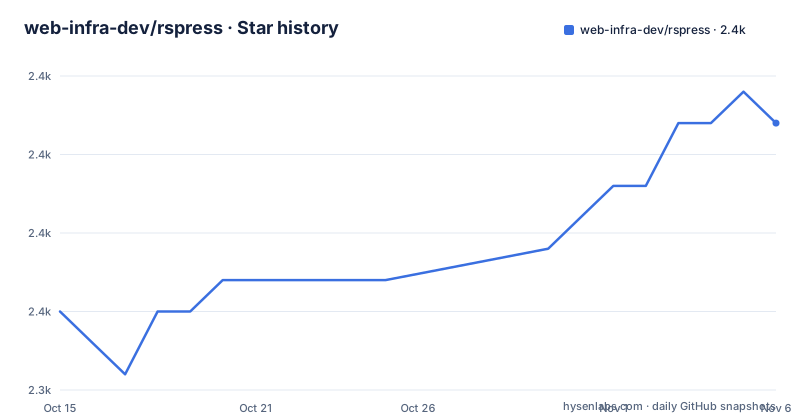
Star history
- web-infra-dev/rspress2,356 ★ · +6
| Repository | 2026-10-15 | 2026-11-06 |
|---|---|---|
| web-infra-dev/rspress | 2.4k | 2.4k |
6 Stars in the last 22 days, measured from the daily GitHub snapshot. Compare with other projects
Editorial analysis
MDX compilation runs through Rsbuild, so the build speed claim depends on Rspack
Rspress describes itself as a fast Rsbuild-based static site generator. The speed claim is attached to two parts: Rsbuild as the build tool and an MDX compiler for the content. That pairing decides what you get. Your Markdown pages are not plain Markdown, they are MDX, so every page can import and render React components. A page that only needs headings and paragraphs still goes through the same pipeline.
Rsbuild itself sits on top of Rspack, and the Rstack table in the repository lists Rspack as the bundler, Rsbuild as the build tool, and Rspress as the static site generator. So a team that already uses Rsbuild for an application meets the same configuration vocabulary here. A team that has never touched Rsbuild learns two layers at once: the Rspress site configuration and the underlying Rsbuild options it builds on.
The repository gives no build-time numbers. It says the speed is extremely fast and stops there, with no benchmark table and no comparison against another generator. If build time is your deciding factor, you have to measure it on your own content volume, because nothing in the repository gives you a figure to plan around.
Components in Markdown are the point, and they tie every page to React
MDX support is listed as a headline feature: you write content and use React components inside it. That is a real capability for documentation that needs live demos, tabs, callouts or custom tables. It is also a commitment. A site written heavily in MDX components cannot be moved to a generator that only reads plain Markdown without rewriting those pages.
The feature list also names a component document use case, with multiple ways to preview a component demo. The repository does not list those ways. The package name @rspress/core on npm and the Quick start at rspress.rs/guide/start/getting-started.html are where the detail lives, and neither is reproduced in the repository's top-level file. If your reason to choose Rspress is component demos, open the website first and check which preview styles exist and whether they match how your components are built.
The practical consequence is a split in who can edit the site. Writers who know Markdown can author prose pages without touching React. Anyone adding an interactive block needs to write or at least import a component, and that needs someone who can run the build locally.
Search is generated during the build, with no external service named
Rspress generates a full-text search index while it builds. The feature description says it provides out-of-the-box full-text search, which means a visitor can search the site without you wiring up a hosted search product. For a documentation site that ships as static files, that removes one moving part from deployment.
What the repository does not say is how the index behaves at size. It names no limit on page count, no index size, and no language handling. A site with a few hundred pages and a site with several thousand are both covered by the same one-line promise. If your documentation is large or multilingual, test the generated index with a realistic copy of your content before committing to it.
There is also no description of how to replace the built-in search. If you already pay for or run a separate search service, the repository does not tell you whether Rspress can step aside. The plugin system is the place to look, and its documentation is on the website rather than in the repository.
Production output is static HTML, which fixes where server features cannot exist
In production, Rspress builds into static HTML files that can be deployed anywhere. That is the whole deployment story in the repository: no server runtime, no hosting adapter, no list of supported platforms. Static output means you can put the result on any file host or content delivery network, and it also means anything that needs a server at request time is outside what this tool produces.
Authentication, per-user pages, server-side redirects and form handling do not come from a static site generator. If your documentation needs gated sections, you would handle that at the hosting layer or in a separate service. The repository does not discuss that boundary, so it is a question you answer before choosing, not one the project answers for you.
The development workflow is a different mode from the production build. The monorepo scripts show this split: a build script compiles the packages, and the website has its own build and preview scripts. For your own site, the same split applies: you iterate in a development server, then publish the static files that the production build writes.
The monorepo layout tells you what is a package and what is only the docs site
The repository root is a private pnpm workspace named rspress-monorepo, with packages/, website/, e2e/, scripts/ and tests/ at the top level, plus pnpm-workspace.yaml and rstack.config.mts. The installable product is not this root. It is the @rspress/core package on npm, whose README link the repository points to. Cloning the repo and running the root scripts is how you contribute, not how you build a documentation site.
These are the root scripts that matter to a contributor, copied from package.json:
"build": "pnpm --filter \"./packages/*\" --workspace-concurrency=3 -r run build",
"build:website": "pnpm --filter @rspress/docs... --workspace-concurrency=3 -r run build",
"dev:website": "pnpm --filter \"@rspress/docs^...\" --workspace-concurrency=3 -r run build && pnpm --filter @rspress/docs run dev",
"test": "pnpm test:unit && pnpm test:e2e",
"test:unit": "rstest run",
"test:e2e": "rstest run --config rstest.e2e.config.mts"
The dev:website script builds every dependency of the docs package first and only then starts its dev server, so a fresh checkout takes a full package build before anything appears. The prepare script also runs pnpm run build, which means a plain install in the monorepo triggers a build too. Contributors should expect that on their first clone.
Testing is split in two. Unit tests and end-to-end tests run through Rstest, with Playwright pinned at 1.64.1 in the development dependencies for the browser side.
The plugin system exists, but the repository gives no plugin API to read
A plugin system lets you customize the build process and the theme. That is the extension story, and it is the answer to the question of what happens when the defaults do not fit. The repository offers no hook names, no example plugin and no list of official plugins. Everything beyond the one-line description sits on rspress.rs.
This matters for planning. If your requirement is a custom theme, a build-time transform or a special page type, the existence of a plugin system does not prove your case is covered. Read the plugin and theme pages on the website, and look for a working example close to what you need, before you assume the hook is there.
Two more things are visible at the root. An AGENTS.md file and a skills.json file sit alongside the usual CONTRIBUTING.md, and the prepare script runs skills-package-manager install. The repository does not explain either file. They show that the contributor setup includes tooling for coding agents, but whether that affects anyone building a docs site with Rspress is not stated, and most users can ignore it.
Version 2.1.0 is still in beta while 2.0.23 is the last stable tag listed
The repository is not archived. The last push was on 2026-10-22, and the recent releases are v2.1.0-beta.2 on 2026-10-28, v2.1.0-beta.1 on 2026-10-15 and v2.0.23 on 2026-09-29. Two betas in two weeks, with a stable patch release a few weeks before, is a visible release rhythm. It also tells you that the newest feature work is in prerelease form.
That creates a decision you make at install time. The stable line ends, in this listing, at v2.0.23. The 2.1.0 betas are what the team is currently building toward. If you need a version that behaves the same next month as it does today, stay on the stable tag and upgrade deliberately when 2.1.0 is no longer a beta. If you want what is new, you accept that beta behaviour can change between releases.
The repository also does not show a changelog or a migration guide between 2.0 and 2.1. Before moving a production site, read the release notes attached to each tag, because the root of the repository does not summarize what changed.
Quality tracking is the one maintenance signal the repository offers beyond releases: Rspress uses Web Infra QoS to observe the trend of key metrics such as bundle size, compile speed and install size. The dashboard is external, so the repository itself holds no figures.
Editorial conclusion
Pick Rspress if your documentation team already writes React and MDX and wants the same Rspack-based toolchain that Rsbuild users run. Skip it if you need a written comparison with VitePress or Docusaurus, because the repository offers none. Before committing, read the Quick start on rspress.rs, decide whether you track the 2.0.x line or the 2.1.0 beta, and confirm that the plugin and theme hooks you need exist in the docs.
Frequently asked questions
What are the key differences between Rspress and VitePress?
The repository contains no comparison with VitePress. What it states about Rspress is that it is built on Rsbuild with an MDX compiler, generates a full-text search index at build time, and outputs static HTML. Check those points against VitePress's own documentation.
What license does Rspress use?
Rspress is licensed under the MIT License. The repository also adopts the ByteDance Open Source Code of Conduct for contributors.
Is Rspress archived or still receiving updates?
The repository is not archived. The last push was on 2026-10-22, and v2.1.0-beta.2 was tagged on 2026-10-28.
Official sources
Add this badge to your README
If you maintain this project, the badge below links readers to this analysis and shows its maintenance status from the daily GitHub snapshot. Paste the markdown into your README; add ?metric=license or ?metric=stars to the image URL for a different field.

[](https://hysenlabs.com/projects/web-infra-dev-rspress)Star history chart for your README
[](https://hysenlabs.com/projects/web-infra-dev-rspress)Was this useful?