AI-Video-Transcriber: three install paths, two Python floors, no lock file
Transcribe and summarize videos and podcasts using AI. Open-source, multi-platform, and supports multiple languages.
At a glance
- What is it?
- This is a FastAPI service that transcribes video and podcast URLs or uploaded files, preferring native subtitles over speech recognition. Its own configuration files disagree with its documentation in specific places: a Python 3.8 floor beside a 3.12 image, nine dependencies with no upper bounds and no lock file, a service that binds all interfaces with no authentication, and a container health check that probes the front page.
- Who is it for?
- This suits a single operator on a private machine who wants subtitles-first transcription with the model kept out of the loop when a platform already has captions. It does not suit exposing the service to a network, because it binds all interfaces, publishes its port and describes no authentication anywhere.
- Can I use it commercially?
- Yes. Apache-2.0 is a permissive licence: you can use, modify and sell software built on it, as long as you keep its copyright and licence notices.
- Is it still maintained?
- Yes. The repository last received commits 12 days ago.
- What is it written in?
- Mainly Python, according to GitHub's language statistics.
Answers come from the project's GitHub data, last synced on November 23, 2026, and from our analysis. They are not legal advice.
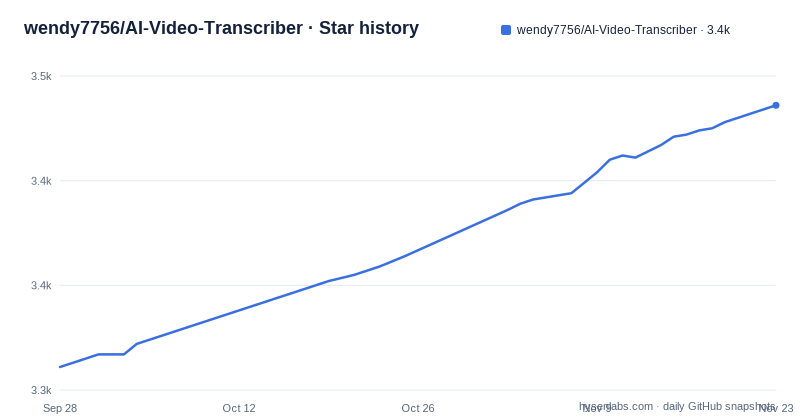
Star history
- wendy7756/AI-Video-Transcriber3,436 ★ · +125
| Repository | 2026-09-28 | 2026-11-23 |
|---|---|---|
| wendy7756/AI-Video-Transcriber | 3.3k | 3.4k |
125 Stars in the last 56 days, measured from the daily GitHub snapshot. Compare with other projects
Editorial analysis
The local floor is 3.8 and the container floor is 3.12
The prerequisites state Python 3.8 or newer. The container image is built on Python 3.12, and its own comment says the image is aligned with the recommended local environment, naming 3.12 as that environment.
Those two statements describe different floors for the same application, and the documentation hedges around the gap rather than resolving it. The installation section says the image uses Python 3.12 on Debian Bookworm and installs the same version constraints as a fresh local virtual environment on a current Python. The qualifier doing the work there is current. Whatever counts as current when the file was written is what the equivalence claim rests on, and it is not a number.
There are three installation routes, and they differ in more than convenience. The automatic route clones the repository, makes the install script executable and runs it:
git clone https://github.com/wendy7756/AI-Video-Transcriber.git
cd AI-Video-Transcriber

chmod +x install.sh
./install.sh
That step needs a Unix shell, since it changes an executable bit before invoking the script. The Docker route copies an example environment file, starts a compose stack or builds and runs an image directly. The manual route creates a virtual environment, upgrades pip and installs from the requirements file, then installs FFmpeg through whichever system package manager the platform uses, with Homebrew for macOS, apt for Debian and Ubuntu, and yum for CentOS and RHEL.
The FFmpeg requirement is the one that cannot be satisfied by pip. The documentation credits it with audio extraction for the downloader, merging downloaded video, and normalising uploaded media, so it is on two of the three code paths rather than an optional extra.
Nine dependencies, all lower bounds, and no lock file
The requirements file is short and every line in it is an inequality with no ceiling:
fastapi>=0.110.0
uvicorn[standard]>=0.27.0
python-multipart>=0.0.9
yt-dlp>=2024.12.13
faster-whisper>=1.1.0
openai>=1.51.0
pydantic>=2.7.0
aiofiles>=24.1.0

# Only needed for mcp_server.py (agent/tool integration)
mcp>=2.0.0
Nine packages, no pins, and no lock file at the repository root. The container image installs from this same file after upgrading pip, setuptools and wheel, and its comment states the intent plainly: take the newest version that satisfies the lower bound. So two builds of the same commit months apart resolve to different versions, and the FastAPI, Pydantic and OpenAI client in particular are exactly the packages where a major bump changes behaviour.
Two entries deserve separate mention. The downloader is the only constraint written as a date rather than a version number, yt-dlp at 2024.12.13 or newer, which is a reasonable habit for a package that needs to keep pace with site changes and a poor one for reproducibility, since it never stops moving.
The last entry is labelled as needed only for one script, the MCP server used for agent and tool integration. It is still installed unconditionally by the base requirements, so an operator who never touches the agent integration still pulls it in.
That the Web framework floor is 0.110.0 and the validation floor is 2.7.0 together means the service expects the modern Pydantic v2 interface rather than the v1 one, which is worth knowing before anyone tries an older lockfile of their own.
The service binds all interfaces and nothing authenticates it
The example environment file ships with a host setting already pointing at every interface:
HOST=0.0.0.0
PORT=8000
The compose file repeats both, and then publishes the port to the host:
    ports:
      - "8000:8000"
So in the documented Docker path the service listens on all interfaces inside the container and is mapped to port 8000 on the machine. The restart policy is unless-stopped, so it comes back after a reboot.
What is missing from every configuration file and every section of the documentation is an authentication mechanism for the service itself. There is a login screen, a token, a password, or an API key that callers must present to submit a job. The only key mentioned anywhere is the one for the AI provider, and that key is the resource at risk rather than the thing protecting it.
That combination is the part to think about. A job submitted to this service spends the operator's provider credit, and the input it accepts is a URL the service will fetch or a file the user uploads. Anyone who can reach port 8000 can submit work against the operator's key.
The documentation does describe where the provider key lives in the browser, and says it is never sent anywhere but the chosen provider, which is a narrower claim than it first appears. The server-side environment variable remains available as a default, so the same key can be present in both places at once.
The provider key is kept in browser local storage
The model configuration step is deliberately client-side. You expand a settings panel, enter an API base URL and an API key, press Fetch to auto-discover the models that endpoint offers, and pick one. Leaving the field blank falls back to whatever the server is configured with.
The credentials are described as stored in the browser's local storage, and never sent anywhere but the chosen provider. Read strictly, that is a claim about where the key travels rather than about how it is protected, and the distinction matters. local storage is readable by any script running on the same origin, it survives until explicitly cleared, and it is not encrypted at rest in the browser profile.
The design has a real advantage and it should be stated as one. Because the key is entered per browser rather than baked into a deployment, two people can point the same server at different providers and different models without reconfiguring anything. A shared instance does not force everyone onto the operator's account.
It also means the browser is the place to look for a leaked credential. On a machine where the origin is reachable by other pages, or where an extension has broad host permissions, a key pasted into that field is exposed in a way a server-side environment variable is not.
The OpenAI-compatible framing is what makes the Fetch button possible in the first place. Any endpoint that speaks that interface can be used, including a local model server, which is why the base URL is a first-class field rather than a fixed constant.
Subtitles are preferred and the model is the fallback
The central design decision is that the application does not reach for speech recognition first. Where a platform already publishes subtitles, for YouTube among the named examples, the transcript is extracted directly and no audio is downloaded. Whisper is described as a fallback that makes the pipeline faster in the common case rather than as the primary path.
The interface makes the path visible. Each URL job carries a badge showing which route it took: a subtitle badge when native captions were found, or a Whisper badge when they were not and the audio had to be downloaded and transcribed. That is a small design decision with real diagnostic value, because the two routes have completely different failure modes and cost profiles.
The download path is shared rather than duplicated. When the original video is kept, which is on by default and capped at 720p by default, the audio for Whisper is extracted from that same file, so the source is fetched once. Turning the toggle off skips the video entirely for a text-only job.
Uploaded files follow the same pipeline after normalisation with FFmpeg, and plain text files skip both download and recognition, going straight into the text stage. Nine extensions are accepted: txt, mp3, mp4, m4a, wav, webm, mkv, ogg and flac.
Downstream, the transcript goes through automatic correction and paragraphing, then summarisation in one of eleven languages, with translation triggered automatically when the chosen summary language differs from the source language of the transcript.
The container health check asks the front page, not the model
The image installs curl and then uses it for exactly one purpose:
HEALTHCHECK --interval=30s --timeout=30s --start-period=5s --retries=3 \
    CMD curl -f http://localhost:8000/ || exit 1
It probes the root path. That is the page the browser is told to open, so a successful check confirms the HTTP server is up and the front end is being served. It does not confirm that the speech recognition model loaded, that the provider endpoint is reachable, or that a key is configured. All three can fail while this check stays green.
The timings are tight for that workload. A five-second start period is short for a service that may be loading a speech recognition model on first use, and the check retries three times at thirty-second intervals before declaring failure. Whether that budget suits a slow first transcription depends on whether model loading happens at startup or lazily on the first request, which the documentation does not say.
The compose file also constrains memory, and the constraint sits awkwardly against a configurable model size:
    deploy:
      resources:
        limits:
          memory: 2G
        reservations:
          memory: 1G
The environment files offer five model sizes, from tiny through large, with base as the default. A two gigabyte ceiling is a reasonable budget for the default and a questionable one for the largest of the five, and nothing in the documentation ties the two settings together.
The compose file is otherwise current in style: it declares no version key at all, and its volumes block is commented out with a note that uncommenting it persists the temp directory on the host.
Development mode and long jobs cannot coexist, by design
The service is started with a script, and there is a second mode for it:
python3 start.py --prodThe reason given is specific: production mode disables hot reloading so that the server-sent events connection stays stable across tasks lasting thirty minutes or more. Progress updates are streamed over server-sent events, and a file watcher restarting the process mid-stream would break exactly the long jobs the tool exists for.
That is a real constraint rather than a stylistic preference, and it explains why the container's start command uses the production flag. It also means the development and production behaviours differ in a way that matters: in development, a code change restarts the server and any in-flight job ends with it.
The same instinct shows up in the upload handling. Uploads are posted to the same route as URLs, as a multipart request to the process-video endpoint, and the documentation gives the reason: it helps when a reverse proxy only allows that one path. So the API is shaped by the constraints of the deployments people actually run it in, rather than by a cleaner separation into two endpoints.
Starting the service is otherwise a single command, and the browser is pointed at port 8000 afterwards. The optional server-side environment variables are described as defaults for people who prefer them, with the note that configuration in the interface is the alternative.
Agent integration is a shipped path, and the README is bilingual
The repository root contains a script for model context protocol integration, a skills directory, a Claude directory and a Codex plugin directory. The documentation's own table of contents reserves a section for using the tool from Claude, Codex or scripts, which places coding agents alongside the browser as expected callers.
That is why one dependency is marked as needed only for the MCP server. The agent integration is not an afterthought bolted on afterwards; it has its own entry script and its own package requirement, and it is the reason the repository ships configuration directories for two specific agent tools.
The documentation is bilingual, with an English file and a Chinese translation at the root, and the repository stores two screenshots named for the language they show. Issues and pull requests from either community are presumably written in one language or the other.
Licensing is Apache 2.0, with a licence file at the root. There are no tagged releases, so there is no version to pin and nothing to diff a running deployment against, and the most recent recorded commit on the default branch is dated 2026-09-15. The project homepage is an external site rather than a page hosted in this repository, so the deployment instructions here and the product site are maintained separately.
Editorial conclusion
This suits a single operator on a private machine who wants subtitles-first transcription with the model kept out of the loop when a platform already has captions. It does not suit exposing the service to a network, because it binds all interfaces, publishes its port and describes no authentication anywhere. Verify three things first. Whether the port is reachable by anyone but you, since the API key it spends is yours. What your dependency versions actually resolve to, since every constraint is a lower bound and nothing is pinned. And whether you have FFmpeg on the host, because the media normalisation and the audio path both depend on it and only the container ships it.
Frequently asked questions
Does AI-Video-Transcriber always run speech recognition on a video?
No. It is subtitle-first: where a platform has native subtitles, for YouTube among the named examples, the transcript is extracted without downloading audio, and the speech recognition model is only a fallback. A badge on each URL job shows which path was taken.
What are the prerequisites for AI-Video-Transcriber?
Python 3.8 or newer, FFmpeg, and an API key from any OpenAI-compatible provider. The key is described as configurable directly in the interface with no server-side environment variable needed. The container image uses Python 3.12 on Debian Bookworm and ships FFmpeg itself.
Where are API keys stored in AI-Video-Transcriber?
Credentials entered in the interface are described as stored in the browser's local storage and never sent anywhere but the chosen provider. An OPENAI_API_KEY environment variable is also supported as a server-side default for people who prefer to configure it that way.
Which file types can AI-Video-Transcriber accept as uploads?
Nine extensions are listed: txt, mp3, mp4, m4a, wav, webm, mkv, ogg and flac. Media is normalised with FFmpeg before transcription, while a plain txt file is treated as transcript text and skips both download and speech recognition.
Why does AI-Video-Transcriber need a production mode for long videos?
Because progress is streamed over server-sent events. Production mode disables hot reloading so that the connection survives tasks lasting thirty minutes or more, since a file watcher restarting the server would otherwise end an in-flight job.
Official sources
Add this badge to your README
If you maintain this project, the badge below links readers to this analysis and shows its maintenance status from the daily GitHub snapshot. Paste the markdown into your README; add ?metric=license or ?metric=stars to the image URL for a different field.

[](https://hysenlabs.com/projects/wendy7756-ai-video-transcriber)Star history chart for your README
[](https://hysenlabs.com/projects/wendy7756-ai-video-transcriber)Was this useful?