Inside WeNet: unbounded torch, CPU by default, and a runtime you build
Production First and Production Ready End-to-End Speech Recognition Toolkit
At a glance
- What is it?
- WeNet is a production first speech recognition toolkit whose pip install tracks the main branch. Its sharp edges are concrete: torch resolves with no upper bound, the command line tool stays on the CPU unless you pass --device cuda, and the x86 runtime is a separate cmake build.
- Who is it for?
- WeNet fits teams that want one toolkit covering Chinese and English models and can accept a pip install that tracks the main branch instead of a tag. Before starting, check the torch build against your driver's CUDA version, remember that --device defaults to cpu, and decide early whether you need the cmake runtime build, since the pip package gives you neither the x86 runtime nor the language model graph.
- Can I use it commercially?
- Yes. Apache-2.0 is a permissive licence: you can use, modify and sell software built on it, as long as you keep its copyright and licence notices.
- Is it still maintained?
- Yes. The repository last received commits 26 days ago.
- What is it written in?
- Mainly Python, according to GitHub's language statistics.
Answers come from the project's GitHub data, last synced on November 19, 2026, and from our analysis. They are not legal advice.
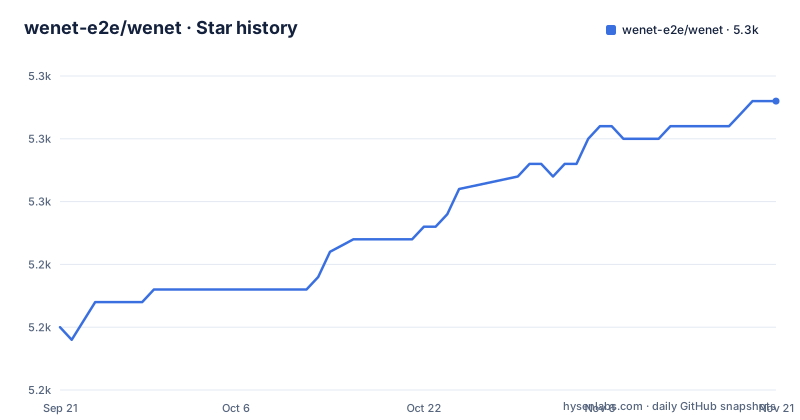
Star history
- wenet-e2e/wenet5,258 ★ · +18
| Repository | 2026-09-21 | 2026-11-19 |
|---|---|---|
| wenet-e2e/wenet | 5.2k | 5.3k |
18 Stars in the last 59 days, measured from the daily GitHub snapshot. Compare with other projects
Editorial analysis
pip installs from main and brings an unbounded torch
The quick install is one line, and it installs from the repository's default branch rather than from a tagged release:
pip install git+https://github.com/wenet-e2e/wenet.gitThere is no tag or branch in that URL, so what pip resolves is the current state of main, not v3.1.0 from 2024-05-23. The dependency that bites first is torch. The package metadata requires `torch>=1.13.0` with no upper bound, so pip is free to hand you a build newer than the CUDA version your driver supports, and it decides that during install, before any code of yours runs. The check to run afterwards is one line:
python -c "import torch; print(torch.cuda.is_available())"If that prints `False` on a machine that has a GPU, nothing raises. Torch falls back to the CPU silently, and you discover it through elapsed time rather than an error. The documented fix is to pin a build matching the driver's CUDA version, for example `torch==2.4.0+cu121` with `torchaudio==2.4.0+cu121` from the cu121 index, added with `--force-reinstall`. What this single command does not bring you is the conda environment, the corpus recipes or the C++ runtime; it installs the Python package and nothing else, which is why the source install reads as a separate procedure rather than a variant.
The CLI stays on the CPU until you pass --device cuda
Model selection is the `-m` flag, and `-h` prints the rest of the parameters:
wenet -m paraformer audio.wavFor Chinese, `-m` accepts `paraformer`, `firered` or `wenetspeech`. For English it accepts `whisper-large-v3` or `whisper-large-v3-turbo`. The Python API mirrors that split and hands back an object with a `transcribe` method:
import wenet

model = wenet.load_model('paraformer')
result = model.transcribe('audio.wav')
print(result.text)
Here is the trap. `--device` defaults to `cpu` even when a GPU is sitting in the machine, so the command above never touches the accelerator unless you ask for it: `--device cuda` on the command line, or `wenet.load_model(model_name, device='cuda')` in Python. A separate note in the Python docs covers hardware specifics, with dtype and attention backend options discussed for Turing parts such as the Tesla T4. That page is worth reading before a first GPU run rather than after. The docs also carry more command line and Python examples than the two shown here, and the README links a hosted demo space where the same package runs without a local install.
Two dependency floors disagree inside the same repo
The repository carries two dependency lists, and they do not line up. The package metadata in `setup.py` is permissive: numpy, requests, tqdm, `torch>=1.13.0`, `torchaudio>=0.13.0`, openai-whisper, librosa, pyyaml, jieba, sentencepiece and langid. The `requirements.txt` on the from-source path is stricter: `torch>=2.1.2`, `torchaudio>=2.1.2`, `deepspeed>=0.14.0`, tensorboard, tensorboardX, textgrid and pytest, plus a linting stack pinned to exact versions such as `flake8==3.8.2`, `pycodestyle==2.6.0`, `pyflakes==2.2.0`, `cpplint==1.6.1` and `clang-format==17.0.6`. One machine can satisfy the pip package and fail the source tree, and installing the package tells you nothing about what the tree expects. Two details hide in plain sight: on Windows the metadata appends PySoundFile to the requirements, and the NPU extra pins `numpy<2.0.0` next to `torch==2.2.0`, `torch-npu==2.2.0` and `torchaudio==2.2.0`.
The training procedure spells the difference out. You clone the tree, build a conda environment on Python 3.10, install CUDA, and then pin the wheels:
git clone https://github.com/wenet-e2e/wenet.gitconda create -n wenet python=3.10
conda activate wenet
conda install conda-forge::soxpip install torch==2.2.2+cu121 torchaudio==2.2.2+cu121 -f https://download.pytorch.org/whl/torch_stable.htmlCUDA 12.1 is the recommended version and the toolkit itself comes from a separate installation page. Count the torch positions and you have three of them in one repository: an open ended floor for the pip package, a `>=2.1.2` floor for the source tree, and a hard 2.2.2 with cu121 wheels for training. A resolver will not reconcile those for you.
sox failures arrive as one RuntimeError with three fixes
The documented symptom is a single line:
RuntimeError: set_buffer_size requires sox extension which is not available.That one error has three answers, depending on how the machine was provisioned. Ubuntu and Debian style:
sudo apt-get install sox libsox-devCentOS and Red Hat style:
sudo yum install sox sox-develAnd inside the conda environment the training path creates:
conda install conda-forge::soxThe third one matters, because the training instructions open with `conda create -n wenet python=3.10`, `conda activate wenet` and then the conda-forge sox install. The development path also ends with `pip install -r requirements.txt` and `pre-commit install`, which is where the pinned flake8 and clang-format versions above come from. Read the error text literally: it names the missing extension and nothing else, so the fix list above is exhaustive for the platforms the project bothered to document, and a different distribution is left to you.
The x86 runtime is a separate cmake build you can skip
Some deployments need a build step and most people never see it. The runtime directory holds the C++ side, and it is only required if you want the x86 runtime or intend to use a language model. Otherwise the instruction is to ignore the step. cmake 3.14 or above is the floor:
# runtime build requires cmake 3.14 or above
cd runtime/libtorch
mkdir build && cd build && cmake -DGRAPH_TOOLS=ON .. && cmake --build .
That integration has borrowed ancestry, and the acknowledgements say so: Kaldi for the WFST based decoding used for LM integration, EESEN for building the TLG based graph, OpenTransformer for python batch inference of end-to-end models, and ESPnet for the transformer based modeling. The practical consequence is that a pure Python install gives you no graph and no LM path. Finding that out after designing a decoding pipeline around it would cost more than the cmake command. The line above is also not the whole story for platforms: the README points at a runtime document for building on more operating systems, which is where anyone not on a Linux box with cmake 3.14 should start.
Ascend NPU installs come with their own version table
NPU hardware gets a separate branch of the instructions. You install the CANN toolkit and kernels first, then install WeNet with its torch-npu dependencies:
pip install -e .[torch-npu]That extra name resolves through `extra_require` in the setup file, which pins `torch==2.2.0`, `torch-npu==2.2.0`, `torchaudio==2.2.0`, decorator, `numpy<2.0.0`, attrs and psutil. Next to it sits a version control table with a minimum column and a recommended column: CANN minimum 8.0.RC2.alpha003 with latest recommended, torch minimum 2.1.0 and recommended 2.2.0, torch-npu the same pair, torchaudio the same pair, and deepspeed minimum 0.13.2 with latest recommended. Notice the friction with the other file: `requirements.txt` asks for `torch>=2.1.2` while this table names 2.1.0 as the floor, and the training path recommends torch 2.2.2 with cu121 wheels. A resolver reading all three will not reconcile them for you. The editable install also matters in practice: the `-e` flag keeps the source tree authoritative, so edits under `wenet/` take effect without reinstalling, which is the whole point of taking this branch over the pip package.
Eighteen recipes share one python package and one C++ runtime
The tree explains why the install has two shapes. `wenet/` is the Python package that exposes the `wenet` console script through `wenet.cli.transcribe:main`, `runtime/` is the C++ side that wants cmake, `tools/` and `test/` sit beside them, and `examples/` holds seventeen recipe directories: aishell, aishell2, aishell4, chime4, commonvoice, csj, gigaspeech, hkust, librispeech, multi_cn, openasr2021, swbd, tedlium3, timit, vkw2021, wenetspeech and wsj. Two kinds of gate sit at the root: lint and format configuration in `.flake8`, `.clang-format`, `CPPLINT.cfg`, `setup.cfg` and `.pre-commit-config.yaml`, and the process files `CONTRIBUTING.md`, `CODE_OF_CONDUCT.md` and `ROADMAP.md`. The README gives no accuracy table, latency number or model size for the shipped models. The claim on offer is state of the art results on a lot of public speech datasets, and the pretrained model list lives in the docs. Tags stop at v3.1.0 from 2024-05-23 while the main branch was pushed on 2026-10-26, so read a tag as a snapshot and the pip install as the moving target. Where the answers live is equally spread out: a hosted documentation site, a papers page, a pretrained model list inside the docs, a roadmap thread on the issue tracker, and a discussion channel that the README points at for problems rather than for features.
Editorial conclusion
WeNet fits teams that want one toolkit covering Chinese and English models and can accept a pip install that tracks the main branch instead of a tag. Before starting, check the torch build against your driver's CUDA version, remember that --device defaults to cpu, and decide early whether you need the cmake runtime build, since the pip package gives you neither the x86 runtime nor the language model graph.
Frequently asked questions
wenet vs whisper: how do the two relate in the WeNet model list?
Whisper is a dependency of WeNet, required as openai-whisper in the package metadata and pinned to openai-whisper==20231117 in requirements.txt. The -m flag accepts whisper-large-v3 or whisper-large-v3-turbo for English, while paraformer, firered and wenetspeech are the Chinese choices.
Why does WeNet ignore my GPU after a pip install?
The package requires torch>=1.13.0 with no upper bound, so pip can install a torch build newer than your GPU driver supports, and torch then runs on the CPU with no error at all. Check it with python -c "import torch; print(torch.cuda.is_available())" and reinstall a build matching your driver's CUDA version, such as torch==2.4.0+cu121 from the cu121 index.
How do I install WeNet on Ascend NPU hardware?
Install the CANN toolkit and kernels, then run pip install -e .[torch-npu], which brings torch==2.2.0, torch-npu==2.2.0, torchaudio==2.2.0, decorator, numpy<2.0.0, attrs and psutil. The version table sets CANN at 8.0.RC2.alpha003 minimum, torch, torch-npu and torchaudio at 2.1.0 minimum with 2.2.0 recommended, and deepspeed at 0.13.2 minimum.
What does the WeNet runtime build need, and when can I skip it?
The build needs cmake 3.14 or above and runs as cd runtime/libtorch, then mkdir build && cd build && cmake -DGRAPH_TOOLS=ON .. && cmake --build . You can skip it entirely unless you want the x86 runtime or plan to use a language model.
Official sources
Add this badge to your README
If you maintain this project, the badge below links readers to this analysis and shows its maintenance status from the daily GitHub snapshot. Paste the markdown into your README; add ?metric=license or ?metric=stars to the image URL for a different field.

[](https://hysenlabs.com/projects/wenet-e2e-wenet)Star history chart for your README
[](https://hysenlabs.com/projects/wenet-e2e-wenet)Was this useful?