withoutbg runs the same call on CPU ONNX or a paid cloud API, and a JPEG save throws away the result
Python SDK for local and cloud background removal (pip install withoutbg)
At a glance
- What is it?
- withoutbg is a Python SDK for background removal with two backends behind one method name: open weights executed locally through ONNX Runtime, or a hosted API billed per image. The local path needs no GPU and one 455 MB download; the cloud path is better on hair and fur and sends your image away. The small details that will bite you are a sidecar metadata file, a batch call that exists because reloading weights is slow, and three separate license files.
- Who is it for?
- withoutbg fits scripts, notebooks and batch jobs where per-image cost or privacy matters more than the last few percent of edge quality.
- Can I use it commercially?
- Check first. The repository uses a licence we do not classify automatically, so read its LICENSE file before any commercial use.
- Is it still maintained?
- Yes. The repository last received commits 11 days ago.
- What is it written in?
- Mainly Python, according to GitHub's language statistics.
Answers come from the project's GitHub data, last synced on November 15, 2026, and from our analysis. They are not legal advice.
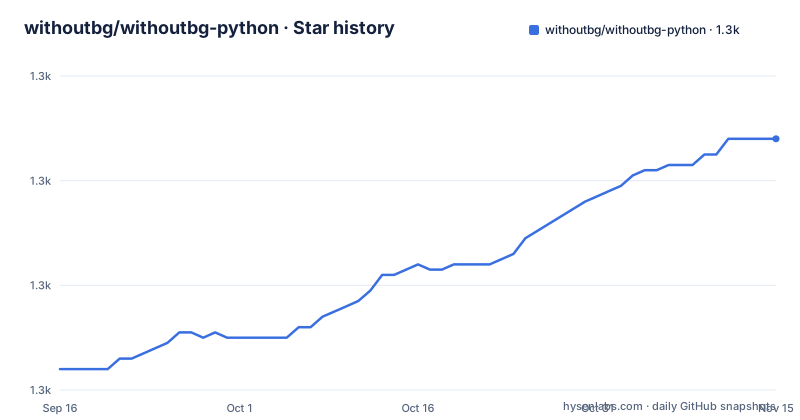
Star history
- withoutbg/withoutbg-python1,308 ★ · +44
| Repository | 2026-09-16 | 2026-11-15 |
|---|---|---|
| withoutbg/withoutbg-python | 1.3k | 1.3k |
44 Stars in the last 60 days, measured from the daily GitHub snapshot. Compare with other projects
Editorial analysis
One method name, two very different places to run it
The SDK's pitch is that both paths share one interface, so the difference between free and paid is a single line of construction. Local is `WithoutBG.open_weights()`, cloud is `WithoutBG.api()`. After that, `remove_background` is spelled the same either way, and so is `remove_background_batch`.
The comparison table makes the trade explicit. Cost is free forever against pay per image. Quality is described as good locally and better in the cloud, specifically on hair and fur, which is the usual hard case for a matte. Privacy is the row to read twice: local stays on your machine, while the cloud mode sends the image to the API. Best for is offline, private and batch work on one side, products and occasional use on the other.
There is also a decision list underneath, which reads like guidance rather than marketing. Offline or private processing points to local. A large batch points to local, with the reasoning given as paying the setup once and amortising it across images. Building a product points to cloud for better quality and zero infrastructure. Occasional use with no tolerance for setup points to cloud.
So the switch is not really about quality. It is about whether your images are allowed to leave the machine and whether you have infrastructure to run against.
Local means CPU ONNX, not a GPU framework
The GPU row in the mode table reads no for both columns, and the local column qualifies it as CPU ONNX. That single phrase decides what this package is: the local path is ONNX Runtime executing a downloaded graph, not PyTorch on a device.
The consequences are worth spelling out. There is no CUDA install to match, no driver to line up, and the code runs the same on a laptop, a build machine and a container. The dependency list confirms it: onnxruntime with a lower bound of 1.12, plus numpy, Pillow, requests, click, tqdm and the Hugging Face hub client.
The cost is the download. The first local run fetches roughly 455 MB of weights from Hugging Face, once, and after that everything stays local. That number is the whole setup story for the free path, and it is the reason the decision list recommends local for batch work where it amortises.
The weights live at a public Hugging Face repository under the project's organisation, and there is also a hosted Space and a self-hosted container image if you would rather not install the package at all.
Saving transparent images as JPEG requires a background
For an RGBA Pillow image, use PNG or a WebP encoder that supports alpha if the result must remain transparent. JPEG has no alpha channel, and current Pillow raises an error when asked to save RGBA directly as JPEG. Composite onto an explicit background first:
from PIL import Image

result.save("output.png")
background = Image.new("RGB", result.size, "white")
background.paste(result, mask=result.getchannel("A"))
background.save("output.jpg")
The command line has the same trap and the same answer. Asking for JPEG output takes a `--format jpg` with a `--quality` setting, which is described as filling the background with white. So the CLI resolves the problem by compositing rather than by refusing, which is a reasonable choice for a batch of portraits and a lossy one if your background was meant to be transparent.
The compositing example shows the intended use of the alpha channel, where the foreground image is pasted using itself as the mask. Once you have done that, the PNG is the thing worth keeping.
Batch is a separate call because reloading weights is the trap
There is a batch method, and the page explains why in one sentence: recreating the model for every image reloads the weights each time, and the instruction not to do that in a loop is explicit.
model = WithoutBG.open_weights()  # keep this object alive

images = ["photo1.jpg", "photo2.jpg", "photo3.jpg"]
results = model.remove_background_batch(images, output_dir="results/")
The comment in the code is the documentation. A 455 MB graph on disk and a session built from it is not cheap to construct, so the difference between hoisting the model out of the loop and building it inside the loop is the difference between a job that runs and one that appears to hang.
The batch call takes a directory for output, which means the returned objects are a convenience rather than the point; for a long job you mostly care that files land somewhere predictable.
Progress reporting is a callback taking a fraction, so a batch job can report a percentage without polling anything. That is a small design choice that matters for the use case the SDK names for itself, which is batch work.
Running offline needs the ONNX file and a sidecar JSON beside it
Two environment variables carry the configuration, and they are not symmetric. The API key is the cloud path's credential, readable from the environment or passed as an argument. The model path is the local path's escape hatch, pointing at a local `.onnx` file and skipping the Hugging Face download entirely.
The catch is stated one sentence later and is the kind of thing that costs an afternoon: keep the sidecar metadata file next to the ONNX file. Its name is given, so you know exactly what the graph expects to find beside it.
So an air-gapped install is a two-file operation, not a one-file one, and the second file is not optional.
The troubleshooting section treats the same three failure modes the page expects: the model download failing, which it points at the Hugging Face repository or the local path override, an import problem, which it answers with three commands to check which interpreter is active and whether the package is listed, and a rejected API key.
Three license files, because the weights are not the SDK
The repository root carries a license file, a second file named for the DINOv3 backbone, a notice file and a third-party licenses file. That is not clutter; it is three different subjects.
The SDK is the easy one. Its metadata declares Apache-2.0, and the page links the Apache 2.0 text. What you install with the package manager is covered by that.
The weights are separate. The page states that the open weights model is licensed under the withoutBG Open Model License, and that this license describes Apache 2.0 for the withoutBG portion. The wording implies the rest is governed separately, so the model's terms are not the same document as the code's terms even though the page points at the same licence family.
The backbone is a third subject. The model is described as built with DINOv3, and the root carries a dedicated license file for it. So a deployment that ships the weights ships something covered by three files, and a deployment that only installs the SDK ships one.
The architecture is described as a unified ONNX graph where depth, segmentation, matting and refinement all run in one pass, which is why a single download gets you the whole pipeline.
Two version mechanisms share one repository
The Python metadata marks its version as dynamic, so the number is injected at build time rather than written in the file. What injects it is the Node tooling: the repository carries a private package manifest for the release system, a release configuration file, and the conventional-commits plugins that derive a version from commit messages.
At the same time, the Makefile has hand-written targets for incrementing a patch, a minor and a major version, alongside the usual install, test, lint, format, type-check and publish targets.
Both mechanisms in one repository is a seam worth knowing about. The automated one reads commit history and writes the release; the manual one edits a version. Nothing in the pages shown explains which one is authoritative, and if you are forking this, that is the first question to ask.
The release tags themselves are conventional: 1.0.6 on 2026-07-02, 1.1.0 on 2026-07-17 and 1.1.1 on 2026-07-19. The repository is not archived, its last push is dated 2026-09-27, and the manifest classifies the package as beta.
This package is one surface of a wider set
The page is explicit that what you are looking at is the in-process path: embedding the library in Python code or calling the command line. The same open-weights technology is offered through other surfaces, and each is aimed at a different workflow.
There is a Docker and self-host option, in a separate repository, for an HTTP API or a browser UI on your own server with either CPU or an NVIDIA GPU. It even ships a ready-made CPU image you can run directly. There is a Mac application for people who want a desktop cutout tool, with an optional local API for plugins and scripts. There is a GIMP 3 plugin built around a private, mask-first workflow that talks either to the Mac local API or to Docker.
That last one is worth noticing: the editor integration is mask-first and routes through one of the two APIs rather than embedding a model, which is the same in-process versus served split this package already represents.
Migration is also documented, which tells you the API has been renamed before. Older names, `WithoutBG.opensource()` and `ProAPI`, are listed as moved, with a migration document. The keyword list in the metadata includes a well-known alternative in the same space, which is the clearest statement of who this is competing with.
Editorial conclusion
withoutbg fits scripts, notebooks and batch jobs where per-image cost or privacy matters more than the last few percent of edge quality. Verify five things first: whether you are allowed to send images off the machine, because the cloud mode is the one that uploads and the two modes are otherwise interchangeable; how you save the result, since JPEG discards transparency without warning; where the model file and its sidecar JSON live if you are running offline; which license applies to what, since the SDK, the weights and the DINOv3 backbone are three separate things; and whether your batch code holds one model object instead of rebuilding it. Version 1.1.1 is the newest tag, dated 2026-07-19, with a last push on 2026-09-27.
Frequently asked questions
How do I remove a background in Python with withoutbg?
Import the client, construct it with `WithoutBG.open_weights()` for the local model, then call `model.remove_background("photo.jpg").save("result.png")`. Every method returns a PIL image in RGBA mode, so save as PNG or WebP rather than JPEG, which drops transparency silently.
Do I need a GPU to run withoutbg?
No. The mode table lists GPU required as no for both local and cloud, and describes local inference as CPU ONNX. The only setup cost is the first run, which downloads roughly 455 MB of weights from Hugging Face once, after which everything stays on your machine.
What is the difference between withoutbg local and cloud mode?
Local is free, private and offline; cloud is pay per image with better edges on hair and fur, and the image is sent to the API. Both expose the same methods, so switching is a change of constructor. The key comes from WITHOUTBG_API_KEY or an api_key argument.
Can I run withoutbg without downloading weights from Hugging Face?
Yes, by setting WITHOUTBG_MODEL_PATH to a local .onnx file, which skips the download. The page also requires keeping the sidecar metadata file, withoutbg-open-weights.onnx.json, next to the ONNX file, so an offline install is a two-file operation.
What license applies to withoutbg?
Three of them. The Python SDK metadata declares Apache-2.0. The open weights model ships under the withoutBG Open Model License, which describes Apache 2.0 for the withoutBG portion. The model is built with DINOv3, and the repository root carries a separate LICENSE-DINOv3 alongside a notice and a third-party licenses file.
How do I process a batch of images efficiently?
Hold one model object and pass the list to `remove_background_batch(images, output_dir="results/")`. The page warns explicitly against recreating the model for every image, because that reloads the weights each time. A progress callback taking a fraction is available for reporting.
Official sources
Add this badge to your README
If you maintain this project, the badge below links readers to this analysis and shows its maintenance status from the daily GitHub snapshot. Paste the markdown into your README; add ?metric=license or ?metric=stars to the image URL for a different field.

[](https://hysenlabs.com/projects/withoutbg-withoutbg-python)Star history chart for your README
[](https://hysenlabs.com/projects/withoutbg-withoutbg-python)Was this useful?