Zutilo for Zotero: Features, Setup, Limits
Zotero plugin providing some additional editing features
At a glance
- What is it?
- Zutilo is a JavaScript plugin for Zotero that adds editing, clipboard, relationship, and interface commands through context menus and configurable keyboard shortcuts. It is aimed at Zotero power users, but the project warns that several features stopped working with Zotero 7.0.
- Who is it for?
- Zutilo is reasonable for Zotero users who need bulk tag handling, item relationships, clipboard formats, and configurable commands, especially if they can tolerate the documented Zotero 7 feature gaps. It is a poor fit for users who need every feature working with current Zotero releases or who cannot inspect the custom license and manage upgrades themselves.
- Can I use it commercially?
- Check first. The repository uses a licence we do not classify automatically, so read its LICENSE file before any commercial use.
- Is it still maintained?
- Yes. The repository last received commits 61 days ago.
- What is it written in?
- Mainly JavaScript, according to GitHub's language statistics.
Answers come from the project's GitHub data, last synced on November 7, 2026, and from our analysis. They are not legal advice.
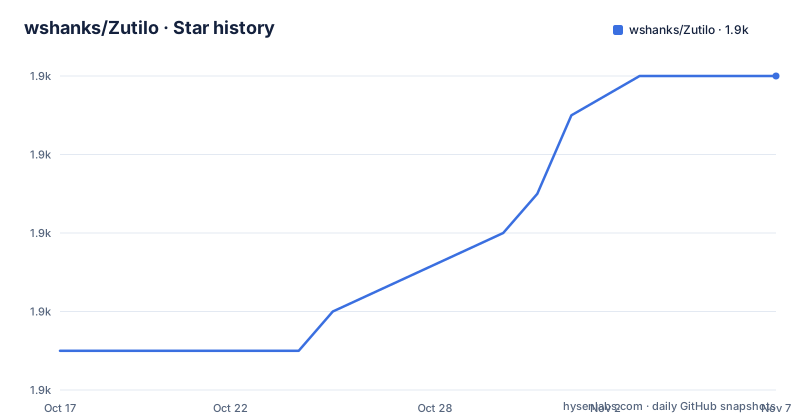
Star history
- wshanks/Zutilo1,890 ★ · +7
| Repository | 2026-10-17 | 2026-11-07 |
|---|---|---|
| wshanks/Zutilo | 1.9k | 1.9k |
7 Stars in the last 21 days, measured from the daily GitHub snapshot. Compare with other projects
Editorial analysis
What Zutilo Adds to Zotero
Zutilo addresses a specific limitation in base Zotero: frequent reference-management actions are not all exposed through the item context menu or keyboard shortcuts in the form a power user may want. The project targets people who already work heavily in Zotero, particularly users who manage tags, connect items, move records between applications, or want to operate the interface without reaching for the mouse every time.
The README identifies four feature groups. Zutilo can copy, paste, and remove sets of tags. It can select several items and relate them through a right-click action. It can copy items to the clipboard in several formats. It also provides keyboard shortcuts for editing items and for focusing or hiding parts of the Zotero user interface. These are editing and workflow additions rather than a replacement for Zotero's library management.
The project makes its graphical additions configurable. Individual graphical elements can be disabled, and available item-menu functions can be placed either inside a Zutilo submenu or directly in Zotero's item menu. That design is useful when the added commands would otherwise make a frequently used menu noisier. It also means that installation does not require accepting every visible command. The README says that Zutilo's graphical elements can be disabled individually, while the preferences window controls which item actions appear where.
This is a narrow plugin rather than a general automation platform. Its value comes from making repetitive actions available through menus and shortcuts. The README does not claim that Zutilo changes Zotero's underlying data model, adds new libraries, or replaces Zotero's synchronization and citation features.
Menu Commands and Clipboard Workflows
Zutilo operates through Zotero's item menu and, optionally, keyboard commands. By default, the plugin places a group of commands in a submenu named `Zutilo` when an item is right-clicked. The preferences window can move commands from that submenu into Zotero's item menu, hide commands from the submenu, or disable their graphical presentation. This gives the user control over both function and placement.
The clipboard features are especially relevant when a workflow crosses application boundaries. The README says Zutilo can copy items to the clipboard in several formats. It does not enumerate those formats, so the exact supported representations should be checked in `docs/COMMANDS.md` before relying on a particular exchange format.
Tag operations are another clear use case. Copying a set of tags and pasting it onto other selected items can reduce repeated editing, while removing a set of tags provides a direct way to manage tags across records. The project also documents selecting several items and using a context-menu action to relate them. These features concern batches of records, which makes Zutilo different from a plugin intended only to change the display of one item.
Keyboard shortcuts cover every function that can appear in the item menu, according to the README. Zutilo also has additional shortcut functions that are unavailable from the item menu. No shortcuts are defined by default. A user assigns a key combination in preferences, and Zutilo warns when that combination is already assigned to another function. This avoids silent conflicts, but it also means a useful setup still requires deliberate configuration after installation.
Installing the XPI in Zotero Standalone
The installation path is a manual XPI installation through Zotero Standalone, not an npm-based application installation. The README directs users to the project's GitHub releases page, where the `zutilo.xpi` file is available. In Zotero, open `Tools` and then `Add-ons`. In the Add-ons Manager, click the gear button in the upper-right area, choose `Install Add-On From File`, and select the downloaded `zutilo.xpi` file. Zutilo's preferences can then be opened through the Zotero Add-ons Manager or the Tools menu.
Firefox users may encounter an important file-handling issue. Firefox treats an `.xpi` file as a Firefox add-on and may attempt to install it through the Firefox add-on workflow. The README suggests saving the link as a file instead. On some systems, particularly Linux, Firefox may not permit that right-click action. In that case, the README says to download the file with a different browser or with a command-line tool such as `curl` or `wget`.
The repository also contains a `Makefile` for building `zutilo.xpi`, plus a `package.json` test script for ESLint. Those files concern development rather than the documented end-user installation path. The build process uses a ZIP archive assembled from the `addon` directory, while the release workflow described to users remains the download-and-install procedure above. The README does not document a supported Zotero plugin directory deployment, automatic update mechanism, or rollback procedure.
Zotero 7 Compatibility and Feature Gaps
The most important limitation is stated directly in the README. As of Zotero version 7.0, some Zutilo features, mainly keyboard shortcuts, no longer function. The README also says there was a long gap between the release of Zotero 7 and a Zutilo release that could be installed with it. This is a direct compatibility warning, not a general impression that the plugin may occasionally misbehave.
That limitation changes how the plugin should be evaluated. The tag, clipboard, and relationship features are described as Zutilo's main capabilities, but the README does not provide a feature-by-feature matrix for Zotero 7. It also does not state which specific keyboard shortcut functions fail, whether every clipboard format remains available, or whether later Zutilo releases restored any of those functions. The command reference would need to answer some of those questions.
Zutilo is therefore a poor fit for a user who requires a fully documented keyboard-driven workflow on Zotero 7 or later without accepting possible gaps. It may still fit a user whose essential work is limited to context-menu operations, but that narrower adoption should be checked against the installed Zutilo release rather than assumed.
There is a second maintenance risk. The README says Zutilo is largely maintained by one person, @wshanks, who does not have much time for it, and asks for additional help adapting to new Zotero releases and fixing bugs. It explicitly warns that without additional contributors, Zutilo may not keep compatibility with future Zotero releases. This is a documented project constraint, not an inference from repository popularity or activity.
Build, Tests, and License Checks
Zutilo has a small, concrete development surface. The repository includes JavaScript source under `addon`, localization files under `i18n`, documentation under `docs`, and a `Makefile`. The `package.json` test command runs ESLint against the addon source:
npm testThe documented end-user build target creates the distributable `build/zutilo.xpi` from the contents of the `addon` directory. The Makefile also builds localized internal README files when the required tooling is available, including `pandoc` and the repository's `scripts/substitute_relative_links`. The README points developers to `docs/DEVELOPERS.md` for build notes, but that file's contents are not available in the repository listing. The Makefile's `0x0` target uploads the XPI to `https://0x0.st`; that is a publishing action, not part of normal installation.
The repository metadata gives conflicting license signals that need direct inspection. The repository description identifies the license as Other because GitHub cannot classify the custom `LICENSE` file, while `package.json` declares `MPL-2.0`. This review cannot determine which terms govern a particular distribution without reading the actual license text. Users who need redistribution, modification, or compliance obligations should inspect `LICENSE.md` and confirm the terms applicable to the downloaded XPI.
Maintenance is a real upgrade cost here. The repository was last pushed on 2026-09-07 and recent releases include v4.2.2, dated 2026-08-22, v4.2.1, dated 2026-04-12, and v4.2.0, dated 2026-02-16. Those facts show recent repository activity, but the contributor warning and the Zotero 7 compatibility note remain the relevant adoption limits.
Choosing Zutilo Over Manual Workflows
Zutilo is appropriate when the desired improvement is a small set of Zotero editing conveniences rather than a new reference workflow. The clearest cases are selecting multiple items for relationship management, copying and removing groups of tags, transferring items through one of the documented clipboard formats, and moving frequently used commands into a context menu or assigning them shortcuts. Disabling individual graphical elements also makes it possible to retain useful functions without accepting a permanently expanded interface.
It is not the right tool when the requirement is dependable current-Zotero keyboard automation. The README explicitly says that some keyboard shortcuts no longer function as of Zotero 7.0. It is also a weak choice for a user who wants broad automation across applications, scheduled transformations, or a managed plugin deployment. Zutilo's documented scope is a set of Zotero-specific menu and keyboard functions, and the README does not describe an API, workflow engine, or headless operation.
Compared with handling each action manually in base Zotero, Zutilo offers direct batch-oriented commands and shortcut configuration. Compared with a general clipboard or automation tool, it stays inside the Zotero item workflow and exposes commands through Zotero's own menus. That narrower approach is the practical distinction: Zutilo reduces repetitive interaction inside Zotero, while it does not promise to automate arbitrary steps outside it.
The first verification should be functional rather than cosmetic. Install a release from the GitHub releases page, open Zutilo preferences, and check the commands required by the intended workflow. Then confirm whether the installed combination of Zutilo and Zotero actually supports the required keyboard actions, given the project's own warning about Zotero 7. The license file and release notes should be checked before redistribution or modification.
Editorial conclusion
Zutilo is reasonable for Zotero users who need bulk tag handling, item relationships, clipboard formats, and configurable commands, especially if they can tolerate the documented Zotero 7 feature gaps. It is a poor fit for users who need every feature working with current Zotero releases or who cannot inspect the custom license and manage upgrades themselves. Verify the Zutilo version, the Zotero 7 limitations, and the LICENSE file before adopting it.
Frequently asked questions
How do I install Zutilo in Zotero?
Download `zutilo.xpi` from the project's GitHub releases page. In Zotero Standalone, open `Tools` then `Add-ons`, use the gear menu to choose `Install Add-On From File`, and select the downloaded file.
Does Zutilo work with Zotero 7?
The README states that some Zutilo features, mainly keyboard shortcuts, no longer function as of Zotero 7.0. It also mentions a long gap before a Zutilo release could be installed with Zotero 7, so compatibility should be verified for the specific feature.
Can I customize Zutilo's keyboard shortcuts?
Yes. The README says no shortcuts are defined by default, but a combination can be assigned to each function in Zutilo's preferences. Zutilo displays a warning when a combination is already assigned to another function.
Official sources
Add this badge to your README
If you maintain this project, the badge below links readers to this analysis and shows its maintenance status from the daily GitHub snapshot. Paste the markdown into your README; add ?metric=license or ?metric=stars to the image URL for a different field.

[](https://hysenlabs.com/projects/wshanks-zutilo)Star history chart for your README
[](https://hysenlabs.com/projects/wshanks-zutilo)Was this useful?