AVideo: three components, one compose service, and a domain that changed
Create Your Own Broadcast Network With AVideo Platform Open-Source. OAVP OVP
At a glance
- What is it?
- AVideo is a self-hosted PHP video platform split into a Streamer, an Encoder and a Live Server, wired together by docker-compose.yml. The defaults it ships are phpMyAdmin on by default and an avideo database password, so the first job after cloning is tightening the compose file.
- Who is it for?
- Adopt AVideo when you want a video site you control end to end, and you can live with one PHP tree, a compose file you must harden yourself, and a licence you have to read in the LICENSE file before you deploy anything commercial. Pass if you need managed encoding or a CDN you do not operate, or if a project description full of acronyms is a bad sign for your own procurement process.
- Can I use it commercially?
- Check first. The repository uses a licence we do not classify automatically, so read its LICENSE file before any commercial use.
- Is it still maintained?
- Yes. The repository last received commits 1 day ago.
- What is it written in?
- Mainly JavaScript, according to GitHub's language statistics.
Answers come from the project's GitHub data, last synced on November 7, 2026, and from our analysis. They are not legal advice.
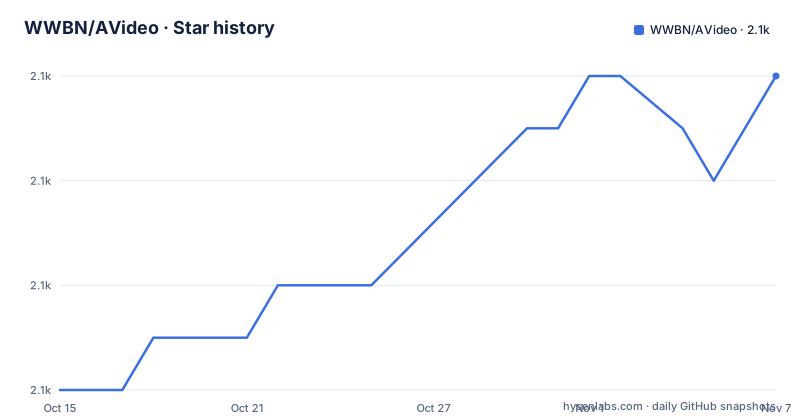
Star history
- WWBN/AVideo2,112 ★ · +6
| Repository | 2026-10-15 | 2026-11-07 |
|---|---|---|
| WWBN/AVideo | 2.1k | 2.1k |
6 Stars in the last 23 days, measured from the daily GitHub snapshot. Compare with other projects
Editorial analysis
Three components and one compose service shape the system
AVideo splits into three named parts, and the split is not cosmetic. Streamer is the interface people watch, Encoder turns uploads into a web format, and Live Server exists for broadcast. The compose file expresses all of that as one service, `avideo`, built from the repository root:
services:
  avideo:
    build:
      context: .
    restart: "unless-stopped"
    environment:
      SOCKET_PORT: ${SOCKET_PORT:-2053}
      HTTP_PORT: ${HTTP_PORT:-80}
      HTTPS_PORT: ${HTTPS_PORT:-443}
      DB_MYSQL_HOST: "${DB_MYSQL_HOST:-database}"
      DB_MYSQL_PORT: ${DB_MYSQL_PORT:-3306}
      DB_MYSQL_NAME: "${DB_MYSQL_NAME:-avideo}"
      DB_MYSQL_USER: "${DB_MYSQL_USER:-avideo}"
      DB_MYSQL_PASSWORD: "${DB_MYSQL_PASSWORD:-avideo}"
Notice what that file does not do. There is no second service for the Live Server, and no service for the database either, even though the default host name for MySQL is `database` and that name has to resolve to something. Its Dockerfile still accepts `NGINX_RTMP_PORT`, `NGINX_HTTP_PORT` and `NGINX_HTTPS_PORT` as build arguments, and the root directory carries a separate `Dockerfile.live` next to `Dockerfile.mariadb`. How those pieces are meant to be spread across machines is a choice the README never spells out.
The encoder is a piece you install on purpose
Running your own encoder needs three arguments, and the README loses the third one. Faster processing than a public encoder server comes first, privacy of your files in transit second, and the network compatibility bullet stops mid-clause at 'In cases where your server is', with nothing after it. That truncation sits in the project's own text, and it leaves the most operational reason for the split unexplained.
Running the encoder yourself also means owning its failures. The `plugin/` directory at the root is where Live, VideoHLS, Subscription, PayPerView, AD_Server, Chat2 and VideoOffline plug in, and each one has its own wiki page rather than a single page describing how the pieces fit. Storage is the other half of that job. The storage page names S3, B2 and FTP as backends, while the tracked tree still keeps an `objects/` directory and a `storage/` directory beside `view/`, which leaves open whether local disk serves files by default before you ever point the platform at a bucket.
env.example and one compose service, with defaults you must replace
Installing means filling in `env.example` and starting the stack, and the README gives no start command, so the compose file is all you have to work from. `SOCKET_PORT` resolves to 2053, `HTTP_PORT` to 80, `HTTPS_PORT` to 443 and `DB_MYSQL_PORT` to 3306 when your environment file is silent. Two more defaults deserve a closer look before anything runs at all:
      ENABLE_PHPMYADMIN: "${ENABLE_PHPMYADMIN:-yes}"
      PHPMYADMIN_PORT: ${PHPMYADMIN_PORT:-8081}
      PHPMYADMIN_ENCODER_PORT: ${PHPMYADMIN_ENCODER_PORT:-8082}
      CREATE_TLS_CERTIFICATE: "${CREATE_TLS_CERTIFICATE:-yes}"
      TLS_CERTIFICATE_FILE: "${TLS_CERTIFICATE_FILE:-/etc/apache2/ssl/localhost.crt}"
      TLS_CERTIFICATE_KEY: "${TLS_CERTIFICATE_KEY:-/etc/apache2/ssl/localhost.key}"
phpMyAdmin ships enabled, and it holds a second port for the encoder, which tells you the two components are administered as separate web roots. The credential defaults are worse than absent ones, because they invite copy and paste: database name, database user and database password all resolve to avideo. Set those three, set `SERVER_NAME` to something real, and set `ENABLE_PHPMYADMIN` to no as soon as you have a shell, since the service is marked to restart unless-stopped and will otherwise come back with the same defaults.
TLS defaults point at certificate files named localhost
Create the certificate yourself or let the build do it. `CREATE_TLS_CERTIFICATE` is set to yes by default, and when your environment file names no paths the two file variables resolve to `/etc/apache2/ssl/localhost.crt` and `/etc/apache2/ssl/localhost.key`. Now look at the tracked root, where `localhost.crt`, `localhost.csr` and `localhost.key` are committed beside `index.php` and `composer.json`. The container path and the repository file names agree on the word localhost. Whether the image copies those three files into `/etc/apache2/ssl` is not shown anywhere, because the compose listing stops partway through the environment block, at `CONTACT_EMAIL`.
Built on `ubuntu:26.04`, the web server layer reads like this:
RUN chmod 1777 /tmp

RUN apt-get update && apt-get install -y --no-install-recommends \
    apache2 \
    libapache2-mod-xsendfile \
    libapache2-mod-php \
    libimage-exiftool-perl \
    memcached && \
    apt-get clean && rm -rf /var/lib/apt/lists/* /tmp/* /var/tmp/*
`libapache2-mod-xsendfile` is the one worth caring about on a video host, because it lets the web server hand the file over instead of pushing every byte through PHP. The same image also installs `sshpass`, `rsync`, `lsof`, `htop` and `mysql-client`, and the Dockerfile labels its maintainer as Daniel Neto at [email protected]. That is a box you administer, not a minimal artefact you ship.
Committed vendor, node_modules and nohup.out bloat every clone
Root-level entries run unusually long, and the reason is that dependencies live inside the repository. `vendor/` sits beside `composer.lock`, `composer.phar`, `composer.patches.json` and a `patches/` directory, which is how this project applies its own edits to packaged code. `node_modules/` and `package-lock.json` are tracked in the same fashion, so a fresh clone is not a small download whichever branch you take.
Workstation leftovers are committed too: `.vscode/`, `.intelephense/`, `.editorconfig`, `nohup.out`, `web.config` next to `.htaccess`, and a `localhost.key` no source tree needs in public view. The parts that matter for your own planning sit further down. `sw.js`, `OneSignalSDKWorker.js` and `workbox-v6.5.3/` together say the front end is a service worker application with push notifications wired to OneSignal. `phpunit.xml` and `tests/` say a test suite exists, `.gitmodules` says parts of the tree are submodules without naming them, and `updatedb/` is the only root entry whose name points at a schema migration step, with no documented way to run it.
Three icon fonts and two jQuery trees in one manifest
`package.json` is where the project's history shows. Three generations of one icon font are listed at once: `font-awesome` at 4.7.0, `fontawesome-free` at 1.0.4 and `@fortawesome/fontawesome-free` at 7.3.1. Two jQuery trees stand side by side as well, with `jquery` at 4.0.0 sitting next to `jquery-ui` at 1.14.2 and `jquery-ui-dist` at 1.13.3, a version gap between the source package and its built copy.
The player stack is more coherent. `video.js` at 8.24.1 is paired with `videojs-contrib-ads` at 7.5.2, `videojs-contrib-quality-levels` at 4.1.0, `@silvermine/videojs-airplay` at 1.3.0 and `@silvermine/videojs-chromecast` at 1.5.0, while `hls.js` at 1.7.3 covers the browser side of the encrypted HLS the README puts first in its feature list. Browser-side storage is `pouchdb` at 9.0.0 with `dexie` at 4.4.6, and the `overrides` block pins two transitive packages by hand, `socket.io-parser` to 4.2.7 and the `uuid` inside `pouchdb` to 11.1.1. Pinning other people's transitive dependencies is a maintenance tax, and this manifest is cut off mid-entry at `videojs-font`, so the real surface is longer than what you can read.
YouPHPTube left the domain but stayed in the topics
The README opens with a domain notice rather than an introduction, which matters for anyone auditing this project. The previous domains `youphptube.com` and `youphp.tube` are being retired after a dispute initiated by Google LLC (YouTube), the README insists it has always been an independent open-source project, and the address to move to is `https://streamphp.com/`. That same domain is the repository homepage and the host in the Dockerfile maintainer label, so the move is complete on the infrastructure side. The leftovers are in the metadata: the topic list still carries `streamer-site` and `streamer-tool`, and the repository description still carries the strings OAVP and OVP. The very first line of the README is a link to `README.fa.md`, so Persian documentation is treated as a first-class translation.
The code has not stood still through the rename. The last push was on 2026-10-06, and v29.3.0, v29.2.0 and v29.1.1 landed on 2026-10-05, 2026-09-28 and 2026-09-23, so choosing this project is partly a decision about how fast you intend to move between point versions.
A public encoder server is the alternative the README names
Because the README names a shared public encoder server as the thing you are moving away from, the honest comparison is with running the encoder elsewhere, not with a different platform. Your own encoder trades a hosted service for three things you then own: the machine that runs it, the storage behind it, and every failure mode that comes with both. That is why the storage page lists S3, B2 and FTP as backends while the tracked tree still keeps local directories for objects.
Two further differences are worth weighing. This platform pushes control toward plugins, with separate wiki pages for restreaming to other destinations, subscriptions, Pay-Per-View, VAST and VMAP advertising, and offline downloads. An object storage plus CDN pipeline has none of that surface and none of that PHP to patch, and it hands encoding off instead of owning it. The other trade is encrypted HLS with keys managed inside the platform, which is exactly the piece you give up when a third party runs the encoder.
Editorial conclusion
Adopt AVideo when you want a video site you control end to end, and you can live with one PHP tree, a compose file you must harden yourself, and a licence you have to read in the LICENSE file before you deploy anything commercial. Pass if you need managed encoding or a CDN you do not operate, or if a project description full of acronyms is a bad sign for your own procurement process. Check first whether Streamer, Encoder and Live Server fit on one host, then change the avideo database password and set ENABLE_PHPMYADMIN to no before the first start.
Frequently asked questions
What are the three components AVideo is built from?
Streamer is the component for playing and managing videos, Encoder converts videos into a web-compatible format, and Live Server handles broadcasting live video. The repository root also carries separate Dockerfile.live and Dockerfile.mariadb images next to the main Dockerfile.
How do I install AVideo with Docker Compose?
The repository ships docker-compose.yml together with env.example. The compose file builds a single service named avideo from the repository root and reads SOCKET_PORT, HTTP_PORT, HTTPS_PORT, DB_MYSQL_HOST, DB_MYSQL_PORT, DB_MYSQL_NAME, DB_MYSQL_USER and DB_MYSQL_PASSWORD from the environment with defaults, and the README gives no start command.
Which ports does the default AVideo configuration expose?
HTTP on 80, HTTPS on 443, a socket port on 2053, MySQL on 3306, and phpMyAdmin on 8081 for the app plus 8082 for the encoder. phpMyAdmin is enabled by default through ENABLE_PHPMYADMIN.
What licence does AVideo use?
GitHub shows the licence as Other, a custom one it cannot classify, and points to the LICENSE file for the actual terms. The README does not summarise them, so that file is the only place the conditions are written down.
How does AVideo protect hosted videos from downloading?
Encrypted HLS with managed keys covers both on-demand and live streams, and download protection is documented under the VideoHLS-Plugin. Letting viewers save a copy for offline use is a separate feature covered by VideoOffline-Plugin.
Official sources
Add this badge to your README
If you maintain this project, the badge below links readers to this analysis and shows its maintenance status from the daily GitHub snapshot. Paste the markdown into your README; add ?metric=license or ?metric=stars to the image URL for a different field.

[](https://hysenlabs.com/projects/wwbn-avideo)Star history chart for your README
[](https://hysenlabs.com/projects/wwbn-avideo)Was this useful?