The README is a build artefact, and the root build runs one package twice
High performance and CommonMark compliant HTML to Markdown converter. Maintained by the Kreuzberg team. Kreuzberg is a fast, polyglot document intelligence engine with a Rust core. It extracts structured data from 98+ document formats using streaming parsers and built-in OCR.
At a glance
- What is it?
- A CommonMark and Djot converter with sixteen language bindings over a single Rust core, and a parsing strategy that escalates through three tiers. What is worth reading is the machinery around it: a generated README with a freshness hash, three version fields, and a root manifest that builds the same package under two names.
- Who is it for?
- html-to-markdown is a good default pick for anyone converting messy real world HTML, with tiered parsing intended to handle different inputs. Validate output against representative HTML and the selected release before relying on parity across paths.
- Can I use it commercially?
- Yes. MIT is a permissive licence: you can use, modify and sell software built on it, as long as you keep its copyright and licence notices.
- Is it still maintained?
- Yes. The repository received new commits within the last day.
- What is it written in?
- Mainly HTML, according to GitHub's language statistics.
Answers come from the project's GitHub data, last synced on November 14, 2026, and from our analysis. They are not legal advice.
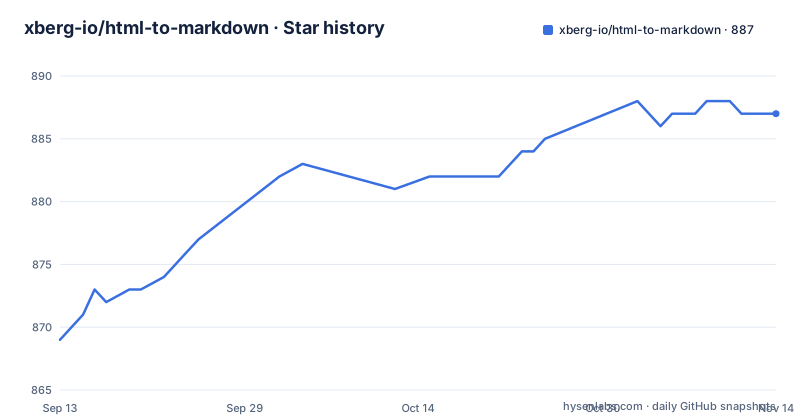
Star history
- xberg-io/html-to-markdown887 ★ · +18
| Repository | 2026-09-13 | 2026-11-14 |
|---|---|---|
| xberg-io/html-to-markdown | 869 | 887 |
18 Stars in the last 62 days, measured from the daily GitHub snapshot. Compare with other projects
Editorial analysis
The README is generated, and it says so in three comments
The first four lines of the README file are comments, and they are the most important thing in it:
<!-- This file is auto-generated by alef — DO NOT EDIT. -->
<!-- alef:hash:bb5deaffa9260a8b7ac79559c4abc1538c7a6dd7dd83f20842bab9e0d7684b81 -->
<!-- To regenerate: alef readme -->
<!-- To verify freshness: alef verify -->
So the document is a build artefact, the hash pins the inputs it was built from, and there is a command to check whether it has fallen behind. The templates live in readme_templates/ at the root, the configuration is alef.toml with .alef-generation.toml, .alef-ownership.toml and a merge provenance file beside it, and there is a second generator's fingerprint in .ai-rulez-generated.json.
This matters when you read a specific claim in it. Every install snippet for every language is templated, so a snippet can be stale in a way a hand-written README would not be. The Elixir line is an example: it tells you to add a requirement of ~> 3.6 to mix.exs, which is a floor from an older release and still resolves, but reads like the current version is 3.6 rather than 3.16.
Sixteen languages, one core, and three version fields
The feature table leads with the shape of the project: 16 languages, one Rust core. The list is Rust, Python, Node.js, WASM, Java, Go, C#, PHP, Ruby, Elixir, R, Dart, Kotlin for Android, Swift, Zig, and a C ABI. The badge row is longer still, with separate registries for each: crates.io, PyPI, two npm packages for Node and WASM, Maven Central with a second Android artifact, the Go module proxy, NuGet, Packagist, RubyGems, Hex, an r-universe, pub.dev, and in-tree Swift and Zig packages.
Three version numbers describe the same project. package.json and Cargo.toml both say 3.16.0, and pyproject.toml says 0.0.0 with the description Workspace-only metadata for tooling. That last one is honest, since the Python workspace exists to run tests and tooling rather than to be published from the root.
One path deserves a note. The Go import path is github.com/xberg-io/html-to-markdown/packages/go/v3, with the major version in the path, so Go consumers pin a module major rather than the 3.16.0 patch level.
The maintainer is one name, Na'aman Hirschfeld, and the Rust toolchain floor is 1.88 with edition 2024.
Three parsing tiers, and output claimed to be byte equal between them
The tiered dispatch line is the technical centre of the project: a byte scanner, then a DOM walker, then html5ever repair, with byte-equal output across tiers. The claim is that the three paths are interchangeable, so a cheap scan and an expensive repair produce the same Markdown.
The workspace dependencies support that story. html5ever at 0.40.1 is the spec compliant HTML5 parser used for the repair tier, encoding_rs handles the mixed encoding case, rayon provides parallelism, mimalloc is the allocator, and ahash does the hashing.
The project lists inputs it aims to handle, including: unclosed tags, CDATA, custom elements, malformed entities, nested tables and mixed encodings. The document is emphatic that none of this requires a parsing strategy choice, and the preprocessing setting has standard, strict and lenient presets or lets you build your own.
Two features are opt in rather than automatic. Inline images are mirrored only if you ask, and the visitor API is feature gated, so a transformation hook over the Markdown AST is compiled in deliberately rather than always present.
One binding decision is worth noting: pyo3 is configured with the abi3-py310 feature, which is why the Python package and the pyproject classifiers both start at 3.10.
The root build script builds the same package twice
The monorepo root is private and named html-to-markdown-monorepo. Its build script is three steps, and two of them are the same command:
build:node   pnpm --filter @xberg-io/html-to-markdown run build
build:wasm   pnpm --filter @xberg-io/html-to-markdown-wasm run build:all
build:ts     pnpm --filter @xberg-io/html-to-markdown run build
The Node package and the TypeScript package are the same workspace package, so `pnpm run build` at the root builds it twice. The test scripts have the same shape: test:node and test:ts are identical, and only test:wasm differs. It is harmless, just slower than it needs to be, and it is the kind of duplication that survives because nobody reads the root manifest.
The rest of that file is more interesting. The dev dependencies are a dozen textlint rules rather than a formatter, including write-good, stop-words, terminology, common misspellings and rules against empty sections, zero width spaces, surrogate pairs and duplicated opening conjunctions. A Markdown converter lints its own prose with a prose linter, and a markdown plugin is in the list because the documentation includes mdx.
Node 18 or newer and pnpm 11 or newer are required, with pnpm 12.3.4 pinned as the package manager.
Coverage has no floor, warnings are errors
The Python workspace configuration is strict in one direction and slack in the other, and the contrast is deliberate enough to notice.
Strict: pytest runs in asyncio auto mode, and filterwarnings is set to error with only three specific warnings ignored, one of them PytestConfigWarning. Any unexpected warning during the test suite fails the run.
Slack: the coverage configuration sets report.fail_under to 0 while turning on report.show_missing. So coverage is measured and printed, and it cannot fail anything. A project that treats warnings as errors and coverage as information has made a choice about where to spend its attention, and it is the opposite of the usual one.
The uv configuration is the more interesting part for a mixed project. Its cache keys list pyproject.toml, the root Cargo.toml, Cargo.lock, the Python package manifest, and globs for every crate manifest and Rust source file under crates/. That means changing the Rust core invalidates the Python tooling cache, which is what keeps a workspace with two languages from serving stale results.
Sixteen languages means sixteen tool configs and six lock files
Count the configuration at the root and the cost of the multi language approach becomes visible.
There is a Go linter config in .golangci.yml, an R one in .lintr, a C and C++ style file in .clang-format, a Rust formatter config, a pinned Rust toolchain file, a Java toolchain declaration in .sdkmanrc, a Ruby version file, a Maven directory in .mvn/, a composer.json and composer.lock for the PHP extension build, a Package.swift for Swift, a config.m4 for the PHP extension's build system, a .cargo/ directory, a deny.toml for cargo dependency policy, and a textlint configuration for prose.
The lock files match: pnpm-lock.yaml, Cargo.lock, composer.lock, and three more named after the poly tooling, which is what `poly lint` and `poly fmt` call. The Cargo workspace itself lists eleven members, eight crates plus the Rust halves of the Dart and Swift packages and a benchmark harness tool, and an exclude list for the fuzz targets and the vendored Ruby, Elixir and R native directories.
Alongside that sit the things a converter project needs that are easy to miss: fixtures/, fuzz/, e2e/, docs-site/, an ATTRIBUTIONS.md, a CITATION.cff, a cli-proxy/ directory, and a .claude-plugin/ directory with plugin/ beside it.
The PHP install is a native extension, and the command is not the usual one
Seven of the install snippets are one line each, and they are the fastest way to see which package manager you will be using:
cargo add html-to-markdown-rs
pip install html-to-markdown
npm install @xberg-io/html-to-markdown
go get github.com/xberg-io/html-to-markdown/packages/go/v3
dotnet add package XbergIo.HtmlToMarkdown
gem install html-to-markdown
PHP is the exception and the documentation is explicit about why. It is a native extension built on the Rust ext-php-rs crate at 0.15.15, so it is installed with PIE rather than pulled by the language's own package manager:
pie install xberg-io/html-to-markdownA reader who reaches for composer require on instinct gets the wrong answer, which is exactly why that line is called out. The same pattern holds for R, which installs from an r-universe repository URL rather than from a package index, and for Elixir, which is a mix.exs dependency. Java is the quiet one: a Maven Central coordinate, io.xberg:html-to-markdown, with the dependency snippet left to a separate Java README in the repository.
So the generated README gives you the command for the common cases and a pointer for the rest, which is the right trade for a file nobody edits by hand.
Editorial conclusion
html-to-markdown is a good default pick for anyone converting messy real world HTML, with tiered parsing intended to handle different inputs. Validate output against representative HTML and the selected release before relying on parity across paths. The multi language support is the other reason, and it is broad enough that you will find a binding for the stack you already have. Two things to check before you adopt it. Treat the README as generated: install snippets come from templates, and at least one of them advertises a version floor from an older release, so verify a command against the language's own README before scripting it. And if you plan to depend on a stable surface, look at the version fields first, because the root manifest, the Cargo workspace and the Python workspace report three different numbers and only the first two track the release. The performance figure is a range with a regression gate behind it rather than a single number, which is the more useful of the two claims.
Frequently asked questions
How do I install html-to-markdown?
It depends on the binding: cargo add html-to-markdown-rs for Rust, pip install html-to-markdown for Python, npm install @xberg-io/html-to-markdown for Node, go get github.com/xberg-io/html-to-markdown/packages/go/v3 for Go, dotnet add package XbergIo.HtmlToMarkdown for C#, and gem install html-to-markdown for Ruby. PHP is a native extension and uses pie install xberg-io/html-to-markdown rather than composer, and Java is published to Maven Central as io.xberg:html-to-markdown.
What does the convert function return?
A structured result with content, warnings and optional metadata. convert() is the single entry point across the bindings. Setting output_format to djot emits Djot instead of Markdown, and metadata covers Open Graph, Twitter, JSON-LD, microdata, RDFa and the header hierarchy parsed from the head element.
How does it deal with broken HTML?
Through tiered dispatch: a byte scanner, then a DOM walker, then repair through html5ever, with the feature table claiming byte-equal output across tiers. The listed cases handled without losing content are unclosed tags, CDATA, custom elements, malformed entities, nested tables and mixed encodings. Preprocessing has standard, strict and lenient presets.
How fast is html-to-markdown?
The README states 19 to 116 MB/s on the Wikipedia/mdream corpus, and says per-group regression thresholds are enforced on every pull request. The Cargo workspace includes a benchmark harness tool, and the repository carries fixtures, fuzz targets and an e2e directory.
Is html-to-markdown CommonMark compliant, and can it output Djot?
The project description calls it a CommonMark compliant converter, and Djot is available as an alternative output format by setting output_format to djot. GFM tables are supported with padded cells, alignment handling and pipe escaping.
What is Kreuzberg, mentioned in the repository description?
A separate product described as a polyglot document intelligence engine with a Rust core that extracts structured data from more than 98 document formats using streaming parsers and built-in OCR. The description states that html-to-markdown is maintained by the Kreuzberg team.
Official sources
Add this badge to your README
If you maintain this project, the badge below links readers to this analysis and shows its maintenance status from the daily GitHub snapshot. Paste the markdown into your README; add ?metric=license or ?metric=stars to the image URL for a different field.

[](https://hysenlabs.com/projects/xberg-io-html-to-markdown)Star history chart for your README
[](https://hysenlabs.com/projects/xberg-io-html-to-markdown)Was this useful?