algernon: two certificate files sit at the repository root
Small self-contained pure-Go web server with Lua, Teal, Markdown, HTTP/2, QUIC, Redis, TypeScript, npm-less React 19, SQLite, and PostgreSQL support ++
At a glance
- What is it?
- Algernon is a single Go executable that serves templated and scripted content over HTTP, HTTP/2 and QUIC, with about twenty template languages decided by filename. The build file hardens the binary only on one Linux distribution, the module list is mostly the maintainer's own packages, and a certificate and its key are committed at the top of the tree.
- Who is it for?
- Algernon is a reasonable choice if you want one binary that serves a small site with scripting on the server and no runtime to install, and its filename-driven dispatch is documented precisely enough to build on. It is not the right choice if you are deploying to a shared host, because the default permission model publishes the site root and guards only two paths, and the two files in the tree mean somebody's certificate and key are in version control.
- Can I use it commercially?
- Yes. BSD-3-Clause is a permissive licence: you can use, modify and sell software built on it, as long as you keep its copyright and licence notices.
- Is it still maintained?
- Yes. The repository last received commits 2 days ago.
- What is it written in?
- Mainly JavaScript, according to GitHub's language statistics.
Answers come from the project's GitHub data, last synced on November 15, 2026, and from our analysis. They are not legal advice.
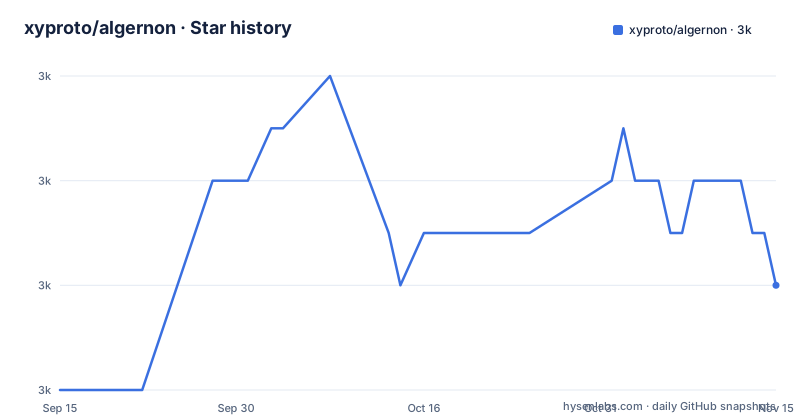
Star history
- xyproto/algernon3,030 ★ · +2
| Repository | 2026-09-15 | 2026-11-15 |
|---|---|---|
| xyproto/algernon | 3k | 3k |
2 Stars in the last 61 days, measured from the daily GitHub snapshot. Compare with other projects
Editorial analysis
cert.pem and key.pem are committed at the repository root
The top level of the tree contains a file named cert.pem and a file named key.pem, alongside a script called gencert.sh. That is the whole certificate story the repository has, and it is the opposite of what a project that treats TLS seriously would ship. The design decisions section says HTTP/2 over TLS is the default if a certificate and key is given, and that regular HTTP is used if not, which makes those two files the material difference between the two modes. So a reader who wants the documented default has a pair of certificate files already in the checkout, and a reader who wants their own has to know which pair to replace. The script that generates a certificate is present, so the fix is available; what is not present is any statement that the committed pair is a throwaway, and nothing in the readme mentions either file by name.
The hardened link flags apply only when /etc/arch-release exists
The build file branches on the host distribution, and the branch that matters is the security one. It tests for the presence of /etc/arch-release, and on a machine that has it the link flags become -O2 with section sorting, as-needed, relro and now all enabled, and the build adds a position-independent executable mode. Everywhere else the flags reduce to strip symbols and debug info. So the protections applied to the binary depend on which distribution the build machine runs rather than on any property of the source. Three smaller decisions sit next to it. A prefix is chosen per platform, /usr/local on macOS and FreeBSD and /usr on everything else. The make program itself is switched to gmake on FreeBSD, because the file uses GNU syntax throughout. And a commented-out experiment line for a garbage collector sits above the detection block, unused.
Two different third extensions for Pongo2 across two lists
The design section has two lists of file extensions and they do not agree. The prioritized index-filename list says a directory index may be written as index.pongo2, index.po2 or index.tmpl. The extension list, further down, says Pongo2 is handled for .po2, .pongo2 or .tpl. So the third extension for the same template language is .tmpl in one list and .tpl in the other, and nothing on the page notes the difference. Two smaller mismatches sit in the same place. TypeScript is listed as .ts and .tsx under extensions, while the index list only offers index.tsx, so there is no index form for a plain .ts file. And the extension list covers ten languages while the index list covers eleven entries, because index.txt is in the first and absent from the second, which is consistent with plain text needing no renderer. Everything else lines up: Markdown, Amber, Sass, GCSS, JSX, Lua, Teal and HyperApp each appear in both.
index.prompt is a four part file for asking a local model
One of the special filenames has no analogue in the extension list and deserves reading on its own. index.prompt is described as a content-type, an Ollama model, a blank line and a prompt, in that order, for generating content with large language models. So the format is positional rather than a syntax: four fields separated by line breaks, where the first two are configuration and the last is the instruction. That is an unusual design in a project whose other formats are all real template languages, and it means a generated page can be served straight from a file on disk. The feature is named in the readme's own prose list of supported technologies as Ollama for language models, and the tree carries a samples directory with a local_llm entry among its examples. The readme does not describe the output: whether the response is streamed, cached, or written back to the index file is not stated anywhere in the visible portion.
style.gcss covers three template languages and not the rest
Two companion filenames sit alongside the index convention and their scope is narrower than it first looks. data.lua is Lua code whose functions and variables are made available to Pongo2, Amber and Markdown pages in the same directory. style.gcss is a GCSS file used as the style for all Pongo2, Amber and Markdown pages in the same directory. So both apply to exactly three of the renderable kinds. They do not apply to a directory whose index is HTML, nor to the JSX and TSX forms, nor to the HyperApp form, all of which supply their own output. That is a sensible division for a static-site-shaped server, and it means the styling story for a React-rendered page has to be bundled rather than dropped in beside it. One oddity in placement: data.lua and style.gcss are listed inside the same prioritized sequence as the index filenames, even though they are not alternatives for the index file at all.
The default permission model publishes the root and guards two paths
The default access model is stated in one line and it is worth reading precisely, because a static-file server default is a security decision. By default, /data and /repos have user permissions, /admin has admin permissions, and / is public. The line adds that this is configurable. So out of the box a site is world-readable at the root, with authentication required only for two named prefixes and one administrative prefix, and the whole model applies to whatever happens to be in the served directory. Two related design points sit nearby. Directories with no index file get a directory listing, and the page says the design of that listing is hard coded, so there is no template hook for it. And other files, which no handler claims, are given a mimetype from their extension, which means a file nobody intended to publish will be served if it sits under the root.
About twenty of the module requirements are the maintainer's own
The module file is the clearest statement of this project's shape. Of the requirements visible in it, roughly twenty are under the same account as the project itself: ask, datablock, env, files, gluamapper, gopher-lua, huldra, jpath, mime, ollamaclient, onthefly, permissionbolt, permissions, permissionsql, permissionsqlite_noc, pinterface, pstore, recwatch, sheepcounter, simplebolt and simpleform. Only one of those, the Lua interpreter, is named in the readme's technology paragraph. The database and permission layer is spread across six of them, and the Ollama client is its own module. So a single executable is small because the dependency graph is narrow, but the code behind it is not a self-contained project; it is the front of a large set of libraries by one author. Four dependencies in the list have capabilities the readme never mentions at all: a web authentication module, an HTML sanitiser, automatic certificate management, and a form library.
The commit that builds the binary is two months newer than the newest tag
The release list shows three consecutive patch releases: 1.17.9 in May 2026, 1.17.10 in July and 1.17.11 at the end of July. No minor version appears in it, which reads as a project that ships small increments. The last push on the default branch is dated 2026-10-02, roughly two months after the newest tag, so the branch is ahead of every published release and there is no tagged build matching it. The installation section is where that difference is felt, since the quick path is:
go install github.com/xyproto/algernon@latestand that resolves to a release rather than to the branch. What is committed is worth noting alongside that. The dependencies are vendored, and every build and test invocation passes a vendor mode flag, which is why the binary can be built without network access. A Go profile for guided optimisation sits at the root, and no build flag in the make file references it, so it is currently documentation of an intent rather than part of a build. The test target runs the suite verbosely with no race detector, and the coverage target profiles every package.
Editorial conclusion
Algernon is a reasonable choice if you want one binary that serves a small site with scripting on the server and no runtime to install, and its filename-driven dispatch is documented precisely enough to build on. It is not the right choice if you are deploying to a shared host, because the default permission model publishes the site root and guards only two paths, and the two files in the tree mean somebody's certificate and key are in version control. Before you run it in earnest, replace those files, decide whether the root should be public, remember that HTTP/2 needs a certificate or a browser may refuse it, and check which of your template extensions the server actually recognises, because the two lists on the page disagree on one of them.
Frequently asked questions
What is algernon the web server?
It is a small self-contained executable written in Go that serves content over HTTP, HTTP/2 and QUIC. It handles Lua and Teal as handlers, and renders Markdown, Pongo2, Amber, JSX, TypeScript and HyperApp pages, preprocesses Sass and GCSS, and can bundle JSX and TSX into JavaScript. Database backends include the built-in Bolt store, SQLite, PostgreSQL, MySQL, MariaDB and Valkey or Redis, with users, permissions and rate limiting.
How do I install algernon?
It requires Go 1.26 or later, then go install github.com/xyproto/algernon@latest. For a development version, clone the repository, change into the directory, build with go build -mod=vendor and run ./welcome.sh. Distribution packages are listed through repology, and a Docker image is published, stated as less than 17MB and tried out on x86_64.
What are the default URL permissions in algernon?
By default /data and /repos have user permissions, /admin has admin permissions, and / is public. The page states this is configurable. Separately, a directory with no index file is shown as a directory listing whose design is hard coded, and files no handler claims are served with a mimetype taken from their extension.
Which special filenames does algernon handle?
In prioritized order: index.lua, index.html, index.md, index.txt, index.pongo2 or index.po2 or index.tmpl, index.amber, index.hyper.js or index.hyper.jsx or index.happ, index.jsx, index.tsx, index.tl, and index.prompt, which holds a content-type, an Ollama model, a blank line and a prompt. Two companions apply to Pongo2, Amber and Markdown pages in the same directory: data.lua for available functions and variables, and style.gcss for styling.
Does algernon need HTTPS to serve HTTP/2?
HTTP/2 over TLS is the default when a certificate and key is given, and regular HTTP is used when one is not, so a certificate is what turns HTTP/2 on. The features list notes that browsers may require HTTPS when using HTTP/2. HTTP/3 over QUIC is available but has to be enabled with a flag.
What platforms does algernon run on?
The executable works on Linux, macOS and 64-bit Windows. The Docker image is stated as less than 17MB and the trial command is given for x86_64. The build file branches per platform, using a different install prefix on macOS and FreeBSD and requiring gmake on FreeBSD.
Official sources
Add this badge to your README
If you maintain this project, the badge below links readers to this analysis and shows its maintenance status from the daily GitHub snapshot. Paste the markdown into your README; add ?metric=license or ?metric=stars to the image URL for a different field.

[](https://hysenlabs.com/projects/xyproto-algernon)Star history chart for your README
[](https://hysenlabs.com/projects/xyproto-algernon)Was this useful?