gcode-preview ships a 3.0 alpha and a stable 2.x behind one package name
A simple GCode parser & previewer lib with 3D printing in mind. Written in Typescript.
At a glance
- What is it?
- gcode-preview is a TypeScript library that parses G-code and renders it in a browser through three.js, with per-path extrusion widths read from slicer comments and tool-indexed colors for multi-material printers. The awkward part for adopters is packaging: 2.x and 3.0-alpha are both published under gcode-preview, 3.0 is ESM-only, and the default branch is develop rather than main.
- Who is it for?
- gcode-preview fits a browser tool that has to preview real slicer output, since the ;WIDTH: and ;HEIGHT: handling and the tool-indexed color array are things a hand-rolled viewer rarely gets right. It does not fit a page loading a script tag, because 3.0 dropped the UMD build and the browser global, and it does not fit a three.js version outside the declared range.
- Can I use it commercially?
- Yes. MIT is a permissive licence: you can use, modify and sell software built on it, as long as you keep its copyright and licence notices.
- Is it still maintained?
- Yes. The repository received new commits within the last day.
- What is it written in?
- Mainly TypeScript, according to GitHub's language statistics.
Answers come from the project's GitHub data, last synced on October 22, 2026, and from our analysis. They are not legal advice.
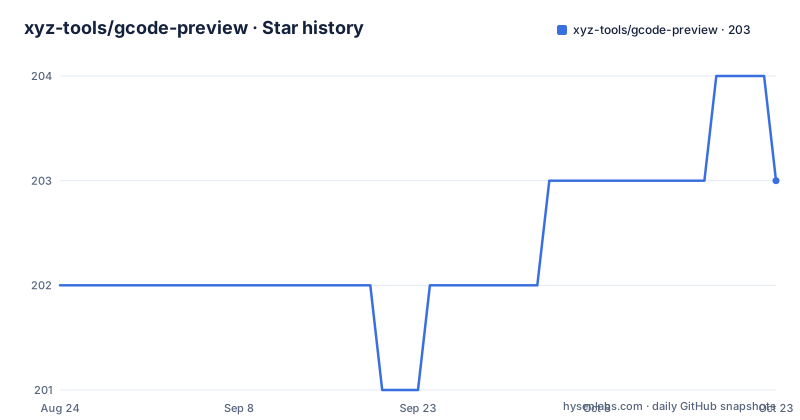
Star history
- xyz-tools/gcode-preview204 ★ · +2
| Repository | 2026-08-24 | 2026-10-22 |
|---|---|---|
| xyz-tools/gcode-preview | 202 | 204 |
2 Stars in the last 59 days, measured from the daily GitHub snapshot. Compare with other projects
Editorial analysis
The default branch is develop, so a plain clone gives you the alpha
The repository's default branch is `develop`, not `main`. Anyone running a bare `git clone` gets the branch where 3.0 is being finished, which is the version whose package.json reads version 3.0.0-alpha.6, whose build runs on rolldown, and whose module format has already broken compatibility once. The published npm package is a different matter, and the distinction is the first thing to get right. There are two installs, one for the alpha and one for the current stable 2.x release:
npm install gcode-preview@alphanpm install gcode-previewA plain install without a tag resolves to 2.x, so a project that upgrades its lockfile can move between a stable major and a pre-release depending on which specifier a dependency declares. The repository also carries a `package-lock.json` rather than a pnpm lockfile, and a `.nvmrc` pinning the Node version the maintainers build against.
Extrusion width resolves in three tiers, and the slicer comment always wins
The `lineWidth`, `lineHeight` and `extrusionWidth` options look like ordinary settings until you read how they interact with the slicer metadata. Standalone `;WIDTH:<mm>` and `;HEIGHT:<mm>` comments, emitted by PrusaSlicer, SuperSlicer, OrcaSlicer and Bambu Studio, are picked up by the slicer metadata pipeline and applied to the paths that follow. Resolution is per path and runs in a fixed order: the value the slicer announced wins, the `lineHeight` and `extrusionWidth` options fill in for paths that have no comment, and the built-in defaults of 0.6 width and 0.2 height apply last. That last tier is why a file with no metadata still renders plausibly, and it is also why an adaptive-layer-height print comes out with its true dimensions rather than a single global width. The default is not a guess about your printer, it is a floor, and the option you pass is only consulted for paths the slicer stayed silent about.
three is bounded on both sides, so the upper limit is the one that bites
The dependency on three.js is declared with a range on both ends: `>=0.166.0 <0.186.0`. The lower bound is the interesting one for reading, because it tells you which renderer features the library relies on, but the upper bound is the one that causes work. A library that caps its peer version is asserting that something changed above that line that it has not adapted to, and a project whose three dependency drifts upward will hit a resolution failure or a subtle rendering difference rather than a clean error. The development dependencies suggest the shape of the risk: `@types/three` is pinned to a 0.185 range and `@webgpu/types` is present, so the renderer surface is being tracked closely. If you maintain a fork of this library, the three version is the constraint to watch, not the gcode-preview version, since the latter is the one you control.
3.0 is ESM-only and the browser global is gone
The module format change is the breaking part of the 3.0 line and it is stated plainly. The package is ESM-only, the only other public package path is `gcode-preview/package.json`, deep imports such as `gcode-preview/dist/gcode-preview.es.js` are no longer supported, and the legacy UMD build with its `GCodePreview` browser global has been removed. A page that used a script tag and read the global now has to be a module. The instructions for the browser path are specific: map `three` in an import map, load the ES build as a module, and when self-hosting, copy the entire `dist` directory including any chunks. That last instruction is not pedantry. A single-file copy of the build breaks as soon as the bundler emits a chunk, and the failure looks like a missing export rather than a missing file. The library adds nothing to the document beyond the canvas you hand it, so the rest of the page is yours to keep.
Unhandled commands are parsed and ignored, and two G92 variants are missing
The interpreter's coverage is a short table and worth reading rather than assuming. Linear moves are `G0` and `G1`, arcs are `G2` and `G3` in both directions, units are `G20` and `G21`, and there is `G28` for home, `G31` for a straight probe, the probe family `G38.2` through `G38.5`, `G92` to set position, `G92.1` to reset coordinate system offsets, and `T0` through `T7` for tool selection. Anything without a handler is still parsed and then ignored, which is the right default for a viewer: an unknown command should not abort a file you want to look at. Two commands are called out as unsupported rather than silently ignored, `G92.2` and `G92.3`, so a file that relies on them will preview with the wrong coordinate behaviour rather than telling you. Arc support arrived through a contribution, and its stated purpose is that G-code already processed by ArcWelder renders correctly.
Options set once at construction move to sceneManager afterwards
The constructor takes about two dozen options, and the division matters more than the count. There is the canvas to render to, the build volume, six colors covering background, extrusion, travel, top layer, last segment and bounding box, four render toggles, the three geometry dimensions, a layer range through `startLayer` and `endLayer`, camera options, `liveRenderInterval` for throttling progressive rendering, `arcChordTolerance` for arc tessellation precision, and a miscellaneous group including `droppable` for drag and drop, `keepLines` and `minLayerThreshold`. After construction most of those move onto the scene manager instead, changed at runtime as `preview.sceneManager.renderTubes = true` and followed by a re-render. The reason is that the scene manager is the object that actually holds the render state, and mutating it directly avoids rebuilding the geometry. The catch is that a scene manager assignment does not trigger a frame, so the re-render is not optional.
Multi-color is a tool-indexed array, not a palette the library picks
Multi-material support is the feature that shapes how you configure the library, because the color you supply is bound to a tool number rather than to a filament you choose. You pass an array as the `extrusionColor` option, or assign it on the scene manager at runtime, and the index in the array is the tool index, T0 through T7. The example in the documentation is three colors for three tools, where T0 is the first entry, T1 the second and T2 the third. The supported hardware list is correspondingly long, covering the Prusa MMU units, the Bambulab AMS and its lite variant, the Enraged Rabbit Carrot Feeder, IDEX machines, toolchangers, 3D Chameleon, and virtual tools for color mixing. The design is honest about its scope: a tool change is a `T` command in the file, and the library maps it to an index. Anything the printer expresses outside that mechanism will not color.
Editorial conclusion
gcode-preview fits a browser tool that has to preview real slicer output, since the ;WIDTH: and ;HEIGHT: handling and the tool-indexed color array are things a hand-rolled viewer rarely gets right. It does not fit a page loading a script tag, because 3.0 dropped the UMD build and the browser global, and it does not fit a three.js version outside the declared range. Before upgrading from 2.x, check the two things that break first: whether your build resolves `gcode-preview` to 2.x after a plain install, and whether the three version you have pinned still falls inside `>=0.166.0 <0.186.0`.
Frequently asked questions
How to preview a G-code file?
Hand the library a canvas element and call `preview.processGCode(gcode)` with the file contents. For a file too large to parse in one pass, fetch it and pass the response body to `preview.processGCodeStream(response.body)` to render progressively, with `liveRenderInterval` throttling the updates.
Which G-code commands does gcode-preview handle?
G0 and G1 for linear moves, G2 and G3 for arcs, G20 and G21 for units, G28 to home, G31, the G38.2 to G38.5 probe family, G92, G92.1, and T0 to T7 for tool selection. Commands without a handler are parsed and ignored, and G92.2 and G92.3 are not supported.
How do I show a multi-color print in gcode-preview?
Pass an array of colors as the `extrusionColor` option, where the array index is the tool index from T0 to T7, so the first entry is T0. The option can also be assigned on the scene manager at runtime, and extrusions render as tubes by default unless `renderTubes` is false.
Can I still load gcode-preview from a script tag?
Not in 3.0. The package is ESM-only, the UMD build and the GCodePreview browser global have been removed, and deep imports such as `gcode-preview/dist/gcode-preview.es.js` are no longer supported. Map `three` in an import map and load the build as a module instead.
What has to be copied when self-hosting gcode-preview?
The entire `dist` directory, including any chunks, because a single-file copy breaks once the bundler emits a chunk. The library adds nothing to the document beyond the canvas it is given, and the stable 2.x release is installed with a plain `npm install gcode-preview` while the alpha needs the alpha tag.
Official sources
Add this badge to your README
If you maintain this project, the badge below links readers to this analysis and shows its maintenance status from the daily GitHub snapshot. Paste the markdown into your README; add ?metric=license or ?metric=stars to the image URL for a different field.

[](https://hysenlabs.com/projects/xyz-tools-gcode-preview)Star history chart for your README
[](https://hysenlabs.com/projects/xyz-tools-gcode-preview)