YapDatabase's newest three tags were pushed in two minutes in descending order, and its hello world ends with the bare word connect
GitHub describes it as YapDB is a collection/key/value store with a plugin architecture. It's built atop sqlite, for Swift & objective-c developers.. The repository metadata lists Objective-C as its primary language. The metadata lists the NOASSERTION license. This article stays within the project description and details documented in the GitHub repository README.
At a glance
- What is it?
- YapDatabase is a collection and key/value store built on top of sqlite for Swift and Objective-C developers, with an object cache, views, secondary indexes, full text search, hooks and CloudKit sync. Its last tag is from 2015, its last commit to the default branch is from 2022, and the worked example in the README is cut off mid-file.
- Who is it for?
- Use YapDatabase if you are building an Apple-platform app that needs more than a table, and you want the extra pieces, an object cache, views that maintain themselves, metadata with its own cache, hooks and cascading deletes, without writing the SQL yourself. The architecture is a genuine advantage over a bare sqlite wrapper for that shape of problem.
- Can I use it commercially?
- Check first. The repository uses a licence we do not classify automatically, so read its LICENSE file before any commercial use.
- Is it still maintained?
- Probably not. The repository last received commits 50 months ago, on September 7, 2022.
- What is it written in?
- Mainly Objective-C, according to GitHub's language statistics.
Answers come from the project's GitHub data, last synced on October 22, 2026, and from our analysis. They are not legal advice.
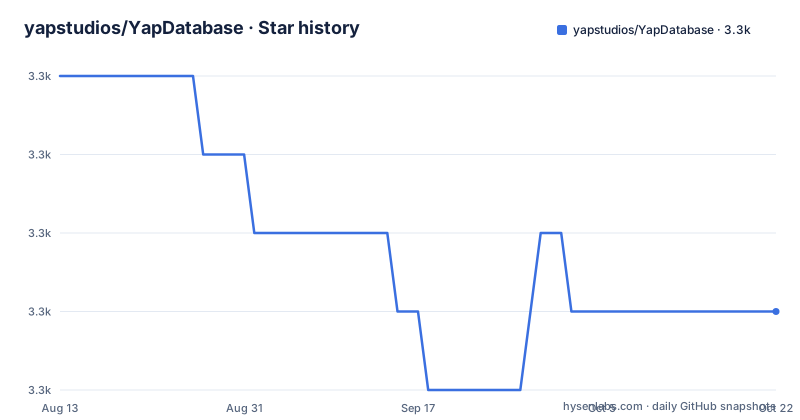
Star history
- yapstudios/YapDatabase3,328 ★ · -3
| Repository | 2026-08-13 | 2026-10-22 |
|---|---|---|
| yapstudios/YapDatabase | 3.3k | 3.3k |
-3 Stars in the last 70 days, measured from the daily GitHub snapshot. Compare with other projects
Editorial analysis
Three tags in two minutes, and the newest is not the last
The three newest releases are all from one afternoon in 2015, and they are not in order.
The first timestamp is 15:44:27 for version 2.7. The second is 15:45:10 for 2.6.5. The third is 15:46:00 for 2.6.4.
So the newest version was tagged first and the two older ones were pushed after it, all inside two minutes. That is what looks like a single maintenance action in which the tags were created in the wrong sequence, or a re-tag after the fact.
Two details make it harder to read. None of the three carries a version prefix, so they sort as strings rather than as versions, and the patch levels descend while the timestamps ascend, which is the opposite of what a version history looks like.
The repository itself has moved on from all three. The last push to the default branch master is dated 2022-09-07, seven years after the newest tag. The repository is not archived, so there is a body of work after 2.7 that has never been tagged.
The hello world example ends with a bare word
The README's only code block is a Swift example, and it stops one line before the interesting part.
// Read it back
connect
Everything above it is complete and well commented. It creates or opens the database file, registers a Codable serialisation for the string type against a named collection, obtains a connection with a note that several connections exist for concurrency, and writes an item inside a read and write block by passing a transaction and setting an object for a key in that collection.
Then the comment says read it back, and the word beneath it is the first four letters of an identifier, standing alone.
So the file shows the entire write path and none of the read path, in the one place a newcomer is guaranteed to read. The README links to a wiki page titled for this example immediately below the block, which is where the missing lines are, but the block itself is what gets copied.
It is worth noting that this is a cut in the middle of an identifier rather than at a sentence boundary, which is what a truncated paste looks like rather than an intentional teaser.
The performance bullet is the only feature with no mechanism behind it
There are eleven features in the list, and ten of them explain themselves.
The concurrency bullet explains that you can read while another thread writes, that the main thread never blocks, and that reads happen on multiple threads at once. The caching bullet explains why the object cache exists at all, which is that the underlying database caches raw serialised bytes while you are working with objects. The metadata bullet notes that extra data travels alongside an object and gets its own separate configurable cache. The views bullet explains that filtering, grouping and sorting do not require writing queries, that they are built from closures, and that they update themselves.
The performance bullet says: fetch thousands of objects on the main thread without dropping a frame.
No mechanism, no configuration, no number. It is the only claim in the list that could not be checked by reading the code, and it is the claim a reader is most likely to act on.
The rest of the list stays at the level of mechanism, which is why this one stands out. A view that updates itself, a cache that skips deserialisation and a metadata store with its own cache are all things you can read about and reason about. A frame budget is not.
Views are closures that maintain their own query
The views feature is the one that most changes how you would write the application layer, so it is worth unpacking.
The claim is that filtering, grouping and sorting your data needs no esoteric SQL, that views work using closures so you provide a bit of native code, that they automatically update themselves, and that they make animating tables easy.
Three of those four are mechanics. Writing a view as a closure over your objects rather than as a query string means the compiler helps you, and it means the view can be inspected in a debugger as code. Updating themselves means a view is a standing description rather than a snapshot: change an object and every view that included it knows.
That last part is the expensive one, and the README does not say how it is done. A self-maintaining query over an object graph needs change notification on every object, which is the same requirement the metadata and hooks features are addressing from other directions.
So the feature list reads as if these were independent conveniences, and in implementation they are probably one mechanism observed from three places.
The object cache exists because the underlying database caches bytes
The caching feature is the one where the README argues rather than lists.
It concedes the point first: the underlying database does have caching, and of course it does. Then it explains why that is not enough, in one sentence that is the whole argument. The database caches raw serialised bytes, and the application is dealing with objects.
So the built-in cache sits one level up, at the object boundary, and its benefit is stated as skipping the deserialisation step rather than as a hit rate.
Metadata gets its own separate configurable cache, and the metadata bullet makes the same point from the other direction by asking whether you have ever wanted to store extra data alongside an object, such as when it was downloaded, or a separate but related object.
Three consequences follow for anyone reading the source. The cache is keyed by object identity, not by key. It is bounded separately from the database's own page cache, which means two cache sizes to tune. And a cached object is a live reference, so mutating one outside a transaction and saving it later is a way to lose writes rather than to save a round trip.
Documentation is generated by a third-party tool from an umbrella header
Two files at the repository root explain how the documentation is produced.
One is a configuration file for a documentation generator, and the other is an umbrella header at the root whose only purpose is to be scanned. That pairing is the standard arrangement for that generator on an Objective-C project: the umbrella imports every public header so the generator sees one module instead of many, and the configuration tells it which directories to walk.
It tells you something about the codebase. An umbrella header at the root means the library is consumed as a framework with a single module, which is consistent with the framework directory and the project file sitting beside it.
For distribution, the root holds exactly one manifest, a CocoaPods specification. The README carries a badge for a second dependency manager as well, which works by building the project's framework targets directly and so needs no manifest of its own.
The test directory and five example projects complete the picture, and one of those examples is the subject of the sync feature below.
The sync feature is one vendor's cloud service, and its example is a todo list
Of the eleven features, one is not a technique but a service integration.
The sync bullet says support for syncing with Apple's cloud service is available out of the box, and that there is a fully functioning example project demonstrating a syncing todo application.
Everything else in the list is something you implement yourself: you write the view, you register the index, you attach the hook. Sync is the one item where the data leaves the device, and the only configuration mentioned is the choice to use it at all.
The example is the honest part. A todo application is the smallest thing that can demonstrate a sync layer without the interesting problems: few records, no conflicts, one device type. It proves the integration works, not that it handles contention.
For an Apple-platform app in 2026, that also makes this feature the most likely to be affected by anything outside this repository, since the service it talks to is controlled by the platform vendor and has changed its interfaces before.
Editorial conclusion
Use YapDatabase if you are building an Apple-platform app that needs more than a table, and you want the extra pieces, an object cache, views that maintain themselves, metadata with its own cache, hooks and cascading deletes, without writing the SQL yourself. The architecture is a genuine advantage over a bare sqlite wrapper for that shape of problem. Three things to know before you adopt it. How old it is, which matters more for a library like this than for most: the branch has not been pushed to since 2022 and the newest tag is from 2015, so the version you would depend on is a decade old and you should check the wiki against your toolchain. Which distribution route you use, because the only manifest at the root is a CocoaPods specification while the README also carries a Carthage badge. And what the sync feature actually is, because it is not a general synchronisation layer but support for one vendor's cloud service, with the working example being a todo application.
Frequently asked questions
What is YapDatabase?
It is a collection and key/value store built on top of sqlite, written for Swift and Objective-C developers and targeting macOS, iOS, tvOS and watchOS. Beyond storage it provides an object cache, metadata with its own cache, views, secondary indexes, full text search on the database's own search module, relationships with cascading deletes, hooks, and an extensions architecture you can add your own to.
How do I open a YapDatabase and store an object?
Create or open the database file with the database type, register Codable serialisation for the type you want to store and name the collection it goes in, then get a connection, where several connections exist for concurrency. Writes happen inside a read and write block that passes a transaction, and you set the object for a key inside a named collection. The README's example of reading the value back is cut off mid-file.
Does YapDatabase cache objects, and why?
Yes, with a configurable object cache built in. The README's argument is that the underlying database also caches, but it caches raw serialised bytes while the application works with objects, so the built-in cache lets you skip deserialisation and get objects faster. Metadata is described as having its own separate configurable cache as well.
Does YapDatabase support syncing?
It supports syncing with Apple's cloud service out of the box, and the repository ships a working example project that demonstrates a syncing todo application. It is the one feature in the list tied to a specific vendor service rather than to a technique, and no configuration beyond using it is described.
How do I install YapDatabase?
The root of the repository holds a CocoaPods specification, and the README carries a badge for a second dependency manager that builds the project's framework targets directly. Documentation is generated by a third-party tool from a configuration file and an umbrella header at the root, and five example projects sit in the examples directory, including one for custom database objects, one for manual views, one for search results and one for the sync example.
When was YapDatabase last updated?
The repository is not archived and the last push to the default branch master is dated 2022-09-07. The three newest releases, 2.7, 2.6.5 and 2.6.4, were all pushed on 2015-08-12 within about two minutes of each other and in descending version order, so the branch carries roughly seven years of work beyond the newest tag and no release to point at.
Official sources
Add this badge to your README
If you maintain this project, the badge below links readers to this analysis and shows its maintenance status from the daily GitHub snapshot. Paste the markdown into your README; add ?metric=license or ?metric=stars to the image URL for a different field.

[](https://hysenlabs.com/projects/yapstudios-yapdatabase)Star history chart for your README
[](https://hysenlabs.com/projects/yapstudios-yapdatabase)