my-claude-code-mods: seventeen plugin mods for one Claude Code marketplace
Custom Claude Code Mods that I need
At a glance
- What is it?
- my-claude-code-mods is a personal collection of Claude Code mods, from a session profiler and a context waste inspector to a branching time machine and a set of workflow commands. It suits a developer who wants to install ready-made mods from a marketplace, and it is worth reading as a worked example of what the mod format can carry.
- Who is it for?
- my-claude-code-mods fits a Claude Code user who wants ready-made instrumentation for a session, such as a profiler for where time goes, a context inspector, or a file snapshot history, and who is comfortable installing from a third party marketplace.
- Can I use it commercially?
- Yes. Apache-2.0 is a permissive licence: you can use, modify and sell software built on it, as long as you keep its copyright and licence notices.
- Is it still maintained?
- Yes. The repository last received commits 7 days ago.
- What is it written in?
- Mainly TypeScript, according to GitHub's language statistics.
Answers come from the project's GitHub data, last synced on November 7, 2026, and from our analysis. They are not legal advice.
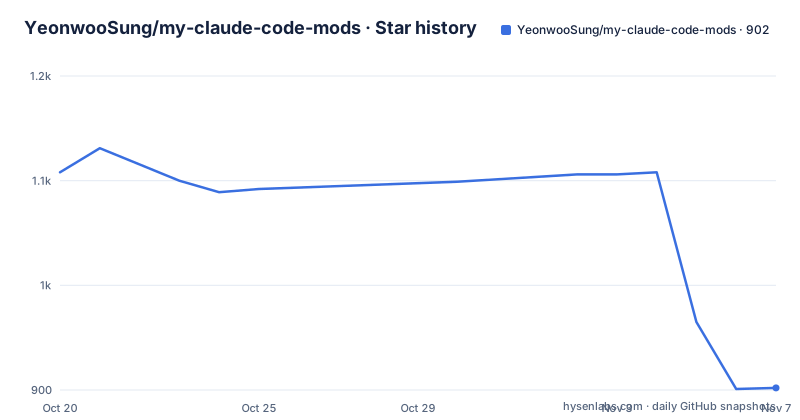
Star history
- YeonwooSung/my-claude-code-mods902 ★ · -206
| Repository | 2026-10-20 | 2026-11-07 |
|---|---|---|
| YeonwooSung/my-claude-code-mods | 1.1k | 902 |
-206 Stars in the last 18 days, measured from the daily GitHub snapshot. Compare with other projects
Editorial analysis
A personal mod collection, not a maintained product
The repository description is unusually blunt: custom Claude Code Mods that I need. That is worth taking at face value, because it shapes everything else. This is one developer's set of mods, published as a marketplace so that other people can install them, and the repository has no GitHub releases at all.
The collection is split into two rough groups. The first seven mods are about the session itself. agent-profiler shows where a session's time goes, broken into model wait, tools, subagents and re-reads, and exports OTLP traces for Jaeger and Tempo. context-inspector analyses context waste, including what fills the window, re-reads and near-duplicate outputs, and reports what compaction kept. time-machine records every tool call on a branching timeline with shadow-git snapshots. loop-detective looks for repeated Bash failures and edit and retry cycles. pin-memo pins memos and todos above the input. model-effort-band shows the selected model and the observed main-thread effort. token-run is a local ASCII runner for request failures and short breaks.
The remaining ten are workflow commands, and they are described in a single list of one-liners: verify-board with PASS, FAIL, STALE and UNKNOWN states, scope-guard for allowed-path warnings, blast-radius for reverse-import impact, decision-ledger for decisions with rationale, handoff-pack for resumable Markdown previews, command-shelf for successful-command history, env-doctor for runtime requirement checks, dependency-lens for npm dependency changes, assumption-tracker for assumption states, and review-queue for purpose-grouped file review.
The marketplace model: one add, one install per mod
Installation goes through the Claude Code plugin marketplace, and the repository ships a .claude-plugin directory, which is where the marketplace definition lives. The whole set installs with a single block that adds the marketplace and then loops over the mod names:
(
  set -eu
  claude plugin marketplace add YeonwooSung/my-claude-code-mods

  for mod in agent-profiler context-inspector time-machine loop-detective pin-memo model-effort-band token-run verify-board scope-guard blast-radius decision-ledger handoff-pack command-shelf env-doctor dependency-lens assumption-tracker review-queue; do
    claude plugin install "${mod}@my-claude-code-mods" --scope user
  done
)
The script runs on macOS and Linux under Bash or Zsh, and the README is explicit that no repository clone and no npm install is needed. The block stops at the first failing command, so a single broken mod leaves the rest uninstalled, and if the marketplace was already added you drop that one line.
Individual mods install the same way, one command each:
claude plugin install agent-profiler@my-claude-code-mods --scope user
claude plugin install context-inspector@my-claude-code-mods --scope user
The same thing can be done from inside a session with slash commands, which is the more convenient path if the marketplace is already configured:
/plugin marketplace add YeonwooSung/my-claude-code-mods
/plugin install pin-memo@my-claude-code-mods
After installing, you start a new session or run /reload-plugins, and /plugin lists the loaded mods and lets you disable individual ones.
The scope flag decides who else gets the mod
Every install command carries a scope, and the three options are the main configuration decision here. The block above uses --scope user, which makes the mods available across projects for your account. For a project-specific installation the README points at --scope project, shared through the project's settings, and --scope local, which affects only you in that project.
That distinction matters for a collection like this, because the mods are not all harmless. agent-profiler exports traces, time-machine creates shadow-git snapshots, dependency-lens reads npm dependency changes, and command-shelf keeps a history of successful commands. Whether a mod is a personal instrument or something your whole team should get is a policy question, and the scope flag is the mechanism that expresses it.
There is also a version constraint to respect. The installation section says to use a current Claude Code CLI with Mods support, and that mods are enabled by default from 2.1.287. Token Run has been verified in real terminal sessions with 2.1.296 and 2.1.301, and each mod's own README carries its tested versions. Time Machine has an extra requirement: git has to be on your PATH, because the snapshots are shadow-git based.
The ten workflow mods return text, not live panels
The most important sentence in the README is in the local preview section: the ten new workflow mods can be loaded from a checkout before the branch is published to the marketplace, and these first releases return command text, they do not add live panels.
That distinction separates the two groups. The seven session mods have real interfaces, since agent-profiler exports OTLP traces, model-effort-band shows a colored band above the prompt, and pin-memo pins memos above the input. The workflow mods, by contrast, produce output when you run a command. The command names are listed in full:
/verify
/scope
/blast
/decision
/handoff
/shelf
/env-doctor
/deps
/assume
/review-queue
Each of them accepts help. The command names are simply short forms of the mod names, which is a sensible convention: verify-board becomes /verify, scope-guard becomes /scope, and so on.
What that means in practice is that a workflow mod is a structured report rather than an interface. review-queue, for instance, groups files by purpose and checks staged and unstaged freshness, and you read that as a list rather than click through it. If you are choosing this collection for its live panels, only the first group qualifies.
Running a mod from a checkout before it ships
The preview workflow is the developer-facing half of the project. Instead of installing from the marketplace, you point the CLI at a directory in the working copy:
claude --plugin-dir ./verify-boardThat flag loads a mod straight from the checkout, which is how the ten workflow mods are exercised before the branch is published. For anyone extending the collection or fixing a mod, this is the loop: edit the files, run the CLI with --plugin-dir pointing at the mod directory, and check the behaviour without touching what is installed for your user account.
The repository layout supports that loop. Each mod is a top-level directory with its own README, several of them with a Korean translation in a README_KR.md file, and the project root also holds docs/ and scripts/ directories. The top-level package.json is marked private and is named my-claude-code-mods-dev, which confirms that it exists for working on the mods rather than for publishing a library.
What the package.json says about the engineering setup
The development tooling is visible in the root package.json. The project is ESM, requires Node 22.19.0 or newer, and keeps only two dev dependencies, expect at 30.2.0 and typescript at 5.9.3. The scripts are more revealing than the dependencies:
{
  "name": "my-claude-code-mods-dev",
  "private": true,
  "type": "module",
  "engines": {
    "node": ">=22.19.0"
  },
  "scripts": {
    "test": "node scripts/test-core.mjs",
    "test:adapters": "node scripts/test-adapters.mjs"
  }
}
The typecheck script runs the TypeScript compiler once per mod, with a separate project for each of the seventeen, which keeps the mods independently buildable. The test scripts split into core tests, adapter tests, workflow integration and lifecycle tests, and a workflow consistency check that runs a sync script in --check mode. There is also a privacy script that runs a redactor sync in --check mode, a redaction test, and a dated privacy audit document under docs/verification, which is a sensible thing to have in a project whose mods watch what you type.
The gaps: no releases, per-mod versions, one author
Three limits are worth naming before anyone installs this. The first is versioning. The repository publishes no GitHub releases, so there is no version history to pin and no changelog to read at the marketplace level. Instead each mod README documents which Claude Code versions it was tested against, which means the compatibility information is distributed across seventeen files and maintained by hand. When a mod breaks against a new CLI build, you find out by running it.
The second is the workflow mods themselves, which as noted return text and do not add live panels. A team that wants a persistent board or a hook into the session UI will not get it from the first releases.
The third is scope of authorship. This is a personal collection, described as mods one developer needed, written in TypeScript and packaged as a marketplace. Nothing in the repository suggests a governance model, a support commitment or a review process for contributions, and the author is the only maintainer evident from the layout. For a personal tool that is fine. For something a team standardises on, it is a risk that has to be accepted explicitly, and the mitigation available today is to fork the repository rather than to depend on it.
Editorial conclusion
my-claude-code-mods fits a Claude Code user who wants ready-made instrumentation for a session, such as a profiler for where time goes, a context inspector, or a file snapshot history, and who is comfortable installing from a third party marketplace. It does not fit a team that needs a released, versioned artifact, since the repository publishes no releases and every mod carries its own tested version notes, and it does not fit a team that needs the workflow mods to be interactive, because the first releases return command text rather than live panels. Before installing, read the mod README you care about for its tested Claude Code versions, note that Time Machine needs git on your PATH, and decide between --scope user, --scope project and --scope local before running the install block. The last push was on 2026-10-18.
Frequently asked questions
How do I install all mods from my-claude-code-mods at once?
Run the block in the README that adds the marketplace with claude plugin marketplace add YeonwooSung/my-claude-code-mods and then loops over the seventeen mod names, installing each with claude plugin install and --scope user. No repository clone and no npm install is needed.
What is the difference between --scope user, --scope project and --scope local?
A user scope makes the mod available across your projects, a project scope shares it through the project's settings, and a local scope installs it for you alone in that project. The install block in the README uses the user scope.
Which Claude Code versions are needed for these mods?
The README says to use a current Claude Code CLI with Mods support, and that mods are enabled by default from 2.1.287. Token Run has been verified in real terminal sessions with 2.1.296 and 2.1.301, and each mod README lists its own tested versions.
Do the workflow mods add live panels to Claude Code?
No. The README states that these first releases return command text and do not add live panels. The command set is /verify, /scope, /blast, /decision, /handoff, /shelf, /env-doctor, /deps, /assume and /review-queue, and each accepts help.
Can I try a mod from the repository before it is published?
Yes. The CLI can load a mod directly from a checkout with claude --plugin-dir ./verify-board, which is how the ten workflow mods are exercised before the branch is published to the marketplace.
Does any mod need extra tooling to be installed?
Time Machine requires git on your PATH, because it takes shadow-git snapshots. The other requirement is a Claude Code CLI new enough to have Mods support, and the rest of the mods have no stated extra dependency.
Official sources
Add this badge to your README
If you maintain this project, the badge below links readers to this analysis and shows its maintenance status from the daily GitHub snapshot. Paste the markdown into your README; add ?metric=license or ?metric=stars to the image URL for a different field.

[](https://hysenlabs.com/projects/yeonwoosung-my-claude-code-mods)Star history chart for your README
[](https://hysenlabs.com/projects/yeonwoosung-my-claude-code-mods)Was this useful?