A scanner that refuses to edit files, and a manual install that asks your agent to fetch from main
A field guide to the visual & copy tics of AI-generated products — and an Agent Skill that scans your project and strips them out. https://killaislop.com
At a glance
- What is it?
- Kill AI Slop is two projects sharing one repository: a multilingual static field guide cataloguing 33 visual and copy habits of generated products, and an agent skill that scans a web project for the code-level signals of those habits. The scanner never writes, suppression is a per-hit comment rather than a blanket disable, and the installation instructions the README calls safer than doing it by hand tell your agent to copy a directory from the default branch.
- Who is it for?
- It fits someone who has inherited a generated interface and cannot articulate why it feels wrong, because a numbered taxonomy turns that discomfort into a list a linter can check. It does not fit anyone who wants an automatic cleanup, since the tool deliberately stops before writing and hands the edit to an agent following a playbook, which means the outcome quality depends on that agent.
- Can I use it commercially?
- Yes. Apache-2.0 is a permissive licence: you can use, modify and sell software built on it, as long as you keep its copyright and licence notices.
- Is it still maintained?
- Yes. The repository last received commits 61 days ago.
- What is it written in?
- Mainly TypeScript, according to GitHub's language statistics.
Answers come from the project's GitHub data, last synced on November 15, 2026, and from our analysis. They are not legal advice.
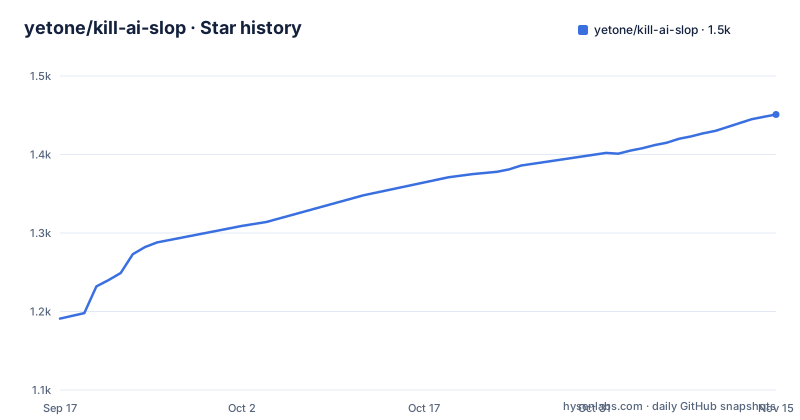
Star history
- yetone/kill-ai-slop1,451 ★ · +260
| Repository | 2026-09-17 | 2026-11-15 |
|---|---|---|
| yetone/kill-ai-slop | 1.2k | 1.5k |
260 Stars in the last 59 days, measured from the daily GitHub snapshot. Compare with other projects
Editorial analysis
Detection and editing are separate on purpose
The most important design decision is stated in the licence section rather than the feature list: the scanner is dependency-free and never edits files. What happens instead is a division of labour. In an agent host such as Claude Code, invoking the skill makes it scan, triage, report, then fix, following the workflow written in `skill/SKILL.md`. Run directly, it only reports:
node skill/scripts/scan.mjs path/to/project          # grouped report
node skill/scripts/scan.mjs path/to/project --json    # machine-readable
The script is a plain `.mjs` file with no npm dependencies, so it runs wherever Node does. The argument for splitting it this way is that a tool judging visual taste is exactly the kind of tool whose automated edits you would not want, and a report you disagree with costs nothing while a wrong edit costs a diff. The README describes the skill as proposing the clean fix or applying it, and which of those happens is decided by the host agent reading the playbook rather than by the scanner.
One catalogue file is the single source of truth for both projects
The repository holds two directories and the architecture is one file. `website/src/data/catalogue.ts` holds the taxonomy and is described as the single source of truth shared with the skill, so a tell cannot exist on the website and be missing from the scanner or worded differently in each. Alongside it, `website/src/styles/tokens.css` holds the rules the site holds itself to. That self-reference is the point of the site rather than a coincidence: the opening paragraph names indigo gradients, glowing cards, emoji in quantity, a mascot in every corner and all-caps stat cards, and the site's own design system is stated as paper and ink, a single editorial red used like a proofreader's pen, hierarchy from scale and space, hairline rules, and an explicit prohibition on gradients, emoji, glass and badges. Four of the banned categories map directly onto four of the opening complaints, so the guide is demonstrated by obeying its own rules. One asymmetry in that opening is worth noticing: every complaint in it is visual, while the project's own description covers visual and copy habits, so the sample that sets the tone is narrower than the scope the tool claims to check.
The manual install fetches a directory from the default branch
There are two installation routes and the second is the one to think about. The first is one command:
npx skills add yetone/kill-ai-slopThe second is described as installing it without touching a single file, and it consists of pasting a paragraph into your coding agent:
Install the kill-ai-slop skill from
https://github.com/yetone/kill-ai-slop/tree/main/skill

Copy everything in that directory into a kill-ai-slop/ folder
inside your agent's skills directory, then confirm it's registered.
The URL points at `tree/main`, so the content the agent copies is whatever is on the default branch when it fetches, with no tag, no checksum and no review step. What makes that worth naming is the framing: the README presents this as the gentle option precisely because you are not editing anything yourself, when the actual risk sits in the agent fetching unversioned instruction text from a branch and then writing it into a directory that changes your agent's behaviour. Installing by hand is documented separately in `skill/README.md`, and a tagged copy is always available if the branch is not what you want.
Suppression is a comment on one hit, not a project-wide disable
A linter that is right often enough to be useful will also be wrong sometimes, and the escape hatch is where a tool's design shows. Here it is a `deslop-ignore` comment directive applied to a specific hit, described as something you add for hits you have confirmed as intentional. That is a confirmation mechanism rather than a suppression mechanism: the cost of disagreeing with the scanner is one comment at the site you checked, and the reason stays in the source next to the decision. The background for a hit comes from `skill/references/`, which is described as holding three separate things, the taxonomy itself, the detection patterns, and a remediation playbook, so the tool distinguishes what to look for from what to do about it rather than shipping one blended rule list. The surrounding controls are four, and they are all narrow. `--only=` and `--skip=` filter by tell id, `--exclude=` drops paths, and `--rules=extra.mjs` loads your own language- or stack-specific tells, which is the extension point. Two naming details are easy to trip over. The directive is `deslop-ignore` rather than anything containing the project name, and the skill is activated by asking the agent to kill the AI slop in the project rather than by a command name.
Four languages, thirty-three demos, and zero JavaScript by default
The site ships in English, Chinese, Japanese and Korean, and it is a static Astro project described as zero-JS-by-default. Running it locally is three commands, changing into the directory, installing, then `npm run dev` on port 4321, and the build emits a `dist/` directory described as static and deployable anywhere. So there is no server component to host, no database and no request handling for the guide itself, which is a proportionate choice for a document meant to be linked to from a discussion. One tension the README does not resolve is between the demos and the constraint. Each of the 33 entries is described as having an interactive before-and-after demo showing the clean fix, and the site is described as zero-JS-by-default, so either a small amount of script is loaded for those demos or the interactivity is achieved with CSS, and the file does not say which. The number that matters for planning is 33 entries times four languages times two states.
The evidence base is thirty-three rebuilds, not thirty-three screenshots
Every entry is reconstructed in plain HTML, and the reconstruction is stated as a deliberate constraint twice. Each entry rebuilds the tell so the machine default and the clean fix sit side by side, and the demos are described as reconstructed for commentary, criticism and education, with the explicit statement that the point is not to disparage any one project. That is the right instinct for a catalogue about taste, since naming products invites both legal friction and tribal argument. It has a cost for a reader who wants to check the claims. The claim that every tell occurs in real shipped products rather than being a strawman cannot be verified from the repository, because the repository contains only the rebuilds. What you can verify is narrower and still useful: whether the rebuild actually exhibits the habit, and whether the proposed fix is as plain as it claims. The framing of the audience is also honest, since the opening line says the habits are so common the reader has stopped noticing them. There is no documentation directory in the repository at all, so the website is the documentation, and anything the catalogue cannot express as a demo does not appear anywhere.
Four names for one project, and six entries at the root
Identity is the one place this project is untidy. The repository is `kill-ai-slop`, the skill is `kill-ai-slop`, the website is `killaislop.com` with no hyphen and no separator, and the suppression comment is `deslop-ignore`. Four strings for one thing, and the one you type into source is the shortest. The root listing is the opposite: `.github/`, `.gitignore`, `LICENSE`, `README.md`, `skill/` and `website/`, six entries with no root build tooling, no root lockfile and no configuration, so each subproject carries its own dependency tree and there is nothing at the top that ties them together other than the shared catalogue import. The licence is Apache-2.0 with the file at the root, the recorded language is TypeScript, the branch was pushed on 2026-09-15, and there are no tagged releases, so like several projects in this shape the version of what you installed is whatever the branch held. The only entry point for the tool is a natural-language request, telling the agent to kill the AI slop in the project, so there is no command to memorise and no flag to discover before you find out what the skill does. Nothing else ties the two directories together: no root configuration, no shared build step and no docs directory, which leaves the catalogue import as the single coupling and makes that one file the thing to check if the site and the scanner ever disagree.
Editorial conclusion
It fits someone who has inherited a generated interface and cannot articulate why it feels wrong, because a numbered taxonomy turns that discomfort into a list a linter can check. It does not fit anyone who wants an automatic cleanup, since the tool deliberately stops before writing and hands the edit to an agent following a playbook, which means the outcome quality depends on that agent. Before running it, read the taxonomy in the skill's references rather than only the report, because a hit is only meaningful against the reason it was flagged, and if you install it the documented manual path pulls whatever is on the default branch at that moment, so prefer a tagged copy when the risk of an unreviewed prompt matters to you.
Frequently asked questions
Does the kill-ai-slop scanner modify files?
No. The scanner is dependency-free and never edits files; it reports grouped or JSON output. Fixing is left to the agent host following skill/SKILL.md, which scans, triages, reports, then fixes.
How do I install the kill-ai-slop skill?
With npx skills add yetone/kill-ai-slop, or by pasting instructions to your agent that point it at the skill directory on the main branch and ask it to copy the contents into a kill-ai-slop folder inside the agent's skills directory.
How do I silence a kill-ai-slop finding?
With a deslop-ignore comment directive at the site you checked. Separately, --only= and --skip= filter by tell id, --exclude= drops paths, and --rules=extra.mjs loads your own stack-specific tells.
How many tells does kill-ai-slop catalogue?
Thirty-three, covering visual and copy habits, each with a before-and-after rebuild. They live in website/src/data/catalogue.ts, which the README calls the single source of truth shared with the skill.
What languages does the kill-ai-slop website ship in?
English, Chinese, Japanese and Korean, as a static Astro site described as zero-JS-by-default, building to a dist/ directory that the README says can be deployed anywhere.
Official sources
Add this badge to your README
If you maintain this project, the badge below links readers to this analysis and shows its maintenance status from the daily GitHub snapshot. Paste the markdown into your README; add ?metric=license or ?metric=stars to the image URL for a different field.

[](https://hysenlabs.com/projects/yetone-kill-ai-slop)Star history chart for your README
[](https://hysenlabs.com/projects/yetone-kill-ai-slop)Was this useful?