VoiceprintRecognition-Pytorch covers three speaker tasks but ships no checkpoints
This project uses a variety of advanced voiceprint recognition models such as EcapaTdnn, ResNetSE, ERes2Net, CAM++, etc. It is not excluded that more models will be supported in the future. At the same time, this project also supports MelSpectrogram, Spectrogram data preprocessing methods
At a glance
- What is it?
- A PyTorch research library for speaker identification, voiceprint comparison and diarization, built around a config matrix of six backbones, five pooling layers and seven loss functions, with pretrained weights kept outside the repository.
- Who is it for?
- Take it if you plan to train speaker embeddings on audio you control and want to swap backbones, pooling layers and losses from a config file; leave it if you need a checkpoint today, because every weight in the benchmark tables sits behind a community invite rather than a download. The honest entry cost is that `visualdl==2.5.3` is pinned while the other eleven dependencies float, and the two benchmark tables disagree about whether more speakers help.
- Can I use it commercially?
- Yes. Apache-2.0 is a permissive licence: you can use, modify and sell software built on it, as long as you keep its copyright and licence notices.
- Is it still maintained?
- Yes. The repository last received commits 54 days ago.
- What is it written in?
- Mainly Python, according to GitHub's language statistics.
Answers come from the project's GitHub data, last synced on November 7, 2026, and from our analysis. They are not legal advice.
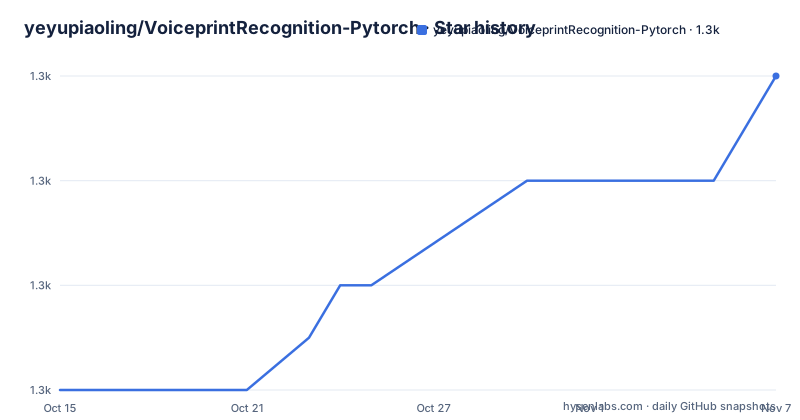
Star history
- yeyupiaoling/VoiceprintRecognition-Pytorch1,326 ★ · +6
| Repository | 2026-10-15 | 2026-11-07 |
|---|---|---|
| yeyupiaoling/VoiceprintRecognition-Pytorch | 1.3k | 1.3k |
6 Stars in the last 23 days, measured from the daily GitHub snapshot. Compare with other projects
Editorial analysis
Six backbones, five pooling layers, seven losses behind one config
A speaker embedding library built around PyTorch, where six backbone names sit behind a single config key: EcapaTdnn at 6.1 million parameters, TDNN at 2.6, Res2Net at 5.0, CAM++ at 6.8, ResNetSE at 7.8, and the two Res2Net variants at 6.6 or 55.1 and 56.2 million depending on the row. Those counts cover the backbone only, not the classifier head attached during training.
Pooling is a second axis rather than a baked-in detail, and all five options are exposed: AttentiveStatsPool, SelfAttentivePooling, TemporalStatisticsPooling, TemporalAveragePooling and TemporalStatsPool. Losses form a third, and AAMLoss is the one the README explains at length, the additive angular margin ArcFace loss that normalizes both the embedding and the class weight before adding a margin to the angle. SphereFace2, AMLoss, ARMLoss, CELoss, SubCenterLoss and TripletAngularMarginLoss sit next to it.
Preprocessing spans classic spectrograms, MelSpectrogram, Spectrogram, MFCC and Fbank, alongside learned front ends named Wav2vec2.0 and WavLM. Augmentation covers speed, volume, added noise, reverberation and SpecAugment. Three inference scripts at the top level mean identification, comparison and diarization come out of a single checkout rather than three repositories, and no file in the tree is tied to one model.
The config file decides the backbone, and the package carries a copy of it
Everything tunable lives in `configs/`, while the runtime code that consumes it ships as the `mvector/` package. `setup.py` registers the distribution under the name `mvector` and rewrites the checkout during the build so the installed copy carries its own config tree instead of reading a repository directory at run time.
The remaining layout is a straight pipeline. `audio_db/` holds audio you organize per speaker, `create_data.py` turns that directory into index files, `dataset/` holds the augmentation and batching code, `extract_features.py` caches features ahead of training, `train.py` fits the model, and `eval.py` produces scores. Helpers live in `tools/` and prose in `docs/`. Inference reuses the same tree through `infer_recognition.py`, `infer_contrast.py` and `infer_speaker_diarization.py`, each with a `_gui.py` sibling for local use at a desk.
One number deserves care before you quote it. The parameter column in the benchmark tables excludes the classifier, so a backbone you count at 6.8 million parameters on its own will be materially heavier once a classification head is attached for a closed-set training run, and an embedding-only deployment will be lighter again.
From audio_db to eval.py, five scripts and no documented flags
The environment block names the stack without giving an install command: Anaconda 3, Python 3.11, Pytorch 2.4.0, with Windows 11 or Ubuntu 22.04 as the two supported platforms. No pip or conda line sits next to it, so the dependency set is only readable as a `requirements.txt` listing, and eleven of those entries are open-ended floors.
numpy>=1.19.2
tqdm>=4.59.0
visualdl==2.5.3
resampy>=0.2.2
soundfile>=0.12.1
soundcard>=0.4.2
pyyaml>=5.4.1
scikit-learn>=1.5.2
pydub>=0.25.1
torchinfo>=1.7.2
loguru>=0.7.2
yeaudio>=0.0.7
`visualdl==2.5.3` is the single exact pin and the one to resolve before anything else, because every other package floats forward and can change under a long training run. `resampy` and `soundfile` cover the resampling and audio IO the augmentation path needs, `pyyaml` and `scikit-learn` carry config parsing and metrics, and `torchinfo` plus `loguru` are inspection and logging helpers.
For a first real run the order is fixed. Build the per-speaker directories under `audio_db/`, run `create_data.py`, cache features with `extract_features.py`, fit with `train.py`, score with `eval.py`, then call one of the three inference scripts. The README's section list names those scripts in that order and does not show how arguments reach them, so read each script for its own options instead of guessing flags. The one config key whose effect is spelled out is the speed perturbation switch, which triples the class count:
speed_perturb_3_class: TrueBoth benchmark sections report it enabled.
Every published checkpoint sits behind a community invite
The model download column is where a newcomer loses the thread. Every row in both benchmark tables points at the same destination, 加入知识星球获取, which means the weights come from the author's paid knowledge community, with a QQ group offered as the alternative channel. Nothing in the repository carries a checkpoint, so the EER figures are attached to files you have to request by hand.
Those figures are also measured by the author rather than reproduced elsewhere. Both sections evaluate against a held-out set distributed through aistudio: 196 speakers for CN-Celeb, and 158 for VoxCeleb1&2. No independent measurement of those numbers is cited anywhere in the repository, and no evaluation protocol, score file or confusion matrix is checked in, so there is no cheap way to confirm them short of retraining.
The hosted demos route around the gap but relocate the problem. A voiceprint comparison page, a voiceprint recognition page and a speaker diarization page all run on tools.yeyupiaoling.cn, with matching WeChat mini programs beside them. Audio sent there leaves your machine and lands on a third-party server, which is a poor fit for clips containing voices you have no permission to process.
The VoxCeleb table says more speakers make the error rate worse
The two benchmark sections disagree about what scale buys, and the contradiction is visible in the rows themselves. In the CN-Celeb section, moving from 2796 training speakers to an unnamed 其他数据集 with 20W+ speakers improves ERes2NetV2 from 0.08071 to 0.03847, and CAM++ from 0.08332 to 0.04765. In the VoxCeleb1&2 section the direction reverses. CAM++ scores 0.02436 at 7205 speakers, 0.03182 at 2W+ and 0.10334 at 20W+. ERes2Net moves from 0.02954 to 0.08904 across those same two rows, and ERes2NetV2 from 0.02742 to 0.08649. In all three cases the largest data claim on the page carries the worst error rate, and the MinDCF column follows suit.
The recipe notes sharpen the problem rather than settling it. The CN-Celeb table lists five conditions, including one recording that noise and reverberation augmentation were applied, while the VoxCeleb table stops at four notes and omits that line. Everything else matches between the two, down to the Fbank front end, the AAMLoss objective and the speed perturbation switch, which makes the missing note the only visible difference between the two recipes.
The unnamed dataset column is the second gap. 其他数据集 carries no name, no usage line and no speaker breakdown, so those rows cannot be reproduced or audited from the page, and a reader has no way to tell whether the 20W+ count is balanced or scraped.
Package metadata claims OS Independent and Python 3.5
Three different support matrices appear in one repository. `setup.py` registers classifiers from Python 3.5 through 3.9 alongside Operating System :: OS Independent, the README badge advertises python-3.8+, and the environment block names Python 3.11 running on Windows 11 or Ubuntu 22.04. None of the three agrees with the others, and the badge is a shields.io image rather than a checked constraint, so nothing enforces any of it at install time. Treat the environment block as the only real requirement and the classifiers as decoration.
Two further details matter if you vendor this into another build. The `download_url` field and its sibling point at VoiceprintRecognition_Pytorch with underscores, which is not the repository name you clone, so scripted dependency resolvers will hit a different path than the code you actually read.
The build step also rewrites the source tree. It deletes `./mvector/configs/` and copies the top-level `configs/` directory into place, then removes the copy again at the end of the run. Installing the package therefore mutates a working tree, which bites in CI when the same directory is reused across jobs and the second build starts from an already-moved config folder.
Branch split between 1.1 and the 1.0.5 code path
Version identity here is carried by branch names rather than by anything in the tree. The default branch is `develop`, the README calls that branch 1.1, and anyone who needs the previous line is pointed at a 1.0 branch pinned to 1.0.5, so two generations of code live in one repository with no marker telling you which one you have checked out.
The maintenance record itself is thin. The last push landed on 2026-09-15, the code is Apache-2.0, and the repository has no GitHub releases, so a version string written into a training log cannot be resolved from the project's own page. The dated log in the README carries a single line, recording 1.1 on 2024.10.12, and the table of contents has no upgrade, migration or rollback entry next to it.
That gap bites harder for a research library than for an application, because config keys are not versioned. A YAML file written for `develop` is not a safe input for the 1.0 path, and a run launched against the wrong branch still prints an EER, just one that is not comparable with anything. Pin the branch before the first run and record which one produced each checkpoint.
Editorial conclusion
Take it if you plan to train speaker embeddings on audio you control and want to swap backbones, pooling layers and losses from a config file; leave it if you need a checkpoint today, because every weight in the benchmark tables sits behind a community invite rather than a download. The honest entry cost is that `visualdl==2.5.3` is pinned while the other eleven dependencies float, and the two benchmark tables disagree about whether more speakers help. Before quoting any EER from this page, reproduce it yourself with `speed_perturb_3_class: True`, `Fbank` and `AAMLoss` on your own test set.
Frequently asked questions
Does VoiceprintRecognition-Pytorch ship pretrained voiceprint models?
No. Every row of both benchmark tables points at 加入知识星球获取, so checkpoints are distributed through the author's paid knowledge community or a QQ group rather than through the repository.
Which preprocessing and loss function produce the published benchmark numbers?
The Fbank front end with AAMLoss, and `speed_perturb_3_class: True` so that speed perturbation triples the class count. Both benchmark sections report that same recipe.
What Python and PyTorch versions does VoiceprintRecognition-Pytorch target?
The environment block names Anaconda 3, Python 3.11 and Pytorch 2.4.0 on Windows 11 or Ubuntu 22.04, while the `setup.py` classifiers stop at Python 3.9 and declare Operating System :: OS Independent.
How many speakers are behind the CN-Celeb and VoxCeleb1&2 error rates?
The CN-Celeb models were trained on 2796 speakers and tested against a 196-speaker test set, while the VoxCeleb1&2 models used 7205 training speakers and a 158-speaker test set.
Which speaker tasks does the repository cover at inference time?
Three: `infer_recognition.py` for identification, `infer_contrast.py` for comparing two clips, and `infer_speaker_diarization.py` for separating speakers in a longer recording. Each ships a GUI sibling named `infer_recognition_gui.py`, `infer_contrast_gui.py` or `infer_speaker_diarization_gui.py`.
Official sources
Add this badge to your README
If you maintain this project, the badge below links readers to this analysis and shows its maintenance status from the daily GitHub snapshot. Paste the markdown into your README; add ?metric=license or ?metric=stars to the image URL for a different field.

[](https://hysenlabs.com/projects/yeyupiaoling-voiceprintrecognition-pytorch)Star history chart for your README
[](https://hysenlabs.com/projects/yeyupiaoling-voiceprintrecognition-pytorch)Was this useful?