PaCMAP: dimension reduction that keeps global and local structure
PaCMAP: Large-scale Dimension Reduction Technique Preserving Both Global and Local Structure
At a glance
- What is it?
- PaCMAP is an Apache 2.0 Python implementation of Pairwise Controlled Manifold Approximation, a dimensionality reduction method that optimises a low dimensional embedding using three kinds of point pairs instead of only nearest neighbours. The result is a 2D or 3D map that keeps both the local clusters and the wider arrangement of the data, which is what makes it useful for visualisation and for embedding new points into an existing space. The trade-off is a heavier dependency set and a package that has changed its default nearest neighbour backend.
- Who is it for?
- Adopt PaCMAP when you need a single embedding that shows both cluster detail and the layout of the whole dataset, especially if you will later map new samples into that space with transform. Skip it if you only need a fast local picture of a very large matrix, or if you cannot add faiss-cpu and numba to your environment.
- Can I use it commercially?
- Yes. Apache-2.0 is a permissive licence: you can use, modify and sell software built on it, as long as you keep its copyright and licence notices.
- Is it still maintained?
- Yes. The repository last received commits 12 days ago.
- What is it written in?
- Mainly Python, according to GitHub's language statistics.
Answers come from the project's GitHub data, last synced on November 7, 2026, and from our analysis. They are not legal advice.
Star history
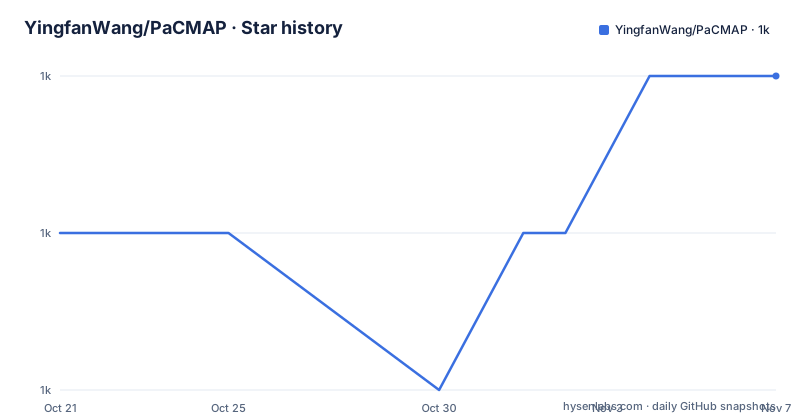
- YingfanWang/PaCMAP1,028 ★ · +1
| Repository | 2026-10-21 | 2026-11-07 |
|---|---|---|
| YingfanWang/PaCMAP | 1k | 1k |
1 Stars in the last 17 days, measured from the daily GitHub snapshot. Compare with other projects
Editorial analysis
Why local structure alone was not enough for PaCMAP
Most dimensionality reduction methods pick one side of a trade-off. The README groups t-SNE, LargeVis and UMAP as techniques that focus on local structure, and TriMAP as one that focuses on global structure. Neither family gives you both without a knob, and the knob is the same knob in each case: the number of considered neighbours, which shifts the result along a spectrum rather than letting you keep the two at once.
PaCMAP takes a different route. Instead of attracting more neighbours to pull in the wider structure, it introduces a dedicated group of mid-near pairs. The stated design is a two phase one: capture global structure first, then refine local structure, so the final embedding preserves both.
The method was published in the Journal of Machine Learning Research, and the README records two awards for the software work, the John M. Chambers Statistical Software Award and the Award for Innovation in Statistical Programming and Analytics from the American Statistical Association sections. The paper is linked from the README as the reference background, and the package description calls it the official implementation of Pairwise Controlled Manifold Approximation Projection.
The audience is anyone who has been disappointed by a 2D scatter plot. A t-SNE map can show fifteen clean clusters and hide the fact that two of them sit next to a third one, and PaCMAP is aimed squarely at that complaint.
The three kinds of pairs that drive the optimisation
The mechanism is a single optimisation over pairs of points in the embedding, and the difference from the usual neighbour-only approach is which pairs enter the loss.
Neighbour pairs are the familiar ones. These are the attraction terms that pull close points together in the low dimensional space, the same idea t-SNE and UMAP use. Mid-near pairs, controlled by the MN_ratio parameter, are the addition. They are points that are not immediate neighbours but are near enough to carry information about the arrangement of clusters, and they are what carries the global structure. Further pairs, controlled by FP_ratio, are pushed apart, the repulsion term that stops the embedding from collapsing everything into a blob.
The example in the README sets both ratios explicitly, with a neighbour count of ten.
embedding = pacmap.PaCMAP(n_components=2, n_neighbors=10, MN_ratio=0.5, FP_ratio=2.0)MN_ratio of 0.5 means that for every neighbour pair you get half a mid-near pair, and FP_ratio of 2.0 means two further pairs per neighbour pair. Those two numbers are the tuning surface. Raise MN_ratio and the layout becomes more global and less locally crisp; raise FP_ratio and the embedding spreads out and separates distant groups more aggressively. The README notes that n_neighbors can be set to None for an automatic choice.
The optimisation itself runs on the low dimensional embedding, and the initialisation matters. The example passes init="pca", which is a sensible default for a 2D map because a PCA start tends to give a well spread initial layout, and the same parameter is available in the sklearn-style fit_transform call.
Installing PaCMAP and producing a first embedding
There are two installation routes and both are one command. Conda and mamba users install the pacmap package from the conda-forge channel.
conda install pacmap -c conda-forgemamba install pacmap -c conda-forgeFor pip users the basic install includes FAISS as the default nearest neighbour backend, and extras add the alternatives.
pip install pacmap
pip install pacmap[annoy]
pip install pacmap[voyager]
pip install pacmap[all]
The pyproject.toml pins the runtime floor at Python 3.8 and depends on scikit-learn 0.20 or newer, numba 0.57 or newer, numpy 1.20 or newer and faiss-cpu. The compiled requirements file shows a concrete recent set, numpy 2.3.5, scikit-learn 1.8.0, numba 0.63.1 and faiss-cpu 1.13.2, with llvmlite and scipy pulled in by numba and scikit-learn. The README also advises that if you hit installation trouble, installing the dependencies with conda or mamba helps, and that some users found they needed numba 0.57 or later.
A complete first run loads a dataset, fits the embedding and draws it. The README uses the COIL-20 dataset in ndarray form, and notes that any array of shape (N, D) works, where N is the number of samples and D the dimension of each one.
import pacmap
import numpy as np
import matplotlib.pyplot as plt

X = np.load("./data/coil_20.npy", allow_pickle=True)
X = X.reshape(X.shape[0], -1)
y = np.load("./data/coil_20_labels.npy", allow_pickle=True)

embedding = pacmap.PaCMAP(n_components=2, n_neighbors=10, MN_ratio=0.5, FP_ratio=2.0)
X_transformed = embedding.fit_transform(X, init="pca")

fig, ax = plt.subplots(1, 1, figsize=(6, 6))
ax.scatter(X_transformed[:, 0], X_transformed[:, 1], cmap="Spectral", c=y, s=0.6)
The comment in the example makes one guarantee explicit: the index of the transformed data corresponds to the index of the original data, so you can join labels back to the embedded points.
Fitting once and mapping new points with transform
The package is built to be compatible with scikit-learn, meaning it has a similar interface with functions in the sklearn.manifold module. That compatibility is more than naming, because it brings the fit and transform split along with it.
The repository layout shows that this is a maintained feature rather than an accident. There is a demo/transform_demo.py, and the Makefile test target runs six named test files, test_general.py, test_transform_iris.py, test_randomness.py, test_transform.py, test_transform_tree.py and test_metric.py. Three of those six concern transform, including one named for a tree variant and one that uses the iris dataset, and a separate file covers randomness, which matters for a stochastic embedding method where a fixed random seed decides whether two runs agree.
This is the feature that separates PaCMAP from a pure visualisation tool. With PaCMAP you keep the fitted embedding and project new samples into the same coordinates, which is what you need if the embedding is going into a report about incoming data rather than into a one off figure.
The cost is that the transform path depends on the nearest neighbour graph being meaningful for the new points, and the tree variant in the test suite is there because nearest neighbour search structures behave differently on new data.
The FAISS default and the optional KNN backends
One change is worth knowing about before you pin a version, and the README is explicit about it. The original PaCMAP paper used Annoy as the default nearest neighbour backend. Since the Annoy package is no longer actively maintained, the maintainers switched to FAISS as the default for better long term stability and performance, and Annoy remains available as an optional backend for compatibility.
The consequence is a change in the installed dependency tree, since faiss-cpu is now a hard requirement rather than an optional one, and the extras mechanism exposes the alternatives explicitly.
pip install pacmap[annoy]
pip install pacmap[voyager]
pip install pacmap[all]
Voyager is a Spotify project, and the pyproject.toml handles it in two ways depending on Python version, the voyager-pypi extra for Python 3.8 to 3.12 and voyager-git for Python 3.13 and later, pointing at the git repository rather than PyPI. The all extra covers Annoy and Voyager together, and an all-git extra exists for the git variants.
The practical point for a deployment is that the default is now a compiled binary dependency, faiss-cpu, which is easy on a workstation and occasionally awkward in a locked down build environment. If your environment cannot take faiss-cpu, installing the Annoy extra and selecting it explicitly is the documented path, and it is the only path that reproduces the original paper's configuration.
Where PaCMAP is the wrong choice
The first limitation is scale and memory. Building the pairwise objective needs a nearest neighbour graph over the data, and the method is designed for visualisation of a dataset you can hold in memory. numba compiles the inner loops, which makes the optimisation fast once it is running, but it does not make the memory free. A dataset that will not fit in RAM will not fit in PaCMAP either.
The second limitation is that the ratios are still tuning. The README frames PaCMAP as removing the need to pick one structure or the other, but MN_ratio and FP_ratio remain parameters that a user has to set sensibly for their data, and the paper's own discussion is part of the recommended reading. It is a better default than t-SNE for global structure, not a parameter free method.
The third limitation is the boundary of the package. The README's news section announces two newer methods, ParamRepulsor, published at NeurIPS 2024 and built on Parametric PaCMAP with GPU support through PyTorch, and LocalMAP, published at AAAI 2025, which adjusts the graph locally in the final stage. Both live in their own repositories, hyhuang00/ParamRepulsor and williamsyy/LocalMAP. LocalMAP is described as being embedded into the PaCMAP package soon, which means the packaged surface and the published results can drift apart, and it means neither newer algorithm is available from a pip install of pacmap today.
The fourth limitation is stability of the package itself. The version numbers are still below 1.0, and the last push was on 2026-07-20 with the most recent tagged release v0.9.1 dated 2026-03-02. A pre 1.0 version carries no compatibility promise from the maintainers, and the backend switch described above shows that even the dependency surface can change between minor releases.
PaCMAP against t-SNE, UMAP, TriMAP and ParamRepulsor
The alternative set divides cleanly by what each method optimises.
The README places t-SNE, LargeVis and UMAP on the local side and TriMAP on the global side. PaCMAP differs from all of them by adding mid-near pairs into the loss, so the global information arrives through a dedicated term rather than through the neighbour count.
Against ParamRepulsor the difference is parametric versus non-parametric and CPU versus GPU. ParamRepulsor learns a parametric map with PyTorch, and it targets online and streaming scenarios where traditional methods struggle. The README reports state of the art results for it in local and global structure preservation. The price is a different installation, a PyTorch dependency and a separate research codebase. If your problem is static visualisation of a dataset in memory, PaCMAP is the simpler tool; if new data must arrive continuously, ParamRepulsor is built for that and PaCMAP is not.
LocalMAP is the other branch, and it attacks the problem at the graph stage rather than the loss stage, adjusting the neighbour graph locally at the end of the optimisation so that clusters in the data become more separable in the map.
Licence, awards and the state of the repository
PaCMAP is released under Apache 2.0, declared in pyproject.toml, and the LICENSE file sits at the repository root. The authors credited are Yingfan Wang, Haiyang Huang, Cynthia Rudin and Yaron Shaposhnik, and the package is built with hatchling. Apache 2.0 permits use inside commercial and closed source products, requires that the licence and copyright notices travel with redistributions, and includes an explicit patent grant, which matters for a technique that is implemented in other projects.
The repository is not archived and the last push was on 2026-07-20. The release history shows v0.8.0 on 2025-02-26 followed by v0.9.0 and v0.9.1 both on 2026-03-02, a quiet year followed by a cluster of work, which lines up with the FAISS default change and the LocalMAP integration mentioned in the news section.
The test setup is modern and reproducible. The Makefile drives uv, with install and install-dev targets that run uv sync --locked, a test target that names the six test files explicitly, and build that calls uv build. There is a uv.lock at the repository root and a requirements.txt generated by uv pip compile, plus separate requirement files for the test environments on Python 3.13 and earlier. A contributor can therefore get a byte-identical dependency set, which is unusual and welcome in a scientific package.
Editorial conclusion
Adopt PaCMAP when you need a single embedding that shows both cluster detail and the layout of the whole dataset, especially if you will later map new samples into that space with transform. Skip it if you only need a fast local picture of a very large matrix, or if you cannot add faiss-cpu and numba to your environment. Before switching from t-SNE or UMAP, run the same data through both with init="pca" and compare how much of the global layout survives before deciding.
Frequently asked questions
What problem does PaCMAP solve that t-SNE and UMAP do not?
t-SNE, LargeVis and UMAP concentrate on local structure, while PaCMAP adds mid-near pairs to the optimisation so the embedding keeps global structure as well, instead of relying on a large neighbour count to approximate it.
How do I install PaCMAP?
Use conda install pacmap -c conda-forge or mamba install pacmap -c conda-forge, or pip install pacmap from PyPI, with extras for the Annoy and Voyager nearest neighbour backends.
What are MN_ratio and FP_ratio in PaCMAP?
MN_ratio sets how many mid-near pairs are used per neighbour pair, and FP_ratio sets how many further pairs are repelled per neighbour pair. The README example uses MN_ratio=0.5 and FP_ratio=2.0.
Why did PaCMAP change its default nearest neighbour backend?
The original paper used Annoy, and since the Annoy package is no longer actively maintained the maintainers switched the default to FAISS, leaving Annoy available as an optional backend for compatibility.
Can PaCMAP embed new data into an existing embedding?
Yes, the package follows the scikit-learn interface, and the repository ships a transform demo along with test files covering transform behaviour on the iris dataset and on a tree variant.
Official sources
Add this badge to your README
If you maintain this project, the badge below links readers to this analysis and shows its maintenance status from the daily GitHub snapshot. Paste the markdown into your README; add ?metric=license or ?metric=stars to the image URL for a different field.

[](https://hysenlabs.com/projects/yingfanwang-pacmap)Star history chart for your README
[](https://hysenlabs.com/projects/yingfanwang-pacmap)Was this useful?