SYSU_Notebook: an archive of one computer science school's course material, maintained by students
Shares course materials, notes, final exam papers, and other useful resources for undergraduate and graduate courses at Sun Yat-sen University's School of Computer Science.
At a glance
- What is it?
- Lecture notes, past papers, lab report templates and interview question banks for Sun Yat-sen University's computer science courses, kept in a repository with no releases, no topics and a license GitHub could not classify.
- Who is it for?
- SYSU_Notebook is a filing cabinet with a README, and that is not a criticism. It solves a problem no course page solves, which is finding out what a specific lecture actually covered and what the exam looked like.
- Can I use it commercially?
- Check first. The repository uses a licence we do not classify automatically, so read its LICENSE file before any commercial use.
- Is it still maintained?
- Yes. The repository last received commits 135 days ago.
- What is it written in?
- Mainly Python, according to GitHub's language statistics.
Answers come from the project's GitHub data, last synced on November 7, 2026, and from our analysis. They are not legal advice.
Star history
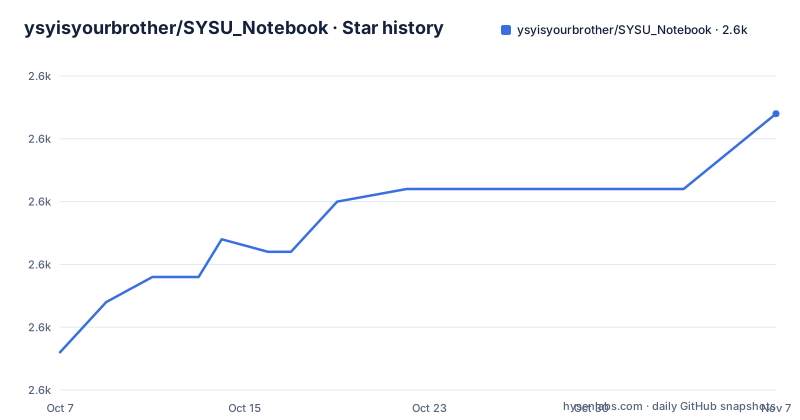
- ysyisyourbrother/SYSU_Notebook2,612 ★ · +19
| Repository | 2026-10-07 | 2026-11-07 |
|---|---|---|
| ysyisyourbrother/SYSU_Notebook | 2.6k | 2.6k |
19 Stars in the last 31 days, measured from the daily GitHub snapshot. Compare with other projects
Editorial analysis
What the repository actually holds
ysyisyourbrother/SYSU_Notebook is a document archive rather than a software project. The repository description says it shares undergraduate and graduate course material from the School of Computer Science at Sun Yat-sen University: lecture notes, recalled past exam papers, assignment references, lab report templates, and question banks for postgraduate admission and summer camp interviews. It describes itself as non-profit and permanently free, and asks that attribution be given when material is forwarded.
The numbers are what you would expect for a resource that gets passed around by word of mouth: 2,585 stars, 299 forks, no open issues. The last push was on 2026-06-25 and the repository is not archived, so the owner is still adding to it, though not on a schedule anyone outside the project could predict.
The top level of the tree is small and tells you the whole structure: `.gitattributes`, `Contribution.md`, `LICENSE`, `ReadMe.md`, an `images/` folder, and four content directories. Those four are postgraduate admission interview preparation, other materials, lab report templates, and course materials. There is no source directory, no test suite, no continuous integration configuration and no documentation site. Everything of value lives inside those four folders.
Reading the course catalogue table
The README's main content is a Markdown table with one row per course offering. Columns record the teaching term, the course name, the semester it falls in, the instructor, and then four availability columns for textbooks and slides, notes, assignments, and final exams. Rows are dated by year and season, starting at spring 2018 and running through spring 2020 in the visible part of the catalogue.
Availability is marked with emoji shortcodes rather than words: a green book for slides, a blue book for notes, a page for assignments, and a check mark for a past exam. That choice makes the table scannable and also makes it hard to parse, so anyone wanting to know which exams exist has to read the table rather than query it. There is no index file, no tag system, and the repository has no GitHub topics at all.
Course titles are written in Chinese, and the links into the tree are percent-encoded GitHub URLs. Decoding one shows the convention: the path segment is the course materials folder followed by the subject name, nested under a shared parent directory.
https://github.com/ysyisyourbrother/SYSU_Notebook/tree/master/%E8%AF%BE%E7%A8%8B%E8%B5%84%E6%96%99/%E6%A6%82%E7%8E%87%E8%AE%BA%E4%B8%8E%E6%95%B0%E7%90%86%E7%BB%9F%E8%AE%A1Concretely, that path decodes to the course materials folder holding probability theory and mathematical statistics. Courses listed this way include operating systems, computer networks, databases, distributed systems, machine learning and data mining, compiler principles, artificial intelligence and natural language processing, which is a fairly complete coverage of a standard computer science undergraduate sequence.
Why GitHub labels the repository Python
The metadata reports the primary language as Python, which is misleading at first glance for a repository of PDFs and scanned exams. GitHub computes that figure by counting file extensions across the whole tree, so a repository whose largest group of committed script files are Python scripts reports Python even when nothing in the repository is a Python package. That is the most likely explanation here.
There is no `setup.py`, no `requirements.txt`, no `pyproject.toml` and no package layout in the tree. Whatever Python exists is committed as course exercise scripts sitting inside per-subject folders, where a language statistic has no way to tell an assignment solution apart from a library. Treat the language field as an artifact of counting rather than a description of what the project is.
The same caution applies to the zero open issues figure. The README's badges for issues and pull requests link to empty targets, and there is no issue tracker described anywhere, so an issue count of zero says only that nobody files issues, not that nothing needs fixing. The contribution guide is a separate markdown file rather than a link to a template.
Licensing metadata that GitHub could not classify
GitHub reports the license as NOASSERTION, which means its license detector could not map the repository to a known identifier. A `LICENSE` file is present at the root, so there is a license file to read. The README adds that the project is non-profit and permanently free open source, and asks readers to credit the source when sharing material onward.
Those three facts together are the whole picture, and they do not settle a licensing question. Open source as a phrase in a README is a claim about intent rather than a grant of specific rights, and the difference matters if you intend to reuse a set of past exam papers or a lecturer's slides in something published. The operational answer is simple: read the `LICENSE` file at the repository root before you reuse anything, rather than trusting the metadata field or the README wording. The repository carries no topics and no homepage, so there is no external site that would add a clearer statement either.
Where the archive stops and external material begins
The README covers three things and delegates everything else. It has a short section on how to obtain the files, a section inviting contributions that links to `Contribution.md`, a contributors acknowledgement block that renders the GitHub contributors graph through an external image service, and then the catalogue.
The download section is worth a note because it reveals the actual failure mode for users of this kind of repository. Rather than describing a way to fetch large files reliably, it points at two third-party download accelerators and asks readers to try those before contacting the owner.
- [DownGit](http://zhoudaxiaa.gitee.io/downgit/#/home) / [Githubd](https://githubd.com/#/)Both are external services of unknown longevity, which is a real fragility for an archive people depend on. Beyond that, the README documents nothing about file formats, licensing of third-party course content, or how the archive should be cited. If you need to know whether a specific exam paper is the original scan or a retyped version, the only evidence is the file itself inside its folder.
Editorial conclusion
SYSU_Notebook is a filing cabinet with a README, and that is not a criticism. It solves a problem no course page solves, which is finding out what a specific lecture actually covered and what the exam looked like. What it cannot do is tell you whether any of it still reflects how the course is taught, because the archive is organised by academic term rather than by syllabus version and nothing in the repository records when a particular folder was last checked. If you are a Sun Yat-sen student or an applicant, open the catalogue table, follow the tree link for the one course you care about, and treat the rest as background.
Frequently asked questions
Can I use material from SYSU_Notebook in my own coursework or projects?
Read the LICENSE file at the repository root before you do. GitHub's own metadata reports NOASSERTION, so the file is the only authoritative statement, and the README's description of the project as non-profit and permanently free describes intent rather than a specific grant of reuse rights.
Does SYSU_Notebook contain runnable code?
Only incidentally. It is a document archive whose top level holds a README, a license file, a contribution guide and four content folders. Some course folders contain Python exercise scripts, which is the likely reason GitHub reports Python as the primary language, but there is no package layout, no dependency manifest and no test suite.
Which subjects does the SYSU_Notebook archive cover?
Computer science courses from Sun Yat-sen University's School of Computer Science, listed in a README table with one row per offering, including the term, the instructor, and separate columns for slides, notes, assignments and past exams. The visible rows run from spring 2018 through spring 2020.
Why does GitHub list SYSU_Notebook as a Python repository?
GitHub derives the language field from file extensions across the entire tree, and the largest group of committed script files here are Python course exercises kept inside per-subject folders. There is no setup.py or package directory, so the field describes what was counted rather than what the project offers.
Official sources
Add this badge to your README
If you maintain this project, the badge below links readers to this analysis and shows its maintenance status from the daily GitHub snapshot. Paste the markdown into your README; add ?metric=license or ?metric=stars to the image URL for a different field.

[](https://hysenlabs.com/projects/ysyisyourbrother-sysu-notebook)Star history chart for your README
[](https://hysenlabs.com/projects/ysyisyourbrother-sysu-notebook)Was this useful?