Drama Skills: eleven agent skills that turn a novel into a short-drama shot list and video prompts
Open-source AI short drama / micro-drama skills for Claude Code and Codex: script, assets, storyboard, image and video prompts, review. MIT licensed.
At a glance
- What is it?
- zenstory-ai/drama-skills is a set of Claude Code and Codex skills that take a short drama from novel analysis through script, visual bible, storyboard and video prompts to a cut episode. Five Markdown files record each creative decision, and a checker script catches inconsistencies between them before anything is generated.
- Who is it for?
- Drama Skills fits writers, micro-drama studios and directors who already use Claude Code or Codex and want the adaptation, storyboard and prompt-writing work kept in plain Markdown files instead of a bespoke tool. It is not a generation engine itself, so you still pay separately for image, video, voice and music calls, and you still need ffmpeg to cut a final episode.
- Can I use it commercially?
- Yes. MIT is a permissive licence: you can use, modify and sell software built on it, as long as you keep its copyright and licence notices.
- Is it still maintained?
- Yes. The repository received new commits within the last day.
- What is it written in?
- Mainly Python, according to GitHub's language statistics.
Answers come from the project's GitHub data, last synced on November 14, 2026, and from our analysis. They are not legal advice.
Star history
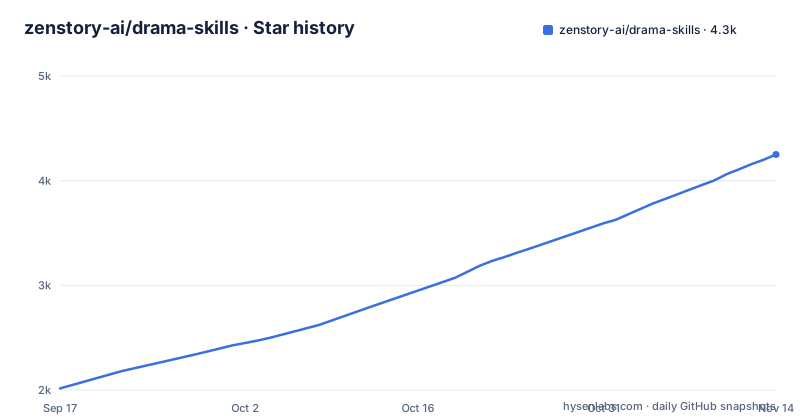
- zenstory-ai/drama-skills4,250 ★ · +2,235
| Repository | 2026-09-17 | 2026-11-14 |
|---|---|---|
| zenstory-ai/drama-skills | 2k | 4.3k |
2,235 Stars in the last 58 days, measured from the daily GitHub snapshot. Compare with other projects
Editorial analysis
Eleven skills cover novel analysis through the cut episode
Drama Skills packages the path from an idea or an existing novel to a finished short drama as eleven skills: novel analysis, episode mapping, scripting, asset decisions, image prompts, storyboarding, video prompts, production, editing and review. They install into an existing coding agent, specifically Claude Code, Codex or another environment that supports the Agent Skill specification, and the writing itself runs on whatever model that agent already uses.
The project is not a generation tool. It writes the documents and prompts that a human or an agent then sends to image, video, voice or music generators, and it waits for explicit confirmation before any of those paid calls happen. The repository is MIT licensed and includes evaluations, docs, examples, maintainers and tools directories alongside the skills themselves.
Five Markdown files split one episode into separate layers
Creative decisions are tracked in five files per project, maintained by stage: Script, VisualBible, Storyboard, ImagePrompts and VideoPrompts, with an EditLog added once an episode is cut. If you only need part of the pipeline, you only deliver the matching documents. The published example episode, titled EP001 of a series called Let You Manage the Account, shows how one shot is described across four files at once.
The script file states only what happens: a line of dialogue over a laptop speaker, then a description of each character's posture. The visual bible, storyboard and video prompt files add progressively more production detail on top of that same shot, each written for a different purpose, which means a change to the plot does not have to be hunted down across scattered prompt text.
A continuity lock is a literal phrase you can paste into any prompt
To keep a character's look stable across shots that are each generated separately, the visual bible records a continuity lock: a short phrase that can be pasted into a prompt exactly as written. The published example locks a character's costume with the phrase pine-green lapel service jacket, tagged to a list of specific shot IDs and to an image prompt item.
The storyboard file then reuses that same lock phrase inside its frozen keyframe prompt, and the video prompt file reuses it again when describing the motion between the shot's start and end points. Because the phrase is copied rather than re-described, a generator is less likely to drift into a different jacket color on a later shot.
A checker script flags unsupported claims and mismatched durations
A script named creator_markdown_check.py cross-checks the five documents against each other. The README demonstrates this by deliberately breaking two things in the example: removing a character from a shot's stated visual basis, and changing a video prompt's duration from 2 seconds to 3 seconds when the storyboard says 2.
The checker reports both errors by shot ID and reason: a frozen keyframe prompt names a character that the stated visual basis does not cover, and a shot's storyboard duration disagrees with its video prompt duration, with a rule that the video prompt must copy the accepted shot duration exactly rather than inventing a new one. This is the mechanism that catches drift before a generation call is made, not after.
Approval happens before any paid generation call
Image, video, voiceover and music tasks all follow the same pattern: the exact content and parameters are written into a file first, and only after explicit confirmation does a production skill call an external API and spend money. The README frames this as a deliberate choice, placing confirmation before production so a production skill shows the quantity, content, references, parameters, outputs and adapter for that batch before it runs.
The demo clip described in the README is a 68-second vertical sample, adapted from a 20-chapter novel into 20 shots, each generated and then cut together with subtitles, an on-screen system panel and sound effects added during editing. The video generation cost for that clip is given as about 40 yuan, which is the author's own figure for that one sample.
Editing writes down why each cut point was chosen, and measurement scripts only report facts
The editing skill is part of the suite rather than a separate manual step. It records, segment by segment, why an in-point and out-point were chosen, pulls subtitles verbatim from the script, normalizes loudness, and renders the result. Verification and measurement scripts in the toolset report facts rather than passing judgment, which keeps the review stage separate from a subjective quality call.
Supplier credentials are kept out of the project files, and neither the project files nor the other skills are tied to a specific vendor, according to the README. That separation matters if you switch image, video or voice providers partway through a series, since the documents describing shots and prompts are not supposed to encode which vendor you used.
Install with npx skills add, and editing needs ffmpeg separately
The project installs into an existing agent with one command:
npx skills add zenstory-ai/drama-skills -y -gThe -g flag installs globally so every directory can use it; leaving it off installs only into the current directory, and re-running the same command applies updates. The scripts need Python 3.9 or newer, and cutting a final episode additionally needs ffmpeg and ffprobe available on the PATH. A manual alternative clones the repository and symlinks the skills directory into Claude Code's or Codex's skills folder, which also allows linking only the specific skills you need rather than the whole set.
The short-drama skill itself handles project initialization, routing between the other skills and a dashboard. Recent releases are v0.10.1 on 2026-11-02, v0.10.0 on 2026-10-30 and v0.9.2 on 2026-10-20, and the last push was on 2026-11-02.
Editorial conclusion
Drama Skills fits writers, micro-drama studios and directors who already use Claude Code or Codex and want the adaptation, storyboard and prompt-writing work kept in plain Markdown files instead of a bespoke tool. It is not a generation engine itself, so you still pay separately for image, video, voice and music calls, and you still need ffmpeg to cut a final episode. Before adopting it, read how the continuity-lock and checker-script mechanism works, since that is what keeps a character's look consistent across many separately generated shots.
Frequently asked questions
what is drama skills
Drama Skills, from zenstory-ai, is a set of eleven agent skills for Claude Code and Codex that take a short drama from an idea or novel through script, visual bible, storyboard, video prompts and a cut episode.
drama-skills github
The repository is zenstory-ai/drama-skills on GitHub, MIT licensed, installed with npx skills add zenstory-ai/drama-skills -y -g into a coding agent that supports the Agent Skill specification.
Drama skills examples
The repository ships a public sample episode, EP001 of Let You Manage the Account, under examples/creator-first, with its Script, VisualBible, Storyboard and VideoPrompts files included for inspection.
Official sources
Add this badge to your README
If you maintain this project, the badge below links readers to this analysis and shows its maintenance status from the daily GitHub snapshot. Paste the markdown into your README; add ?metric=license or ?metric=stars to the image URL for a different field.

[](https://hysenlabs.com/projects/zenstory-ai-drama-skills)Star history chart for your README
[](https://hysenlabs.com/projects/zenstory-ai-drama-skills)Was this useful?