Two type fields, one config file, and a container that copies your keys
A large model-based chatbot builder that can quickly integrate AI models (including ChatGPT, Claude, Gemini) into various software applications (such as Telegram, Gmail, Slack, and websites).
At a glance
- What is it?
- bot-on-anything is a Python chatbot framework whose entire configuration surface is a JSON file with two type fields, and that is genuinely all it takes to run a bot. The interesting parts are at the edges. The model list mixes official APIs with two adapters described as being built on a website's web version, the pinned OpenAI SDK is capped below a major version that current model names postdate, and the container build copies the whole project directory, which is where the documentation tells you to put your API key.
- Who is it for?
- Use this if you want a bot on a chat platform in an afternoon and are willing to run a framework whose newest tagged release is three years old. The design decision worth respecting is the decoupling: models and channels are independent, so changing a model touches one field and adding a channel reuses every model you already have.
- Can I use it commercially?
- Yes. MIT is a permissive licence: you can use, modify and sell software built on it, as long as you keep its copyright and licence notices.
- Is it still maintained?
- Yes. The repository last received commits 132 days ago.
- What is it written in?
- Mainly Python, according to GitHub's language statistics.
Answers come from the project's GitHub data, last synced on November 14, 2026, and from our analysis. They are not legal advice.
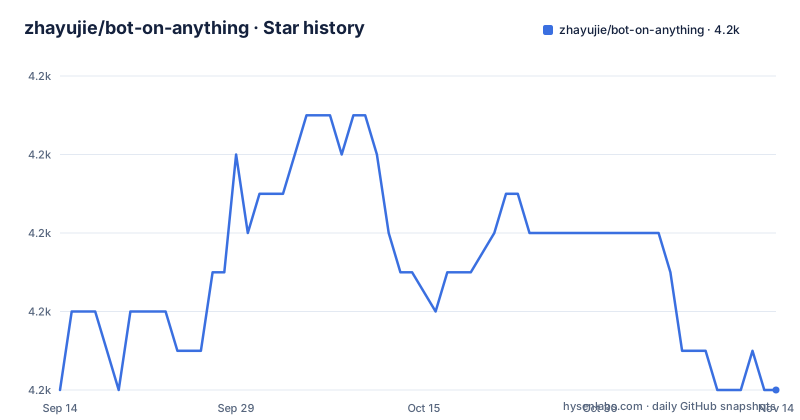
Star history
- zhayujie/bot-on-anything4,216 ★ · +0
| Repository | 2026-09-14 | 2026-11-14 |
|---|---|---|
| zhayujie/bot-on-anything | 4.2k | 4.2k |
0 Stars in the last 61 days, measured from the daily GitHub snapshot. Compare with other projects
Editorial analysis
The whole product is two type fields
The architecture claim is that models and channels are not bound together. You write one configuration file, it names one model and one channel, and the bot runs. Changing the model means changing one field; adding a channel reuses every model already configured, and adding a model works across every channel already configured.
The file is JSON, created by copying a template that ships with the repository, and its top level splits into exactly two objects. The first carries a `type` naming which model to use plus a block for that model's settings. The second carries a `type` naming which channel to connect plus a block per channel, and that `type` may be an array instead of a single value, which is how several channels start at once.
That last detail has a consequence the page states plainly: listing several channels starts them as separate processes that do not interfere with each other. So parallelism is process-level, not task-level, and one channel crashing does not take the others with it.
The entry point is a single script. Run it in the project root and the default channel is a terminal, which is the cheapest way to find out whether your model credentials work before you connect a messaging platform.
Twelve channels, and models that are partly website front ends
The capabilities table has two rows worth reading closely.
The channels row claims twelve and names eleven: a terminal, a web page, a WeChat subscription account and service account behind one slash, enterprise WeChat, QQ, Telegram, Gmail, Slack, DingTalk, Feishu and Discord. Counted with the WeChat pair as two it comes to twelve, so the figure is right under the looser reading and one short under the stricter one.
The models row is the more consequential. Five adapters are offered. The first uses the OpenAI-compatible chat API and can be pointed at any compatible endpoint. The second is a gateway sold as one key covering a hundred or more models including DeepSeek, Claude and Gemini. The remaining three are described in terms of what they are built on rather than what they call: one is based on a web version of a chat product, one is based on Bing chat and is advertised as supporting a jailbreak mode, and one is based on another web version.
So three of the five are unofficial front ends. That is a real category difference, not a technicality: an official API has a version and a changelog, while a web front end depends on somebody else's page, and one of the five advertises a mode whose purpose is to get around the product's own behaviour. If you point this at a channel that matters, know which of the two kinds you are running.
An SDK capped below a major version, paired with current model names
The dependency on the model SDK is pinned with both a floor and a ceiling:
openai>=0.27.0,<1.0.0The documentation repeats the constraint as an install command, and adds a note that the project uses the legacy line of that SDK, that the requirements file already pins a compatible version, and that if installation fails you should upgrade pip first.
A ceiling below 1.0.0 is the whole story of this project's maintenance position. The README calls it the legacy SDK, and the configuration examples next to it name current models. So the page shows a pairing of a several-year-old client library with model names that did not exist when that library was current. It works, because the client talks to an HTTP endpoint and the request shape has not moved much, and the page is candid about the reason: a note says that one model family accepts only default sampling parameters and that the project skips them automatically.
That last line is a compatibility shim described in a sentence, and it is the pattern to watch for. The wider evidence is the release history: the newest tag is 1.1.0 from 2023-04-11, preceded by 1.0.0 and 0.0.7 in the weeks before it, while the branch itself was pushed on 2026-07-05.
Two of ten requirements are pinned, and one is a development release
The requirements file is ten lines long, and the pinning is uneven.
PyJWT
flask
flask_socketio
itchat-uos==1.5.0.dev0
openai>=0.27.0,<1.0.0
EdgeGPT
requests
discord.py>=2.0.0
wechatpy
cryptography
Three entries carry version constraints, and two of them stop upgrades. One is the SDK ceiling discussed above. The other is an exact pin on a development release of a third-party chat library, named with a dev suffix and a zero release number.
An exact pin on a pre-release is defensible when that release is the only one with the API you need, and it is what stops a fresh install from silently changing behaviour. It is also a dependency on someone's build output rather than on a published stable version, so when that account publishes something new under the same name you either stay where you are or move by hand.
The rest float: the web framework, the socket layer, the web client library, the token library, the Discord client with a floor of 2.0.0, and the cryptography package. One of those, the web client library, is the same category as the unofficial model front ends, and it is the one most likely to break when somebody changes a page.
The container copies the directory your key lives in
The Dockerfile has six instructions:
FROM python:3.10-alpine

WORKDIR /app

COPY requirements.txt .

RUN pip install --no-cache-dir -r requirements.txt

COPY . .

CMD ["python", "app.py"]
The requirements are copied and installed first, which is the right order, and then the entire project directory is copied with no exclusions.
That is a problem in this particular project, because the instructions tell you to create your real configuration file in the project root, by copying a template, and that file is where the API key goes. The repository tree contains no file that tells the Docker daemon to skip anything, so a build from the project root as documented puts your key into an image layer.
There is no user directive either, so the entry script runs as root inside the container, and there is no exposed port. Combined, the image is a convenient way to run the bot and a careless way to distribute a credential. If you build it, create your own ignore file first, or build from a clean copy that contains only the template.
The config examples are fenced as shell, and two are not valid JSON
The first three configuration example blocks are all fenced as a shell script while containing JSON. That is a small thing that costs a reader time, because a syntax highlighter in a Markdown viewer will colour a brace-delimited object as though it were a command.
None of the three parses as JSON.
The first example, the overall structure, closes its braces but carries # comments, which JSON does not allow. The second, the OpenAI block, stops in the middle of the object at the temperature field with its explanatory comment and no closing punctuation. The third, the gateway block, has a trailing comma immediately before its last closing brace and never closes the outermost object:
    "character_desc": "You are an intelligent assistant."
    },
}
None of those is fatal, since a reader fills in the fields anyway, but it means nobody can copy a block out of the page and hand it to a JSON parser to check their work.
The fields themselves are worth reading, because they are the real API. There is an optional endpoint override, a proxy address with a localhost port in the example and a link to an issue about it, a persona field, a limit on total input and output tokens, and an optional cap on how much conversation history is kept before older turns are cleared.
A word filter, a bridge directory, and an entry script
The repository is laid out around the three nouns in the configuration file. There is a directory for models, a directory for channels, and a directory called bridge, which is presumably where a model is adapted to speak a channel's protocol. Alongside them are a common directory, a scripts directory, a plugins directory, a documentation directory, and two Python files at the root: the entry script and the configuration loader.
Two other root files matter. There is a template of the configuration file, which is the file you copy to start. And there is a single file named for sensitive words.
The runtime story is short. Python is required with a recommended range from 3.7.1 to 3.10, the three named operating systems are Linux, macOS and Windows, and the container image uses a 3.10 Alpine base. The page also points at a sibling project for anyone who wants task planning, long-term memory, skills and protocol support rather than a chat loop.
Editorial conclusion
Use this if you want a bot on a chat platform in an afternoon and are willing to run a framework whose newest tagged release is three years old. The design decision worth respecting is the decoupling: models and channels are independent, so changing a model touches one field and adding a channel reuses every model you already have. Two things to check first. Read what your model adapter actually talks to, because two of the five are described as being built on a website rather than an API, which is a different maintenance and reliability story. And keep your real configuration file out of any Docker build context, because the included Dockerfile copies the entire project directory and the instructions for the API key put that file in exactly that directory.
Frequently asked questions
What exactly is a bot on the internet?
In this repository the term means a chatbot built by pairing one large model with one application channel through a single configuration file. It documents five model adapters and channels including a terminal, a web page, a WeChat account, QQ, Telegram, Gmail, Slack, DingTalk, Feishu and Discord.
Are bots illegal?
On the technical side, the README says that two of its five model adapters are based on the web version of a chat product, one advertises a jailbreak mode, and one of its dependencies is a web client library rather than an official API.
How do I run bot-on-anything?
Clone the repository, install the requirements file, copy the configuration template to the real configuration file, and run the entry script in the project root. The default channel is a terminal, and the channel setting may be an array so several channels start at once as separate processes.
Which AI models does bot-on-anything support?
Five adapters: one for the OpenAI-compatible chat API with an optional alternative endpoint, one gateway sold as covering a hundred or more models with a single key, and three based on existing chat products, one of them Bing chat with a jailbreak mode. Other providers are routed through the gateway.
Does bot-on-anything run in Docker?
A Dockerfile is included, based on a 3.10 Alpine image, which installs the requirements and runs the entry script. The build copies the entire project directory and the repository contains no ignore file for that, while the configuration file you create in that directory holds your API key.
Official sources
Add this badge to your README
If you maintain this project, the badge below links readers to this analysis and shows its maintenance status from the daily GitHub snapshot. Paste the markdown into your README; add ?metric=license or ?metric=stars to the image URL for a different field.

[](https://hysenlabs.com/projects/zhayujie-bot-on-anything)Star history chart for your README
[](https://hysenlabs.com/projects/zhayujie-bot-on-anything)Was this useful?