Memsearch keeps agent memory in Markdown and treats Milvus as a rebuildable shadow index
A persistent, unified memory layer for all your AI agents (e.g. Claude Code, Codex, DSH), backed by Markdown and Milvus.
At a glance
- What is it?
- zilliztech's memsearch is a Python package that writes each coding agent's conversations to daily Markdown files under .memsearch/memory/ and keeps a Milvus store beside them as a derived index. The parts worth reading closely are the two consent flags its OpenClaw plugin needs, the approval bypass its Codex install asks for, and dependency pins that resolve differently per platform.
- Who is it for?
- Memsearch is worth reading if you want your agent's history to stay as files you can read, diff and delete, and worth installing with the platform in mind rather than by reflex. Check three things.
- Can I use it commercially?
- Yes. MIT is a permissive licence: you can use, modify and sell software built on it, as long as you keep its copyright and licence notices.
- Is it still maintained?
- Yes. The repository last received commits 1 day ago.
- What is it written in?
- Mainly Python, according to GitHub's language statistics.
Answers come from the project's GitHub data, last synced on November 14, 2026, and from our analysis. They are not legal advice.
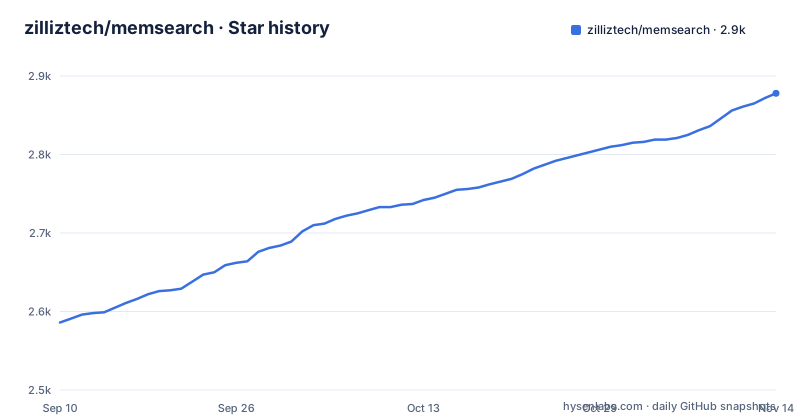
Star history
- zilliztech/memsearch2,878 ★ · +292
| Repository | 2026-09-10 | 2026-11-14 |
|---|---|---|
| zilliztech/memsearch | 2.6k | 2.9k |
292 Stars in the last 65 days, measured from the daily GitHub snapshot. Compare with other projects
Editorial analysis
Windows and every other platform resolve different Milvus floors
The dependency block splits on sys_platform, and not by a hair. On anything that is not win32 the package takes pymilvus from 2.5.0 with 2.6.10 excluded outright, and milvus-lite from 2.5.0. On win32 the floors jump:
    "pymilvus>=2.5.0,!=2.6.10; sys_platform != 'win32'",
    "pymilvus>=2.6.11; sys_platform == 'win32'",
    "milvus-lite>=2.5.0; sys_platform != 'win32'",
    "milvus-lite>=3.1.1; sys_platform == 'win32'",
So the same command installs a different vector stack depending on the machine, and the excluded 2.6.10 release means an existing lock or mirror that happens to hold it cannot be used on Linux or macOS. Two more markers narrow the resolution further: tomli is pulled only below Python 3.11, and setuptools is held between 78.1.1 and 81, an upper bound low enough to collide with anything else in the same environment that wants a newer setuptools.
Markdown is the record, the vector store is the shadow
The design choice everything else follows from is stated plainly: memories are Markdown files and Milvus is a derived, rebuildable cache. Captured turns land in daily files under .memsearch/memory/, and the check the guide gives you is a directory listing followed by reading today's file:
ls .memsearch/memory/          # you should see daily .md files
cat .memsearch/memory/$(date +%Y-%m-%d).md
The file name comes from the machine's local date, so a session that starts just after midnight files itself under the new day. On top of the files, three layer recall runs search, then expand, then transcript, over dense vectors plus BM25 sparse results joined by RRF reranking. A watchdog based file watcher reindexes as files change, and SHA-256 content hashing lets unchanged files be skipped. If the vector store is the thing you lose, the Markdown is what remains.
The OpenClaw plugin needs two switches set before it will read anything
OpenClaw is the only platform whose install asks you to change host configuration rather than just drop a file in place:
# Install from ClawHub
openclaw plugins install --force clawhub:memsearch
openclaw config set plugins.entries.memsearch.hooks.allowConversationAccess true
openclaw config set plugins.entries.memsearch.hooks.allowPromptInjection true
openclaw gateway restart
Those two config keys are the entire consent surface, and they say what they mean. allowConversationAccess is permission to read what you typed to the agent; allowPromptInjection is permission to put text into what the agent sees next. Both default to off, both must be set one dotted key at a time, and the gateway restart is what makes them take effect. The install also passes --force, so a second run overwrites rather than asking.
The Codex route tells you to start the agent with approvals off
Codex is installed by cloning the repository and running the plugin's own script, and the third line of that block is the one to read twice:
# Install
git clone --depth 1 https://github.com/zilliztech/memsearch.git
bash memsearch/plugins/codex/scripts/install.sh
codex --yolo  # needed for ONNX model network access
The reason given is network access for the ONNX model, and the extras explain where that download comes from: onnxruntime, tokenizers and huggingface-hub, with onnxruntime itself capped below 1.24 on Python 3.10 and left open on 3.11 and later. So the first run of this plugin fetches model files over the network, and the documented way to allow that is to launch the coding agent in a mode where it no longer asks before acting. That is a wider grant than the model download itself requires.
Eight extras, and one that names the package it belongs to
The optional dependency table is where the provider choices live: google, voyage, jina, mistral, ollama, local, anthropic and onnx, plus an all entry that lists the package with its own extras attached:
all = ["memsearch[google,voyage,jina,mistral,ollama,local,anthropic,onnx]"]Two of those extras are thin wrappers worth noticing. jina pulls httpx and nothing else, so that provider is reached over plain HTTP rather than through its own client, while local pulls einops and sentence-transformers, which is where a local embedding model and its numeric stack arrive. openai is not optional at all: it sits in the base dependency list, so every install carries that client whether or not you plan to call it.
Claude Code and DeepSeek Harness install without any script
Two platforms avoid the shell entirely. Claude Code takes two slash commands, a marketplace add and a plugin install, followed by a restart of the agent, and the repository ships the matching plugin directory at its top level. DeepSeek Harness instead goes through its own profile mechanism:
# Install the published plugin into your DSH profile
uv tool install "memsearch[onnx]"
dsh plugin --profile web add @zilliz/memsearch-dsh
# Restart that DSH profile, or start a new session
Two details there are easy to miss. The install names the onnx extra explicitly, so the DSH route is the one that drags in onnxruntime and the model download. And the plugin is scoped to a named profile, web in this case, which also gets a dock for reviewing skill candidates and browsing supported files under .memsearch/ without editing them.
Skills are a third memory layer, maintained in the background
Beyond stored facts and stored transcripts, the recent additions add a procedural layer: repeated workflows are distilled into installable agent skills that the tool then keeps current in the background. Alongside that, optional background tasks maintain durable PROJECT.md and USER.md notes across sessions, so state that would otherwise live only in chat ends up in two files with obvious names. Both features run outside the foreground conversation, which means work happens to your notes after you stop asking for it. Retrieval can also be reranked remotely: an optional Jev reranker calls the TypeSafe API instead of downloading a local model, and the project points at a Chinese and English evaluation of that path under its evaluation directory.
One repository holds the tool, its own memory file and its agent instructions
The top level carries MEMORY.md next to AGENT.md, CLAUDE.md and CONTRIBUTING.md, so the tool that writes agent memories into Markdown demonstrates its own output format in its own tree. The rest of the layout follows a normal Python project: src/memsearch as the wheel package, tests as the pytest target with asyncio mode set to auto, docs with a mkdocs configuration, a plugins directory holding one subdirectory per platform, and an evaluation directory. Version 0.4.21 is written directly into pyproject.toml rather than derived from a file, and the console script maps memsearch to the click entry point in memsearch.cli, which is why every platform ends up calling the same command underneath.
Editorial conclusion
Memsearch is worth reading if you want your agent's history to stay as files you can read, diff and delete, and worth installing with the platform in mind rather than by reflex. Check three things. The Milvus store is a cache, so confirm the Markdown files under .memsearch/memory/ are the copy you actually care about before you trust the recall path. The OpenClaw plugin wants both conversation access and prompt injection switched on, which is a deliberate widening of what a plugin can see. And the Codex route asks you to start the agent with approval bypassed so the ONNX model can be fetched, so decide whether a first-run model download is something you want inside your normal editing loop.
Frequently asked questions
what is memsearch
memsearch is a Python package, version 0.4.21, that records coding agent conversations as Markdown files under .memsearch/memory/ and keeps a Milvus vector store as a derived index over them. It installs a memsearch command that fronts the CLI, requires Python 3.10 or later, and is published under the MIT license.
If I delete the Milvus store in memsearch, do I lose my memories?
No. The Markdown files are the source of truth and Milvus is described as a shadow index, a derived and rebuildable cache. Recall reads the files back through the search, expand and transcript layers, so the store can be dropped and rebuilt.
Why does the memsearch Codex install tell me to run codex with approval bypassed?
Because the onnx extra needs network access to fetch its model, and the extra pulls onnxruntime, tokenizers and huggingface-hub to do it. The guide's answer is to start the agent with approvals turned off, which is a broader grant than the download itself.
What does the memsearch plugin ask permission for on OpenClaw?
Two host config keys, both of which have to be set before the gateway restart takes effect: plugins.entries.memsearch.hooks.allowConversationAccess and plugins.entries.memsearch.hooks.allowPromptInjection. The first covers reading conversations, the second covers injecting text into prompts.
Which Python versions does memsearch support?
requires-python is greater than or equal to 3.10 and the classifiers stop at 3.13, listing 3.10, 3.11, 3.12 and 3.13. There is no 3.14 classifier, and tomli is pulled in only below 3.11.
Which agent platforms ship a memsearch plugin?
Claude Code, Codex, DeepSeek Harness, OpenClaw and OpenCode, one subdirectory each under the plugins directory, with a matching plugin manifest directory at the top level of the repository. Install paths differ per platform: two of them are slash commands, two run an install script or a profile command, and OpenClaw changes host configuration.
Official sources
Add this badge to your README
If you maintain this project, the badge below links readers to this analysis and shows its maintenance status from the daily GitHub snapshot. Paste the markdown into your README; add ?metric=license or ?metric=stars to the image URL for a different field.

[](https://hysenlabs.com/projects/zilliztech-memsearch)Star history chart for your README
[](https://hysenlabs.com/projects/zilliztech-memsearch)Was this useful?